





When customers reach out to you on chat, they expect an instant reply. They don’t want to wait in a queue or repeat information across channels. That’s where live chat agents make the biggest difference. They manage multiple conversations simultaneously and resolve issues quickly. They also guide customers to complete purchases, upgrade plans, or choose the right product tier with confidence. As more customers rely on chat for quick help, having skilled agents isn’t just a nice-to-have. It’s what keeps conversations human, responsive, and conversion-friendly.
What Is a Live Chat Agent?
A live chat agent is a professional who helps customers in real time through a chat window on a website or app. They answer questions, troubleshoot issues, and guide users while they’re already online, without making them wait for an email or phone call.
For example, if a customer is having trouble applying a discount code on your checkout page, a live chat agent can step in immediately. They identify why the code isn’t working, validate it in the backend, and apply it manually if needed. Once resolved, the agent guides the customer to complete the purchase within minutes.
Live chat agents also manage several conversations at once. They keep replies consistent, move issues forward quickly, and make sure no customer feels ignored. Tools like Hiver Copilot, Zendesk macros, or Intercom’s AI suggestions support this work by handling routine tasks such as drafting responses, summarizing chats, or routing complex questions to the right team.

With this support, a trained agent can handle three to five chats at once while keeping responses quick and accurate. The result is higher CSAT and faster resolution times.
Core Responsibilities of a Live Chat Agent
Live chat agents resolve customer queries, assist with purchases, and document every interaction accurately. They work across tools and channels to keep conversations fast, consistent, and trackable through metrics like response time, CSAT, and conversion rate. Their daily work covers these six key responsibilities.
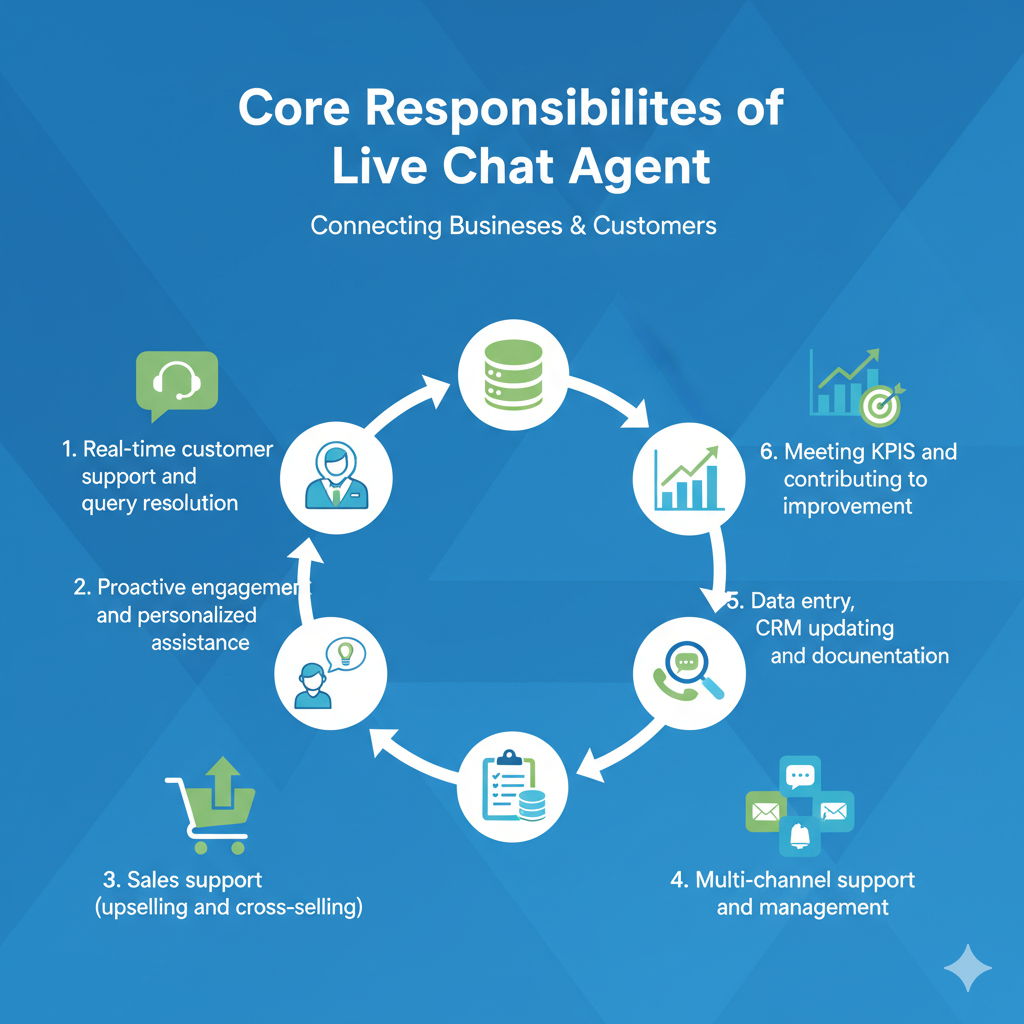
1. Real-time customer support and query resolution
Agents respond instantly and aim to resolve issues in the first chat. They handle billing errors, product setup, login issues, and shipping delays using clear, step-by-step replies or help links.
2. Proactive engagement and personalized assistance
When customers hesitate on pages like pricing or checkout, automated proactive messages appear to offer help. Once the customer responds, a live chat agent steps in. They answer questions, clear up confusion, and guide the customer toward the next step so they don’t abandon the journey.
3. Sales support (upselling and cross-selling)
While assisting customers, agents identify upgrade or add-on opportunities. They recommend relevant plans or products based on the customer’s query or usage pattern.
4. Multi-channel support and management
Agents manage issues that move between chat, email, or phone. They document customer history and previous chat notes before transferring to another team. This ensures a smooth handoff without forcing customers to repeat information.
5. Data entry, CRM updating, and documentation
After resolving a chat, agents record the issue type, resolution, and customer feedback in the CRM. These records create visibility for audits, training, and trend analysis across the support team.
6. Meeting KPIs and contributing to improvement
Agents track metrics like First Response Time, Customer Satisfaction (CSAT), and Average Handle Time to spot delays or recurring issues. The results help teams plan shifts, update response templates, and train agents to deliver faster, clearer support.
Recommended reading
10 Key Live Chat Metrics to Track for Better Customer Engagement
Essential Skills for Live Chat Agents
Live chat agents need both technical and soft skills to perform effectively. On the technical side, they work inside customer support platforms like Hiver, Zendesk, or Intercom to access customer history, review account details, and handle requests in one place. They also rely on internal tools such as CRMs, billing dashboards, or shared spreadsheets to verify information quickly and complete tasks like looking up orders, resetting accounts, or walking customers through setup.
Soft skills like empathy, clear writing, and patience help agents understand customer intent and resolve issues with accuracy and care.
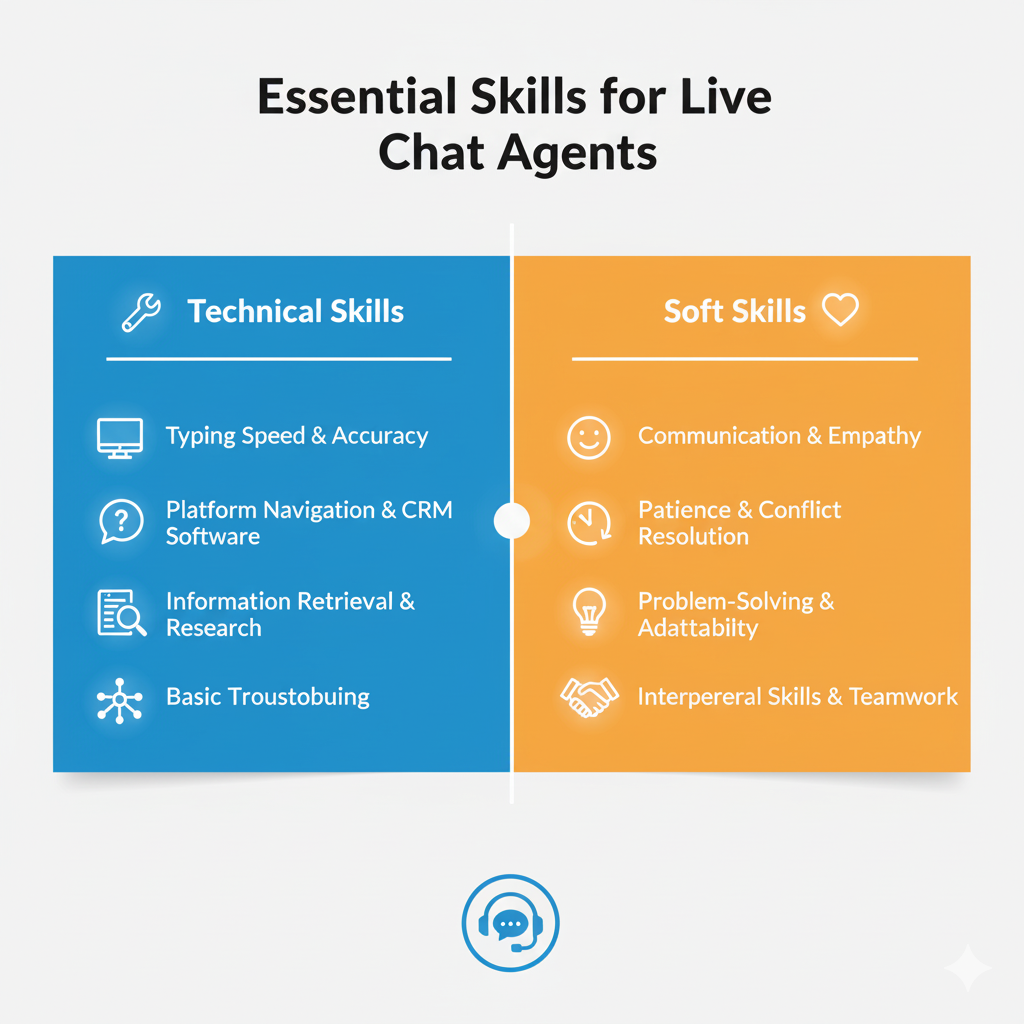
Technical Skills
- Typing speed and accuracy: Agents should type 65–80 words per minute to handle multiple chats simultaneously and respond promptly.
- Chat and CRM proficiency: They must be familiar with tools such as Hiver, Zendesk, Intercom, or HubSpot Service Hub. These customer support and CRM platforms help agents track tickets, view customer data, and update records accurately.
- Troubleshooting basics: Agents often need to understand what the customer is seeing so they can pinpoint the root cause. That might involve checking the same workflow, testing the feature on their end, or reviewing logs. Once they identify the issue, they guide the customer through quick fixes like resetting a password or clearing browser data.
- System navigation: They should switch quickly between chat tools, help docs, and CRMs to find and share accurate information. Each conversation should stay organized with clear notes and tagged updates.
- Data handling: Agents must update customer information accurately to prevent errors in billing, shipping, or account access.
Soft Skills
- Empathy: Live chat agents need to recognize when customers are frustrated or confused. Responding with understanding and reassurance helps defuse tension and builds trust.
- Written communication: Agents must write clear, short messages with correct grammar and tone. This ensures customers understand instructions even when conversations move quickly.
- Tone control: Since customers can’t hear tone in chat, agents must use positive language, like “I can help you with that” instead of “You did it wrong.” It maintains a polite, helpful, and human tone.
- Multitasking: Live chat agents manage multiple conversations simultaneously. They need to stay organized, track context, and respond accurately to avoid errors or delays.
- Patience: Some customers type slowly or need extra guidance. Staying calm and repeating steps when needed helps ensure every issue is resolved fully.
Recommended reading
How to Hire the Right Live Chat Agent
Agents you hire should be able to manage multiple chats at once, use CRM and chat tools efficiently, and resolve issues in real time without escalating every case. A clear, skills-based hiring process helps you identify candidates who can meet your chat volume, accuracy, and CSAT targets from day one.
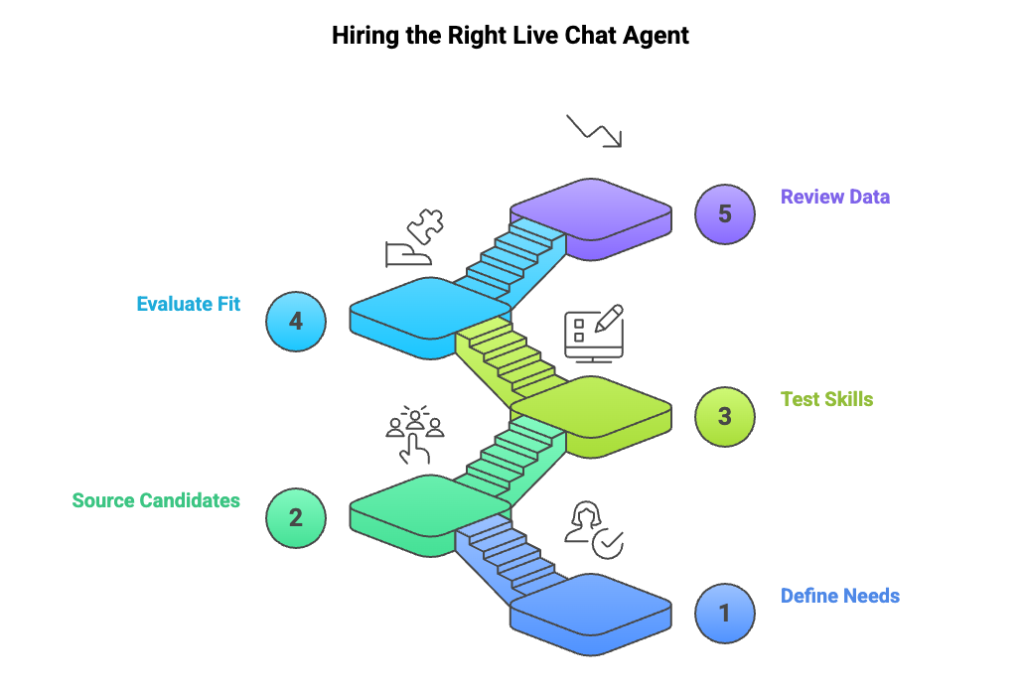
Step 1: Estimate your chat load to staff your team correctly
Start by mapping out what your support team actually handles on a day-to-day basis.
- Chat volume: Estimate how many chats each agent will handle per shift. This helps determine the required headcount.
- Concurrency: Decide how many simultaneous chats an agent should manage—typically 3 to 5 for standard support, fewer for technical products.
- Task Complexity: Identify whether your agents will be troubleshooting technical issues, handling billing, or assisting with sales.
- Coverage hours: Determine if you need 24/7 live chat support, regional coverage, or fixed business hours.
A clear picture of your workload prevents overstaffing or burnout. It sets accurate hiring expectations.
Step 2: Pick the best hiring platforms for your chat team
Each platform attracts a different talent pool. Choosing the right one helps you find agents with the right experience faster.
- LinkedIn: Best for hiring full-time live chat agents with prior experience in customer support or SaaS.
- Indeed: Ideal for high-volume or entry-level hiring when you need quick responses and broad reach.
- Upwork or Fiverr: Useful for short-term or project-based roles, such as seasonal spikes or product launches.
- CX outsourcing agencies: Effective when you need trained agents for 24/7 or multilingual support without managing in-house training.
When posting the job, mention the tools your team uses, such as Hiver, Zendesk, or Intercom. Specify chat volume, shift timings, and performance metrics so applicants know what success looks like from day one. Clear, detailed listings attract candidates who already have the right experience.
Step 3: Test practical and communication skills
Don’t rely only on resumes. Use assessments that reflect real day-to-day work and show how candidates communicate with customers:
- Chat simulation: Give candidates mock customer scenarios and evaluate their speed, clarity, tone, and ability to keep responses simple and helpful.
- Writing test: Ask them to rewrite a poorly written chat transcript. This helps you check grammar, structure, and whether they can adapt to your brand’s communication style.
- Technical check: If you offer a SaaS or technical product, test their ability to explain steps clearly. For example, walking a customer through account setup or basic troubleshooting in plain, easy language.
- Multitasking test: Run a timed exercise to see how they handle multiple chats while staying accurate, calm, and consistent in their communication.
Step 4: Evaluate cultural fit
Use the interview to gauge whether a candidate’s work style and values align with how your support team operates.
- Empathy under pressure: Ask how they handle frustrated or impatient customers. Look for calm, respectful, and solution-focused responses that reflect the attitude your team values.
- Team fit: For remote or hybrid teams, assess how they collaborate and stay organized. Ask about their experience using tools like Slack for communication or Notion for documentation, and how they stay aligned with teammates across time zones.
- Work habits and mindset: Dig into how they approach feedback, deadlines, and cross-team collaboration. Candidates who are adaptable, curious, and consistent in their follow-through usually thrive in a support environment.
“When we hire new agents, we look for an enabler’s mindset. It’s someone who can identify a customer’s problem and guide them toward a solution. They also bring that mindset to their team by supporting others and helping the group work through issues together.”
Meena Kumari R, VP & Global Head HR | Hiver
Step 5: Review performance data from probation period
Before making a permanent hire, consider a short trial or probation period (2–4 weeks). Track measurable outcomes such as First Response Time, CSAT, and chat accuracy during that window. These numbers show how well the agent meets your standards.
Recommended reading
Training Your Live Chat Agents
After hiring the right people, the next step is to train them for consistency and accuracy. A structured training plan ensures every agent understands your product, brand tone, and chat processes before they go live. It also helps new hires resolve queries faster and deliver a uniform customer experience.

“Before an agent goes live, we need to verify their core skills. This minimum skill verification helps new hires deliver the same level of service as seasoned agents. That consistency matters because customers judge your brand by the interaction they have.”
Shankar Srinivasan, Vice President of Customer Experience | Hiver
1. Onboarding and product immersion
Start by familiarizing new agents with your product or service in detail.
- Train them on key features, pricing, and policies so they can resolve queries confidently without escalating simple issues.
- Share your tone and communication guidelines. Explain when agents should use a friendly tone and when a more formal tone is appropriate.
- Review chat protocols, such as greeting formats, escalation rules, and tagging conventions in tools like Hiver or Zendesk.
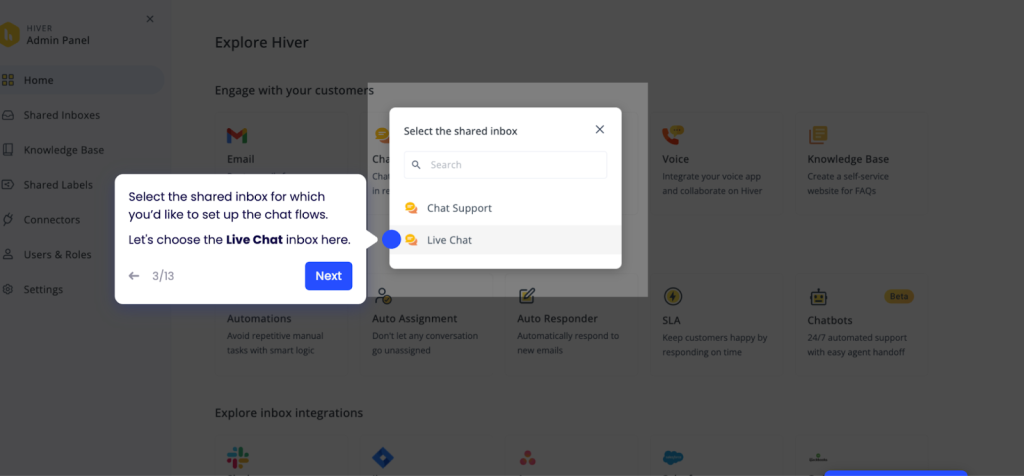
Create a structured onboarding manual or Notion workspace with tone guidelines, product FAQs, escalation steps, and sample chat transcripts. This provides new agents with quick and reliable reference material during live conversations.
2. Communication training
Writing quality directly affects how customers perceive support. Clear, brief responses help customers understand instructions quickly and keep chats moving smoothly.
- Train agents to keep each response short — ideally two or three lines.
- Use real examples to teach tone control and show how to sound helpful instead of robotic.
- Focus on clarity. Every message should directly answer the customer’s question.
Hold short writing workshops or review past chat transcripts to identify tone, grammar, or phrasing issues.
3. Scenario-based learning
Practical training gives agents a chance to apply product knowledge and communication skills in real-world situations. It helps them learn how to respond quickly, choose the right tone, and solve problems without relying on supervisors.
- Present specific customer scenarios such as failed payments, delayed orders, or login errors, and ask agents to walk through the full resolution.
- Include both technical and emotional elements so they learn to balance accuracy with empathy.
- Host role-play sessions to simulate live customer interactions and help agents practice tone, clarity, and problem-solving.
“Scenario-based learning focuses on top contact generators — the recurring issues that drive most of your chat volume. When agents rehearse these real scenarios, they handle them in the moment with far greater speed and accuracy.”
Shankar Srinivasan, Vice President of Customer Experience | Hiver
This type of simulation builds judgment and confidence, helping agents stay composed during live interactions.
4. Continuous improvement and feedback
Live chat performance declines when training stops after onboarding. Run biweekly coaching sessions using QA scorecards and real chat examples. Focus on improving tone, accuracy, and resolution flow, while updating agents on new product features or policy changes.
- Run weekly QA reviews to check tone, grammar, issue resolution, and any critical failures (customer-critical, business-critical, or compliance-critical). Use these insights to mentor agents and improve processes, not just to flag errors.
- Pair new agents with experienced ones for peer coaching and hands-on feedback.
- Use performance dashboards to identify skill gaps and guide coaching
- Hold weekly check-ins to review common mistakes, highlight top-performing chats, and share updated response templates.
Ongoing coaching ensures agents stay consistent, confident, and aligned with your brand’s evolving support standards.
Recommended reading
Key Performance Metrics (KPIs) for Live Chat Agents
Tracking the right metrics helps you measure agent efficiency and customer satisfaction in real time. These KPIs show how well your chat team balances speed, accuracy, and service quality.

1. First Response Time (FRT)
Set a response target of 40 seconds or less for new chats. A quick first reply reassures customers that help is available and prevents chat abandonment. Set up automated greetings or AI routing to send instant replies when agents are unavailable.
2. Average Chat Duration
Track the total time from when a chat starts to when it’s resolved. A 10-minute resolution time is a general benchmark for most teams, although it can vary by industry. Routine queries should close within 6–8 minutes when your workflows and responses are well-optimized. If chats consistently run longer, look into what’s causing the delay. Review canned responses, FAQs, and workflows to see if agents are spending extra time typing or searching for information. Escalate only complex issues; everything else should move quickly when the right resources are in place.
3. First Contact Resolution (FCR)
Track how often issues are resolved in a single chat without follow-up. Review transcripts of unresolved cases to spot knowledge gaps or tool access issues. Provide product refreshers or update your internal knowledge base to improve FCR.
4. Customer Satisfaction (CSAT) and Net Promoter Score (NPS)
Send a one-question CSAT or NPS survey right after each chat. Use analytics to find patterns in low-rated interactions, such as tone, speed, or escalation frequency. Use this data to coach agents individually. Recognize agents who consistently earn high ratings to reinforce good habits.
5. Chat Concurrency
Aim for two to three simultaneous chats per agent to balance productivity and quality. Handling multiple chats at once slows responses and increases errors. Automate chat assignment as per agent availability so new chats are routed efficiently without overloading anyone.
6. Chat-to-Conversion Rate
Track how many chat interactions lead to sign-ups, purchases, or demos. Review high-performing chat transcripts to spot language patterns or offers that drive conversions. Train agents to use product recommendations or contextual nudges (like discounts or feature links) at the right time.
Recommended reading
How to Use Customer Support Benchmarks to Deliver Better Support
Live Chat Agent Job Description & Requirements
Live chat agents handle real-time customer conversations, troubleshoot issues, and keep interactions moving without delays. To succeed in this role, they need a blend of customer-facing experience, fast thinking, and comfort with digital tools.
General Qualifications
Educational Background
When hiring live chat agents, practical experience often matters more than formal education. Employers should focus on candidates who can communicate clearly, handle customers with empathy, and quickly learn new tools. These abilities directly influence how well an agent performs in real-time support.
What to look for:
- High school diploma or equivalent: A basic qualification that demonstrates foundational communication and comprehension skills.
- Customer service or support experience: Candidates with backgrounds in help desks, e-commerce, or SaaS environments typically adjust more quickly and handle live interactions with confidence.
- Technical familiarity: Prior experience with CRM or chat tools like Hiver, Zendesk, or Intercom reduces onboarding time and training effort.
- Strong written communication: Excellent grammar, concise messaging, and a brand-aligned tone are essential, as all communication occurs in text.
- Computer proficiency: Comfort with multitasking across chat windows, documentation, and dashboards helps maintain speed and accuracy.
Remote vs. In-Office Live Chat Agents: Key Differences
Beyond skill and experience, the setup you choose—whether remote or in-office—impacts collaboration, data security, and agent performance. The table below compares both options across flexibility, collaboration, infrastructure, and monitoring.
| Aspect | Remote Agent | In-Office Agent |
|---|---|---|
| Flexibility | Works from any location with a stable internet connection. Offers better schedule coverage, especially for 24/7 or global support. | Works on-site during fixed shifts. Easier to manage attendance and shift coordination. |
| Collaboration | Communicates through chat tools, video calls, and shared dashboards. Requires strong digital coordination and documentation. | Collaborates face-to-face with team members and supervisors. Quick discussions and coaching are easier. |
| Infrastructure | Responsible for personal equipment, internet, and workspace setup. Employers must verify readiness before onboarding. | Works on company-managed systems within a secure network, ensuring consistent performance and data protection. |
| Monitoring | Performance tracked through software dashboards, chat transcripts, and activity logs. Requires clear KPIs for accountability. | Managers can directly observe interactions and provide on-the-spot feedback or support. |
Technical Setup for Remote Roles
If you choose to hire remote live chat agents, make sure their setup supports reliable and secure performance. A stable setup ensures quick responses, secure customer data, and reliable service performance.
What to check for:
- Stable internet: At least 15–20 Mbps speed to keep chat tools, CRMs, and browsers running without lag.
- Dual monitors: One for chat windows and another for CRM or documentation, allowing faster access to customer information.
- Quiet workspace: A noise-free area helps agents focus and maintain professionalism during customer interactions.
- Reliable hardware: A modern laptop or desktop with updated software reduces crashes and downtime.
- Backup plan: Access to a hotspot or secondary internet source ensures continuity during outages.
After defining the skills and setup, outline the role clearly. A focused job description attracts candidates who can handle real-time chats and deliver measurable results. Here’s a sample job description you can use or adapt for your hiring process.
Sample Job Description: Live Chat Agent
Role Overview
A Live Chat Agent provides real-time customer support through online chat channels. The role involves handling customer questions, troubleshooting product or account issues, and ensuring every interaction reflects the company’s service standards. This position is ideal for candidates who are skilled communicators, quick learners, and comfortable managing multiple conversations simultaneously.
Key Responsibilities
-Respond to customer queries promptly through website or in-app chat.
-Provide accurate information on products, pricing, orders, and account issues.
-Troubleshoot technical or process-related problems and guide customers through solutions.
-Escalate unresolved or critical issues to the relevant team or supervisor.
-Document each interaction in the CRM with clear notes and resolution details.
-Meet or exceed targets for First Response Time, Customer Satisfaction (CSAT), and chat resolution rate.
-Identify recurring issues and share insights with the team to improve processes and FAQs.
Requirements
-Excellent written communication skills with fluent English.
-2+ years of experience in live chat, online customer support, or digital helpdesk roles.
-Familiarity with chat and CRM tools such as Hiver, Zendesk, Intercom, or HubSpot CRM.
-Typing speed of 50+ WPM with strong accuracy.
-Ability to multitask across multiple chat sessions while maintaining quality.
-Strong problem-solving skills and attention to detail.
-Reliable internet connection and a distraction-free workspace (for remote roles).
Preferred Skills
-Experience supporting customers in SaaS, ecommerce, or other tech-driven environments.
-Familiarity with customer experience metrics like CSAT, FRT, or resolution time.
-Comfort working with AI-assisted tools or automated chat systems to speed up responses and improve accuracy.
Recommended reading
Listening, Understanding, Acting: A Blueprint for Customer Satisfaction
Salary and Compensation (2025–2026)
Competitive pay helps attract and retain skilled live chat agents, especially as customer expectations for fast, human support continue to rise. Salaries vary based on experience, location, and industry, with SaaS and eCommerce companies typically offering higher pay.
Average salary benchmarks:
- Entry-level agents: Around $38,000–$42,000 per year, suitable for candidates with less than two years of experience.
- Mid-level agents (2–5 years): Typically earn $45,000–$55,000 per year, depending on workload and specialization.
- Senior-level agents: Average a base salary of $63,728 per year and total compensation of about $73,892, including bonuses or incentives.
- Hourly benchmark: Most live chat roles pay $15–$22 per hour.
* Additional benefits: Competitive employers also offer health insurance, PTO, bonuses, and remote work flexibility to improve retention.
Live Chat Agent vs. Chatbot: Key Differences
Once you’ve aligned compensation, it’s worth evaluating where live chat agents fit within your broader support model, especially as AI and chatbots become more capable. Most support teams use both.
Chatbots handle quick, repetitive tasks, while agents focus on complex and high-value conversations. The table below compares them and outlines when to use each.
| Feature | Live Chat Agents | Chatbots |
|---|---|---|
| Response Type | Human, personalized replies tailored to each customer’s context. | Automated responses based on pre-set workflows or AI models. |
| Availability | Limited to working hours or scheduled shifts. | Operates 24/7 across all time zones. |
| Complexity Handling | Excels at understanding nuance, context, and emotions. Ideal for technical or emotional issues. | Best for straightforward, rule-based queries; limited in handling context-heavy conversations. |
| Cost | Higher due to ongoing salaries, training, and management. | Lower long-term cost after setup and integration. |
| Empathy & Personalization | High — builds trust, diffuses tension, and strengthens relationships. | Low — lacks emotional understanding and tone variation. |
| Scalability | Limited by staffing capacity and shift coverage. | Instantly scalable during peak volumes. |
| Best For | Billing or technical issues, product guidance, or complex troubleshooting. | FAQs, order tracking, password resets, and appointment scheduling. |
Recommended reading
Chatbot vs Live Chat: Which is Better for Customer Experience in 2025?
Benefits of Hiring Live Chat Agents
After comparing chatbots and live agents, it’s clear that automation alone can’t deliver a complete support experience. Live chat agents add the human judgment, empathy, and adaptability that turn support interactions into long-term customer relationships.
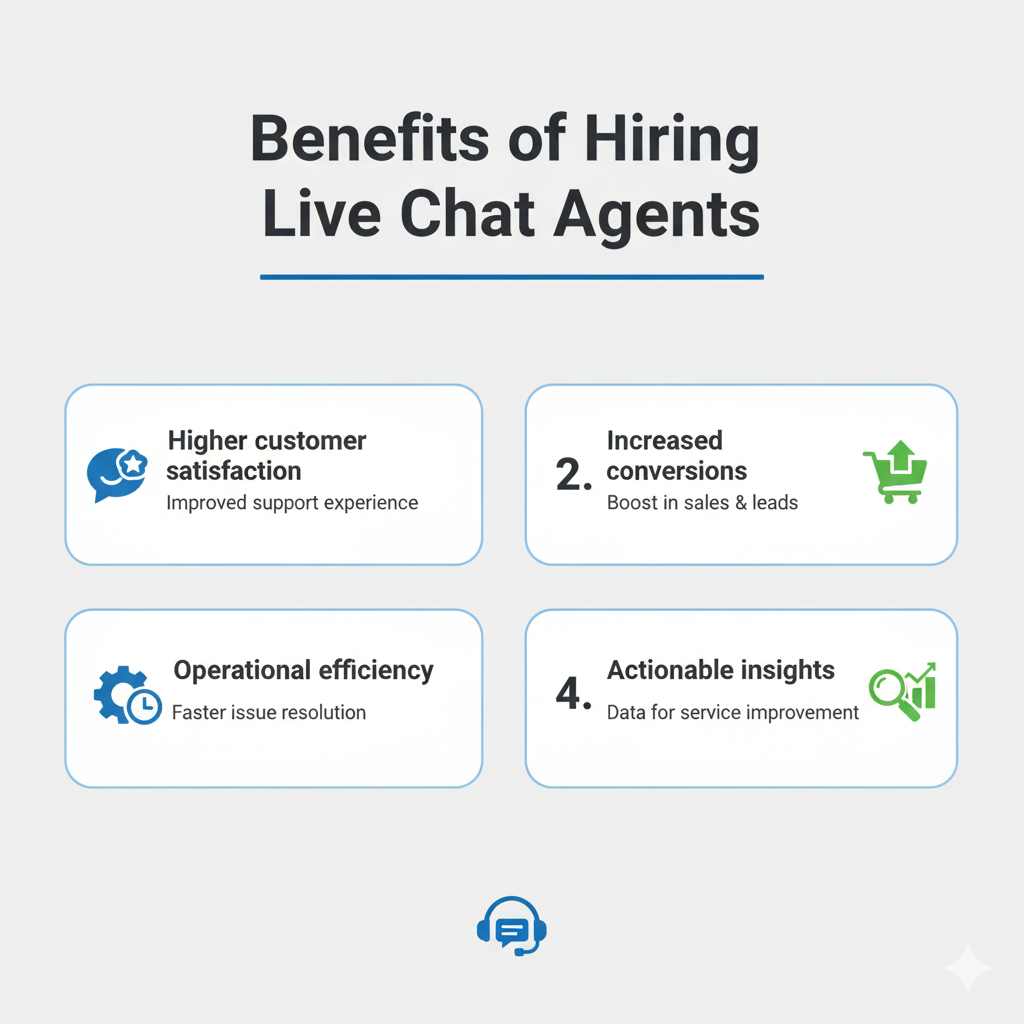
1. Higher customer satisfaction
Live chat agents provide real-time, empathetic responses that resolve issues before frustration builds. They read context better than bots, adjust tone naturally, and build trust faster. This leads to higher CSAT and retention.
2. Increased conversions
Agents influence purchase decisions in real time. During checkout or plan selection, they clarify details and suggest relevant upgrades. They also step in to recover abandoned carts and help guide customers through the purchase process.
3. Operational efficiency
Live chat systems enable agents to manage multiple chats with AI-suggested replies and shared templates, ensuring quality remains intact. This reduces queue times and cost per contact without sacrificing personalization.
4. Actionable insights from live chat interactions
Live chat agents often surface recurring customer issues before other channels do. Reviewing their chat transcripts helps identify common pain points, confusing steps, or product bugs. Your team can use these insights to update FAQs, improve workflows, and alert product teams to recurring issues.
Live Chat Agent Career Path and Growth
A defined career path helps customer support teams scale efficiently. It keeps high-performing agents motivated, builds leadership internally, and reduces the cost of external hiring. Each level adds new responsibilities that improve quality, speed, and strategic impact.
| Level | Typical Title | Key Focus |
|---|---|---|
| 1 | Live Chat Agent | Handle customer queries, meet SLAs, and maintain CSAT targets. |
| 2 | Senior Agent | Resolve escalations, guide new hires, and identify process improvements. |
| 3 | Team Lead / Supervisor | Manage daily operations, track KPIs like FRT and FCR, and ensure consistent quality. |
| 4 | Manager / Trainer | Lead hiring, training, and workflow optimization. Introduce automation and AI tools to improve efficiency. |
| 5 | CX Specialist / Analyst | Utilize analytics to refine your CX strategy, enhance automation, and align support performance with business objectives. |
Recommended reading
Career growth and skill development
Live chat agents in the U.S. earn an average annual salary of $41,045. Certifications like Google CX, HubSpot Service Hub, or CCXP boost credibility and prepare live chat agents for senior CX and operations roles.
Agents looking to expand into analytics or automation can pursue programs in AI and conversational design, such as the IBM Applied AI Professional Certificate or Google Cloud Contact Center AI training.
In-House vs. Outsourced Live Chat Agents
As your chat team expands, the next challenge is scaling. Decide whether to keep operations in-house or supplement them with outsourced agents. The right choice depends on your priorities, such as maintaining full control over quality or scaling coverage quickly and cost-effectively.
| Factor | In-House Team | Outsourced Team |
|---|---|---|
| Control | Direct oversight of quality, tone, and processes. Easier to align training with brand goals. | Quality depends on vendor performance and contract terms. Less flexibility to adjust daily operations. |
| Cost | Higher upfront costs due to salaries, tools, and training. Long-term value through consistent quality and retention. | Lower hourly rates and minimal setup costs. Ideal for handling overflow or short-term projects. |
| Training | Fully customized to your product, brand voice, and policies. | Often standardized or shared across multiple clients. Requires extra time for brand onboarding. |
| Availability | Matches internal business hours unless you expand shifts. | Can offer 24/7 or multilingual coverage across time zones. |
| Culture Fit | Strong alignment with company values and customer expectations. | Varies by vendor. May require closer QA to maintain tone and brand consistency. |
How to Decide Between an In-house Team or an Outsourced One
- Choose outsourcing if your focus is cost efficiency, 24/7 availability, or quick scaling during high-volume periods.
- Choose in-house teams if you prioritize brand consistency, complex issue handling, and long-term customer relationships.
Some CX leaders adopt a hybrid model, where in-house agents manage core support and escalations. Outsourced teams, on the other hand, handle FAQs or off-hour coverage. This balances cost and quality without losing control.
Recommended reading
Best Practices for Managing Live Chat Agents
Running an effective live chat team requires structured scheduling, consistent quality checks, and strong internal collaboration. Here’s how to manage your agents for speed, accuracy, and morale:

1. Schedule overlapping shifts
Plan 15–30 minutes of overlap between shifts to handle peak chat volume and ensure smooth handovers. Utilize analytics to pinpoint high-traffic periods and adjust staffing accordingly.
2. Conduct weekly chat audits
Review at least five chats per agent each week. Check tone, accuracy, resolution steps, and adherence to brand voice. Share findings in one-on-one sessions to reinforce best practices and promote ongoing learning.
3. Standardize responses
Use shared templates, saved replies, and an updated knowledge base for FAQs. This ensures consistency across agents and reduces response time for repetitive questions.
4. Strengthen internal collaboration
Set up a dedicated Slack channel or shared inbox for quick communication. Agents can use it to confirm details, escalate issues, or tag subject-matter experts. This ensures agents receive quick answers from the right people, which keeps chats moving and helps resolve customer issues more efficiently.
5. Recognize and retain top performers
Showcase agents with top CSAT scores or fastest resolutions in team meetings to reinforce accountability and best practices. Give public shoutouts or small bonuses to reinforce performance and motivate consistent quality.
Recommended reading
8 Takeaways From Customer Service Experts on Live Chat Support
Common Challenges and Solutions
As chat volumes grow, teams often struggle with burnout, inconsistent quality, and engagement drop-offs. Tackling these challenges early helps maintain fast responses, high CSAT, and steady performance.
1. Agent burnout during peak hours
Why it happens: Chat agents often juggle multiple conversations while handling repetitive requests. During sales, launches, or outages, chat queues surge and exceed normal capacity limits, resulting in mental fatigue and slower response times.
Solution: Monitor concurrency and chat duration to spot early signs of overload. Rotate shifts during busy periods and establish limits on the number of chats each agent can handle simultaneously. Utilize AI chatbots to manage FAQs and order-tracking queries, so agents can focus on complex issues that need a human touch.
Tools like Zendesk’s real-time monitoring dashboard make this easier. You can track each agent’s live workload, spot who’s about to get overloaded, and reassign chats before burnout kicks in.
2. Drop in response quality
Why it happens: As teams grow, new agents may not fully grasp tone, workflows, or escalation rules. Without consistent reviews, variations in grammar, empathy, or accuracy can creep in and harm CSAT.
Solution: Conduct biweekly QA reviews using a defined scorecard for tone, clarity, and problem-solving. Share examples of strong replies during team huddles and follow up with short one-on-one coaching sessions to reinforce learning.
3. Missed chats and long wait times
Why it happens: Unbalanced shift scheduling, poor chat routing, or slow handovers between agents often leave customers waiting too long. Over time, this drives down FRT and satisfaction scores.
Solution: Use real-time dashboards to monitor chat queues and coverage. Automate routing based on agent availability and skill level. Add part-time or temporary support during campaigns or peak hours to prevent backlog.
4. Low engagement and motivation
Why it happens: When feedback is infrequent and career progression unclear, agents lose motivation. This causes productivity to drop, conversations to feel less empathetic, and eventually, agents start leaving.
Solution: Hold regular one-on-one sessions to review metrics and progress. Recognize steady progress, not only top CSAT scores, to build long-term engagement. Outline clear career paths in QA, training, or CX analytics so live chat agents see how they can grow within the team.
Building a High-Performing Live Chat Agent Team
As chat volumes grow and customer expectations rise, CX leaders need to balance speed with empathy. Skilled live chat agents make that possible. With the right AI tools, they deliver fast, clear, and human support exactly when customers need it.
To build a high-performing team, set clear KPIs like CSAT, First Response Time, and resolution rate. Refresh training quarterly to keep communication sharp and product knowledge up to date. Use chat audits to identify recurring issues and update FAQs or workflows regularly.
Most importantly, give agents the right tools and autonomy to make decisions in real time. That’s how you turn support from a reactive function into a proactive, relationship-building experience.
Frequently Asked Questions
1. What does a live chat agent do?
A live chat agent assists customers in real time through a website or in-app chat. They answer questions, troubleshoot issues, and assist customers in completing purchases or finding the right solutions quickly.
2. What skills do you need to be a successful live chat agent?
Strong writing, empathy, and multitasking are essential for live chat agents. They should understand the product well and be comfortable using chat and CRM tools like Hiver, Zendesk, or Intercom. These tools help them manage conversations quickly and accurately.
3. How many chats can a live chat agent handle at once?
Most agents manage three to five chats simultaneously. The number varies based on chat complexity, customer urgency, and system efficiency.
4. What is the difference between live chat agents and chatbots?
Live chat agents offer human judgment, empathy, and personalized responses. Chatbots handle repetitive questions like order tracking or password resets, freeing agents for complex issues.
5. How do you measure the effectiveness of live chat support?
Track key metrics such as First Response Time (FRT), First Contact Resolution (FCR), Customer Satisfaction (CSAT), and chat-to-conversion rates to evaluate quality and efficiency.
6. Can live chat agents work remotely?
Yes. Most chat platforms support secure remote logins, activity tracking, and performance monitoring, making remote live chat support just as effective as in-office operations.













