



Are you thinking of outsourcing customer service?
As support becomes more complex and time-consuming, companies are rethinking what to handle in-house and what to outsource. That’s why 38% of businesses now outsource their customer service operations globally, and the market is projected to swell to $450 billion by the end of 2025.
But deciding whether or not to outsource customer support is a big decision—one that involves aligning objectives, processes, and security from day one. To help you with that, this article will walk you through:
- How to set clear goals
- Vet and select the right outsourcing partner
- Put governance in place to keep quality high and data safe
- Top 7 outsourcing vendors to consider in 2025
Let’s dive in.
What is Customer Service Outsourcing?
Customer service outsourcing is the process of hiring an external company to manage customer support operations on behalf of your business. This means that instead of your in-house team, customer queries through calls, emails, chats, or even social media are handled by agents from a third-party provider. These providers may also take care of tasks like resolving issues, providing product information, and collecting customer feedback.
Types of Customer Service Outsourcing

When outsourcing customer service, there are two key things to consider: how the work is set up (engagement models) and where the support team is located (location models). There’s also a third type of model that blends both (hybrid). Each approach comes with its trade-offs in cost, expertise, and coordination. Let’s try to understand this in a bit more detail:
Engagement Models
Engagement models outline how an outsourcing partner structures, manages, and charges for your support services. They cover team composition, engagement scope, performance governance, and billing methods. The three primary models include:
- Dedicated Team: In this model, a fixed squad of agents is assigned exclusively to your account. They become familiar with your products, processes, custom KPIs, and SLAs and are billed on a monthly or annual retainer basis. It’s ideal for organizations requiring deep product expertise. However, due to the premium, exclusive resources, it comes with higher costs.
- Shared (Pooled) Team: In this, support agents handle queries for multiple companies simultaneously. This setup works well for handling basic or low-volume customer questions. They’re typically charged at a lower hourly or per-ticket rate. It’s more affordable but may lead to slower responses and less brand-specific knowledge.
- Project-Based: In this setup, you get support staff for a defined time span or project scope tied to specific campaigns or peak periods (e.g., a Black Friday). They’re billed according to a fixed-price or a milestone-based contract. This model is ideal for businesses needing temporary support for events like holiday surges or product launches. However, once the project wraps up, support stops, so you’ll need to onboard a new team if you need help again.
Location Models
Location models describe where your outsourcing partner’s team is based relative to your business. While evaluating location models, you need to factor in cost structures, time zone alignment, cultural fit, and regulatory compliance. Common types of location models include:
- Onshore: Onshore providers operate in the same country as your business. This means there’s no misalignment when it comes to language, culture, and work hours. Also, you don’t have to worry about local rules or data laws. This model works for companies that need real-time collaboration, strict data-privacy compliance, and deep cultural or legal alignment. For example, a U.S. startup can hire a call center in Florida to ensure compliance and real-time support.
- Offshore: This involves partnering with a service provider in a different country (Asia, Africa, Eastern Europe). Companies prefer this model for the low labor rates and broad scalability. But to make it work well, you’ll need to set up clear processes, train the team properly, and stay in sync across time zones.
- Nearshore: In this model, companies partner with teams in neighboring or nearby countries (e.g., Latin America). It helps reduce costs while keeping communication easy, due to similar time zones and fewer language barriers. It’s preferred by U.S.-based companies seeking significant cost reduction without major communication hurdles. The trade-off? You won’t save as much as with offshore, and the local talent pool can be smaller.
- Hybrid: In this model, support is split between onshore (or dedicated) teams for complex issues and offshore (or pooled) teams for routine, high-volume tasks under a single governance framework. It’s ideal for businesses that need both cost efficiency and premium service. For instance, a SaaS company can send tier-1 tickets abroad but handle escalations in-house. The trade-off is extra coordination complexity and the need for strong oversight to keep both teams aligned.
Cost Benchmarks by Location:
| Region | Typical Cost (per agent/month) | Language Coverage | Time-zone Overlap |
| Onshore | $2,500–4,000 | English (native) | Full (same as US hours) |
| Offshore | $600–1,200 | English plus regional languages | Minimal (4+ hour shift) |
| Nearshore | $1,200–2,500 | English, Spanish, Portuguese | Partial (2–4 hour window) |
| Hybrid | $1,500–3,000 | English (native) + regional languages | Full coverage via staggered shifts |
💡Pro Tip: The model you choose will typically depend on where your customers are located. While deciding this, you should consider language, cultural differences, technological infrastructure, time zones, and cost benchmarks.
Pros and Cons of Outsourcing Customer Service
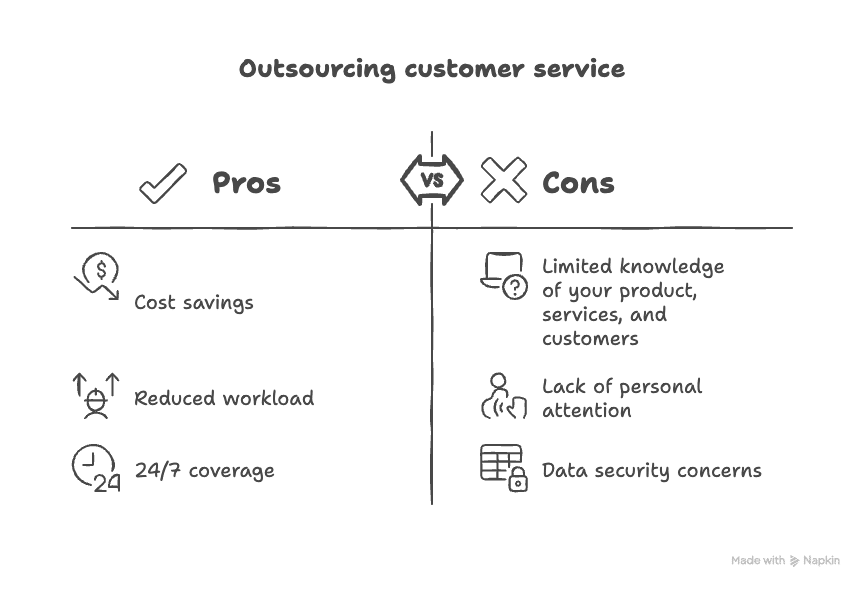
Here’s a quick look at the pros and cons of outsourcing customer support so you can decide if it fits your support strategy:
Pros and cons of outsourcing customer service
Pros
- Cost savings: When you outsource support, you’re cutting down on costs associated with hiring, onboarding, and training employees. Instead of managing a full in-house team, you pay only for the services you use, making it easier to control costs as your business grows. In fact, outsourcing helped IBM reduce its customer contact cost by 97%.
- Reduced workload and more focus: You can delegate routine tickets, like order-related queries like “Where’s my order?” or “Can I update my shipping address?” to your outsourcing partner. This frees your in-house team from repetitive tasks and gives them room to focus on strategic initiatives.
- Flexible, 24/7 coverage: You can strike an agreement with the third-party company to be available for your customers outside traditional business hours as well. You might need to pay them more, for example, paying a 1.5× premium to have them handle support on weekends. It will still be much easier to do that than to expect your in-house team to pull off double shifts.
Cons
- Limited knowledge of your product and customers: Even skilled outsourcing teams can miss the finer details of your offerings and customer history, leading to generic responses. For instance, when users report an issue with a new beta feature, they might get a “Have you tried restarting?” message instead of a tailored solution.
- Lack of personal attention: Your outsourcing partner will often be servicing multiple clients simultaneously, and your business may not be their top priority. So when a long-standing VIP customer asks for a special discount or a personalized setup walkthrough, they’re more likely to send a generic “Thank you for your loyalty—here’s our standard offer” template. This may make the VIP customer feel like just another ticket number.
- Data security concerns: Outsourced agents often need access to your CRM, ticketing system, and customer databases. So if their credentials aren’t tightly controlled, they can accidentally email sensitive account details to the wrong person or use unencrypted personal devices to handle tickets. For example, an agent might copy a customer’s full payment history into a chat platform without realizing it’s not PCI-compliant. This poses a high security risk, increasing the likelihood of systems getting hacked.
6 Best Practices for Outsourcing Customer Service
Handing customer support to an external team isn’t just a plug-and-play decision. To get the most out of it, you need transparent processes, strong communication, and the right partner. Start with these six best practices:

1. Set Clear Objectives and Service Levels
Defining goals and SLAs upfront ensures everyone is aligned on success metrics and avoids miscommunication. Before signing any contract, determine your business goals and performance standards. Outline specific SLAs (e.g., CSAT ≥ 90%, FRT < 1 hr) and identify core KPIs for your provider.
💡Pro Tip: Create a simple one-page SLA document and review it together during your kickoff call.
2. Prioritize Comprehensive Onboarding
Your outsourced team should be an extension of your brand from day one. A thorough onboarding process ensures they understand your product, tone, values, and customer expectations clearly.
Share product demos, detailed playbooks, customer personas, and FAQs. Host interactive workshops and record sessions for future hires. For example, create a 90-minute training session covering your top 10 ticket types, and follow it up with a short feedback survey to fine-tune the learning experience.
Don’t overlook AI training. Agents should know when and how to use AI tools—without losing the human touch. As Simone Silva, Principal at Experience Tales Consulting, highlights:

💡Pro Tip: Train agents on when to switch between AI-assisted scenarios and fully manual ticket resolution. After each round, review cases to compare resolution accuracy and speed. Use those insights to adjust AI prompts and improve agents’ judgment in genuine interactions.
3. Establish Regular Governance and Feedback Loops
Ongoing reviews help catch issues early, reinforce best practices, and keep performance on track. Hold weekly check-ins focused on metrics ( Ticket volume, CSAT, average handle time) and trends. Organize monthly deep dives to discuss ticket quality and emerging challenges. Use a shared dashboard so both teams can see real-time performance and surface issues quickly.
💡Pro Tip: Block recurring calendar invites for your governance calls, and send a short “Top 5 Ticket Trends” report before each session to focus the conversation.
4. Ensure Data Security & Compliance
Strong security measures protect customer data and prevent costly breaches, ensuring regulatory standards are met. Check for certifications like SOC 2 or ISO 27001, and confirm that their data handling processes align with CCPA or GDPR if required. Also, lock down system access with explicit role-based permissions and enforce multi-factor authentication (MFA) to reduce risk.
💡Pro Tip: Share a simple roles-and-permissions chart with your vendor and review it every quarter.
5. Leverage QA and Automation Tools
A strong QA process helps you catch quality issues early and reduce the need for constant manual checks. Use tools like Zendesk QA or MaestroQA to score every interaction against your criteria. Automate sampling of daily tickets and set up alerts for subpar ratings to spot trends without manual effort.
💡Pro Tip: Set your QA tool to sample at least 5% of daily tickets automatically, and route low-scoring ones to a coaching queue for follow-up and training.
6. Plan for Scalability and Flexibility
Flexibility lets you handle volume changes without new contracts or extra fees. Include flexible seat-based licensing and volume adjustment clauses in your contract. Agree on a 30-day notice period for scaling headcount up or down without penalties.
💡Pro Tip: Add contract language that allows ±20% seat changes each quarter with just one month’s notice.
Top 7 Outsourcing Vendors in 2025 Compared
Here’s a snapshot of leading outsourcing providers, their entry-level pricing, and core offerings:
| Vendor | Starting Cost (per agent/hr) | Service/Offerings | Free Trial |
| PartnerHero | $10 | – End-to-end customer support (chat, email, voice)- Knowledge-base management- Tech support, back-office processing | Free consultation |
| HelpSquad BPO | $8.50 | – 24/7 omnichannel support (chat, email, phone, SMS, social)- Order & returns processing – Subscription billing updates- CRM data entry | 14-day trial |
| Teleperformance | $25 | – Omnichannel care (voice, chat, email, social)- AI analytics & automation- Vertical-specific compliance teams- Back-office & F&A | No |
| TELUS International | $25+ | – CX & technical support- AI data annotation & testing – Cybersecurity (SOC services) | No |
| Concentrix (Webhelp) | $25 | – CX consulting & design- RPA automation & chatbots- Multilingual support (50+ languages) | No |
| TTEC | $20–30 | – CX strategy & design workshops- Digital-transformation consulting- QA & coaching | No |
| TaskUs | $15 | – Customer support (voice, chat, social)- Content moderation- Back-office & data processing- AI training data services | No |
1. PartnerHero
PartnerHero is a U.S.-headquartered support partner with delivery centers across Latin America. They offer customer care, technical support, and back-office services under flexible seat-licensing plans and transparent pricing. It’s best for startups and SMBs needing tight alignment with U.S. working hours and a culture-first approach.
Services / Offerings:
- End-to-end customer support (email, chat, voice)
- Knowledge-base management & content creation
- Technical support for SaaS & e-commerce platforms
- Back-office processing & data entry
Starting cost: $10 per hour, billed per conversation (AI-Assisted plan)
2. HelpSquad BPO
HelpSquad is a U.S.-based customer support partner founded in 2015, offering omnichannel assistance across chat, email, phone, SMS, and social. Beyond live support, they handle back-office tasks like order processing, returns management, subscription billing updates, and CRM data entry. This frees your teams to focus on product development and growth. If you’re an e-commerce brand or a consumer app looking to outsource high-volume chat/email at budget-friendly rates, you can consider HelpSquad.
Services / Offerings:
- 24/7 chat support with AI-augmented triage
- Email ticket management & SLAs enforcement
- Social-media moderation and community engagement
- Simple CRM integrations (Zendesk, Freshdesk)
Starting cost: $500 /month for a part-time agent (or $1,560 /month for full-time)
3. Teleperformance
Teleperformance is a Paris-based global CX leader founded in 1978, operating in over 90 countries. They combine omnichannel customer care, AI-driven digital solutions, and industry-specific expertise to support enterprises in finance, healthcare, technology, and beyond.
Services / Offerings:
- Omnichannel customer care (voice, chat, social, SMS)
- AI-driven analytics and automation (TP Cloud Campus)
- Sales & customer-retention programs
- Compliance-driven services for finance & healthcare.
Best for: Large enterprises needing multi-site redundancy, strict compliance, and global 24/7 coverage.
Starting cost: Custom enterprise pricing—vendor rates typically begin around $25 per agent-hour for basic voice support
4. TELUS International
TELUS Digital is the technology arm of TELUS International, serving clients in tech, gaming, media, e-commerce, finance, travel, healthcare, and automotive. They support clients with everything from technical helpdesks to large-scale annotation projects. They have a network of innovation labs and SOC-certified security centers across North America, Europe, and Asia. This setup enables them to serve emerging tech startups and Fortune 500 companies.
Services / Offerings:
- Customer care & technical support
- Digital Product Development
- AI data annotation, moderation, and testing
- Cybersecurity operations (SOC services)
Best for: Tech firms and emerging AI companies that want a partner versed in machine-learning workflows alongside customer service.
Starting cost: Custom quotes only; most CX engagements start in the mid-$20s per agent-hour
5. Concentrix (Webhelp)
Concentrix, based in Newark, California, is a global business process outsourcing (BPO) company known for its customer experience (CX) solutions and technology. It serves many industries, including many Fortune Global 500 companies, to help them improve customer experience. It’s suitable for enterprises undergoing digital transformation, needing hands-on CX delivery and strategic advisory.
Services / Offerings:
- CX design & consulting services
- AI and automation implementation (RPA, chatbots)
- Multilingual support across 50+ languages
- Sales enablement and loyalty programs
Starting cost: Custom enterprise packages; typical blended rates start around $25 per agent-hour
6. TTEC
TTEC is a global customer experience company powered by its proprietary Engage platform and end-to-end managed services. They combine technology and human expertise to help brands deliver seamless, personalized support across all touchpoints. It’s preferred by mid-to-large-sized companies looking for a CX platform plus managed services in one package.
Services / Offerings:
- TTEC Engage platform for unified CX management
- Digital self-service (IVR, chatbots, knowledge bases)
- Workforce management & predictive analytics
- Sales and retention outsourcing
Starting cost: Platform subscriptions generally begin at ~$5,000 /month for the platform, then $20–$30 per agent-hour on usage
7. TaskUs
TaskUs is a digital-first BPO that handles customer support, content moderation, and AI operations for tech and social media brands. With delivery centers in the Philippines and India, they’re known for quickly building teams and using smart tools to keep work flowing smoothly. It’s excellent for scaling startups and gaming/tech firms that need rapid ramp-up, creative support solutions, and a modern workplace culture.
Services / Offerings:
- Omnichannel support (voice, chat, social)
- Content moderation and community management
- Back-office and data-processing services
- AI training data and annotation
Starting cost: $15 per agent-hour for basic support tiers
Step-by-Step Guide to Choosing the Right Customer Service Outsourcing Company
Outsourcing customer service success starts with a structured decision process. Follow these five steps to select the right partner for your needs:

Outsourcing vendor selection criteria
1. Identify Your Support Requirements
Begin by auditing where and how you currently receive tickets: email, chat, phone, or social. Note your peak volume periods and the complexity of inquiries. You also need to assess your:
- Ticket mix: Analyze the percentage of transactional (e.g., “What’s the status of my order?”) vs. technical tickets(“Can you help me configure single sign-on (SSO) for our team?”).
- Skill and language needs: List critical skills (e.g., troubleshooting, upselling) and required languages or dialects.
- Performance benchmarks: Record your current CSAT, first response time (FRT), and resolution time to set clear baselines.
2. Match Partner Scale to Your Business Size
Your company’s scale dictates the partner model. If you’re an SMB, you need flexibility and transparent costs; large enterprises require multi-site support and high-volume capacity.
- SMB Focus: Look for vendors offering flexible seat licensing, pay-as-you-go pricing, and minimal contract lock-ins—e.g., PartnerHero or HelpSquad BPO. These providers let you scale up or down without hefty commitments.
- Enterprise readiness: Choose partners with global footprints, backup-site redundancy, and proven high-volume SLAs—think Teleperformance, Concentrix (Webhelp), or TELUS International. They have the capacity and infrastructure to handle millions of interactions seamlessly.
3. Select the Optimal Outsourcing Model
Choosing the right outsourcing model boils down to balancing expertise, cost, and flexibility. Here are four quick tips:
- Align with workload predictability: If your ticket volume is steady, hire a dedicated team, as they’ll build deeper expertise over time. If volume changes often, choose a shared or project-based model to stay flexible and avoid paying for idle time.
- Match skill requirements: If your support issues are complex, for example, API integrations or custom configurations, choose dedicated or onshore teams. And if most tickets are routine, like password resets or order-status checks, lean on offshore shared teams to cut costs.
- Consider communication needs: If you require real-time collaboration and fast feedback, go with onshore or nearshore teams in your time zone. If you need 24/7 coverage, layer in offshore support with planned overlap hours to ensure smooth handoffs.
- Factor in cost flexibility: If your monthly ticket volume fluctuates, negotiate pay-as-you-go terms with shared or project-based providers. If you need predictable budgeting, secure a fixed-rate contract with a dedicated team.
4. Shortlist Potential Providers
Once you know your needs and outsourcing model, start narrowing down your vendor options with the right filters.
- Case studies & testimonials: Look for success stories in your industry and company size.
- Performance metrics: Verify published CSAT scores, FRT averages, and SLA compliance rates.
- Cultural fit: Evaluate communication style, time zone overlap, and language skills to avoid friction later.
Recommended reading:
Multilingual Customer Support: How To Assist A Global Audience
5. Deep-Dive into Quality, Pricing & Contract Terms
Before you sign anything, get clarity on the fine print to avoid surprises later.
- Quality assurance framework: Ask how often they audit tickets, how they score each interaction, and how they coach agents afterward.
- Pricing structure: Compare per-agent, per-ticket, and outcome-based pricing. Check for hidden costs like onboarding, offboarding, or training fees.
- Contract flexibility: Look for clauses around scaling up/down, early exit options, and volume-based pricing changes.
Does Outsourcing Customer Service Make Sense for Your Business?
Before you commit, run through these quick checks to see if outsourcing aligns with your customer service goals and capacity:
- Do you see seasonal or unpredictable spikes in demand? Outsourcing can absorb the overload without costly hires.
- Are routine inquiries consuming your team’s strategic bandwidth? Offloading repetitive tickets frees internal resources.
- Compare your in-house cost structure against outsourcing benchmarks—if you’re above the midpoint of onshore rates, it’s time to consider it.
- Do you need extended or 24/7 coverage? External teams can fill gaps overnight or across regions without overtime.
If you check at least three of these boxes, it’s a good time to explore outsourcing.
Frequently Asked Questions (FAQs)
1. What’s the best way to train outsourced agents on our brand?
Effective brand training for outsourced agents starts with clear guidelines and immersive learning experiences. Here’s how to ensure they truly understand and represent your brand:
- Develop a brand playbook: Start with a concise guide covering your mission, tone of voice, key messaging pillars, and FAQs.
- Use multimedia learning: Create short video modules and slide decks illustrating ideal customer interactions, product demos, and brand do’s & don’ts.
- Hands-on shadowing: Have new agents listen in on live calls or chat sessions with your top performers for at least 5–10 hours before they jump in.
- Interactive role-plays: Run weekly scenarios where agents practice handling tricky situations, like an upset VIP customer, and get real-time feedback.
- Ongoing refreshers: Schedule bi-weekly quizzes and monthly “brand huddles” to reinforce updates, share success stories, and calibrate on voice/tone.
2. How long does it take to onboard an outsourced team fully?
Onboarding typically spans 3–4 weeks, broken into phases:
- Week 1 – Orientation & Tools: Account setup, system access, process walkthroughs, and compliance training.
- Week 2 – Product Deep Dive: In-depth workshops on features, use cases, and troubleshooting guides.
- Week 3 – Supervised Practice: Shadowing live interactions, paired coaching, and QA feedback loops.
- Week 4 – Certified Independence: Agents handle live tickets with spot checks, scorecard ramp-ups, and final calibration.
Adjust this timeline based on your product’s complexity and desired service levels, and build in buffer time for certifications or specialized training.
3. How can we ensure data security with an outsourced partner?
Start by including strict data-protection clauses in your contract, requiring your vendor to follow standards like ISO 27001 or SOC 2. Limit agent access with role-based permissions in your CRM and ticketing systems, and enforce multi-factor authentication on all accounts. Schedule quarterly security audits and share best-practice incident-response playbooks. Finally, run joint tabletop exercises so your internal team and the partner know how to handle a breach scenario.
4. What metrics should we track to measure outsourcing success?
Focus on both operational and customer-centric KPIs. Track CSAT (customer satisfaction score) and NPS (net promoter score) for quality, FCR (first-contact resolution) and AHT (average handle time) for efficiency, and SLA compliance to ensure you meet agreed response targets. Monitor ticket volume trends and escalation rates to spot process gaps, and monitor cost per ticket to validate ROI. Use a unified dashboard—feeding data from both your systems and the partner’s QA tool—to stay aligned on real-time performance.