





If you’ve run the support function at a small business, you’ll probably relate to this. At first, it’s easy to manage. A few emails a day, with you and maybe one other person handling replies.
But as the business begins to grow, so does the volume and complexity of customer queries. Email threads get longer, information becomes harder to find, and it becomes difficult to keep track of who is handling what. As a result, conversations start to slip through the cracks.
This is where a ticketing system can help.
A ticketing system is a tool that turns customer requests into organized tickets, and helps your team track conversations, assign ownership, and make sure every issue is resolved on time.
In this guide, I’ve reviewed the 6 best ticketing systems for small businesses in 2026. You’ll find a clear comparison of pricing, features, and ease of use to help you choose the right tool for your team.
A quick note for transparency: I work at Hiver, a customer service software company, so you’ll see it featured here. But the intent isn’t to push one tool. It’s to help you get a real sense of what’s out there and which tool might work best for your team.
A quick comparison of the best ticketing systems for small businesses
Here’s a quick overview of the best ticketing systems I found in my research. I’ve gone into more detail on each tool further down in the article.
| Brand | Price | Setup | Features | AI capabilities |
|---|---|---|---|---|
| Hiver | Free plan available; Paid plans start at $25/user/month | Very easy; quick setup, minimal learning curve | Email assignmentMulti-channel support +Automation +Reporting + Internal collaboration | AI across the workflow at all touchpoints – triage, drafting, insights |
| Freshdesk | Free plan available; Paid plans start at $15/agent/month | Easy; intuitive UI, quick to adopt | Omnichannel support + Automation + Parent-child tickets + KB | Freddy AI (triage + assist |
| Front | No free plan; Paid starts at $25/user/month | Moderate; easy UI but setup can take effort | Shared inbox + Internal collaboration + Automation + Analytics | AI Copilot + Smart QA + Smart CSAT |
| Groove | No free plan; Paid starts at $24/user/month | Very easy; quick email-based setup | Email-based ticketing + Automation + Live chat + KB | Basic AI (writing assist + summaries) |
| Help Scout | No free plan; Paid starts at $25/user/month | Easy; clean UI, quick rollout | Shared inbox + Live chat + Beacon + KB + Basic automation | AI summaries + reply suggestions + AI Answers |
| Pylon | No free plan; Paid starts at $59/user/month | Moderate to complex; setup takes more effort than others on the list | Omnichannel (Slack + email + chat) + Account-level view + Automation + Integrations | AI agents + routing + automation (add-ons) |
How to choose a ticketing system (SMB checklist)
Before diving into the tools, here’s a simple checklist you can use to decide what will work best for your team.
6 best ticketing systems for small businesses
I looked at a range of ticketing systems before I finally narrowed it down to these 6 that stood out to me for small businesses. Here’s a closer, in-depth look at each one.
1. Hiver
Hiver is a full-stack customer service platform that offers all the features small businesses would need in a ticketing system. It brings customer conversations from channels like email, chat, and WhatsApp into one place, converting them into trackable tickets.
This allows teams to stay organized, keep track of ticket status, and manage customer queries with better visibility and control.

Why this is in the list:
I’ve put Hiver first in this list because it’s extremely easy to set up and use, making it a strong fit for small businesses that don’t have the time or resources to invest in complex help desk systems. Teams can get started quickly without a steep learning curve, which is critical when time and bandwidth are limited.
It also offers a forever free plan with the core functionality needed to run a basic ticketing system, allowing small businesses to get started without upfront investment or long-term commitment.
On top of that, Hiver covers all the essential features teams expect from a ticketing system, with AI capabilities built into the workflow to help automate routine tasks and improve efficiency.
Pricing:
Hiver offers three paid plans apart from its forever free plan – the Growth plan ($25/user/month), the Pro plan ($55/user/month), and the Elite plan ($85/user/month).
Key strengths:
- Strong internal collaboration – Hiver makes it easy for teams to collaborate internally on tickets. You can use internal notes and mentions to loop in teammates, work on shared drafts, and avoid duplicate replies through collision detection.
- AI across all support touchpoints – Hiver has AI built across every step of the ticketing process, from tagging and triaging tickets to drafting responses and surfacing insights that help teams improve performance.
- Knowledge base and self-service – You can create both internal and customer-facing knowledge bases. This helps agents find answers faster and enables customers to resolve common queries on their own, reducing incoming ticket volume.
- SLA management – You can set service level agreements (SLAs) to define how quickly tickets should be responded to and resolved. Hiver tracks these timelines and automatically flags tickets that are close to breaching or have already breached SLAs, triggering alerts or escalations so teams can take action in time.
Limitations:
- Mobile experience is more limited than desktop – While a mobile app is available, most teams will rely on the desktop experience to manage workflows and collaboration effectively.
- Limited native calling support – Hiver offers voice support through integrations, but does not provide a deeply built-in calling experience. Teams that rely heavily on voice as a primary support channel may need additional tools.
User reviews:
“What I really like about Hiver is that even the free plan offers amazing features. We’re able to categorize emails, set responsibilities, use tags, and have internal chats, which is extremely helpful for managing our shared inbox and avoiding confusion about who is responsible for what…Setting up Hiver was a breeze, even for those of us who aren’t IT experts; onboarding took less than ten minutes.” – G2 review
“I would love to be able to have a certain user with a different account type, and not having to move my whole organization to a different price level to enjoy certain Pro features.” – G2 review
“Limited Mobile Experience – The mobile experience isn’t as robust as desktop, which can be limiting for teams who are often on the go.” – G2 review
2. Freshdesk
Freshdesk is a cloud-based omnichannel help desk that converts customer inquiries from various sources, like live chat, social media, phone, and web forms, into organized tickets.
For a small business, it acts as a centralized command center. Instead of managing disparate messages across different platforms, your team works out of one interface where every customer issue is assigned, tracked, and measured until it is resolved.

Why is Freshdesk in this list:
I’ve included Freshdesk in the list because it’s a good option for smaller businesses that want a reliable ticketing system without a high upfront cost. It offers a free plan and its starter plan is priced at $15 per agent per month.
It also strikes a good balance between ease of use and functionality. The interface is intuitive, making it easy for teams to get started and use the platform without an extensive learning curve.
Pricing:
Apart from its free forever plan, Freshdesk offers three paid plans – the Growth plan ($15/agent/month), the Pro plan ($49/agent/month), and the Enterprise plan ($79/agent/month).
Key strengths:
- AI assistance for agents – Features like AI summarizer, tone enhancer, and email draft generator help agents write better responses quickly, improving both speed and quality of support.
- AI-powered ticket triage – Freshdesk’s Freddy AI helps automatically prioritize and route tickets based on factors like urgency and customer sentiment.
- Customer portal and knowledge base – You can create a branded customer portal where users can submit tickets and access help articles. This helps customers find answers on their own and reduces incoming ticket volume.
- Parent-child ticketing – Freshdesk lets you break down larger, multi-step issues into smaller child tickets. You can assign these to different teams and work on them in parallel, while still keeping everything linked to the main ticket for visibility.
Limitations:
- Advanced features locked behind higher plans – A lot of valuable features are hidden behind higher priced plans and separate add-ons which makes it a little inaccessible for smaller teams with budgetary constraints. For example, the AI features are only available in the Pro plan and you’ll need to purchase it as an add-on.
- Ticketing performance issues at scale – Some users report issues like duplicate tickets, slower loading times, and lag, especially during high-volume periods. This can make it harder to manage tickets efficiently when your support volume increases.
User reviews:
“The core ticketing functionality is solid and reliable day-to-day. Automation rules, SLAs, and basic workflows are well thought out and generally easy to configure.” – G2 review
“The reporting features could be more detailed, but they still give a good overview.” – Capterra
“The mobile app is often reported to lack some of the functionality available on the desktop version, making it harder for teams to manage support tickets on the go.” – Capterra
Recommended reading
12 Best Freshdesk Alternatives for 2025 (Tried, Tested and Compared)
3. Front
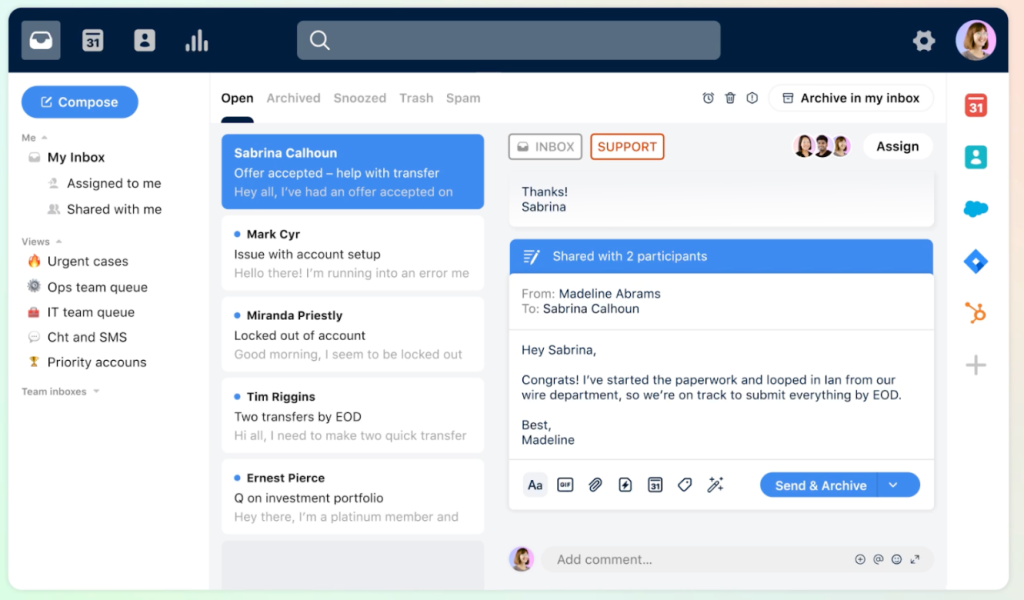
Front is a collaborative customer communication platform that brings channels like email, SMS, and live chat into one shared workspace. It doesn’t feel like a traditional help desk.
Everything looks like a normal inbox, which makes it a good fit for small businesses that want to stay organized without sounding robotic.
Why it’s on this list:
Front is a great option for small businesses that want a ticketing system that feels familiar and easy to adopt. It offers all the core ticketing features teams need, packaged in a fairly intuitive and straightforward email-like interface.
It also comes with a strong set of AI features that help small teams handle more work with less effort, making it easier to manage customer conversations.
Pricing:
Front offers three paid plans – the Starter plan ($25/user/month), the Professional plan ($65/user/month), and the Enterprise plan ($105/user/month). It does not offer a free forever plan.
Key strengths:
- Strong internal collaboration – Teammates can leave comments inside threads, work on shared drafts, and see in real time when someone else is replying. This helps teams coordinate better and avoid duplicate responses. Managers can also set up escalation paths for high-priority issues, and teams can loop in external stakeholders when needed, without losing context.
- AI-powered assistance and automation – Front’s AI Copilot assists agents in real time by suggesting replies, rephrasing messages, and pulling in context from past conversations or KB content. Features like Smart QA automatically score conversations to highlight performance gaps, while Smart CSAT estimates customer satisfaction based on conversation sentiment.
- Analytics and reporting – Front offers pre-built reports and live dashboards to track SLAs, workload, and customer satisfaction. You can also schedule reports or export data for deeper analysis.
Limitations:
- Limited starter plan – Front’s Starter plan ($25/user/month) is limited to a single channel (email, chat, or SMS) and capped at 10 seats. If you cross 10 users or want multiple channels, you’ll be forced to upgrade to the Professional plan ($65/user/month) which can be too expensive for smaller businesses.
- AI features gated behind add-ons – While Front offers advanced AI capabilities, none of these features like Copilot, Smart QA, and Smart CSAT are included in either the Starter or the Professional plans. Instead they’re sold as separate add-ons. This can be a deal-breaker for smaller teams operating on a tight budget.
User reviews:
“I also appreciate being able to mention a team member in internal comments. It helps cut down on the overall number of emails by reducing forwarding and eliminating the need to reply just to Cc someone on my team. Those comments are also useful for leaving a note to my future self so I can quickly pick up where I left off.” – G2 review
“The biggest issue for me is pricing. Front can become expensive as the team grows, especially when adding advanced features. – G2 review”
Recommended reading
Front Pricing 2026: Plans, Real Costs & What Teams Actually Pay
4. Groove
Groove is a simple, user-friendly help desk designed specifically for small-to-medium businesses that have outgrown their basic email setup but aren’t ready for a complex, enterprise-level system.
It provides a clutter-free workspace where teams can collaborate on customer conversations, manage internal tasks, and provide self-service support.
Its primary goal is to offer big-company support features (like automation and analytics) without the confusing interface or steep learning curve of larger platforms.

Why Groove is on this list:
Groove is on this list because it’s the only tool here built specifically for small, growing businesses. That’s their core audience, and the product reflects that.
While a lot of help desks try to do everything and end up feeling overcomplicated, Groove takes a different approach. As they put it, many help desks are confusing or simply overkill for smaller teams.
That focus on simplicity makes Groove a good fit for businesses that want a ticketing system without the overhead of a heavy, feature-packed tool.
Pricing:
Groove has three pricing plans – the Standard plan ($24/user/month), the Plus plan ($36/user/month), and finally the Pro plan ($56/user/month). There’s no free plan and the cheapest plan is capped at a maximum of 25 users.
Key strengths:
- Easy to set up and use – Groove is quick to implement. Teams can connect their support emails and start managing tickets with minimal setup, making it ideal for small businesses that want to get started fast.
- Built-in knowledge base and live chat – You can create a knowledge base for self-service and use live chat to handle customer queries in real time, helping reduce incoming ticket volume.
- Strong customer support – Groove is known for responsive and helpful support. You can reach out to their team when needed or use their knowledge base for guidance. They also value customer feedback and take feature requests seriously, with regular updates to the product.
Limitations:
- Limited integrations – Groove offers integrations (40+ native integrations), but the overall ecosystem is smaller compared to other tools, which can be limiting as your needs grow.
- Best suited for email-first support – Groove works best for teams that primarily manage support via email, with other channels being less deeply integrated.
- Basic AI features – While the platform includes AI features like writing assistance and summaries, overall AI capabilities are still fairly basic compared to more advanced platforms.
User reviews:
“The user-friendly interface of Groove makes it incredibly easy to navigate and use. Within a short amount of time, our support team was up and running, making it a seamless transition for our agents.” – G2 review
“The reports can’t be downloaded. We like to report on specific ‘issues’ categorised by subject (Tags). But this is all integrated into Groove, so generating a report and creating spreadsheets and graphs is a little more complicated, as you must manually input the data.” – G2 review
“The areas where I think they can improve, are the rules feature, though has been a really good feature for our workflow, it can be improved by maybe adding some additional customization options. This way we’re able to create more complex rule and improved our workflow even more.” – G2 review
5. Help Scout
Help Scout is a help desk ticketing system that focuses on delivering a simple, email-like support experience across channels like email and live chat.
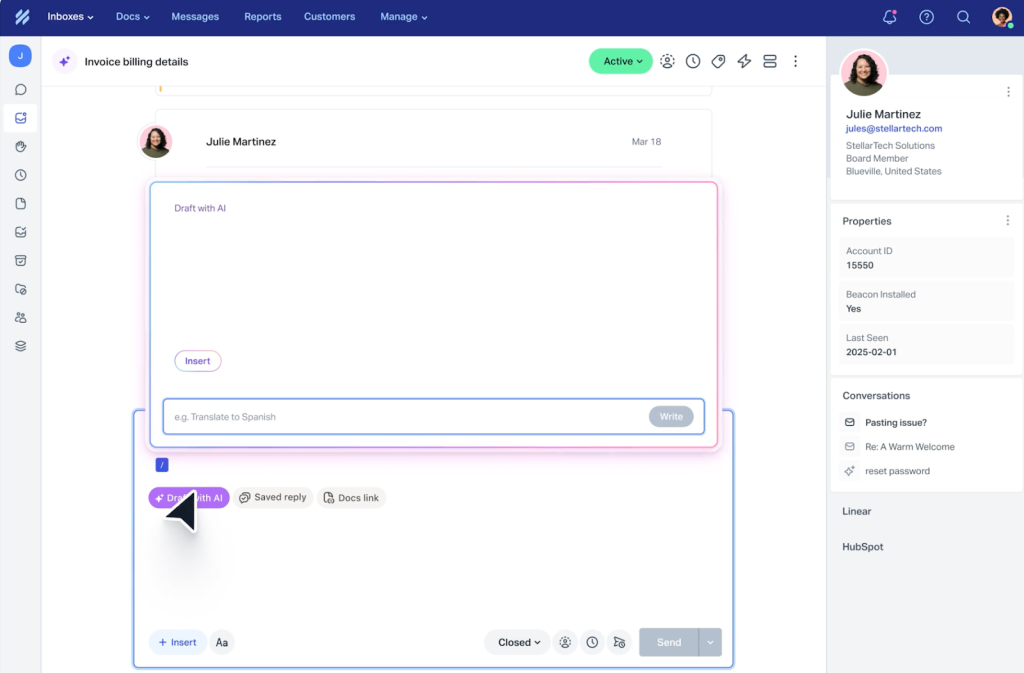
It’s known for giving agents full customer context directly within the help desk, with a sidebar that shows past interactions, contact details, and activity, so teams can respond quickly without switching between tools.
Why I’ve added it to the list:
Help Scout is on this list because it strikes a really good balance between simplicity and capability. It’s clean, easy to roll out, and doesn’t overwhelm small teams with too many features upfront.
Where it really stands out is how it keeps support personal. Unlike more rigid ticketing systems, it’s designed to feel like email, but with enough structure underneath to track and manage conversations properly.
As I mentioned earlier, it’s also a strong fit for small businesses that care about context and want to offer more personalized support. Agents get full visibility into past conversations and customer details inside the ticket itself, which makes responses faster and more thoughtful without needing to switch between tools.
Pricing:
Help Scout offers three pricing tiers – the Standard plan ($25/user/month), the Plus plan ($45/user/month), and the Pro plan ($75/user/month). The AI Answers feature is billed separately at $0.75 per resolution.
Key strengths:
- Beacon widget – Help Scout’s Beacon lets you embed a contact form, live chat, and knowledge base directly into your website or app. Customers can choose how they want to get help, which improves accessibility and reduces friction in reaching support.
- Strong self-service with Docs – The “Docs” knowledge base feature is popular for being extremely easy to set up. Customers can quickly find answers on their own, which helps reduce incoming ticket volume and speeds up resolution.
- AI assistance for agents – The platform also offers some useful AI features like conversation summaries, reply suggestions, and content recommendations, helping agents respond faster and maintain consistency. While they’re pretty basic features, they do help teams fast track a lot of work.
Limitations:
- Limited to shared inboxes only – Help Scout is built for shared support addresses (like support@ or info@). Teams will still need to use Gmail or Outlook separately for personal communication.
- Basic automation capabilities – Automation is limited to simpler actions like tagging, assignment, and auto-replies. It lacks the ability to set up more complex, multi-condition workflows.
- Limited collaboration features – Teams collaborate using private notes in a sidebar. While useful, it does not support real-time co-drafting of replies, which can slow down coordination a bit.
User reviews:
“I like that it’s very simple to use. Nothing too complicated. Like what you need is what you’ll get. Some customer support communication tools/software have a lot of features that we rarely use in our day to day job. And most of them are just all over the interface which can be too overwhelming for new users.” – G2 review
“Reporting can feel a bit limited at times, and more customization options for workflows would be helpful.” – G2 review
“Help Scout does the basics well. Clean interface. Reasonable price. Nothing fancy.” – Reddit
6. Pylon
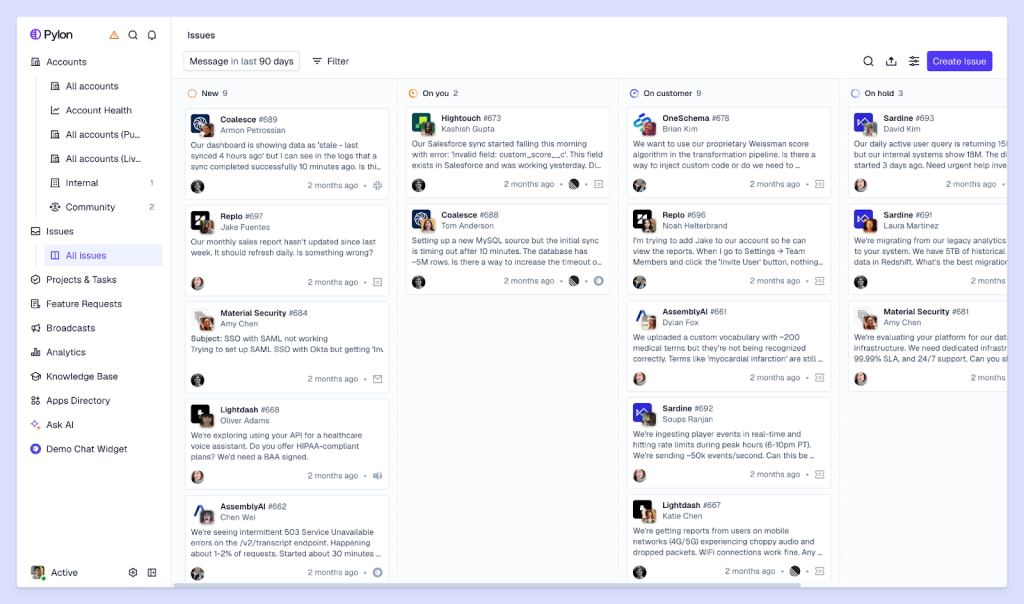
Pylon is a modern, chat-first customer operations platform built for B2B companies and small businesses that communicate with clients where they already work, primarily in shared Slack or Microsoft Teams channels.
Rather than treating chat as secondary, it turns these ongoing conversations into organized, trackable tickets, right where the conversation is happening.
Why Pylon made it to the list:
I’ve added Pylon to the list because it’s built specifically for B2B teams. While most ticketing systems focus on individual tickets, Pylon focuses on the broader customer relationship, which is critical for startups managing fewer but higher-value accounts.
It’s also a strong fit for fast-growing teams that want to unify support and customer success. Instead of treating support as a separate function, Pylon brings conversations, context, and collaboration into one system.
Pricing:
Pylon offers three paid plans — Starter ($59/seat/month), Professional ($89/seat/month), and Enterprise ($139/seat/month). It does not offer a free plan. AI features like AI Assistants and AI Agents are billed separately as add-ons.
Key strengths:
- AI-powered knowledge base optimization – Pylon automatically identifies content gaps, generates help articles from past responses, detects duplicates, and keeps documentation up to date.
- AI-first support system – The platform leverages AI agents to triage tickets, gather information, route issues, and even respond to simple queries. This helps smaller teams reduce manual work and handle higher volumes without increasing headcount.
- Strong integrations and data connectivity – It also integrates with CRMs, data warehouses, and other business tools, allowing teams to connect support with customer success and product workflows.
Limitations:
- Higher starting price compared to SMB tools – With pricing starting at $59/user/month, Pylon is more expensive than many other tools on this list, which may not suit very early-stage teams. This is without factoring in AI and account intelligence add-ons.
- Initial setup can feel complex – Pylon brings customer support and customer success workflows into one system, so teams need a lot of time and effort to set everything up properly and get started.
- Not ideal for simple use cases – Pylon is built for more complex, B2B-style support workflows. Teams looking for a simple ticketing system may find it more than they need.
User reviews:
“Pylon ships incredibly quickly and thoughtfully. I often log-in to new features and functionality and it always works. The experience is intuitive and I feel empowered to own the system, even a non-technical person.” – G2 review
“Getting Pylon fully set up and working exactly as needed can feel a bit cumbersome at first, and it can be noisy with a high volume of activity.” – G2 review
“I find the Kanban style board to be clunky and difficult to use. It feels like things get lost easily, and it’s hard to understand the status of tickets.” – G2 review
Recommended reading
Essential features small businesses actually use
Not every feature matters when you’re choosing a ticketing system. For small businesses, the focus is on tools that help you respond faster, stay organized, and keep customers happy without adding complexity.
Here are the features that actually make a difference and what you should actually look for when choosing a ticketing system –
Shared inbox – A shared inbox brings all customer conversations into one place, making it easier to stay organized and giving the team full visibility into what’s coming in and what’s been handled.
Team collaboration – Features like internal notes, mentions, and shared drafts help teams work together on tickets without switching tools. Collision detection prevents duplicate replies by showing when someone else is responding, reducing wasted effort for small teams.
Automation, workflows, and SLAs – Automation handles repetitive tasks like assigning tickets and setting priorities. SLAs ensure tickets are responded to on time, helping teams stay accountable and maintain response standards.
Knowledge base and self-service – A knowledge base lets customers find answers on their own. This reduces incoming ticket volume (particularly important for smaller teams) and allows them to focus on more complex issues.
Reporting and analytics – Reporting tools help track response times, resolution rates, and team performance. This gives managers visibility into what’s working and where improvements are needed.
Integrations (Slack, CRM, ecommerce) – Integrations connect your ticketing system with other tools your business uses. This keeps customer data in sync and reduces the need to switch between platforms.
How to successfully implement a ticketing system in your organization
Setting up a ticketing system doesn’t have to be complicated. The goal is to introduce structure without slowing your team down, so you can start seeing value quickly.
Step 1: Define your support process – Start by mapping how customer queries come in and how they should be handled. Decide who owns incoming tickets, how they are prioritized, and what a resolved ticket looks like. Keep this simple to begin with, you can refine it later.
Step 2: Set up channels and basic workflows – Connect your support channels like email, chat, or social. Then set up simple workflows for assigning tickets, adding tags, and organizing incoming queries so nothing gets missed.
Step 3: Configure automations and SLAs – Introduce automation for repetitive tasks like ticket assignment and follow-ups. Set SLAs to define how quickly tickets should be responded to and resolved, so your team has clear expectations.
Step 4: Train your team and iterate – Walk your team through how the system works and make sure everyone understands their responsibilities. Start using it in real scenarios, and adjust workflows based on what’s working and what isn’t.
This is all you need to get started and deploy a ticketing system at your small business. Over time, as you scale, you can gradually add more structure and complexity as your needs evolve.
How to scale your ticketing system as your business grows
As your business grows, your support volume and complexity will increase. More tickets, more channels, and more moving parts.
The goal is to scale without adding unnecessary complexity.
Start by building on the basics. Introduce more advanced automation to handle higher volumes, refine your workflows to reduce manual effort, and use reporting to identify bottlenecks before they become bigger issues. As your team grows, features like better collaboration, clearer ownership, and SLA tracking become even more important.
At the same time, avoid over-engineering your setup. Many teams make the mistake of switching to tools that are too complex too early, which slows them down instead of helping them move faster.
Ideally, you want a ticketing system that grows with you. One that is easy to use when you’re starting out, but still has the depth to support you as your operations scale.
This is where tools like Hiver stand out. It gives small teams a simple way to manage support without a heavy setup, while still offering the automation, AI capabilities, and visibility needed to handle increasing volume over time.
If you want to check out what Hiver can do for you, sign up for a free trial or get a demo.
Frequently asked questions (FAQs)
1. Is there a free ticketing system for small businesses?
Yes. Tools like Hiver and Freshdesk offer free plans with basic ticketing features, which are a good starting point for small teams.
2. How hard is it to migrate from a shared inbox to a help desk?
It’s not very difficult. Most tools let you forward emails, import conversations, and get set up within a few hours without disrupting your workflow.
3. Do I need an omnichannel ticketing system for my small business?
No, not always. If most of your support comes from one or two channels, you can start simple and expand later as your volume and channels grow.
4. Which AI capabilities are helpful for small businesses?
AI features like auto-triaging, reply suggestions, conversation summaries, and AI agents help reduce manual work and improve response times.
5. How do SLAs and automation improve response times?
SLAs set clear deadlines for responses, while automation handles tasks like assignment and prioritization. Together, they help teams respond faster and stay consistent.
6. Which free ticketing system is best for a one-person team?
Hiver and Help Scout are good options for solo users. They’re easy to set up and offer enough features to manage tickets without added complexity.
7. When should I shift from a free plan to a paid plan?
You should upgrade when you need more automation, better reporting, or support for multiple channels as your ticket volume increases.













