Skip to content





I used a chatbot recently to reach out to a support team. I had to get my account ownership changed, and that was the only way to do it.
Seemed simple enough. But the experience? Anything but.
I was stuck with a bot, where I had to type in “speak to an agent” multiple times, for it to finally tell me:
“Our agents are unavailable at this hour. They will get back to you soon.”
No email or contact form—just a frustrated customer left hanging.
If you’ve put all your effort into perfecting your product or website experience, it’s worth asking—what about your chatbot?
Is your chatbot helpful enough? Do customers get a smooth handoff to agents, or are they left combing through help articles?
At the heart of this is your chatbot template. A good one makes support faster, smoother, and more human. A bad one? It turns users away.
In this post, we’ll walk through some tried-and-tested chatbot templates our own support team at Hiver uses, and ones you can start using too.
Table of Contents
- What is a Chatbot Template?
- 10+ Free Chatbot Templates by Industry
- Customer Service Chatbot Templates
- Sales Chatbot Templates
- E-commerce Chatbot Templates
- Manufacting
- Hospitality Chatbot Templates
- HR Chatbot Templates
- Finance Chatbot Templates
- Healthcare Chatbot Templates
- How to Use Chatbot Templates
- Best Chatbot Template Examples
- How AI can Enhance Chatbot Templates
- Improve Customer Experience with Hiver’s Chatbot
- Frequently asked questions
What is a Chatbot Template?
A chatbot template is a ready-to-use conversation flow designed to help support teams automate customer interactions. Regardless of the chatbot you use, these templates are designed to guide users through specific actions—like checking an order, submitting a form, or asking for support—using predefined logic and messages.
You can customize these templates for tone, branding, and use cases, allowing support, HR, finance, or sales teams to quickly set up chatbots that feel personal and on-brand.
Think of these templates as “conversation blueprints.” Each one serves a specific purpose, such as deflecting FAQs, collecting leads, scheduling demos, or resolving issues, so your team can focus on the more complex cases instead.
📚Create a Chatbot using Hiver
Before we begin, here’s how easy it is to create a chatbot using Hiver:
You can go ahead and sign up for the free trial, and create a chatbot for your website.
10+ Free Chatbot Templates by Industry
To help your customer support team save time and deliver faster support, we’ve put together 10+ ready-to-use chatbot templates—organized by industry. Each one is built using Hiver’s chatbot and can be customized to fit your tone, goals, and workflows.
Customer Service Chatbot Templates
Customer service chatbot templates are ready-made conversations that help your support team handle everyday customer queries quickly and efficiently. They can answer common questions, collect key details, or pass the chat to a live agent when needed. This means customers get help faster, and your agents spend less time on repetitive tasks.
1. CSAT chatbot template

A CSAT chatbot template helps you check in with customers right after a support interaction. It automatically asks how satisfied they were with the help they received, giving you instant insight into your team’s performance. It’s an easy way to spot what’s working and where you can improve.
Recommended reading
2. NPS Survey Chatbot Template

An NPS chatbot template makes it easy to ask the one question that matters:
“How likely are you to recommend us to a friend or colleague?”
It takes seconds for customers to respond, and gives you real insight into loyalty without spamming them with long surveys. Over time, you can track trends, spot drop-offs, and tie improvements directly to your support efforts.
3. Chatbot to Live Agent Transfer Template
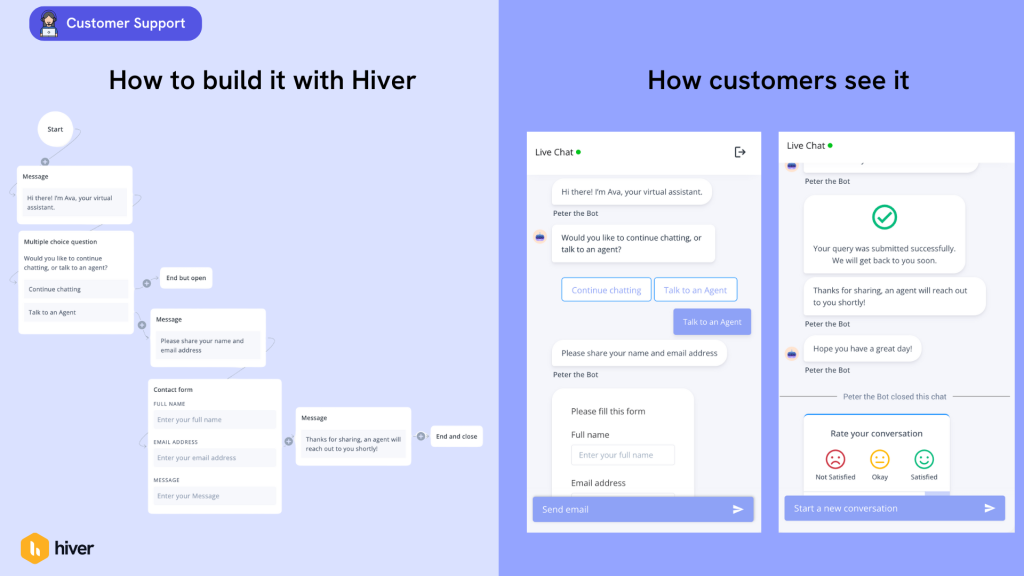
Some conversations just needs a human touch. Whether it’s a complex issue or a frustrated customer, this chatbot flow makes it easy to loop in a live agent, without losing context. The customer doesn’t have to repeat a thing, and the agent can jump in fully informed.
Recommended reading
Sales Chatbot Templates
4. Pricing Page Chatbot Template

The pricing options chat template is perfect for when visitors are comparing plans on your website. It can highlight differences between tiers, help them find what fits their budget, and even connect them to your sales team for a quick walkthrough.
5. Lead Generation Chatbot Template

When someone is comparing pricing plans or features, this template steps in and offers a guided next step. You can customize the workflow to gather the visitor’s name, work email, and company, and even book a follow-up with sales.
6. Business Hours Template
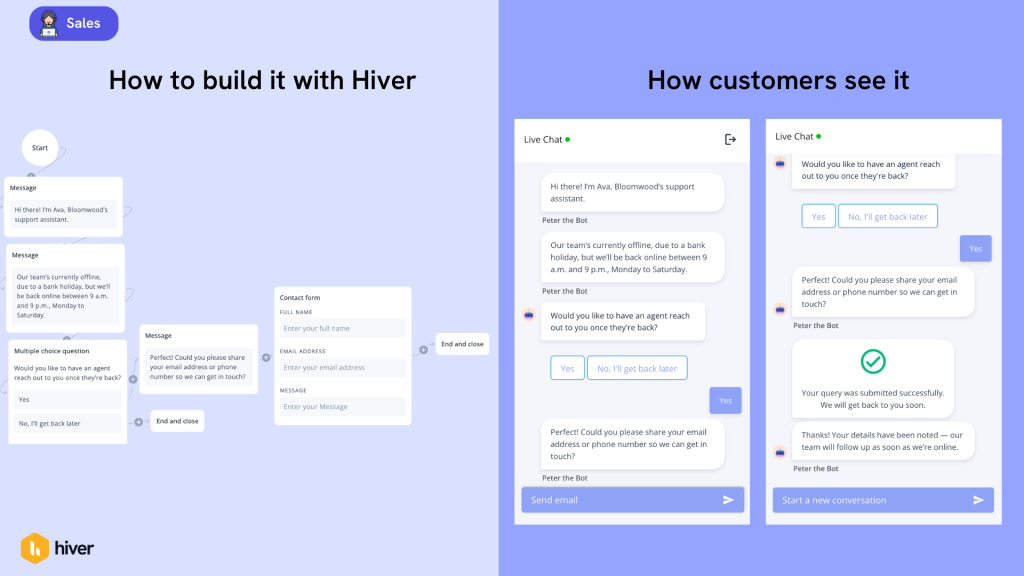
This template helps you stay responsive even when your team isn’t online. It collects key details like the customer’s name, contact information, and issue, then assures them that your team will follow up once business hours resume. This way, customers feel heard right away, and your agents can jump in with full context when they’re back online.
E-commerce Chatbot Templates
7. Discount Code Chatbot Template

This template helps capture hesitant shoppers before they drop off. The bot offers a small incentive, such as a discount or special deal, and links them to the right page to use it. It keeps the experience smooth and gives your conversion rates a solid lift.
Recommended reading
Manufacting
8. Troubleshooting Chatbot Template
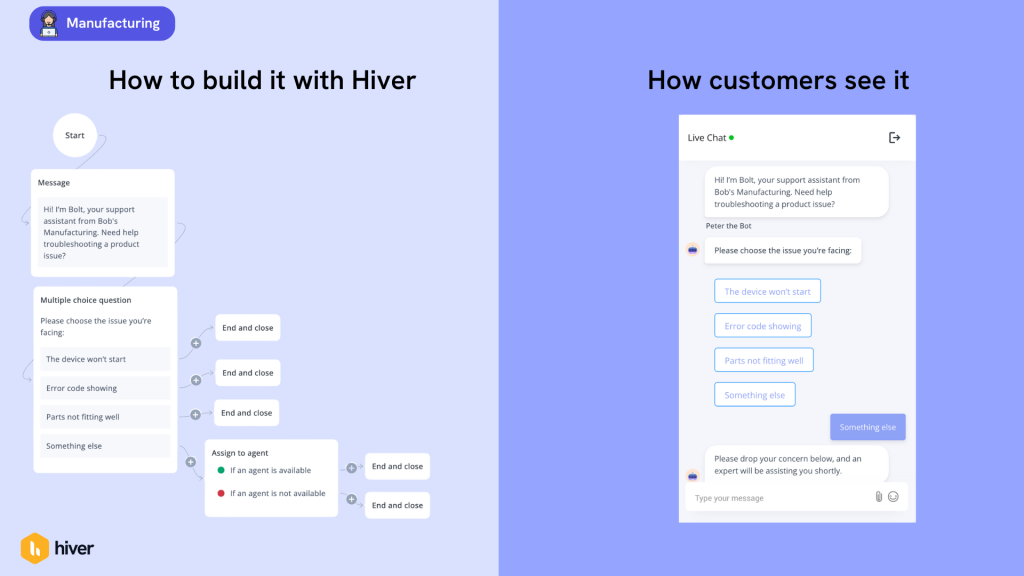
For manufacturing and hardware teams, this chatbot template helps customers get quick answers when something stops working. Instead of calling support, users choose from a set of common problems. The bot then routes them to the right fix—whether it’s a help article or a technician. It cuts down on repetitive queries and helps customers get back up and running, without the wait.
Recommended reading
Hospitality Chatbot Templates
9. Restaurant Reservation Chatbot Template
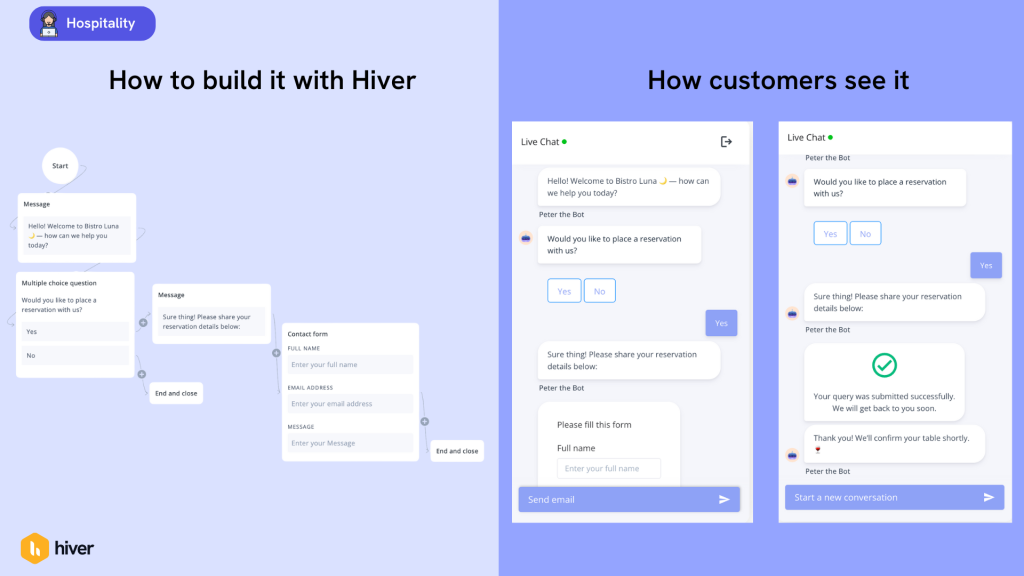
A reservation chatbot helps diners book a table in a few quick steps, without calling the host stand. It collects the essentials, such as date, time, party size, and contact details, then confirms the booking on the spot. Your team spends less time on the phone, and guests can make plans at any time that suits them.
Recommended reading
HR Chatbot Templates
10. Employee Onboarding Chatbot Template

An employee onboarding chatbot helps new hires get up to speed from day one. It can share company policies, introduce team members, and guide employees through tasks like setting up accounts or completing HR forms. With this template, new employees can find everything they need in one place, while your HR team spends less time on repetitive questions and more time creating a great first-week experience.
Finance Chatbot Templates
11. Loan Application Chatbot Template

This chatbot template helps customers kick off the loan process the right way. You can customize the chatbot to run them through a quick eligibility check, so they know if they qualify. Once confirmed, the bot directs them straight to the application form or recommends other financial products if they don’t yet meet the criteria.
Recommended reading
Healthcare Chatbot Templates
12. Prescription Request Chatbot Template
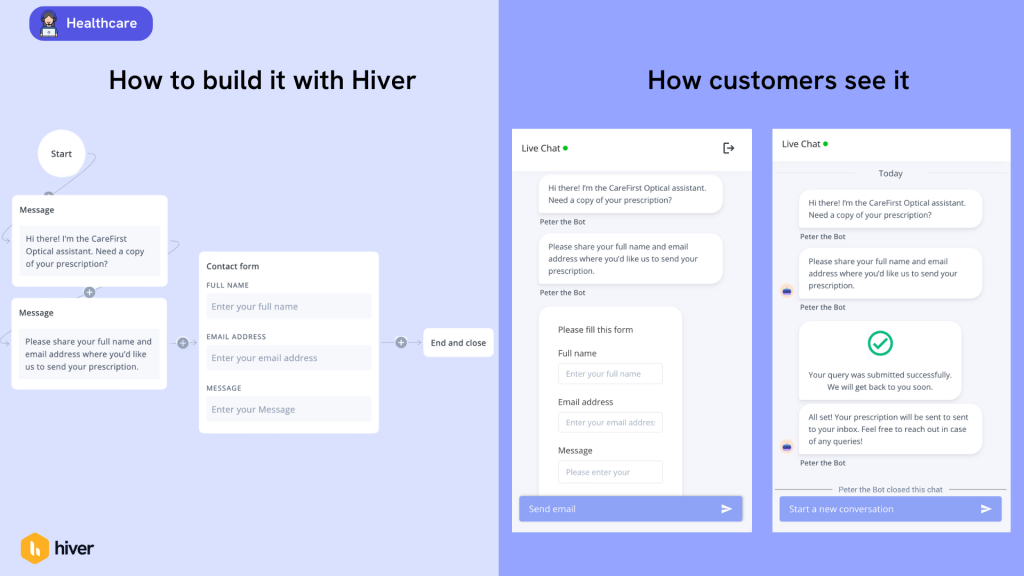
This chatbot template makes managing prescriptions simple and secure. Patients can share a few basic details, like their name and email, and the bot verifies the request before sending their prescription directly to their inbox. It saves time for both patients and staff while ensuring medical information is shared safely and efficiently.
Recommended reading
How to Use Chatbot Templates
Chatbot templates make it simple to create automated conversations without starting from scratch. They’re flexible, easy to edit, and can help your team deliver a faster, more consistent experience. In fact, here’s how to make the most of them:
1. Identify your goal
Start by defining what you want your chatbot to do. Do you want to collect leads, answer FAQs, or help users track orders? Having a clear purpose helps you choose the right template and design the right conversation flow.
2. Pick the right template
Most chatbot platforms come with ready-made templates for different industries and use cases. Choose one that fits your business needs, whether that’s for customer service, HR, finance, or e-commerce.
3. Customize the chat flow
Personalize the conversation so it sounds like your brand. Update greetings, add quick reply options, and include links to helpful resources. You can even give your chatbot a friendly name or personality to make it more engaging.
4. Set up triggers
Decide when and where your chatbot should appear. For example, you might have it greet visitors on your pricing page or offer help during checkout. Smart triggers make the chatbot feel proactive rather than intrusive.
5. Test and optimize
Run a few test conversations before launching your chatbot. Look for gaps or confusing moments, and adjust the wording or flow as needed. Once it’s live, use performance data to keep improving the experience.
Regardless of the type, using chatbot templates saves time and ensures your team offers fast, reliable support around the clock. The more you refine your bot, the more natural and helpful it will feel to your customers.
Best Chatbot Template Examples
Now let’s explore real, working chatbots that do a great job at answering user questions, nudging them at the right time in the buyer journey or just keep support moving smoothly.
These quick snapshots show how different teams use templates to greet, guide, and convert without heavy setup:
1. SayHello’s chatbot powered by Hiver
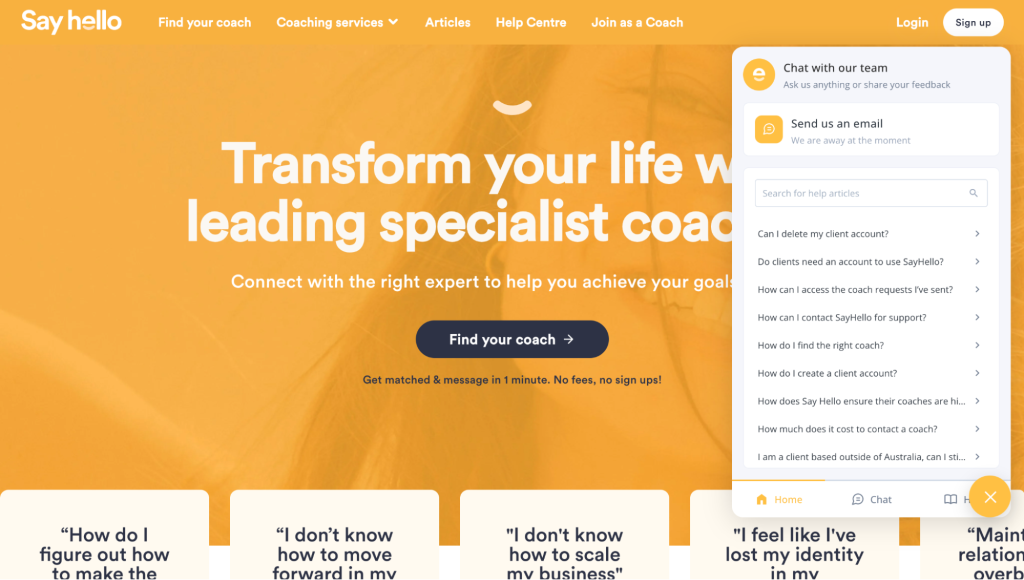
SayHello uses Hiver for their website chatbot to greet visitors and handle common support questions in real time. It shows relevant help articles, has a live chat and collects key details like issue type and contact information when agents are unavailable. It also routes complex queries directly to the right support team.
2. Storylane’s Pricing Page Chatbot

On Storylane’s pricing page, a chatbot nudges users when they spend time comparing plans. It is also personalized to show a live agent, rather than a bot. The chatbot offers helpful nudges: a quick demo, key pricing info, or a direct line to sales.
This smart trigger keeps potential customers engaged at a critical decision point, without making them fill out a long form.
3. Rippling’s Homepage Chatbot
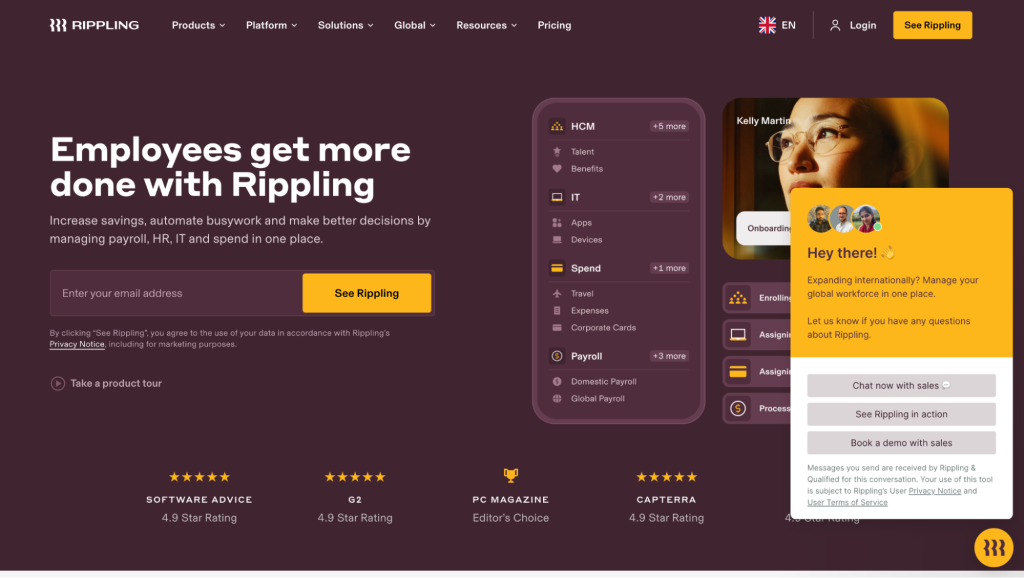
Rippling’s homepage chatbot acts as a digital front desk for new visitors. It welcomes users, asks what they’re looking for, and provides links to the right product pages or resources. The conversation feels smooth and natural, guiding visitors to explore features or schedule a demo without ever leaving the chat window.
How AI can Enhance Chatbot Templates
When you use AI features in tandem with your chatbot, you can go beyond static scripts to understand your customer intent better, pull the right data, and automate steps like tagging, routing, and answering simple questions.
That way, teams benefit from fewer handoffs, clearer data, and conversations that feel consistent across channels.
With Hiver AI, that intelligence plugs right into your inbox. Here’s a quick example how:
Picture this: a customer lands on your pricing page.
Hiver’s AI Opener detects their intent and greets them with — “Hey there! Comparing plans? I can help you pick the right one.”
As the chat continues, AI Extraction picks up useful details like their company size or location.
AI Agents can then triage and route them to the right agent based on predefined rules or the user’s needs.
AI CoPilot then drafts a personalized reply using data from previous interactions or your knowledge base. If the question is straightforward, agents can use AI compose to draft a quick reply. Even if it’s something complex, agents can quickly edit the response as needed and send it across.
Finally, AI Insights analyze the chat for tone, accuracy, and resolution time so your team knows how to keep improving. By combining your chatbot templates with Hiver AI, you get automation that feels personal, and support that stays consistent.
Improve Customer Experience with Hiver’s Chatbot
Great support shouldn’t feel robotic. With the right chatbot templates, your customers get quick, helpful answers without the runaround. And your team gets more time to focus on the conversations that truly need a human touch.
That’s where Hiver’s chatbot shines. Pick a template that fits your workflow, tweak the tone to match your brand, and let Hiver’s AI handle the rest. It picks up on customer intent, captures key details, suggests relevant replies, and even highlights trends your team can act on.
The payoff? Support that feels genuinely helpful, works seamlessly no matter where your customers reach out, and runs smoothly. It’s the kind of experience that keeps customers happy and coming back.
Wondering how this can work for your team? Start a free trial today– and see how Hiver fits in!
Frequently asked questions
Why use a chatbot template?
Templates save you from building conversations from scratch and help you launch faster. They’re designed around proven support patterns, so you start with something that already works. Instead of designing every conversation block by block, your team can focus on fine-tuning the tone, flow, and experience. Plus, templates also keep responses consistent.
How can I use AI with chatbot templates?
AI takes your templates from good to great by understanding customer intent and personalizing responses in real time. It can automatically tag conversations, pull relevant information, and suggest replies that match your tone. The AI learns from interactions to get smarter over time, handling more complex questions while keeping the conversation natural.
Start using Hiver today
- Collaborate with ease
- Manage high email volume
- Leverage AI for stellar service