Skip to content




Why Do Teams Still Struggle with Shared Inboxes?
Hiver’s latest study found that 77% of customers prefer email over other support channels to contact a business.
Which is why it’s not surprising to see companies make use of group email IDs such as support@, finance@, hr@, or sales@yourcompany.com to manage incoming queries and requests.
But when you use a group email (an email ID that multiple users can log into), it comes with several drawbacks.
- Establishing ownership becomes tough, and teams have a hard time knowing who is working on what.
- Collaboration issues set in, leading to missed or delayed responses.
- No means to track team performance and stay on top of metrics such as response and resolution time.
This is where a dedicated team email management software can make a difference.
Table of Contents
- Why Do Teams Still Struggle with Shared Inboxes?
- Quick Summary
- Why Trust Us?
- Why Your Team Needs an Email Management Software
- A Quick Rundown of the Top 19 Team Email Management Software
- 13. Zoho TeamInbox
- 14. Helpwise
- 15. ProProfs Help Desk
- 16. LiveAgent
- 17. Loop Email
- 18. Kayako
- 19. Helpmonks
Quick Summary
If you’re tired of inbox chaos and missed replies, this article reviews 19 of the best team email management tools for 2025, including Hiver, Front, and Help Scout, to help your team collaborate seamlessly and resolve emails faster together.
Why Trust Us?
At Hiver, we’ve empowered over 10,000 teams worldwide to manage shared inboxes seamlessly. Our platform improves email management, simplifies team collaboration, and boosts response times. For instance, teams like Clutter saw a 25% improvement in email resolution speed after integrating Hiver.
Why Your Team Needs an Email Management Software
Without structure, shared inboxes quickly turn chaotic. Messages begin to pile up, and ownership becomes unclear, leading customers to wait longer for replies.
A team email management software like Hiver centralizes communication, assigns accountability, and makes collaboration effortless through shared inboxes, notes, tagging, and performance tracking.
A Quick Rundown of the Top 19 Team Email Management Software
Here is a list of the 19 best team email management software to help you determine what will work best for your team.
| Software | Key Features | Pricing |
|---|---|---|
| 1. Hiver | – Shared Inbox– Works inside your inbox– Email assignment and tags– Internal Notes – Real-time workload view– Canned responses– Email workflow automation– Reporting & analytics | Starts at $19/user/month |
| 2. Gmelius | – Shared inbox– Gmail Kanban boards – Quick notes and shared drafts– Meeting scheduler | Starts at $15/user/month |
| 3. Drag | – Email tracking– Shared labels– Drag boards– Due dates tracking | Starts at $5/user/month |
| 4. SmartReach.io | – Shared inbox– Sentiment analysis– Multichannel outreach– AI-generated content | Email Outreach plan starts at $29/user/month |
| 5. HappyFox | – Unified inbox– Reporting and analytics– Private notes – Smart rules for workflows | Agent-based: $39-$99/agent/month Unlimited Agents: $1499-$4999/month |
| 6. Zendesk | – Unified Workspace– Email templates– Email triggers and workflows– Internal notes for collaboration – Built-in SLAs | Starts at $49/agent/month |
| 7. Groove | – @mentions and Slack notifications– Collision detection – Internal notes– Auto-reply personalization | Starts at $15/user/month |
| 8. Front | – Omnichannel inbox– Workflow Automation– Internal Collaboration– Advanced analytics | Starts at $19/user/month |
| 9. Freshdesk | – Custom views– Automated email assignment – Merging of tickets – Canned responses – One-click reports | Starts at $19/user/month |
| 10. Help Scout | – Saved replies library– Conversation history, detailed reports | Standard: $25/user/month Plus: $50/user/month Pro: $65/user/month |
| 11. SupportBee | – Email categorization – Email assignment– AI summarizer for emails– Collision alerts | Starts at $20/user/month |
| 12. Missive | – Shared inbox & assignments– Thread-level chat & @mentions– Rules/automation & workflows– Shared labels and tags– Shared drafts | Starts at $14/user/month |
| 13. Zoho TeamInbox | – Shared inbox for teams– Email delegation & assignments– Tags, @mentions, shared drafts– Activity timeline & SLAs (via Zoho suite) | Starts at $5/user/month |
| 14. Helpwise | – Shared inbox (email, SMS, WhatsApp)– Collision detection & internal notes– Rules, auto-assign, and tags– Reports & SLAs | Starts at $12/user/month |
| 15. ProProfs Help Desk | – Team shared inbox– Canned responses & macros– Automation rules & SLAs– Reports & knowledge base | Starts at $19.99/user/month |
| 16. LiveAgent | – Omnichannel shared inbox– Live chat & call center– Canned responses & routing– Reporting & audit logs | Starts at $15/user/month |
| 17. Loop Email | – Shared inbox for teams– Workflow automations– SLA monitoring– Integrations with email | Starts at $17.24/user/month |
| 18. Kayako | – Shared inbox & omnichannel support– Automations & SLAs– Customer journey context– Reports & insights | Starts at $79/month |
| 19. Helpmonks | – Shared inbox & team collaboration on email workflows– Assign emails, internal notes, tags & SLAs– API integrations & team performance reports | Pricing starts at $99/month |
1. Hiver
Handling emails as a team—whether customer complaints or internal requests—shouldn’t be a daily balancing act.
Hiver ensures it isn’t by providing a collaborative inbox for your team to handle all emails arriving in inboxes like info@, support@ and help@. What teams love about Hiver is that it’s an extension to their Gmail and Outlook inbox and as a result, they don’t have to migrate to an external system and undergo extensive training.
“Hiver provides the functionality to manage a shared email address between multiple people directly through Google’s email interface. New emails pop into the Hiver managed folders where your assigned team can all see them. It’s very simple to manage the emails through assignments, comments, and tags. Hiver takes the chaos of a Google group or shared email address and adds a layer of functionality and workflow. It is a gamechanger” – G2 Review

Once you install Hiver, all your team inboxes appear on the left side panel of your inbox – the same place where you have other tabs like ‘Starred’ and ‘Sent’. This makes it really super easy to toggle between multiple shared inboxes and your personal inbox tab.
It’s worth mentioning that Hiver offers a forever-free plan that lets you set up one shared inbox, along with other support channels such as chat and WhatsApp.
Key features include:
- Color-code conversations to categorize, prioritize, and share them with your team.
- @mention anyone across the organization and write a note to discuss emails.
- Real-time view of your team’s workload helps you assign emails in a balanced manner.
- Create and share email templates with your team. These templates can be customized using placeholders, adding a touch of personalization when responding to emails.
- Reduce manual, repetitive work with rule-based tagging and assignment of emails. For instance, you can create an automation to assign all emails from a specific sender to a customer.
- Track team performance by measuring key metrics such as first response time and average resolution time for every shared inbox. You can also create custom reports to track metrics that you specifically want.
Pricing:
Hiver offers a forever-free plan that offers one shared inbox. Paid plans are as follows:
- Lite: $19/user/month
- Pro: $49/user/month
- Elite: $79/user/month

2. Gmelius
Gmelius helps create a collaborative workspace within Gmail where teams can get real-time visibility of their workload, distribute tasks effectively, automate grunt work, and collaborate faster.
Key features include:
- A shared inbox solution supporting 2-way integrations with your existing tools
- Gmail Kanban boards that convert email conversations into task cards
- Quick notes for internal discussions
- Shared drafts to collaborate on replies and craft accurate responses
- Meeting scheduler to schedule and coordinate meetings
Pricing:
- Flex: $15 per month for your entire team
- Growth: $24 /user/month, billed annually
- Pro: $36/user/ month, billed annually
3. Drag
Drag is an extensive all-in-one workspace within Gmail. It comes with boards and collaboration tools that are designed to help your teams streamline customer service workflows, visualize sales pipelines, and close deals.
Key features:
- Email tracking to know who has clicked and viewed emails
- Shared labels and color codes to organize boards based on urgency, time zones, etc.
- Drag boards with different permission levels can be used to streamline cross-functional collaboration
- Due dates can be added to emails and tasks to ensure your teams never miss a deadline
Pricing:
- Starter: $5/user/month
- Plus: $10/user/month
- Pro: $15/user/month

4. SmartReach.io
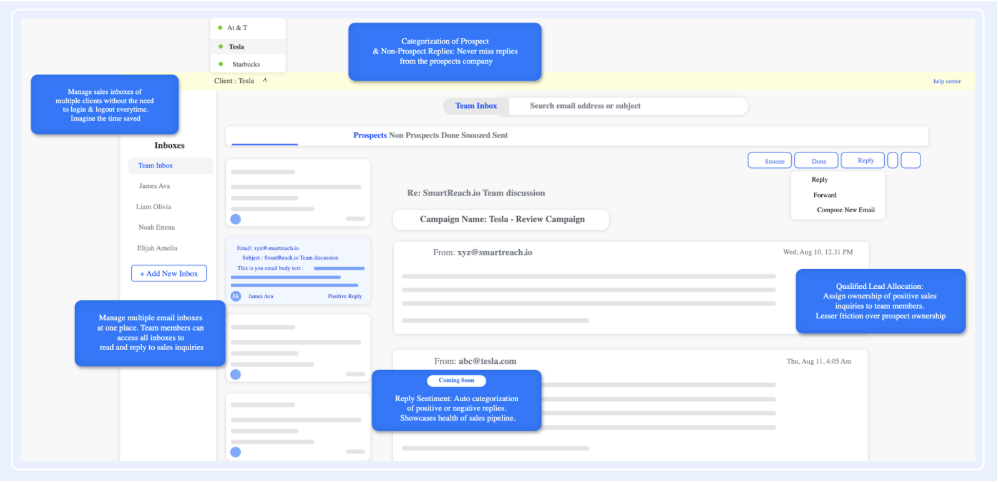
SmartReach.io is a sales engagement platform that helps businesses increase lead conversion and shorten sales cycles by delivering effective cold outreach campaigns.
With SmartReach, effortlessly find and connect with your ideal prospects. Explore a wide range of features designed to enhance prospecting and boost engagement for your sales team.
Key Features:
- Increase transparency across sales & marketing team with the shared inbox
- Auto-categorization of positive & negative replies with reply sentiment
- Cold outreach via multiple channels like LinkedIn, WhatsApp, email, text & call
- Increase audience reach and possibilities of getting response with multichannel outreach
- AI-generated email content & subject line based on the input provided.
- Some of the prominent features that helps increase deliverability are spintax, hyper-personalization, custom merge tags, detailed reporting and many more
Pricing:
- Email Outreach Plan starts at $29 per user per month
- Sales Outreach Plan starts at $49 per user per month
- For Agency & Enterprise plan, reach out to the sales team
5. HappyFox
HappyFox is a customer support platform designed to simplify and streamline your support process. By automatically converting emails, phone calls, chats, and web requests into tickets, it ensures efficient tracking and prioritization of customer inquiries.
Key features include:
- A unified inbox from where all customer requests can be managed
- Queues to prioritize and resolve support requests better
- Private notes to streamline internal communications
- Smart rules to automate ticket assignments
Pricing:
HappyFox offers two different pricing models
- Agent-based Pricing:
- Mighty: $39 per agent per month
- Fantastic: $59 per agent per month
- Enterprise: $79 per agent per month
- Enterprise Plus: $99 per agent per month
- Unlimited Agents Pricing:
- Starter: $1499 per month
- Growth: $1999 per month
- Scale: $2999 per month
- Scale Plus: $4999 per month
6. Zendesk
Zendesk is a multi-channel customer service tool. One of its power functionalities is team email management – helping teams assign, track, and collaborate on customer emails.
But, the downside of using Zendesk is that it’s got a complicated user interface. That means you and your team need to spend a lot of time and effort figuring out how the platform works.
Key features include:
- Dynamic request forms to gain more context on incoming requests
- Mobile app to respond to customer queries on the move
- Built-in SLAs to meet deadlines
- Pre-designed responses called macros to take care of repetitive queries
Pricing:
Zendesk has three tiers of pricing for small to large-sized businesses.
- Suite Team: $49 per agent per month
- Suite Growth: $79 per agent per month
- Suite Professional: $99 per agent per month
For enterprise companies, Zendesk has two tiers of pricing:
- Suite Enterprise: $150 per agent per month
- Additional and more powerful enterprise plans start at $215 per agent per month
7. Groove
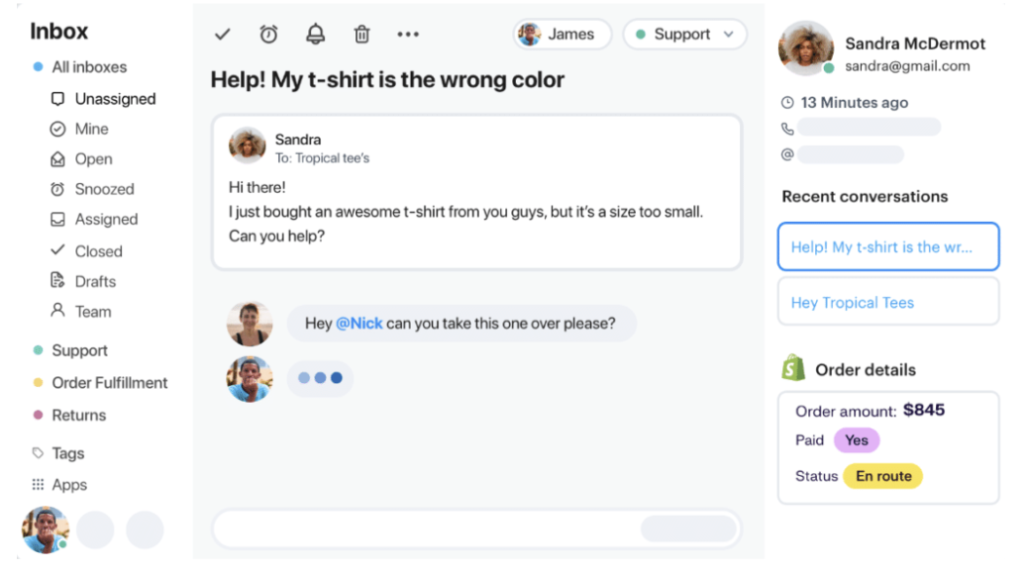
Groove is a popular help desk software that has an intuitive shared inbox feature. With Groove, teams can prioritize and resolve customer emails – from a familiar interface.
Key features include:
- @mentions and Slack notifications to always keep your teams in the loop
- Collision detection triggers to avoid duplicate responses
- Internal notes to help teams collaborate better
Pricing:
Groove offers 3 pricing plans each under the monthly and yearly models.
- Starter: $15/user/month
- Plus: $25/user/month
- Pro: $45/user/month
8. Front
This customer communication tool has built-in collaboration features that let your team efficiently manage incoming email queries and requests. Front has an interface inspired by that of commonly-used email clients and is quite simple to use. You can easily loop in team members without creating endless threads and provide timely support to your customers.
Key features include:
- Omnichannel inbox that consolidates messages across channels into a single interface
- Integrated customer details such as account data and message history, are displayed alongside the customer message
- Advanced analytics to monitor team performance and customer experience
Pricing:
Starts at $19/user/month
9. Freshdesk
Freshdesk is a comprehensive customer support platform. Its email management feature will help your teams convert incoming customer emails into tickets, enabling you to track and respond to customer emails seamlessly.
Key features include:
- Multiple custom views to better manage tickets
- Merging capability to consolidate related tickets into one
- Canned responses and autoresponders to speed up resolution times
- One-click reports to get detailed insights on email activities, spot outliers, and identify trends in customer queries
Pricing:
Front offers four pricing options.
- Starter: $19 per person per month
- Growth: $49 per person per month
- Scale: $99 per person per month
- Premier: $229 per person per month
10. Help Scout
Help Scout is a powerful support tool that lets teams manage all customer emails from a centralized platform. It makes it easy for you to assign, track, and collaborate on these conversations in real time.
Key features:
- A searchable library of saved replies to respond to FAQs in seconds
- Conversation history and customer data are displayed with the most recent messages to provide much-needed context
- Detailed reports on outreach volume, response times, and other custom data points that matter to your team
Pricing:
Help Scout offers three types of pricing options.
- Standard: $25 per user per month
- Plus: $50 per user per month
- Pro: $65 per user per month
11. SupportBee
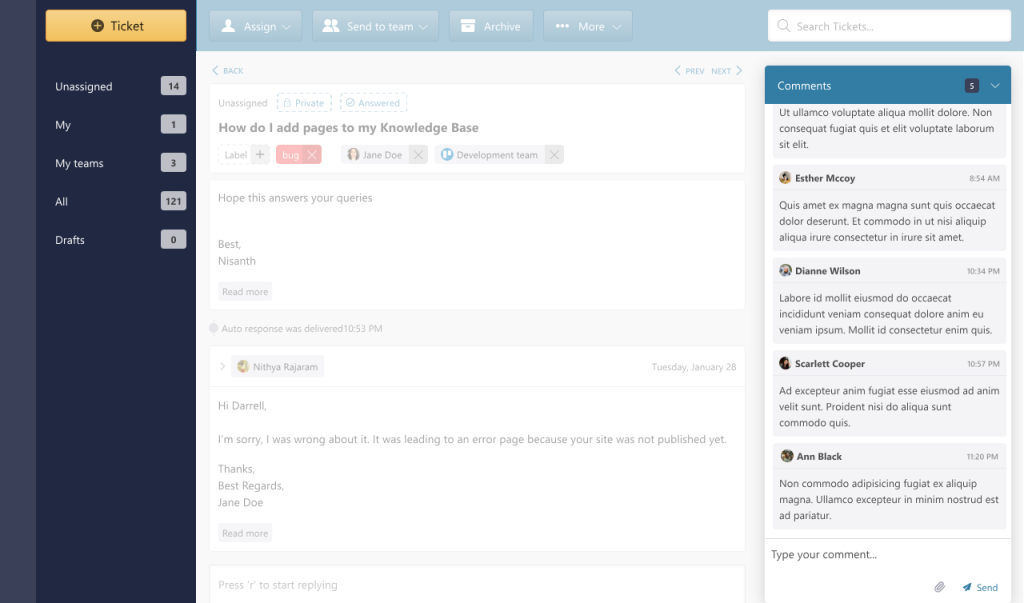
SupportBee is a ticketing system that has a shared inbox to streamline customer email communication. The tool offers the familiarity of an email interface and offers multiple functionalities such as email assignment, automation, and draft replies.
Key features include:
- Emails can be categorized as ‘Answered’, ‘Unanswered’, or ‘Archived’, to keep inboxes organized
- Drafts can be created and shared with team members to collaborate on customer responses
- Log all actions taken on a ticket, to keep teams accountable and informed
Pricing:
- Personal: $39 annual
- Business: $59 annual
12. Missive
Missive blends email, chat, and tasks in one workspace so teams can handle shared inboxes without chaos. It feels like using a familiar email app, just smarter. You can discuss, assign, and close out messages right where they live without endless threads or forwarding.
Key features include:
- Shared inbox with real-time assignments and tags
- Internal chat threads are attached to each email
- Labels and tasks to maintain organization
- Calendar integrations for follow-ups and scheduling
Pros
- Brings chat and email together in a clean workspace
- Smooth internal collaboration without leaving the inbox
- Mobile apps function nearly as smoothly as desktop software
Cons
- Restricted analytics and reporting
- Lacks deeper CRM-style automation
Pricing
Here’s what Missive’s pricing model looks like when billed annually:
- Starter plan: $14 per user per month
- Productive plan: $24 per user per month
- Business plan: $36 per user per month
13. Zoho TeamInbox
Zoho TeamInbox keeps every group email, like support@ or sales@ organized and owned. It’s built for transparency, so everyone knows who’s replying, what’s pending, and what has already been done.
Why Zoho TeamInbox stands out:
- Shared inboxes with ownership visibility
- You can leave comments, tag teammates, or co-write replies in shared drafts
- Shared drafts for precise and consistent replies
- Team analytics and integrations with Zoho apps
Pros
- Affordable and beginner-friendly
- Deep integration with the Zoho suite (CRM, Desk, Projects, etc.)
- Clean layout for assigning and delegating messages
Cons
- Lacks third-party integrations beyond Zoho apps
- Mobile experience isn’t as polished as the web experience
- Automations could be smarter
Pricing
- Starter plan: $5 per user per month
- Professional plan: $7.50 per user per month
14. Helpwise
Helpwise turns team email chaos into structured collaboration. It pulls together email, SMS, and even WhatsApp conversations into one interface, so your team can reply faster without stepping on each other’s toes.
Key features include:
- Shared inbox with automatic assignment
- Collision detection to prevent duplicate replies
- Private notes and shared drafts for teamwork
- Integration with Slack, HubSpot, and Zapier
Pros
- Easy-to-use interface
- Plenty of integrations for CRM and chat tools
- Responsive customer support
Cons
- Slight learning curve for automation setup
- Occasional lag when switching inboxes
- Reports could be more customizable
Pricing
Helpwise has three main pricing plans:
- Standard plan: $12 per user per month
- Premium plan: $23 per user per month
- Advanced plan: $39 per user per month
15. ProProfs Help Desk
ProProfs Help Desk simplifies email collaboration by converting emails into organized, trackable tickets. It’s ideal for small teams looking to streamline support without losing the personal touch of email conversations.
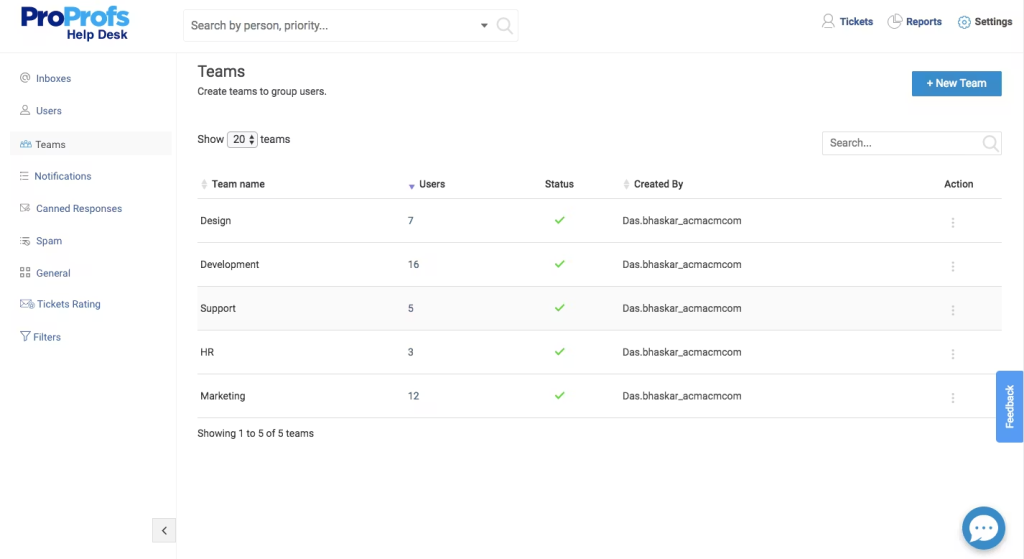
Key features include:
- Shared inbox and ticket tracking dashboard
- Automated assignments and prioritization rules
- Internal notes and response templates
- Customizable reports for SLA and performance tracking
Pros
- Ideal for startups and small teams
- Comes with a free forever plan
- Helpful automation for repetitive tasks
Cons
- The interface feels dated compared to newer tools
- Limited scalability for large enterprises
- Basic integrations only
Pricing
- Single user: Free forever plan for a single user with all premium features.
- Team (2+ Users): $19.99 per user per month
16. LiveAgent
LiveAgent unifies emails, chats, and calls into one help desk system. For teams handling high-volume inboxes, it ensures quick ticket routing and internal collaboration with ease.
Key features include:
- Shared inbox and hybrid ticketing.
- Time tracking and SLA automation.
- Internal notes for seamless handoffs.
- Integrations with WordPress, Shopify, and CRM tools.
Pros:
- Robust multichannel setup for support teams
- Highly customizable ticketing and automation
- Reliable 24/7 live chat support
Cons
- The interface feels cluttered for new users
- Some features are locked behind higher plans
- The reporting dashboard can be overwhelming
Pricing
LiveAgent has four different pricing tiers, all billed annually:
- Small business: $49 per agent per month
- Medium business: $29 per agent per month
- Large business: $49 per agent per month
- Enterprise: $69 per agent per month
17. Loop Email
Loop Email transforms shared inboxes into collaborative workspaces where teams can chat, assign tasks, and stay organized, all within one clean interface. It’s especially popular with operations and client-facing teams managing multiple inboxes.
Key features include:
- Shared inbox with internal chat
- Task assignment and ownership tracking
- Workflow automation and message tagging
- Real-time performance overview and reminders
Pros
- Great balance between chat and email collaboration
- Sleek, minimal interface
- Keeps internal discussions tied to actual emails
Cons
- Limited integrations outside core tools
- No advanced analytics
- Mobile version lags occasionally
Pricing
- Starter plan: $17.24 per user per month
- Pro plan: $34.47 per user per month
- Enterprise plan: Custom
18. Kayako
Kayako offers a unified support solution combining shared inboxes, live chat, and customer journey tracking. Teams can view the full conversation history and context before replying, reducing back-and-forth and improving customer experience.
Key features include:
- Shared inbox with contextual conversation view
- SLAs, automation, and workflow triggers
- Omnichannel support across email, chat, and social
- Customer journey mapping and advanced analytics
Pros
- Strong omnichannel and customer history view
- Great for teams managing complex support operations
- Easy-to-follow conversation timelines
Cons
- Costly for small businesses
- Interface can feel dated
- Limited integrations compared to newer platforms
Pricing
All features are unified under a single plan starting from $79 per month.
19. Helpmonks
Helpmonks brings clarity to shared inboxes by combining collaboration, automation, and customer tracking. Teams can assign emails, add notes, and analyze workload performance without leaving the inbox.

Key features include:
- Shared inbox with tagging and assignments
- Automated workflows and follow-up reminders
- Internal chat and customer history view
- SLA management and reporting dashboards
Pros
- Deep automation and workflow options
- It works well with existing email accounts
- Excellent for tracking SLA and workload
Cons
- The interface isn’t as modern as other competitors
- Setup can feel technical at first
- It lacks mobile app consistency
Pricing
Here’s what Helpmonk’s pricing looks like
- Pro plan: $99 per month when billed monthly
- Unlimited plan: $499 per month when billed annually.
Our Selection Criteria For Best Team Email Management Software
Picking the right team email management tool involves looking beyond features to what actually works for your team. So when we reviewed these platforms, we looked at how they perform in real team settings, not just on paper. Each platform on this list was carefully assessed across the following factors:
- Ease of Setup: The best tools should be quick to roll out and easy enough for anyone to figure out without a week of training.
- Collaboration and Shared Inbox Visibility: We looked at collaboration, including shared inboxes, tagging, internal notes, collision detection, and all the little things that make teamwork smoother.
- Automation and AI: We leaned toward tools that cut down repetitive work. Automatic assignments, tagging, and smart replies can save hours every week.
- Channel Coverage: Email rarely lives alone anymore. The best tools also handle chat, social, or CRM integrations without becoming a headache.
- Analytics and Reporting: We also paid close attention to reporting, SLA tracking, team performance, and customer feedback dashboards that show how things are really going.
- Support and Transparency: Clear pricing, no hidden charges, and responsive support teams made a huge difference in our scoring.
How to Choose the Right Team Email Management Software?
With plenty of options available in the market, choosing the right email management software may seem challenging. We lay out a few of the most important factors that you need to consider before finalizing one:
- Features: Opt for a tool that is backed with advanced capabilities to help you manage emails in an effective way. With a tool like Hiver, you can ensure that every email gets a dedicated owner and can be tracked till resolution. That’s not all. By setting up SLAs, you can be assured that customers get timely responses to their queries.
- User interface: The software should have an easy-to-use interface that lets you smoothly navigate the platform. Since Hiver works right out of Gmail, its interface is very intuitive – meaning, your teams don’t have to spend weeks trying to learn a new software.
- Price: This plays a key role when you narrow down on a software. Choose a software that fits your budget and offers good value for money. Hiver has reasonable pricing plans that growing businesses can afford.
Managing emails as a team doesn’t have to be overwhelming
Many tools are out there that help teams manage emails collaboratively. But most of these tools, I believe, add more complexity than needed.
If your team members spend a good chunk of their work hours in their inbox responding to emails, the software you choose should ideally have a similar interface.
This makes the transition smooth for your team. It also completely circumvents any training needed to get started.
Or better, choose an extension like Hiver – that adds collaborative features to your Gmail and Outlook inbox. To know more about how Hiver can fit into your specific workflow, here are some interactive tours you can try out:
Frequently Asked Questions (FAQs)
1. What is team email management software?
Team email management software helps teams collaborate efficiently on shared inboxes. It allows for email assignments, internal notes, and tagging to streamline communication, track performance, and improve response times across multiple team members.
2. How does a shared inbox work?
A shared inbox gives access to multiple team members to manage emails from a common address (like support@). It allows for ownership and accountability, making it easier for teams to assign, track, and resolve emails together.
3. Why should my team use a team email management tool?
Using a dedicated tool simplifies team collaboration on shared inboxes, prevents email chaos, improves visibility into workloads, and ensures timely responses with tracking, automation, and reporting features.
4. What features should I look for in team email management software?
Look for features like shared inboxes, real-time email assignment, internal notes, collision detection, and automation. These tools help streamline workflows, reduce manual work, and improve accountability and team collaboration.
5. Can I integrate my team email management software with other tools?
Absolutely, many team email management tools offer integrations with CRM systems, Slack, project management tools, and more. These integrations help centralize communication and streamline workflows across different platforms.
6. How much does team email management software cost?
Prices vary depending on the software. Basic plans usually start around $5–$15 per user per month, while more feature-rich tools can go up to $79 or more per user per month, depending on the plan and features.
Start using Hiver today
- Collaborate with ease
- Manage high email volume
- Leverage AI for stellar service