







Customer expectations from brands and logistics providers have evolved to the point where timely updates, on-time delivery, and a seamless experience are now standard.
Most logistics-driven businesses invest heavily in systems and workflows to ensure that nothing breaks along the way. Because even a small delay or disruption can lead to a poor customer experience.
At the heart of making all this work is strong IT support. From resolving internal tech issues to responding to shipment-related queries, IT support teams play a central role in keeping everything on track.
In this blog, we’ll explore –
- Some of the common IT challenges logistics businesses face
- How using a support tool like Hiver can help solve them
- Real-world story of a logistics business using Hiver for IT support
Most Common Challenges Faced by Logistics IT Teams
Let’s look at some of the most common challenges logistics businesses face when it comes to IT support. These issues often create delays, frustrate customers, and slow down internal operations if not addressed quickly.
1. High Volume of Customer Queries
Logistics teams often deal with a large number of customer questions every day – things like “Where’s my package?”, “Can I change the delivery address?”, or “Why is my shipment delayed?”. These queries come in from multiple customers at once, often during peak hours or festive seasons, and keeping up without a robust IT support system for logistics can be overwhelming.
2. Too Many Channels to Manage
Customers, delivery partners, and internal teams may reach out through email, WhatsApp, live chat, or even phone calls. For example, a customer might email about a delay, while a warehouse manager pings on WhatsApp about a software issue.
What makes this even more difficult is that the same person may use different channels at different times – following up first over email, then switching to WhatsApp or calling directly. Without a centralized platform, these conversations get scattered across tools, making it easy to lose context or miss important updates.
3. Internal Tech Issues Affecting Operations
Barcode scanners not working, delivery apps crashing, system access problems at warehouses – internal tech glitches like these are common in logistics. Even a brief delay in resolving these issues can hold up shipments and cause a backlog. Reliable IT support for logistics teams is essential to keep operations running without interruption.
4. Lack of Coordination Across Teams
IT teams, warehouse staff, delivery partners, and support agents often need to work together to resolve issues – like when a missing package needs to be tracked down across multiple systems. Without a shared support platform, this coordination is slow and messy. Updates happen in silos, and response times suffer.
5. No Clear System to Prioritize Urgent Issues
Not all issues are equal. A failed warehouse system or a delivery routed to the wrong city requires immediate attention – more so than a routine request like a password reset. But without a system that flags or prioritizes based on urgency, logistics IT support teams can waste time figuring out what to handle first.
6. Poor Visibility and Tracking
Many logistics businesses still use shared inboxes or spreadsheets to manage IT support. This makes it hard to see which tickets are unresolved, who’s responsible, or how long an issue has been open. Over time, this lack of visibility leads to delays, missed SLAs, and frustrated internal teams.
7. No Data to Improve Support Over Time
Without proper reporting and analytics, it’s hard to identify recurring issues or systemic gaps. Are barcode scanner issues happening every Monday in a specific warehouse? Are certain types of customer queries consistently delayed? Without these insights, IT support for logistics companies remains reactive – with no way to improve over time.
How Hiver Solves These IT Support Challenges
Using the right IT support software can make all the difference in how smoothly a logistics operation runs. It helps teams stay on top of issues, respond faster, and prevent small glitches from turning into major delays.
One such tool built to handle the unique needs of logistics teams is Hiver – a modern AI ticketing solution for fast-moving logistics businesses that brings all your support conversations into a single, intuitive platform. Let’s break down how Hiver addresses these challenges.
1. Manage Customer Conversations Seamlessly Across Channels
Hiver’s omnichannel ticketing system lets logistics teams manage support across channels like email, live chat, WhatsApp, voice, SMS, and social media – all from a single, unified interface. No more switching between tabs or juggling multiple disconnected tools. Your team gets a 360° view of every customer or partner conversation in one place.
Each conversation comes with its own status (open, pending, or closed), a full response history, and internal notes – so it’s easy to track ownership and progress without any confusion.
This helps logistics teams stay organized even during high-volume periods, respond faster across every channel, and ensure no message gets missed..
Let’s say a customer reaches out on Facebook about a missing package, then sends a WhatsApp message later that day. With Hiver, both messages land in the same inbox, visible to the same agent, with all previous context intact – making it easy to reply quickly and keep things moving.

2. Collaborate Across Teams Without Losing Context
Hiver makes collaboration across different teams and departments simple and seamless – right within the ticket itself. This is very important in IT support for logistics as issues often involve multiple teams – IT, support, warehouse staff, delivery partners, finance, and more.
To make this easier, Hiver offers a set of built-in collaboration features:
- Use @mentions in Notes to loop in teammates, share context, or get quick approvals – without switching tools. For example, an agent handling a billing issue can tag someone from Finance with:
“Customer is asking about a double charge in July. Can you confirm the refund status?”
Finance replies in the note, and the agent updates the customer directly — all within Hiver. - Shared drafts let two or more team members co-edit replies before sending them — helpful for high-stakes or sensitive issues.
- Collision detection alerts agents in real time if someone else is replying to the same ticket, preventing duplicate responses.
- With Collaborators, even non-Hiver users (like contractors or field ops) can be invited to view and contribute to specific conversations.

3. Prioritize and Track Every IT Issue with Confidence
Some support issues are more urgent than others – like a customer threatening to cancel a bulk order due to repeated delays, or a key enterprise client facing frequent tracking failures. But without a clear system to flag and organize these tickets, teams can lose time figuring out what needs immediate attention – and risk missing critical deadlines.
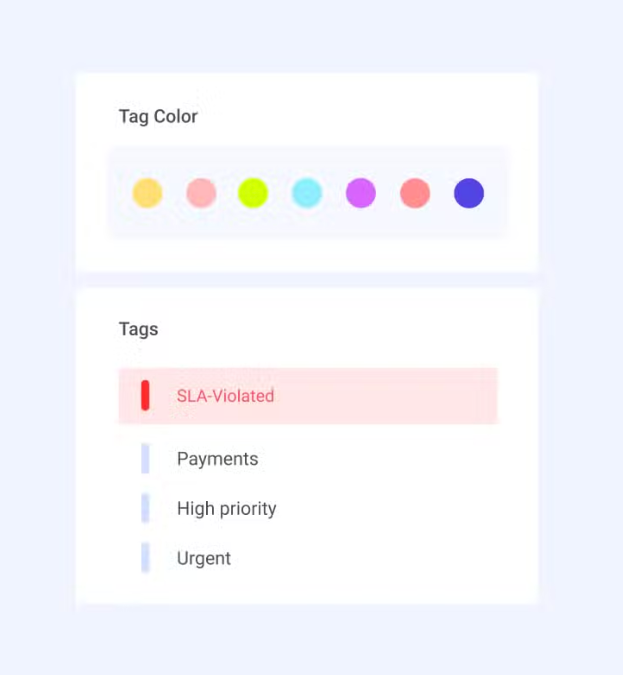
Hiver helps logistics teams stay in control by letting you tag, categorize, and prioritize every ticket. You can add custom fields like ticket type, urgency level, warehouse location, due date, or SLA target – and use these to filter and sort tickets.
For example, you can build custom views like “High priority today,” “Driver app failure,” or “Billing issues pending refund” – so nothing gets missed, even when volumes are high.
You can also set SLAs for response and resolution times, and Hiver will automatically alert managers or agents if a deadline is about to be breached. This ensures that urgent issues are handled on time, and team performance stays on track.
Let’s say a ticket is tagged as “High urgency: Fulfillment delay” with a 2-hour SLA. If no one responds in time, Hiver notifies the assigned agent and their manager – so they can take action before it escalates further.
4. Reduce Repetitive Queries with a Self-Service Knowledge Base
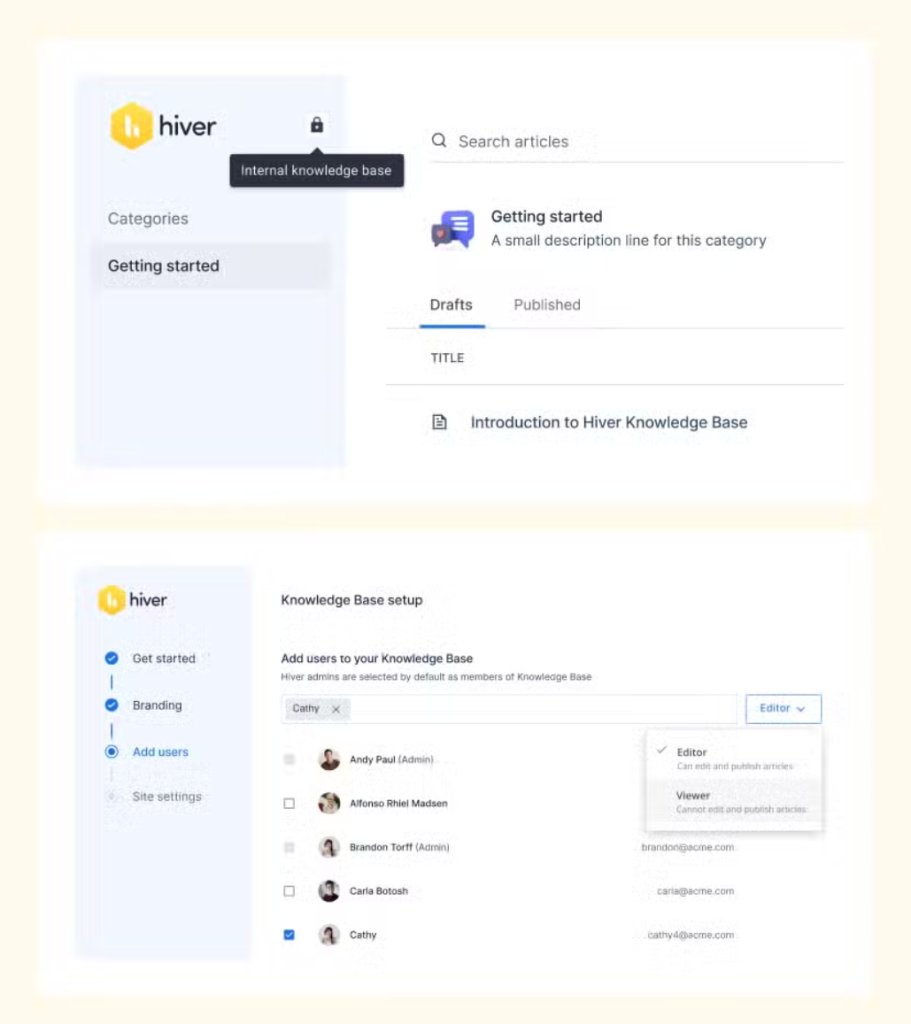
Hiver lets you set up a knowledge base so customers and teams can find answers on their own – reducing the load on your IT support team.
- You can set up a public-facing KB to help customers resolve common queries like tracking orders, updating delivery addresses, or understanding shipping timelines – without raising a ticket.
- Or you can set up an internal KB to securely store and share sensitive information like SOPs, IT policies, troubleshooting steps, and training materials – so warehouse staff, delivery teams, and support agents always have the right info at hand.
This helps speed up resolutions, and reduces back-and-forth.
5. Improve Support Operations with Clear, Actionable Analytics
Without proper data, logistics IT teams are forced to work reactively – with no easy way to identify recurring problems or track how well issues are being resolved. It’s hard to know if a specific warehouse is logging more scanner issues than others, or if customer complaints about missed deliveries are rising.
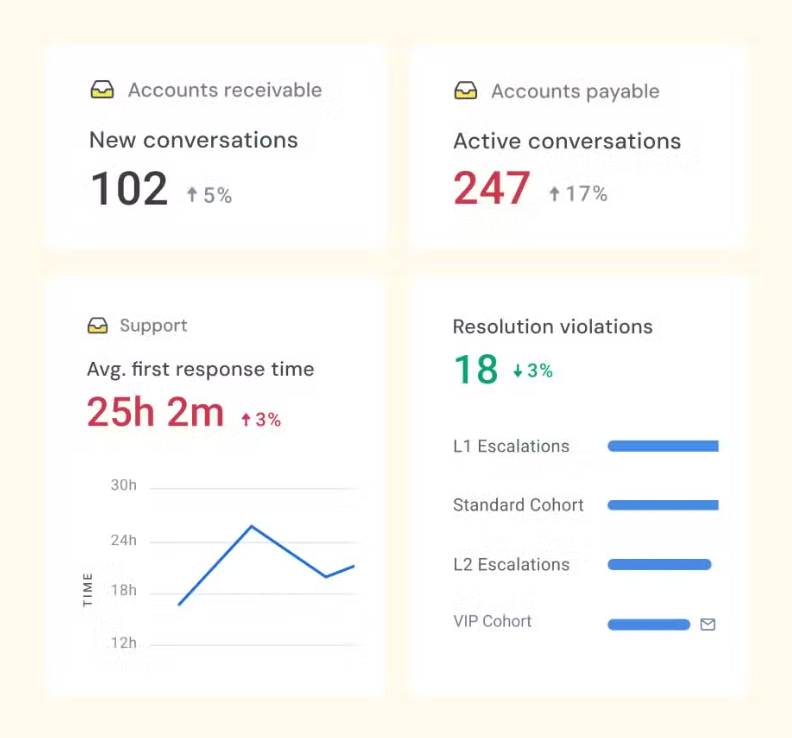
Hiver solves this with built-in analytics and reporting tools that help you monitor performance and spot trends across your support operations.
You can track data like:
- New Conversations – See how many tickets are coming in and from which channels
- First Response Time – Measure how quickly your team replies to customers
- Resolution Time – Track how long it takes to close tickets completely
- SLA Performance – See which tickets are on time and which are at risk of breaching
- Workload Distribution – View how tickets are spread across agents, teams, tags, or locations
- CSAT Scores – Gather direct customer feedback after each interaction
You can also build custom dashboards combining these metrics to track what matters most – whether that’s high-priority client issues or team workload. Reports can be scheduled and exported, making it easy to share insights across your ops, IT, or leadership teams.
6. Streamline IT Support with AI Built Into Every Step
Hiver AI is built into every part of the support process – from triaging and routing issues to drafting replies and analyzing performance. It’s not just layered on top – it’s built to work behind the scenes, end to end.
AI helps your team manage the high volume and complexity of logistics IT issues by taking care of repetitive work, speeding up responses, and helping agents make better decisions.
With AI Agents, Hiver can automatically tag and route conversations based on intent (like shipping delays, billing issues, or access problems). It can extract important information – like order ID, device type, or location – from the message itself and use that to assign the ticket correctly.
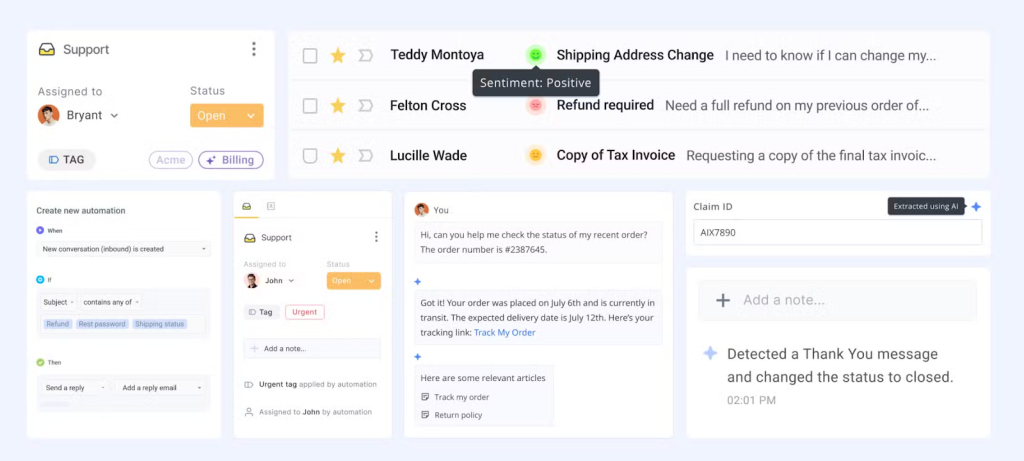
AI Copilot helps agents in real time by drafting responses, summarizing long threads, and pulling answers from your help docs or internal SOPs. Instead of switching between tabs to find information, agents can stay focused and reply faster.
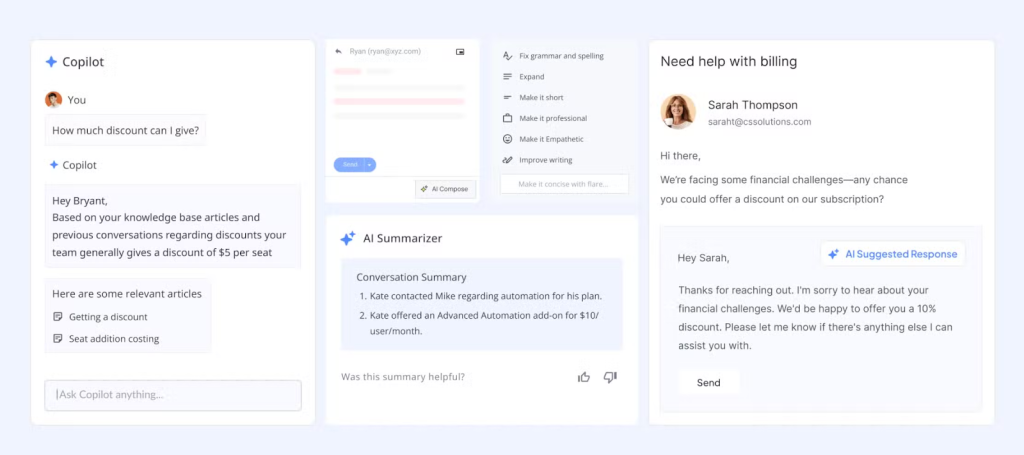
You can also automate full workflows – like issuing refunds, updating CRMs, or notifying teams when a specific type of issue comes in. And with AI QA and AI Insights, support managers get a full picture of team performance, customer sentiment, and process gaps – without having to review everything manually.
How ITS Logistics Transformed Their IT Support with Hiver
ITS Logistics is a Miami-based freight brokerage firm providing LTL and FTL ground transportation across the U.S., Mexico, and Canada. With a back office in Medellín, Colombia, the team manages hundreds of customer conversations each day – spanning quotes, dispatch, tracking, and approvals.
Before Hiver, ITS relied on Google Groups and individual inboxes to manage support. And they struggled without a centralized system. Up to 19 employees would sometimes reply to the same customer, creating overlap and confusion. There was no clear ownership or accountability, which meant queries were often duplicated or left unanswered. Every incoming email had to be read and routed manually, slowing the team down and creating bottlenecks.
To make things harder, communication was scattered across phone, WhatsApp, and email with no single source of truth to refer back to. And because their setup offered no reporting, leadership had no way to track response times, ticket volumes, or SLA performance – making it impossible to identify gaps or improve processes.
Then they decided to switch to Hiver, and this allowed the team to structure support without disrupting their workflow.
Here’s how they used Hiver to turn things around:
- Shared Inboxes: Customer emails were centralized into four inboxes — Quotes, Traffic/Tracking, Dispatch, and Operations — replacing 19 addresses with just a few clear contact points.
- Automated Workflows: Today, 85–90% of tickets are auto-routed to the right rep. Tags trigger transitions between teams, and VIP clients reach the right contact instantly.
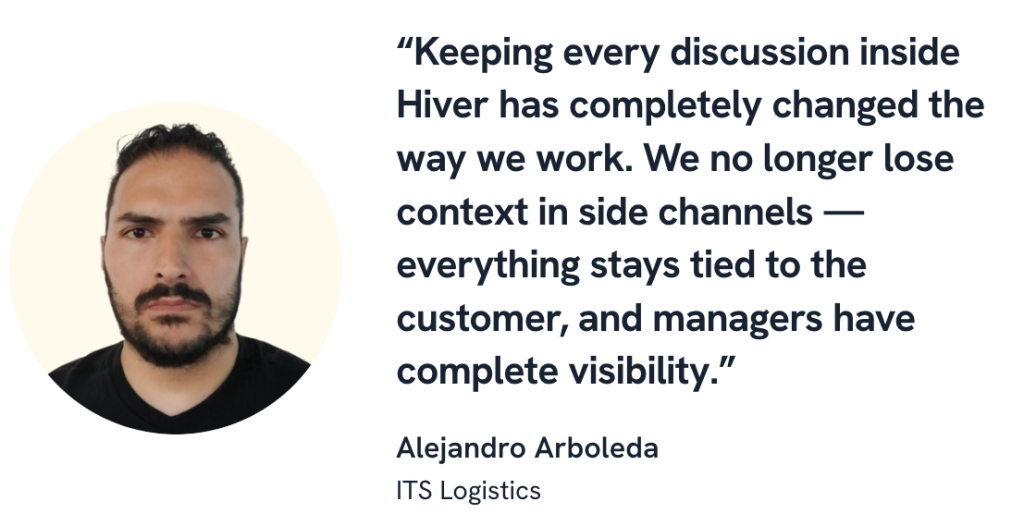
- Collaboration: Internal discussions moved out of WhatsApp and into Hiver Notes, where teammates tag each other and co-edit replies — with everything tied to the customer conversation.
- Analytics: Managers now track workload, SLA compliance, and ticket distribution across reps. This visibility helps balance work and improve accountability.
- AI Features:
- Sentiment Analysis helps flag sensitive conversations early, so they can be prioritized.
- AI Compose improves clarity and tone, especially for newer agents.
- AI Tagging and Extract (in progress) will help automate classification and pull key details from invoice PDFs.
- Omnichannel Support: While 85% of tickets come via email, Hiver helps ITS handle WhatsApp and phone queries with the same visibility and consistency.
Results in Just 3 Weeks
- Quote turnaround time was cut by 61%, dropping from over an hour to just 39 minutes.
- Dispatch was handled 26% faster, with resolution time reduced from 35 minutes to 25 minutes.
- 85–90% of assignments were automated, eliminating the need for manual triage.
- The customer experience was simplified, as 19 fragmented contacts were replaced with just 3–4 shared inboxes.
- Team morale improved significantly, thanks to clearer ownership, less context-switching, and smoother collaboration.
Choosing the Right Platform for Logistics IT Support is Crucial
As we discussed earlier, customer expectations in logistics are higher than ever – on-time deliveries, real-time updates, and smooth service are the baseline. To meet these expectations and avoid costly disruptions, strong IT support is essential. It keeps internal systems running, ensures accountability, and helps teams stay responsive at every stage.
That’s why using the right tool matters. Hiver gives logistics teams a structured, AI-powered platform to manage both internal issues and customer queries – all in one place. It brings visibility, automation, and consistency to your support operations, so nothing gets missed and your business can scale without compromise.
Start using Hiver today
- Collaborate with ease
- Manage high email volume
- Leverage AI for stellar service













