As customer expectations for instant support rise, businesses are under pressure to deliver fast, accurate responses around the clock. Chatbots make that possible. By automating repetitive tasks and offering immediate assistance, they help companies scale support without compromising on quality.
Nearly 9 in 10 people have chatted with a bot in the past year, and close to a billion people worldwide now interact with AI chatbots regularly. And if you’re wondering whether your business should jump on the chatbot bandwagon, you’re in the right place.
In this guide, we’ll unpack what chatbots are, how they work behind the scenes, the different types, and why they’ve become such a big deal. We’ll also look at how to make them work for your business (without annoying your customers).
Ready? Let’s dive in.
What Are Chatbots?
A chatbot is a software application designed to simulate human-like conversation with users via chat interfaces or voice commands. They can live on websites, messaging apps (think Facebook Messenger, WhatsApp), mobile apps, or even via voice on smart speakers (hello, Alexa!).
At their core, chatbots work by recognizing the user’s input and responding with useful information or questions.
Some chatbots are fairly simple: they follow pre-written scripts and respond with fixed answers.
Others are more sophisticated, using Artificial Intelligence (AI) to understand natural language and learn from each interaction.
They even ask follow-up questions and remember context from earlier in the chat. To do this, they rely on technologies like Natural Language Processing (NLP), which allow your chatbot to parse your sentence, determine your intent, and extract key details to form an accurate response.
Recommended reading
Why Chatbots Matter in Today’s Digital World
So, why is everyone talking about chatbots? The short answer is that we’re all online and we expect instant answers. Modern consumers demand speed, convenience, and 24/7 service. Patience for waiting on hold or digging through FAQ pages is wearing thin, and chatbots help meet these expectations in several key ways:
24/7 Availability
Unlike humans, chatbots are available all day, every day to answer questions. Research suggests that over 50% of customers expect businesses to be open and responsive 24/7, and 64% of internet users say the best thing about chatbots is getting service at any hour.
Global Reach
Have customers in different time zones? Or late-night shoppers who crave answers at 3 AM? A chatbot has you covered around the clock. Being always-on means you won’t miss inquiries or leads just because it’s after business hours. In essence, a bot lets even a small business appear like it has a 24/7 support team.
Recommended reading
Multilingual Customer Support: How To Assist A Global Audience
Instant Responses
Chatbots can provide instant replies to common queries without the customer needing to wait or hold. In fact, 90% of customers now expect an instant response when reaching out with a service query, and 60% define “immediate” as 10 minutes or less. This real-time interaction can make customers happier and more likely to stick around.
Omnichannel Presence
Chatbots aren’t limited to just one platform. They can be deployed on your website, your mobile app, Facebook Messenger, WhatsApp, Slack, voice assistants, you name it. This means businesses can meet customers on whatever channel they prefer.
Recommended reading
Cost Savings and Efficiency
Chatbots can save businesses a lot of support costs. Automating routine queries requires fewer human agents to field repetitive questions. Also, bots can handle many conversations at once, so instead of hiring 10 more reps for peak times, a single bot instance scales up automatically.
Domino’s pizza chain, for example, used a chatbot to automate ordering and saw significant savings – their bot handled 1.5 million+ conversations and cut live agent costs by $500,000. That’s real money to the bottom line.
Handling Spikes and Scaling Easily
Businesses often face surges – holiday shopping, Black Friday, viral campaigns, etc. Hiring and training temporary staff for a short period is expensive and impractical. Chatbots scale effortlessly. Got 100,000 visitors at once? No problem – the bot can chat with each one concurrently.
This scalability means you’re always prepared for growth or spikes in demand without scrambling to increase headcount.
Consistency and Reduced Human Error
People have off days; chatbots don’t. A bot will give the correct information every single time, and this consistency is huge for trust. For example, a bank’s chatbot can quote interest rates or fees accurately without accidentally saying the wrong number – something that could happen if an agent was new or misread a script. Fewer errors mean fewer headaches and a more professional image.
Data Collection and Insights
Every interaction with a chatbot can be logged (anonymously and securely, of course) and analyzed. Businesses can glean valuable insights from chatbot conversations – what are customers commonly asking? Where do they get stuck? What products are they interested in? This data can inform everything from improving your website to marketing strategies. Plus, bots can ask users for feedback at the end of a chat to gather satisfaction data directly.
Increased Customer Engagement and Loyalty
A chatbot can actually make interacting with your business fun, or at least less tedious. With a bit of personality, a bot turns a boring FAQ lookup into a pleasant conversation. This positive experience encourages customers to engage more frequently. They’re also likelier to stick with brands offering quick, helpful service.
Sephora, for instance, reported a 50% increase in customer loyalty after launching its chatbot. Likewise, many companies find that their NPS (Net Promoter Score) or CSAT (customer satisfaction score) improves after implementing a good chatbot, as routine issues get resolved faster.
Recommended reading
Your Ultimate Guide to Choosing the Best Chatbot Name + 42 Unique Bot Name Ideas
Marketing
Some businesses also use chatbots for marketing campaigns or interactive content (like quizzes, giveaways, product finders). A chatbot can proactively message users (within platform rules) to re-engage them, send order updates, or promote a new feature, all of which can gently push customers down the sales funnel.
Recommended reading
How Do Chatbots Work? (The Tech Behind the Chat)

How does a chatbot really work? It’s a mix of clever programming, language smarts, and AI. Let’s break it down in simple terms:
Step 1: Understanding User Input (Natural Language Processing)
When you send a message to a chatbot, say, “Can I change my flight date?”, the first thing the bot interprets is your text (or speech). This is where Natural Language Processing (NLP) comes in. NLP is the technology that allows a machine to understand human language. It involves a few steps:
- Natural Language Understanding (NLU): The bot tries to understand your question. It looks at the words and sentence structure to determine your intent (you want to change a flight date) and identify any relevant information (like “flight” or maybe a date if you mentioned one).
- Entity Recognition: If your message contains specifics like dates, times, locations, names, etc., the bot will pick those out. In our example, if you said “Change my flight date to October 5th,” the bot should recognize October 5th as a date – that’s an entity.
Step 2: Matching Intent and Fetching an Answer
Once the bot has a good idea of what you’re asking (your intent), it needs to figure out the answer or action. Different chatbots do this differently:
- Rule-Based Bots: If it’s a simple, scripted bot, it’ll match your question to a pre-defined decision tree or keyword. For example, it might have a rule like: if the user’s message contains “flight” and “change”, then respond with “Sure, I can help with flight changes. What’s your booking number?” These bots are only as intelligent as the rules written for them. They work great for predictable questions.
- AI-Powered Bots: Smarter bots use machine learning models that have been trained on lots of example conversations. They don’t just look for keywords; they actually classify your query into an intent based on patterns they’ve learned.
For instance, an AI bot might have learned from thousands of samples that “I need to reschedule my flight” and “can I change my flight date?” both mean the user wants to modify a booking. These bots often consult a knowledge base or database to fetch the answer. For example, it might pull your flight details from an airline’s system and then decide the appropriate response or next question.
In both cases, after determining the intent, the bot might perform an action (like looking up your account info or calculating an order status) and then prepare a response.
Step 3: Generating the Response
Now that the chatbot knows what you want and has the info it needs, it will send a reply.
This could be a text message, a list of options, a link, or even a rich element like an image or button.
Advanced bots use Natural Language Generation to create a response that feels natural. For example, rather than a stiff “PASSWORD RESET LINK: CLICK HERE”, a good bot will say, “No problem, I can help with that. Here’s a link to reset your password.”
The goal is to keep the tone conversational and helpful, not robotic.
Under the hood, the chatbot might be using templates (“Here’s a link to reset your password: [link]”) or dynamically generating text with AI.
Modern AI chatbots, especially those powered by large language models, can produce remarkably human-like responses because they’re trained on vast amounts of human conversation data. They predict the best response word by word, which can even allow for a touch of humor or empathy when appropriate.
Step 4: Learning and Improving
The coolest part about AI-driven chatbots is that they can learn over time. They analyze which responses satisfied the user, which conversations didn’t go well, and refine their algorithms accordingly.
For instance, if the bot keeps failing to understand questions about “refund status,” developers might notice and feed it more training examples for that topic, or adjust its programming. Some bots have an active learning loop. They might ask, “Did that answer your question?” If a lot of users hit “no”, the bot’s handlers know it needs some tuning in that area.
In summary, chatbots work through a cycle of understanding, deciding, and responding:
- They speak back with a relevant response.
- They hear you (via text or voice input).
- They think about what you mean (using rules or AI to parse language and intent).
💡Fun fact: Some of the most advanced chatbots today use Generative AI (like the tech behind ChatGPT) to hold conversations. These bots can handle open-ended questions and respond with original sentences. They leverage large language models that have digested billions of words, enabling a more flexible, even witty, dialogue. This is a big leap from early chatbots, which would go blank if you phrased a question oddly.
What Are the Different Types of Chatbots?
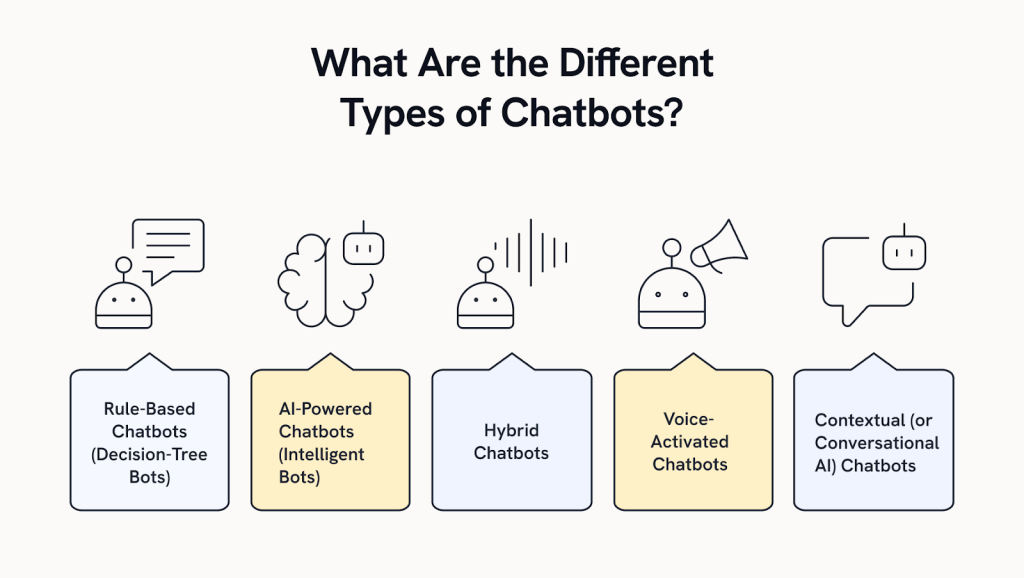
Not all chatbots are created equal. In fact, “chatbot” is a broad term covering everything from a basic automated FAQ widget to Siri on your iPhone. Here are the main types of chatbots you’ll encounter, and how they differ:
1. Rule-Based Chatbots (Decision-Tree Bots)
These are the simplest kind. Think of them as interactive flowcharts. A rule-based chatbot follows pre-defined rules or scripts to answer questions.

It might look for specific keywords or ask you a series of options (“Press 1 for store hours, 2 for support,” etc.). They cannot truly “understand” free-form language beyond what they were programmed for.
Rule-based bots are great for handling frequently asked questions or straightforward tasks (like telling you the weather or your account balance).
They’re reliable within their scope but not flexible – if you ask something unexpected, you might get an “I’m sorry, I didn’t get that.”
2. AI-Powered Chatbots (Intelligent Bots)
As discussed earlier, these bots use Artificial Intelligence and NLP to understand more complex, free-form queries.
They don’t rely solely on hard-coded rules; instead, they are trained on data and can generalize to new inputs. AI chatbots can handle variations in how people phrase things, and they improve through experience.
They often use machine learning algorithms and sometimes deep learning to decide on the best response.
This category includes fancy virtual assistants like Apple’s Siri, Amazon’s Alexa, and Google Assistant, as well as many customer service chatbots that can go beyond simple Q&A.
These bots can also personalize responses using context (like remembering you asked about an order earlier in the chat).
For example, if you ask Siri, “Do I need an umbrella today?”, it replies with the weather forecast in a conversational way.
Recommended reading
3. Hybrid Chatbots
These combine the best of both worlds: they use simple rules for everyday, straightforward tasks, but fall back on AI for more complex queries.
A hybrid chatbot might try to answer with a scripted response, but if it detects that the question is outside its rule set, it can switch to an AI mode or escalate to a human agent.
This approach ensures reliability and flexibility.
For example, a bank’s chatbot can answer “What’s my balance?” with a quick programmed answer, but if you type a long rant about a complex issue, it recognizes that it should involve a human.
4. Voice-Activated Chatbots
These are chatbots you talk to instead of typing.
Technically, voice bots are powered by the same principles (NLP, etc.), but they include a speech recognition layer to hear what you’re saying and a text-to-speech layer to respond audibly.
Smart speakers and virtual assistants (Alexa, Google Home, Siri) are prime examples.
You ask a question out loud, the voice bot interprets it, then talks back.
Voice bots have to handle things like accents, background noise, and the natural cadence of speech.
5. Contextual (or Conversational AI) Chatbots
These are advanced AI bots that maintain context over multiple interactions.
A normal bot might treat two questions in a row independently. A contextual chatbot remembers past inputs and uses them to inform later answers.
For instance, if you first ask, “I need a flight to LA next Friday,” and then follow up with, “Also, do they offer Wi-Fi?”, a contextual bot knows “they” refers to the airline for that flight you just inquired about.
These bots are often powered by advanced machine learning and are considered a subset of AI-powered chatbots. They strive to make the interaction feel like a natural back-and-forth conversation rather than a series of disjointed Q&As.
Recommended reading
Conversational AI or Chatbots: Which One Is Right for Your Business?
You can also categorize chatbots by use case or industry:
- Customer service bots (for support and FAQs),
- E-commerce bots (help you find products or track orders),
- Personal assistants (to manage your schedule or tasks),
- Entertainment bots (play games or tell jokes),
- Healthcare bots (to offer health advice or triage symptoms), and so on.
But at a high level, understanding whether a chatbot is rule-based or AI-based (or a mix) tells you what kind of interactions to expect.
Rule-based bots are like menu-driven assistants – very task-specific. AI bots are like having a conversation with someone who can understand nuance (up to a point).
Rule-Based vs. AI-Powered Chatbots: Key Differences
| Aspect | Rule-Based Chatbot | AI-Powered Chatbot |
|---|---|---|
| How it works | Follows predefined rules/decision trees. Only understands preset commands or keywords. | Uses NLP and machine learning to interpret free-form language and intents. Can generalize beyond preset phrases. |
| Flexibility | Limited to its scripting. Struggles with unexpected inputs or phrasing. | Flexible and can handle varied phrasing and more complex questions. Improves over time with learning. |
| Learning | Does not learn from interactions (must be manually updated by developers). | Continuously learns from new data and user interactions to refine responses (with training). |
| Example Use | FAQ bot that asks you to pick a topic from a menu and gives a canned answer. | Virtual assistant that you can ask anything (e.g., “What’s the weather in Chicago next week?”) and it will figure it out. |
| Pros | Predictable and controllable responses; easier to build; good for simple, common tasks. | More natural and user-friendly; can handle a broader range of queries; reduces need for many hard-coded flows. |
| Cons | Very rigid – fails if user input doesn’t match rules. Can frustrate users if they have to guess the “right” command. | Requires more data and training; can sometimes make mistakes or “hallucinate” answers if AI gets it wrong; less predictable. |
How Can I Build or Implement a Chatbot for My Business?

Ready to get a chatbot of your own up and running? Great! The good news is you don’t need a PhD in computer science or a Silicon Valley budget to implement a chatbot for your business.
With today’s tools, even small businesses can deploy chatbots fairly quickly.
Here’s a step-by-step game plan to build or implement a chatbot:
1. Define Your Goals and Use Cases
Start by asking, “What do I want the chatbot to do?”
Identify the tasks or questions you want the bot to handle. Is it answering FAQs on your website? Helping customers navigate your services? Taking food orders? The clearer your chatbot’s purpose, the easier it is to design.
For example, a restaurant might focus on a bot that handles reservations and menu questions, while an online retailer might have the bot track orders and recommend products. Defining success metrics here is useful, too (e.g., reducing live chat volume by 30%, achieving 80% bot CSAT, etc.).
2. Choose the Right Platform or Tool
You have two main routes – build from scratch or use a chatbot platform.
Platforms are your friend if you’re not very technical or want to quickly implement a chatbot.
Many user-friendly chatbot builders (some with drag-and-drop interfaces) let you create bots without coding. Examples include Hiver, ManyChat, Tidio, Dialogflow (by Google) for those a bit more technical, and IBM Watson Assistant, among others.

These platforms often come with templates for common use cases and easily integrate with channels like Facebook Messenger or your website.
If you have an in-house dev team or specific needs, you might build a custom chatbot using a programming framework (Python has some libraries, Node.js, etc.) and connect it to NLP’s AI services.
3. Design the Conversation Flow
This is the “script” or brain of your chatbot.
Outline how a typical conversation should go. For a rule-based bot, this means mapping out questions and responses (e.g., if the user says X, respond with Y, or present options A/B).
For an AI bot, you’ll still want sample dialogues to train it. Pay special attention to the greetings and default responses. The bot’s greeting message should be friendly and set the context (e.g., “Hi, I’m Ava, the virtual assistant. I can help with tracking orders, returns, and more!”).
Also decide how the bot will handle things it can’t understand – a good practice is to have it apologize and offer alternatives (like “I’m sorry, I didn’t catch that. You can ask me about your order status, returns, or say ‘agent’ to talk to a human.”).
Don’t forget to inject a bit of personality to match your brand.
4. Train the Bot (for AI/NLP bots)
If you’re using an AI-powered chatbot, you’ll need to train its language understanding.
This involves feeding it example phrases for each intent. For instance, if one intent is “Track Order,” sample user messages could be “Where’s my package?”, “track my order status”, “my order hasn’t arrived” etc.
The more examples (and the more variety), the better the bot will understand real-world inputs.
Many platforms have training interfaces where you enter these or even let the bot learn from actual chat transcripts. Also, set up your entities (like telling the bot to recognize dates, order numbers, locations, or any custom keywords relevant to your business).
Training is an ongoing process – after launch, you’ll keep reviewing and refining as the bot encounters new ways people phrase questions.
5. Choose Your Channels and Integrate
Decide where this chatbot will live. Commonly, businesses put a chat widget on their website (often in the bottom-right corner, saying “Chat with us!”).
You might also integrate it with Facebook Messenger (very popular for consumer-facing bots), WhatsApp, Slack (for internal/team bots), or even SMS. Many chatbot platforms let you deploy to multiple channels from one bot brain.
Integration also means connecting the bot to any necessary backend systems.
For example, if it needs to fetch order info, you’d integrate it with your order database or e-commerce platform via an API. Or connect to your CRM to log conversations. If you’re not a developer, don’t worry – most platforms have point-and-click integrations or plugins for popular software.
6. Test, Test, Test
Before unleashing your chatbot on the world, test it thoroughly.
Use real-life scenarios and have people on your team try to “stump” it or unintentionally break it. Pay attention to where it fails to understand or gives an incorrect response.
Ensure the conversation flow makes sense and that the bot isn’t getting stuck in any loops.
Also test the integrations – e.g., is it actually fetching the correct info from your database? To watch how it performs, it’s wise to do a soft launch or beta test with a small group or at off-peak times.
7. Deploy and Promote
Now you’re ready to launch. Deploy the chatbot on your chosen channels and then let your customers know by announcing the new chatbot on your website, social media, or newsletter.
If it’s on your website, consider triggering the chat widget to pop up with a welcome message to draw attention. This invites users to engage.
8. Monitor and Improve Continuously
Launching a chatbot isn’t a one-and-done project. Continuously monitor its performance.
Track metrics like containment rate (how many inquiries the bot handled without human help), user satisfaction, usage rates, and fallback rate (how often it said “I don’t understand”). Use these to identify weak spots.
Maybe a lot of people are asking a question your bot doesn’t cover, so you know it’s time to update its knowledge. Or perhaps users keep using a slang term you didn’t anticipate, so you can train the bot to recognize it.
Regular updates and training will keep your bot effective. Also, keep content (like business info, product details) updated. A chatbot is only as good as its latest information.
💡 Bonus: Pro Tips for Designing a Chatbot That Actually Delights
- Name Your Bot: Even a simple name (“Alex” or “Maya”) makes the bot feel more approachable than “the system.” Customers are more likely to say, “Alex helped me out,” which humanizes the interaction.
- Think Accessibility First: Make sure screen readers can interpret responses (avoid emoji overload), and that voice bots are clear for users with speech difficulties. Accessibility isn’t optional; it’s good design.
- Be Transparent About Data: If you need personal details (“What’s your email to look up the order?”), tell users why. A quick line like “We only use this info to help with your request” builds instant trust.
- Don’t Neglect Multilingual Audiences: If you serve a global or diverse user base, consider adding multi-language support. Even a polite fallback (“Sorry, I can only help in English right now”) is better than confusing users.
- Pair Bots with Humans Smoothly: A chatbot is only as good as its handoff. When users escalate, agents should see the full conversation so customers don’t have to repeat themselves.
- Watch the Logs, Not Just Metrics: KPIs like containment rate are useful, but the gold is in the chat transcripts. Reading where real conversations go off track gives you the most precise improvement roadmap.
What Are Common Challenges with Chatbots?
Like any technology, chatbots come with their own set of challenges and limitations.
If you’re aware of these going in, you can plan for them and mitigate issues. Here are some of the most common challenges and pitfalls associated with chatbots:
Limited Understanding (and Misunderstandings)
We’ve all encountered the dreaded “I’m sorry, I didn’t understand that” when interacting with chatbots.
Despite advances in AI, chatbots can still struggle to understand human input, especially if the user’s query is long, complex, or phrased in an unusual way.
Slang, misspellings, or idioms can trip up bots.
A user might ask a question in a way the bot’s never seen, and the bot might give an irrelevant answer or no answer at all.
It’s a big challenge to anticipate all the different ways people might say something. For AI bots, lots of training data helps, but there will always be edge cases.
Handling the Unknown
What does the bot do when it doesn’t know the answer?
A common mistake is not having a good fallback plan.
Some early bots would just get stuck or repeat “Sorry?” over and over.
Without a fallback plan, users can get caught in a loop, or just give up.
Remember, a frustrated user might abandon the chat or even your service entirely if they hit a dead-end with a bot.
When Chatbots Go Off-Script
AI chatbots, especially the ones using generative models, can sometimes produce odd or incorrect answers. This is sometimes called “hallucination”.
The bot might confidently state something just flat-out wrong or not grounded in your actual data.
For example, an AI bot might make up a fake fee or a wrong return policy if it wasn’t properly bound to your knowledge base.
One way to handle this is to have a curated database for certain answers (like product info or company policies).
Context and Multi-Turn Conversations
Keeping track of context in a conversation is tricky.
Many bots falter if a conversation goes in circles or the user asks something referencing a previous question.
If a user says “Actually, what about shipping times?” in a follow-up, a limited bot might not realize they’re still talking about their previous order question.
Contextual understanding requires a more complex design. If your bot isn’t built for multi-turn dialogue, it may treat each query in isolation, which can be jarring.
Integration and Backend Challenges
A bot isn’t very powerful on its own; often its usefulness comes from integrating with other systems (like databases, APIs, CRM, etc.).
Setting up these integrations can be complex. If the integrations aren’t robust, the bot might fail to fetch information or perform actions, leading to errors.
For instance, if your inventory database goes down and your bot can’t check product stock, it might give a generic error.
User Trust and Adoption
Some users are simply hesitant to interact with a bot.
They might not trust it with their issue or assume it won’t be helpful.
If someone has had a bad bot experience in the past, they might immediately type “I want to talk to an agent” or ignore the chatbot’s attempts to help.
Overcoming this means designing the bot to be genuinely helpful and maybe even guiding users on how to use it.
It also means ensuring a smooth transition to human support so users feel they won’t be stuck with the bot if it can’t help.
Balance Between Automation and Human Touch
Deciding how much to automate with the bot versus when to involve humans is a delicate balancing act.
Lean too far into automation, and you risk annoying customers with complex issues that a bot isn’t suited to handle.
Lean too little, and you won’t reap the benefits of automation.
The handoff strategy is key: identifying trigger phrases or frustration signals where the bot should stop and say, “Let me get a human to help with that.”
Recommended reading
AI vs Human in Customer Service: 50% Support Professionals Support AI-Human Collaboration
User Frustration and Personality Mismatch
A subtle challenge is getting the chatbot’s tone and personality right. A bot that tries too hard to be funny or uses slang might irritate some users, while one that’s too stiff could make the experience dry.
Users might lose patience if the bot misinterprets something and gives a totally off response.
Designing a consistent and likeable bot persona, and scripting good responses for off-topic or sensitive inputs, is more challenging than it seems.
You don’t want the bot to reply with something inappropriate or that could be taken the wrong way.
Privacy and Security Concerns
Chatbots often deal with personal or sensitive information.
Ensuring the security of those interactions is crucial. A challenge is making sure the chatbot platform and your implementation comply with data privacy laws (like GDPR) – e.g., if someone asks about their account, the bot needs to verify their identity without exposing data to the wrong person.
Also, storing chat logs must be done securely. If a bot is improperly configured, it might risk exposing info. Security testing and implementing proper user authentication steps are critical challenges to tackle.
Recommended reading
Customer Data Protection: Strategies, Best Practices and Compliance
What Does The Future of Chatbots Look Like?
Chatbots have come a long way from the clunky “Eliza” program of the 1960s. Today’s AI bots can hold surprisingly fluid conversations.
But what’s next? The future of chatbots is incredibly exciting, and we’re just getting started. Here are some trends and developments shaping the future of chatbots:
More Human-Like Conversations
The holy grail is for chatbots to be indistinguishable from humans in conversation.
We’re not there yet, but getting closer by the day. Advances in Natural Language Understanding and massive AI models (like GPT-4 and beyond) mean bots are improving their grasp of context, humor, empathy, and even the ability to handle ambiguous queries.
Expect conversations to flow more naturally, with bots understanding not just the literal meaning of words but the intent and sentiment behind them.
They might even pick up on emotional cues, for example, detecting if a customer is frustrated or upset from their language and adjusting tone accordingly (e.g., apologizing more, expediting an issue, etc.).
Omni-channel and Seamless Experience
Chatbots will become even more ubiquitous across channels. You might start a conversation with a bot on a smart home device (“Alexa, check my bank balance”) and later continue it on your phone via the bank’s chat app, with the context handed over.
The lines between voice and text bots will blur; a conversation could seamlessly switch modes. For businesses, chatbot platforms are moving toward “build once, deploy everywhere” – so the same intelligence runs on your website chat, your app, your Facebook Messenger, and your voice assistant. This means customers get a consistent experience regardless of how they reach out.
Integration with IoT and Devices
As the Internet of Things grows, chatbots will integrate with more devices. Your refrigerator might have a chatbot that helps you order groceries when you run low. Your car’s chatbot (many new cars have AI assistants) could coordinate with your calendar bot to plan routes and schedule oil changes.
Essentially, chat interfaces might become a standard way to interact with all sorts of smart devices in our lives. It’s often easier to just say “Hey, oven, preheat to 375°” than to find the app or manual controls. Chatbots will be the conversational glue between humans and their increasingly smart environments.
Voice and Multimodal Interaction
Future chatbots won’t just stick to text or voice – they’ll use multimodal inputs and outputs. Imagine a travel bot where you can say, “I’m thinking of destinations like this,” and show it a picture, and it recognizes features to suggest places. Or a bot that can send you a map when giving directions, not just text instructions.
We’re seeing the start of this with AI that can analyze images or generate them. A customer support bot might let you upload a photo of a defective product and then the bot identifies the issue or processes a return, all as part of the chat. This rich interaction combining voice, text, images, and even video is on the horizon.
The Chatbot Advantage
If there’s one thing chatbots prove, it’s that customers don’t always need fireworks to feel taken care of – they just need quick, clear, and consistent answers when it matters most. A well-built bot does exactly that: it handles the repetitive stuff, keeps your tone on brand, and knows when to tap a human on the shoulder for backup.
The future of chatbots isn’t about replacing people; it’s about freeing them up. When bots handle the routine queries, your team gets the space to lean into what they do best – empathy, problem-solving, and building relationships.
And the best part? You don’t need a massive budget or years of tinkering to get started. With tools like Hiver, you can drop a chatbot right into your support flow, give customers instant answers, and keep every conversation in the same friendly, consistent voice.Want to see how Hiver can help you deliver instant, consistent, and human-feeling support with chatbots? Sign up for a free trial today.
Frequently Asked Questions
1. Are chatbots AI?
Some are, some aren’t. “Chatbot” is a broad term. Rule-based chatbots use fixed rules and aren’t what we typically call “AI” – they’re more like decision trees. AI chatbots use artificial intelligence techniques (especially Natural Language Processing and machine learning) to understand and respond to language in a smarter, more flexible way. So, while all AI chatbots are chatbots, not all basic chatbots have advanced AI.
2. What’s the difference between live chat and a chatbot?
Live chat usually means a live human agent chatting with you in real time via a chat interface. Chatbots are automated programs that chat with you. Companies often offer live chat support (with human reps) and might have a chatbot that either handles the initial interaction or works alongside humans. Think of a chatbot as the automated greeter or first-line support, whereas live chat connects you to a real person.
3. Will chatbots replace human customer service agents?
It’s more accurate to say chatbots will work alongside humans, rather than outright replace them. Chatbots excel at handling simple, repetitive queries and can do so at scale and low cost. This likely means fewer humans are needed for those basic Tier-1 support questions. However, human agents are still very much needed for complex, sensitive, or high-stakes interactions. Also, many customers still prefer talking to a human for nuanced issues or when they’re frustrated.
4. Do I need to know how to code to build a chatbot?
Not necessarily! There are many no-code or low-code chatbot builders available. These let you create chat flows by dragging, dropping or configuring rules in a dashboard. If you can make a flowchart or fill out a form, you can make a basic chatbot with these tools. They also provide AI training interfaces for adding example phrases without coding. However, if you have very custom requirements or you want to build a chatbot into a unique platform, some coding might be needed (or you’d use a developer or a chatbot development agency).
5. What’s the cost of implementing a chatbot?
The cost can vary widely. If you use a simple platform for an FAQ bot, it might be very affordable – sometimes even free for basic versions (some platforms charge based on the number of conversations or users). On the other hand, developing a custom AI chatbot with deep integration into your systems can cost tens or hundreds of thousands of dollars when you factor in development and maintenance. Generally, though, for small to mid-sized needs, you might be looking at a monthly SaaS fee in the range of $50 to a few hundred dollars, or more if you have high volume. Enterprise solutions (like building a complex virtual assistant with voice recognition, etc.) could be more.