Simplify email management for Outlook
Assign, track, manage, and collaborate on emails arriving in Outlook team inboxes like info@ and support@.
Unlimited users on Free plan ✦ No credit card needed
Trusted by 10,000+ Customer service, Finance & IT teams
Drive email visibility and accountability with Hiver
Categorize, assign and track your team emails
Ensure every incoming email gets a dedicated owner. Establish clear accountability and streamline communication with all your stakeholders.
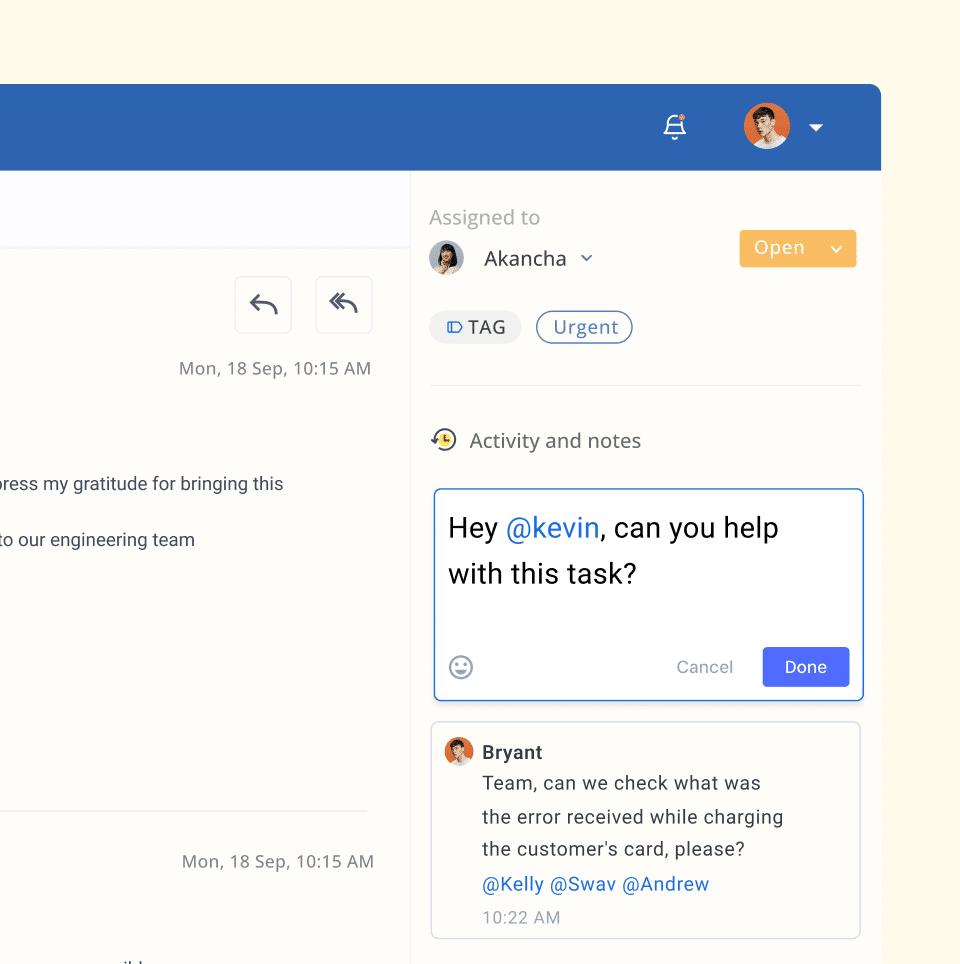
Unlock seamless teamwork within your inbox
Discuss queries internally alongside email threads and get faster team approvals and inputs. Share email templates within your team to quickly respond to repetitive questions.
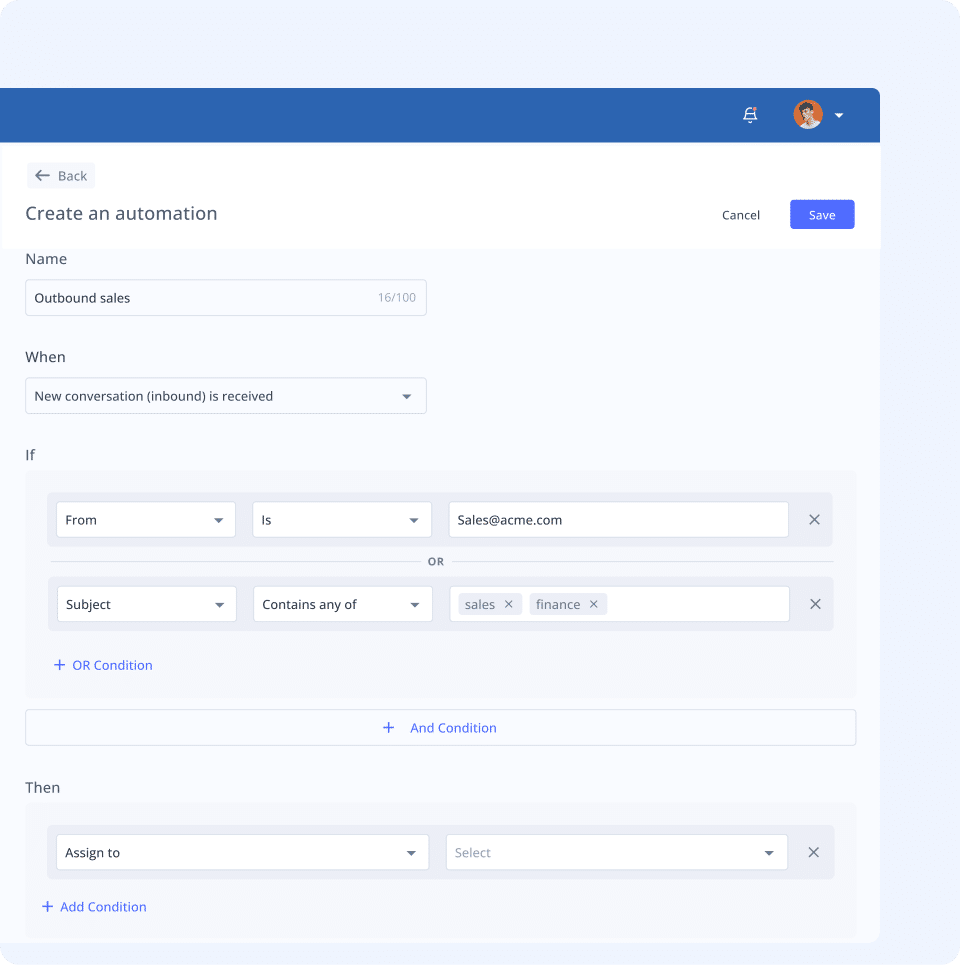
Automate routine tasks to boost team productivity
Easily handle growing email volumes with automations workflows. Set up ‘if-then’ rules to automatically – assign emails, apply tags, update status, and send responses.
Improve team performance with Analytics
Monitor key metrics such as first response and average resolution time for emails. Get access to multiple reports to identify bottlenecks and continuously improve workflows and processes.
Explore more powerful features to
help your team resolve queries faster
Shared Inbox
Organize, assign, and track queries efficiently to ensure nothing gets missed.
Workflows
Triage, assign, and monitor tickets automatically with rule-based automation.
Hiver AI
Let AI deliver instant resolutions, assistance, and insights for your team.
Integrations
Connect with 100+ apps to bring in customer data and manage tasks inside Hiver.
Permalinks
Share emails with other departments through private and public permalinks.
Collision Alerts
Avoid duplicate responses by seeing who is working on a conversation in real-time.
Shared Drafts
Collaborate on responses in real time by sharing drafts with teammates.
Approvals
Speed up resolutions using approval workflows on customer requests.
“With Hiver, we've stopped missing emails, and I have better visibility into their resolution. It's essentially like having an additional person on my team.”
Nathan Strang, Ocean Freight Operations Manager
“We scrolled through inboxes weekly, to ensure nothing was missed. Missing even one email leaves a bad taste for learners. Hiver ensures that doesn’t happen.”
Emma Minnis, Interim Manager of Student Success
“Our team operates more seamlessly with Hiver, leading to less back-and-forth. This has improved our accuracy and speed in processing vendor payments.”
Jill Tarnoff, Sr. AP Specialist at Ping Identity
“I get visibility into the volume of emails, and the types of issues. I can now ensure that operational tasks are accomplished faster”
David Pinto, Business Development
“Hiver is extremely easy to use. We hit the ground running right from day one. Also, their customer service is simply fantastic!”
Luke Thompson, Co-owner
50%
decrease in email resolution time
90%
increase in productivity
65%
reduction in resolution times
100%
SLA success
rate
100%
increase in
productivity
“With Hiver, we've stopped missing emails, and I have better visibility into their resolution. It's essentially like having an additional person on my team.”
Nathan Strang, Ocean Freight Operations Manager
50%
decrease in email
resolution time
“We scrolled through inboxes weekly, to ensure nothing was missed. Missing even one email leaves a bad taste for learners. Hiver ensures that doesn’t happen.”
Emma Minnis, Interim Manager of Student Success
90%
increase in
productivity
“Our team operates more seamlessly with Hiver, leading to less back-and-forth. This has improved our accuracy and speed in processing vendor payments.”
Jill Tarnoff, Sr. AP Specialist at Ping Identity
65%
reduction in
resolution times
“I get visibility into the volume of emails, and the types of issues. I can now ensure that operational tasks are accomplished faster”
David Pinto, Business Development
100%
SLA success
rate
“Hiver is extremely easy to use. We hit the ground running right from day one. Also, their customer service is simply fantastic!”
Luke Thompson, Co-owner
100%
increase in
productivity
Frequently Asked
Questions
How does the 7-day free trial work?
When you sign up, you instantly get access to our Elite plan for 7 days. We will email you when your trial expires. You can then select a plan and pay by credit card to continue using the product. If you choose not to continue, your account will be suspended.
Which features can I use during the trial?
You get access to the Elite plan during your trial, which means you can use Hiver without any limits, and can also experience the best support we have to offer.
What happens at the end of my trial period?
If you do not upgrade your Hiver account during your trial period, your account will be suspended at the end of your trial. You can re-activate your account by upgrading within 7 days from the date of the end of your trial.
Do I need a credit card to sign up?
No, you do not. You will only be required to produce your credit card information when you upgrade to a paid subscription.
How do I import my existing emails to my Hiver shared inbox?
If you’d like your emails to be imported to your Hiver shared inbox, please write to us on support@hiverhq.com and we will assist you with the process. The duration of the import process depends on the number of emails to be imported.
Do I need to pay for all the users in my Outlook account?
No. You just pay for the users you enable to access Hiver. You can control this from within Hiver and change the users at any time. If you add new users to your Outlook account, you can easily add them to Hiver.
We already use Outlook to manage team inbox emails. How can Hiver help?
Hiver offers a simpler yet more effective way of managing customer queries when compared with webmail services like Outlook. Without Hiver, businesses cannot drive visibility and accountability into incoming queries; they face difficulty in collaboration and have no way to track the team’s performance. Hiver lets you overcome all these challenges without having to learn new software from scratch.
How does Hiver justify its cost compared to Outlook, which is included in the Office 365 subscription?
While Outlook inboxes are basic email inboxes that multiple teammates or colleagues can access, Hiver offers advanced inbox automation and collaboration features that drive efficiency and email visibility. The additional value provided by Hiver in terms of productivity gains, ability to monitor and improve SLA adherence, customer satisfaction rating and streamlined workflows justify the investment compared to Outlook and has guaranteed returns.
As an executive juggling multiple priorities, can optimizing email communication workflow help me save dollars?
If you don’t collect a dollar within a year, it’s worth only 46 cents. Missing just one customer email can hurt your bottom line. Simplifying email communication workflows can save your team the time they’d spend sorting and tracking emails manually. With automation and better teamwork, your staff can focus on important tasks instead of grunt work. This boosts productivity and helps you cut costs on staffing.
Fast-track customer query resolution.
Try Hiver!
Get unlimited users on the Free plan ✦ No credit card needed
Skip to content