Skip to content



Choosing the right support platform often comes down to how your team manages requests, conversations, and internal workflows.
If you’re comparing Zendesk and Jira Service Management, you’re likely trying to figure out which platform actually fits the way your team handles support operations.
They’re both strong platforms, but they’re built for different kinds of support.
Zendesk is designed for customer-facing teams managing conversations across email, chat, voice, and social channels, while Jira Service Management focuses on structured service workflows used by IT, engineering, and internal operations teams.
In this guide, I have compared Zendesk vs Jira Service Management across features, AI, pricing, workflows, and real-world use cases so you can make a practical decision.
Table of Contents
- How I Approached This Comparison
- Quick Comparison Chart for Jira vs Zendesk
- Zendesk vs Jira Service Management: Core Feature Comparison
- Pricing Plan Differences: Zendesk or Jira Service Management
- Choosing the Right Platform: Zendesk or Jira
- Hiver: Alternative to Zendesk and Jira
- Frequently Asked Questions
How I Approached This Comparison
The goal of this comparison is to evaluate how Zendesk and Jira Service Management perform in real support environments. Both platforms are widely used, but they solve different operational problems depending on whether a team focuses on customer support or structured service workflows.
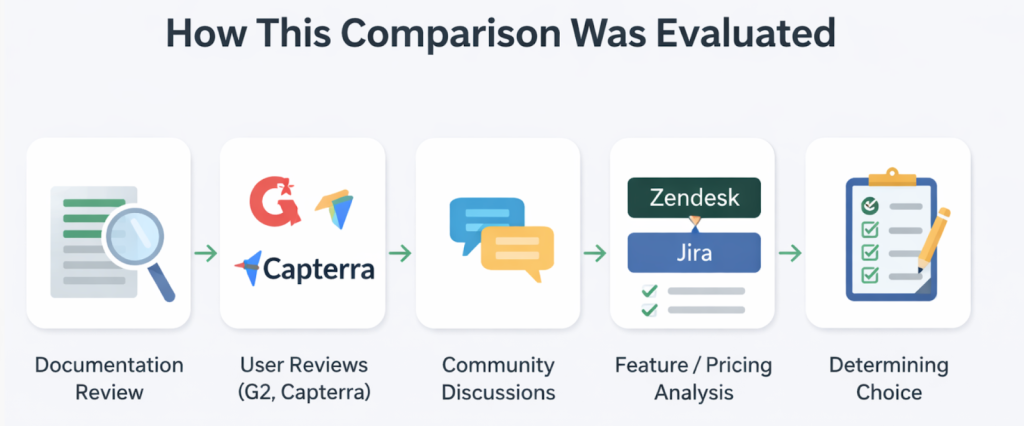
To build this analysis, I reviewed official documentation from both platforms, evaluated plan structures, and feature availability.
I also looked at how each tool handles core workflows like ticket management, automation, reporting, and integrations.
Beyond product pages, I researched about where teams encounter challenges after adoption. Instead of listing every feature, I focused on the factors that influence real buying decisions: pricing structure, workflow flexibility, setup effort, and long-term scalability.
Quick Comparison Chart for Jira vs Zendesk
If you want the quick answer before diving into feature-level comparisons, the table below highlights how Jira and Zendesk compare across the areas most teams evaluate when choosing a support platform:
| Feature | Jira Service Management | Zendesk |
|---|---|---|
| Core Focus | IT service management platform built for internal service desks, incident management, and engineering workflows. | Customer support platform designed for managing conversations across email, chat, voice, and social channels. |
| Channels | Primarily built for internal requests and service desks. Customer-facing channels often require integrations or additional setup. | Native multichannel support, including email, chat, voice, social media, and messaging platforms. |
| ITIL Scope | ⭐⭐⭐⭐☆ Strong ITSM capabilities, including incident, change, problem management, approvals, and SLA tracking. | ⭐⭐☆☆☆ Basic ticketing and SLA workflows, but limited native ITIL process management. |
| User Interface | ⭐⭐⭐⭐☆ Structured project-based interface with queues, issue views, and workflow transitions aligned with Atlassian tools. | ⭐⭐⭐☆☆ Clean, conversation-first workspace designed for support agents managing multichannel tickets. |
| AI Capabilities | ⭐⭐⭐☆☆ Automation rules and integrations with Atlassian intelligence features for ticket routing and workflow triggers. | ⭐⭐⭐⭐☆ AI agents, suggested replies, and automation built into Zendesk Suite. |
| Knowledge Base | ⭐⭐⭐⭐☆ Native integration with Confluence enables structured documentation and internal knowledge sharing. | ⭐⭐⭐⭐☆ Built-in help center with article management, customer portals, and self-service content. |
| Reporting & Analytics | ⭐⭐⭐⭐☆ Custom dashboards, SLA tracking, and operational metrics across service projects. | ⭐⭐⭐⭐☆ Zendesk Explore provides ticket metrics, CSAT reporting, and support performance dashboards. |
| Asset / CMDB | ⭐⭐⭐⭐☆ Asset and configuration management available through Jira Service Management and marketplace apps. | ⭐⭐☆☆☆ Limited native asset tracking; often handled through integrations or external tools. |
| Integrations | ⭐⭐⭐⭐⭐ Deep ecosystem integrations with Atlassian tools, developer platforms, and marketplace apps. | ⭐⭐⭐⭐☆ Large marketplace with integrations for CRM, ecommerce, collaboration, and analytics tools. |
| Pricing | ⭐⭐⭐⭐☆ Free tier available; paid plans generally lower cost but require setup and administration. | ⭐⭐⭐☆☆ Higher starting price with add-ons for advanced automation, reporting, and AI features. |
Zendesk vs Jira Service Management: Core Feature Comparison
The sections below compare how both platforms perform across key areas such as interface design, automation, reporting, and integrations:
1. User interface
Winner: Jira Service Management
Jira Service Management provides a clearer interface structure: It uses a predictable layout for tickets, queues, and request details. Agents can quickly see ticket status, update fields, and move requests forward without switching between multiple views.
Ticket details, activity history, and workflow status appear in the same workspace, which makes it easier to track progress and manage requests during day-to-day support operations.
Zendesk’s interface: Conversation-focused but less structured for workflows
Zendesk’s interface is designed around handling customer conversations quickly. The agent workspace keeps messages, customer details, and internal notes in one view, which makes it easier for agents to respond without opening multiple screens.
However, the interface is less structured for managing complex service workflows, which can make it harder to organize tickets and processes as operations grow.
2. CX and omnichannel
Winner: Zendesk
Zendesk delivers stronger native omnichannel customer support: Zendesk is built for teams that handle customer conversations across multiple channels. Requests from email, live chat, messaging apps, social platforms, and voice can all be managed in a single support environment, helping agents respond without switching tools.
Another advantage is that Zendesk keeps customer context unified across channels, linking conversation history and identity within a single ticket for more consistent support.
Jira Service Management: Omnichannel support depends on integrations
Jira Service Management is designed mainly for structured service requests rather than conversational CX. Requests typically enter through the service portal, email, or internal queues, where teams manage incidents, changes, and approvals inside Jira issues.
The limitation arises when teams want to add channels like chat, voice, or messaging apps, since Jira typically relies on Marketplace apps or external integrations, which often require additional setup to build a fully connected omnichannel experience.
3. Knowledge base management
Winner: Zendesk
Zendesk offers a more mature knowledge management system: Zendesk provides a knowledge base system designed for both customers and support teams. Articles, guides, and FAQs can be organized in a help center that customers can search before contacting support, reducing ticket volume.
The knowledge base connects with support workflows, which means agents can quickly reference or share articles during conversations, making it easier to resolve questions faster.
Jira Service Management: Knowledge management relies on Confluence
Jira Service Management handles knowledge management differently. Instead of a native knowledge base inside Jira, most teams rely on Confluence to create and manage documentation.
While the integration works well for internal documentation, knowledge management often sits in a separate tool, which can add complexity for customer-facing self-service portals.
4. AI & automation
Winner: Zendesk
Zendesk provides stronger AI for customer support workflows: Zendesk uses AI across several parts of the support workflow. AI Agents can automatically resolve common customer questions, while AI Copilot helps agents draft replies, summarize conversations, and suggest next steps during live interactions.
Zendesk also connects AI with knowledge, automation rules, and support data through systems like its Resolution Learning Loop. This allows teams to automate more interactions over time, deflect routine requests through self-service, and improve response speed as the system learns from past resolutions.
Jira Service Management: AI focuses more on IT workflow automation
Jira Service Management uses AI to help teams handle requests faster and reduce manual work. Virtual service agents can automate common requests, and AI assists agents with ticket summaries, suggested replies, and triage recommendations.
However, these capabilities are primarily designed for internal service workflows rather than conversational customer support automation.
5. Reporting & analytics
Winner: Zendesk
Zendesk provides more support-focused analytics: Zendesk includes reporting tools designed for customer support teams. Dashboards track metrics like ticket volume, response times, CSAT, and agent performance, helping teams monitor service quality and identify workflow bottlenecks.
These reports are designed for support operations, making it easier for managers to understand team performance and customer experience trends.
Jira Service Management: Reporting focuses on operational and IT metrics
Jira Service Management provides reporting tailored to IT and service delivery workflows. Dashboards track metrics such as incident resolution times, backlog health, and team workload across projects.
However, these reports are less focused on customer support metrics like CSAT or multichannel service performance.
6. Workflow model
Winner: Jira Service Management
Jira Service Management offers deeper workflow customization: Teams can define how requests move across departments so incidents, approvals, and escalations follow a predictable path. This helps IT teams maintain process control and clearly track progress across the organization.
Workflows also connect closely with automation, queues, and workload management. Requests can be routed automatically, tasks distributed across teams, and repetitive steps handled through automation rules.
Jira provides deeper control over routing logic, auto-assign models, and workload distribution across service teams.
Zendesk: Workflow automation focused on support efficiency
Zendesk approaches workflows from a customer support perspective. Automation rules, triggers, and routing help assign tickets, prioritize conversations, and move requests through resolution stages.
However, organizations that need highly customized operational workflows may find Zendesk’s workflow engine less flexible than Jira’s.
7. ITIL processes
Winner: Jira Service Management
Jira Service Management supports full IT service management workflows: Jira Service Management supports ITIL-aligned service workflows. IT teams can follow structured processes when handling incidents, approving changes, or investigating recurring problems, which helps keep operations organized as requests move across teams.
These processes integrate directly with workflows, approvals, and asset tracking inside Jira. For organizations running formal IT service management practices, this makes it easier to standardize how incidents and changes move through the system.
Zendesk: Limited support for ITIL-style service management
Zendesk can manage service requests and ticket workflows, but it is primarily designed for customer support operations rather than full ITIL frameworks.
However, structured processes like change management, problem tracking, and incident governance often require additional customization.
8. Implementation and time to value
Both platforms require a structured setup: Zendesk and Jira Service Management both require thoughtful implementation before teams can fully use the platform. Zendesk may appear simple at first, but setting up routing rules, triggers, automations, permissions, and reporting layers often takes careful planning, especially for larger support teams.
Jira Service Management also involves significant configuration upfront. Teams usually define request types, workflows, approvals, and service processes before launching the service desk. Because both platforms support complex operational environments, implementation can take time and often requires admin expertise to set up workflows correctly.
9. Integrations
Winner: Jira Service Management
Jira Service Management works better with developer tools: Jira Service Management connects naturally with tools used in engineering and IT environments. Integrations with platforms like GitHub, Jenkins, Slack, and monitoring systems allow teams to link incidents, deployments, and operational alerts directly with Jira tickets. For organizations already working inside the Atlassian ecosystem, these integrations help keep development and service workflows connected.
Zendesk: Integrations focus more on customer service tools
Zendesk integrations are primarily built around customer support workflows. Teams commonly connect Zendesk with CRM systems, ecommerce platforms, messaging tools, and analytics software to manage customer interactions in one place.
However, some advanced workflows still rely on additional marketplace apps, which can add complexity as the support stack grows.
10. Security, compliance, and data residency
Winner: Jira Service Management
Jira Service Management provides stronger governance controls: Jira Service Management includes advanced security and compliance controls designed for IT and enterprise service environments. Features like role-based permissions, audit logs, and identity management help organizations manage access and maintain operational accountability.
The platform also supports data residency and enterprise security configurations, which can be important for organizations operating under strict regulatory requirements.
Zendesk: Security features available, but often tied to higher plans
Zendesk also provides security features such as role-based access, encryption, and compliance support. However, several advanced capabilities like enhanced security controls and audit tools are typically available only in higher-tier plans.
For organizations that require deeper governance and infrastructure-level controls, Jira Service Management may align more closely with enterprise security and compliance needs.
11. Migration and change management
Both platforms require careful planning during transitions: Migrating to Zendesk or Jira Service Management usually involves structured data transfer and workflow redesign. Teams often need to move tickets, user data, automation rules, and reporting setups from their previous helpdesk, which can require planning and administrative effort.
Another factor is change management. Because both platforms introduce new workflows, permissions, and operational processes, teams often need training and internal adjustments before the system runs smoothly. For organizations switching from simpler tools, the transition phase can take time before teams fully adapt to the new environment.
Pricing Plan Differences: Zendesk or Jira Service Management
When evaluating pricing, most teams eventually assess the total cost of ownership (TCO), which includes add-ons, integrations, training time, and the effort required to manage the platform as it grows.
To understand how these costs add up in practice, it helps to look at how each platform structures its pricing plans and what teams typically pay as they scale.
Overview pricing comparison
| Pricing Factor | Zendesk | Jira Service Management |
|---|---|---|
| Pricing Model | Per-agent subscription | Per-agent subscription + free tier |
| Entry Plan | Support Team: $19/agent/month | Free plan (up to 3 agents) |
| Mid-Tier Plan | Suite Team: $55/agent/month | Standard: ~$25/agent/month |
| Advanced Plan | Suite Professional: $115/agent/month | Premium: ~$57/agent/month |
| Enterprise Plan | Suite Enterprise: $169/agent/month | Enterprise: Custom pricing |
| Add-ons / Extra Costs | Copilot, QA, WFM, Contact Center | Confluence (KB), marketplace apps |
| Hidden Costs | Add-ons like Copilot, Workforce Management, QA, and Contact Center increase the total cost | Knowledge base often requires Confluence, plus marketplace apps for extended functionality |
| Ecosystem Costs | Marketplace apps and AI features may increase monthly spend | Atlassian ecosystem tools (Confluence, Opsgenie, Guard) can add to the stack cost |
| Cost Scalability | Scales with agents + add-ons | Scales with agents + assets |
Zendesk Pricing
Zendesk uses a per-agent pricing model based on its Support and Suite plans. The basic Support Team plan starts around $19 per agent per month, while most customer support teams evaluate the Suite plans that begin at $55 per agent per month and scale up to $169 per agent per month for enterprise-level functionality.
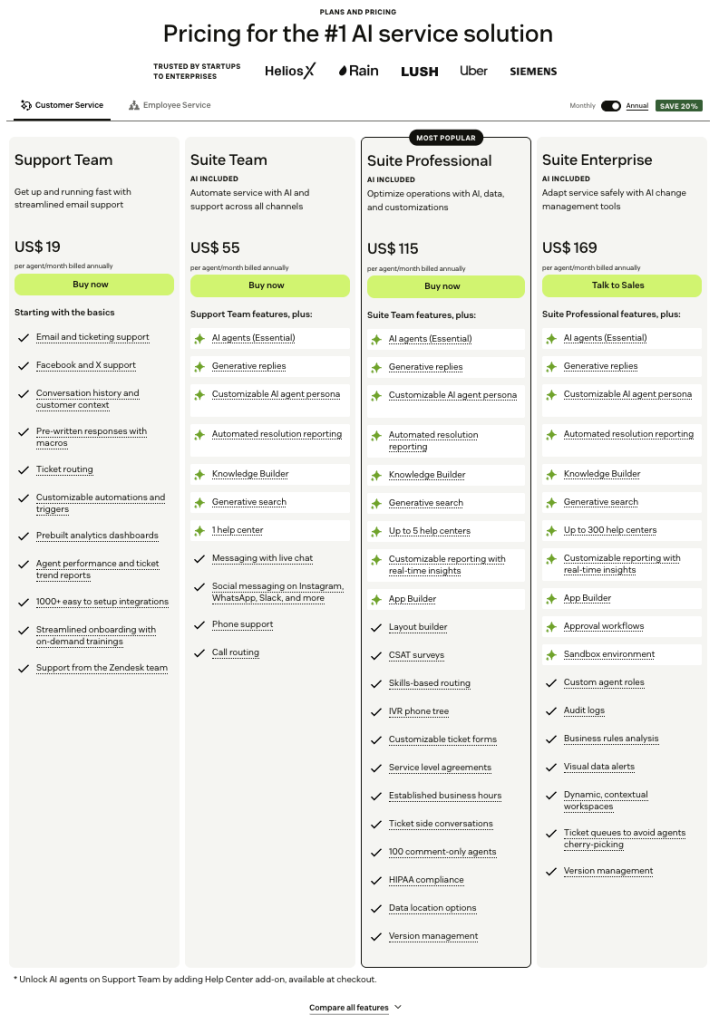
Higher tiers unlock features such as advanced reporting, multiple help centers, SLAs, AI agents, and deeper customization. While many capabilities are included in the suite, Zendesk also offers several paid add-ons that extend automation, analytics, and workforce management.
Add-ons can increase the total cost quickly:
- Copilot: about $50 per agent/month
- Quality Assurance: about $35 per agent/month
- Workforce Management: about $25 per agent/month
- Advanced AI agents or Contact Center features: additional enterprise add-ons
Example scenario for a support team:
- Suite Professional: $115 per agent/month
- 10 agents → $1,150/month base cost
If the team adds Copilot, Quality Assurance, and Workforce Management:
- Copilot → $500/month
- QA → $350/month
- WFM → $250/month
Estimated monthly total: ~$2,250
Estimated yearly cost: ~$27,000
Beyond subscription pricing, organizations sometimes factor in implementation services, configuration work, and internal admin management, especially for larger support operations.
For a deeper breakdown of plan tiers and pricing signals, see our full Zendesk Pricing guide.
Jira Service Management Pricing
Jira Service Management uses a tiered pricing structure, starting with a free plan that supports up to three agents, which works well for small teams testing service desk workflows.
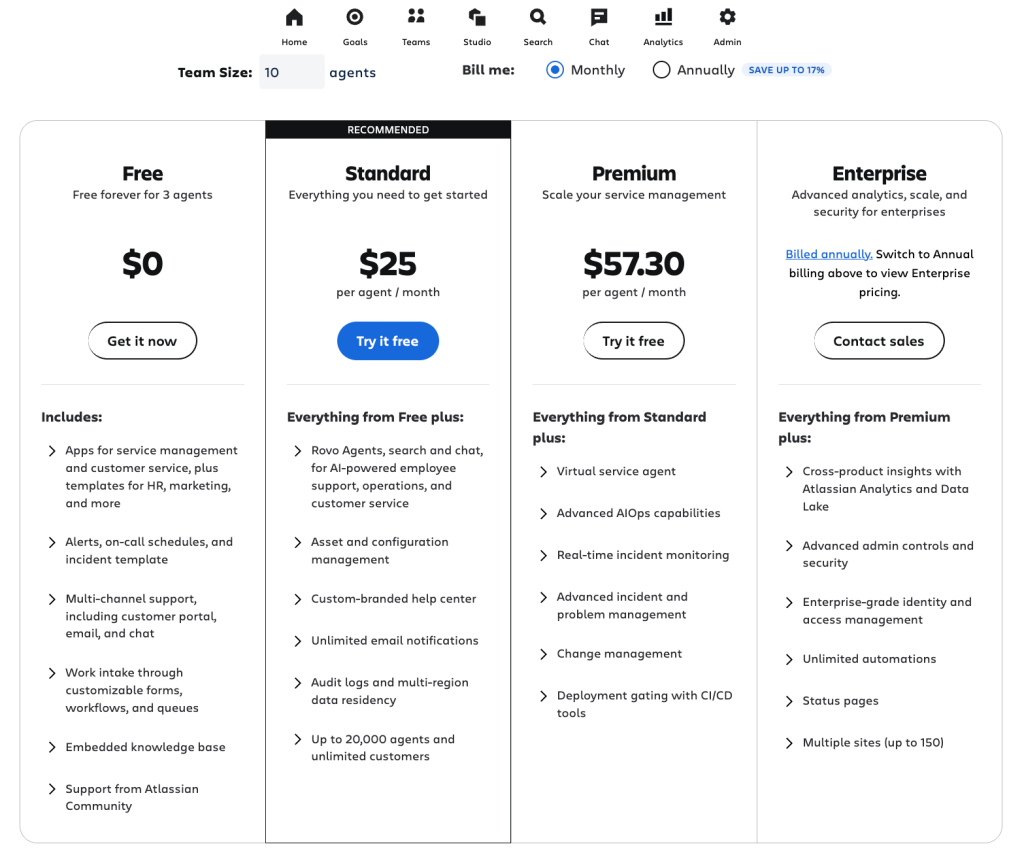
Paid plans begin with the Standard tier at about $25 per agent per month, followed by the Premium plan at roughly $57 per agent per month, while Enterprise pricing is available for large organizations with advanced governance and analytics requirements.
Example scenario for a team of 10 agents:
- Premium plan: $57 per agent/month
- 10 agents → $570/month base cost
At first glance, Jira appears significantly cheaper than Zendesk. However, many teams add additional Atlassian products or marketplace apps to complete the workflow.
Common additional components include:
- Confluence for knowledge base documentation
- Marketplace apps for integrations and automation
- Asset and configuration management expansions
- Administrative setup and workflow customization time
These additional tools can gradually increase the operational cost depending on how complex the service environment becomes.
For a detailed breakdown of pricing tiers and cost considerations, see our Jira Pricing guide.
Choosing the Right Platform: Zendesk or Jira
Both tools are capable platforms, but the right choice depends on how your team handles requests and what workflows you prioritize. Zendesk focuses on customer-facing support operations, while Jira Service Management is built for structured service delivery inside technical environments.
Jira: Best for IT and engineering service workflows
Jira works best for teams that manage internal service requests, incidents, and development-related tasks. IT and engineering teams benefit from its structured workflows, customizable issue types, and tight integration with tools like Confluence, Bitbucket, and CI/CD pipelines.
For organizations already using the Atlassian ecosystem, Jira feels familiar and flexible. Teams can build complex workflows, automate approvals, and connect incident management directly with engineering processes.
Zendesk: Best for customer support teams
Zendesk is designed for customer-facing support operations. Support teams can manage conversations from email, chat, social media, and phone inside a unified workspace. Built-in automation, macros, and AI tools help agents respond faster and maintain consistent service quality.
Because the interface is simpler and onboarding is faster, many customer service teams adopt Zendesk without needing extensive configuration or dedicated administrators.
Hybrid Integration with Jira and Zendesk
Some organizations use both platforms together. Zendesk handles customer conversations and frontline support, while Jira tracks technical issues that require engineering attention.
In this setup, support agents escalate bugs or technical incidents from Zendesk into Jira tickets. Engineering teams then manage development work inside Jira while support teams keep customers updated from Zendesk. This approach allows each team to use the platform designed for its workflow.
Hiver: Alternative to Zendesk and Jira
When comparing Zendesk and Jira, some teams realize they need something in between. Zendesk can feel enterprise-heavy with layered configuration and add-ons, while Jira Service Management is primarily designed for IT and engineering workflows.
For customer support teams that want structure without that operational complexity, Hiver offers a simpler alternative.
Hiver, a modern AI-powered customer service platform, brings email, live chat, WhatsApp, voice, and social conversations into one shared workspace. Hiver also offers a free plan, and core capabilities like AI assistance and automation are available in the early tiers. This makes it easier for growing support teams to adopt the platform without committing to expensive add-ons.
Support teams still get the capabilities expected from a modern service tool such as automation, analytics, knowledge management, and AI assistance, but without the overhead that often comes with complex implementations.
Here’s where Hiver stands out:
1. Omnichannel conversations in one place: Email, chat, WhatsApp, voice, and social conversations are managed in a single connected workspace. Agents can track conversations, collaborate internally, and resolve requests without switching between multiple tools.
2. Fast onboarding with minimal setup: Hiver is designed for teams that want structured workflows without lengthy configuration. Ownership, SLAs, automation rules, and shared inbox management can be set up quickly, allowing teams to go live in hours rather than weeks.
3. Practical AI for everyday support tasks: AI features help teams summarize conversations, detect intent, suggest replies, and automate routine tasks. The goal is to improve productivity directly inside daily support workflows rather than adding separate AI tools.
4. Transparent pricing that scales with your team: Hiver uses straightforward per-user pricing without complex usage-based billing. That makes it easier for teams to forecast costs and scale support operations without worrying about unpredictable add-ons.
Choose Hiver if:
- Your team wants structured support workflows without implementing a heavy enterprise system
- You need AI-powered assistance without layering multiple add-ons
- You want omnichannel support in a platform that teams can adopt quickly
See how teams manage customer conversations, automation, and AI in one workspace. Start your free trial with Hiver today.
Frequently Asked Questions
1. Which is easier to set up, Zendesk or Jira?
Zendesk is easier to set up for customer support teams. Jira takes longer but offers deeper customization.
2. Is Jira good for customer-facing support?
Not usually. It works better for internal IT, engineering, and project teams.
3. Which platform has stronger automation, Jira or Zendesk?
Jira offers deeper automation for engineering workflows. Zendesk automates support tasks. Hiver combines both with simple, intuitive automation.
4. How does pricing compare between Jira and Zendesk?
Zendesk and Jira charge per agent with add-on costs. Hiver has transparent, predictable per-user pricing.
5. Why choose Hiver over Jira and Zendesk?
Hiver offers modern customer service features, AI automation, multichannel support, workflows, and analytics without enterprise complexity or unpredictable pricing.