







When you look at the Jira pricing page, it looks budget-friendly. The Free and Standard plans are less pricy, and many teams assume they can scale without spending much more.
But in reality, that’s not the case once your team grows or you require more features.
Most organizations start with Jira’s lower tiers. They soon learn that essential features, such as advanced analytics, admin controls, or SLAs, are only available in Premium or Enterprise plans.
As your user counts increase, so does the total bill, because Jira’s pricing shifts at every tier. Many buyers do not account for these long-term costs during the initial evaluation.
In this article, we break down Jira’s 2025 pricing, what each plan actually includes, the hidden fees that matter, and how much teams end up paying once they scale.
What Does Jira Do?
Jira is Atlassian’s project management tool that helps teams plan projects, track tasks, and keep work moving across departments. Engineering teams use it to manage software development, IT teams track service requests, and marketing and business teams run projects and campaigns.
Atlassian positions Jira as an AI-powered workspace that removes administrative effort so teams can stay focused on impact.
Jira is not a single product. Atlassian offers different versions depending on the workflow you want to manage:
- Jira Software for agile development, sprints, and software project delivery
- Jira Service Management for handling IT and customer service requests
- Jira Product Discovery for capturing ideas, prioritizing features, and shaping product roadmaps
Each product comes with its own capabilities and pricing structure, which is why teams often evaluate them separately.
Here, we break down Jira Software Cloud pricing, the version that supports most teams’ regular project and engineering workflows.
Overview of the Top Jira Features
Below is a clear overview of some of the core Jira features from all the plans users rely on:
1. Project and Task Tracking
Jira helps teams track work across projects using standard Agile views. Backlog, list, board, timeline, calendar, and summary views support different work styles and make it easy to monitor progress.
2. Goals, Projects, Tasks, and Forms
Teams can create as many projects, tasks, and goal alignments as needed. Forms allow teams to capture structured data from stakeholders and funnel requests into the right workflows without manual triage.
3. Reports and Dashboards
Jira offers built-in dashboards that surface key metrics across projects and teams. Reports highlight workload distribution, cycle times, progress trends, and planning insights, enabling leaders to identify bottlenecks early.
4. AI-Powered Features with Rovo
The standard plan and above include Rovo Search, Chat, and Agents. Teams use Rovo to break work down, summarize updates, surface relevant information, and speed up planning. The AI layer reduces admin tasks and makes project details easier to access.
5. User Roles and Permissions
Jira supports detailed user roles, allowing teams to assign the right level of access to each member. Permissions help control who edits workflows, creates issues, or manages configuration settings, useful for growing teams that need structure.
6. External Collaboration
Teams can involve contractors, partners, or external stakeholders in projects without giving them full platform access. It keeps collaboration flexible and maintains internal control.
7. Automation for Routine Work
Jira includes automation rules that help teams eliminate manual work. The free plan offers 100 runs each month, the Standard plan expands to 1,700 runs, and the Premium plan introduces per-user automation limits. Your team can automate status updates, notifications, repetitive transitions, and integrations.
8. Multi-Region Data Residency
The standard plan and above allow teams to store data in specific geographic regions. Organizations with compliance or residency needs can choose where Jira hosts project data.
9. Storage for Project Assets
Each plan comes with a different storage allowance. The free plan includes 2 GB, the Standard plan increases storage to 250 GB, and the Premium plan offers unlimited storage. Large or distributed teams benefit from richer file-sharing capabilities.
10. High-Availability SLAs and Advanced Support
Support levels vary across plans:
- Standard: 9/5 regional support
- Premium: 24/7 support for critical issues with a 99.9% uptime SLA
- Enterprise: 24/7 support for all issues with a 99.95% SLA
Support commitments become more important as teams scale and depend on continuous availability.
Understanding the Difference Between Jira Cloud and Data Center
The first step in evaluating Jira pricing is choosing the deployment model. There’s Jira Cloud and Data Center.
They both operate very differently, and each comes with its own cost structure and operational expectations. Here’s a clear breakdown.
Jira Cloud
Jira Cloud gives you a fully hosted experience on Atlassian’s infrastructure. Atlassian handles the updates, security, uptime, and performance, so your team doesn’t have to worry about servers or maintenance tasks.
You get all the essential Agile tools for planning, tracking, and reporting, plus the option to extend Jira with APIs, Rovo AI features, and Marketplace apps.
Jira Data Center
Jira Data Center is the option for teams that want to run Jira on their own infrastructure. You can host it on your own servers or deploy it through providers like AWS or Azure.
It’s built for organizations that need tight control over performance, security, and data residency.
Which one should you choose?
- Choose Jira Cloud if your team values simplicity, fast onboarding, automatic updates, and lower administrative overhead. Jira Cloud uses a subscription model with predictable monthly or annual pricing.
- Choose Data Center if your organization requires strict control over data, performance, security, and compliance, especially at large scale. Jira Data Center uses an annual license model.
Overview of Jira Pricing Plans
Jira’s pricing has four main Cloud plans, each offering a different level of automation, storage, governance, and planning capabilities:
- Free
- Standard
- Premium
- Enterprise
The Data Center deployment model is for large enterprises that need full control over infrastructure and compliance.

You’ll notice pretty quickly that Jira’s plans don’t scale in a straight line. As your work grows, a lot of the functionality you rely on, like higher automation limits, stronger admin controls, or enterprise-level governance, is on Premium or Enterprise. That means you might find yourself upgrading sooner than you expected.
Most teams start on Free or Standard because the basics feel enough at first. But once you hit automation limits, run out of storage, or need more control across projects, those lower tiers start to feel restrictive.
At that point, moving to Premium or Enterprise becomes more of a requirement to keep work running smoothly.
Detailed View of Jira Pricing Plans
Let us break down what each Jira Cloud plan includes and how the cost looks for teams.
1. Jira Free Plan
The Free plan gives you an easy way to get hands-on with Jira. You can start organizing work immediately and see how the platform fits into your day-to-day flow.
Price: $0: Free to use forever.
Who it’s for: Best suited if you’re working with a team of up to 10 people and want to try Agile boards, simple workflows, or basic project tracking before moving to a paid plan.
What you get:
- Unlimited goals, projects, tasks, and forms
- Backlog, list, board, timeline, calendar, and summary views
- Reports and dashboards
- 100 automation rule runs per month
- 2 GB of storage
- Support from the Atlassian Community
- Up to 10 users
Where you start to question the Free plan: The 10-user cap, limited automation, and small storage allowance start to feel restrictive as your team grows or attaches more files. Many teams move to Standard once they need more room and more automation power.
2. Jira Standard Plan
The Standard plan works well once you’ve outgrown the basics and need more structure, permissions, and automation. It gives you a stronger setup than the Free plan, without the heavy complexity of the higher tiers.
Price: $9.05 per user per month (annual billing, 51–100 user tier)
Cost example for a 100-user team:
$9.05 × 100 = $905 per month
Total ≈ $10,860 per year
Who it’s for: Ideal if your team has grown past the 10-user limit or you want better control over work with roles, permissions, and stronger automation. Standard works well for small and mid-sized teams that want reliability without jumping to Premium-level features.
What you get: You get everything in the Free plan, plus the following features:
- Rovo Search, Chat, and Agents with integrated AI-powered features
- User roles and permissions
- External collaboration
- Multi-region data residency
- 1,700 automation rule runs per month
- 250 GB of storage
- 9/5 regional support
- Support for up to 100,000 users per site
Where you start to question the Standard plan: As your workflows grow more complex, the automation cap and lack of advanced planning tools can slow your team down. Many teams move to Premium once they need higher automation limits, advanced approvals, or cross-team coordination.
3. Jira Premium Plan
The Premium plan works best when your team manages multiple projects, depends on heavy automation, or needs more control over approvals, planning, and uptime.
Price: $18.30 per user per month (annual billing)
Cost example for a 100-user team:
$18.30 × 100 = $1,830 per month
Total ≈ $18,300 per year
Who it’s for: Choose Premium if you’re working across several teams, coordinating shared timelines, or relying on automation to keep work moving. It suits growing orgs that need predictable uptime, stronger admin controls, and advanced planning features.
What you get: You get everything in the Standard plan, plus these features:
- Cross-team planning and dependency management
- Customizable approval processes
- Per-user automation limits (1,000 rule runs per user each month)
- Unlimited storage
- 24/7 support for critical issues
- 99.9% uptime SLA
Where you start to question the Premium plan: Once you reach enterprise scale or need governance across many sites, Premium’s controls may feel limited. Teams that need enterprise-grade security, analytics, and multi-site management often move to the Enterprise plan.
4. Jira Enterprise Plan
The Enterprise plan supports companies that run Jira at a very large scale. If you manage multiple teams, regions, or business units and need consistent controls across all of them, Enterprise gives you the governance, security, and visibility required to run Jira in a unified way.
Price: Custom (based on user count, sites, and compliance needs)
Who it’s for: Choose Enterprise when you’re operating with hundreds or thousands of users, handling sensitive data, or coordinating work across several Jira sites. It suits organizations that need advanced security standards, centralized admin oversight, and guaranteed uptime.
What you get: You get everything in Premium, plus these features:
- Cross-product insights with Atlassian Analytics and the Data Lake
- Advanced admin controls and enhanced security options
- Enterprise-level identity and access management
- Unlimited automation rule runs
- Support for multiple sites (up to 150)
- 24/7 support for all issues
- 99.95% uptime SLA
Where the Enterprise plan becomes essential: If you depend on consistent performance across many teams and locations, Enterprise helps you keep everything running smoothly. It adds the governance and control missing from the other plans.
What Jira Really Costs for Your Team
Your actual Jira cost depends on the number of users you have, the level of automation you rely on, the rate at which your workflows evolve, and the number of Marketplace apps your team needs to function smoothly.
Below is a realistic breakdown of what different teams ultimately pay once they start using Jira at scale.
1. Smaller SaaS Teams Starting Their Businesses (5 to 10 users)
Many small teams start with Jira to manage basic work, planning, and bug fixes. The free tier covers the essentials, but limits around storage, automation, and workflows become visible as soon as they begin releasing features more frequently.
Use case: A five-person SaaS team tracking bugs, feature requests, onboarding feedback, and internal tasks. They need quick issue updates, simple automation, and a reliable way to organize weekly sprints.
Typical Jira plan: Free or Standard, $0 to $9.05 per user each month.
Hidden costs:
- Free automation limits push teams into Standard or Premium.
- SLAs, advanced roadmaps, and admin controls require Premium.
- Marketplace apps for reporting, time tracking, or test management add recurring per-user fees.
Initial monthly cost: 5 × $9.05 = $45.25
Final monthly cost: Standard or Premium + Marketplace apps ≈ $80 to $150
Pain point: Teams outgrow the Free plan quickly because storage, reporting, and automation limits become blockers as soon as they begin shipping frequently.
Verdict: A good starting point for very small teams, but costs increase sooner than expected once real workflows take shape.
2. Growing Companies Standardizing Their Workflows (11 to 50 users)
As teams expand, the Standard plan appears sufficient at first, but the need for automation, permissions, and cross-team visibility pushes many toward Premium.
Use case: A 20-person team coordinating product development, internal projects, campaign tracking, and customer issues. They need structured workflows, clear permissions, and enough automation to avoid manual updates.
Typical Jira plan: Standard or Premium, $9.05 to $18.30 per user each month.
Hidden costs:
- Time tracking, advanced reports, and integrations require Marketplace apps.
- Automation limits trigger upgrades to Premium.
- User-tier jumps increase per-user pricing.
Initial monthly cost: 20 × $9.05 = $181
Final monthly cost: $9.05 to $18.30 per user + Marketplace extensions ≈ $400 to $800
Pain point: Standard lacks many admin and workflow controls, which forces upgrades earlier than planned.
Verdict: Great for small teams that need structure, but the combined cost of Premium and Marketplace tools grows quickly.
3. Mid-Market Teams Running Multi-Project Operations (50 to 300 users)
Scaling companies rely on Jira to coordinate several projects across multiple teams. Workflow complexity increases, and Jira’s baseline features often feel restrictive, making Premium or Enterprise a practical essential rather than an upgrade.
Use case: A 75-person engineering and operations team spread across regions, working on several product lines. They need advanced automation, cross-project visibility, and consistent workflows across teams.
Typical Jira plan: Premium or Enterprise, around $18.30 per user or higher.
Hidden costs:
- Automation and workflow complexity require Premium or Enterprise.
- QA, test management, and reporting tools come from Marketplace vendors.
- Admin effort increases as permissions and workflows expand.
- Compliance and data residency features require Enterprise.
Initial monthly cost: 75 × $18.30 = $1,372.50
Final monthly cost: Premium + Marketplace apps ≈ $2,000 to $3,000
Pain point: Premium still leaves gaps in governance for larger teams, which pushes many into Enterprise.
Verdict: Strong for complex teams, but automation-heavy workflows and compliance needs increase long-term cost.
4. Enterprise Organizations With Complex Delivery Pipelines (300+ users)
Large organizations use Jira to manage regulated processes, global delivery, and cross-functional programs.
Use case: A 300-person global engineering and IT organization managing compliance-heavy workflows, incident management, change requests, and multi-team programs.
Typical Jira plan: Enterprise or Data Center.
Hidden costs:
- SSO and identity management depend on Atlassian Guard or other add-ons.
- Marketplace tools are required for specialized workflows across IT, QA, and product.
- Large implementations require consulting partners.
- Data Center demands internal infrastructure and operational staff.
- API limits and automation needs push teams to higher tiers.
Initial monthly cost (Premium): 300 × $14.54 = $4,362 per month
Final monthly cost: Enterprise or Data Center + infrastructure + apps ≈ $7,000 to $10,000 each month
Pain point: Large teams face high costs once governance, automation, security, and infrastructure are factored in.
Verdict: Ideal for regulated or global organizations, but pricing becomes complex as multiple teams, products, and compliance requirements come together.
What Do Users Appreciate Most About Jira?
Jira stands out to many teams because it makes organizing work and tracking progress more manageable. Here’s what users commonly point to as Jira’s biggest advantages.
1. Powerful issue tracking and project visibility
Jira earns praise for helping teams centralize everything from backlogs to releases.

2. Customizable workflows that fit almost any team
Users appreciate that Jira can adapt to simple or complex processes.

3. A deep ecosystem of integrations
Jira connects well with engineering, product, and collaboration tools.
“The integration with GitHub and Google Workspace makes collaboration much easier. this implementation makes it easy to use. The ability to tag team members, add members , add comments and update tasks in real time also helps cut down on back and forth communication.”
– Jira user
What Jira Users Complain About the Most
At the same time, teams also highlight some drawbacks that make Jira feel more demanding than expected. Let’s look at that:
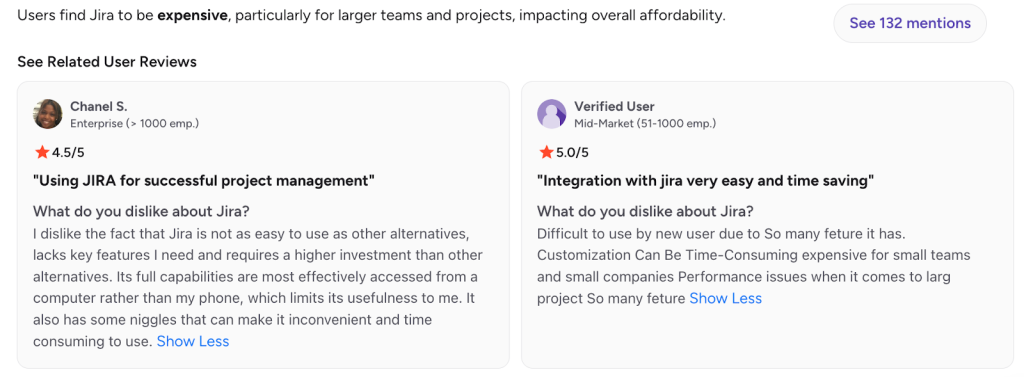
1. Jira is expensive
Many users feel Jira becomes expensive once you add Premium features, apps, and higher user tiers.
2. Steep learning curve and complex interface
A large share of users mention that Jira feels overwhelming, especially at first.
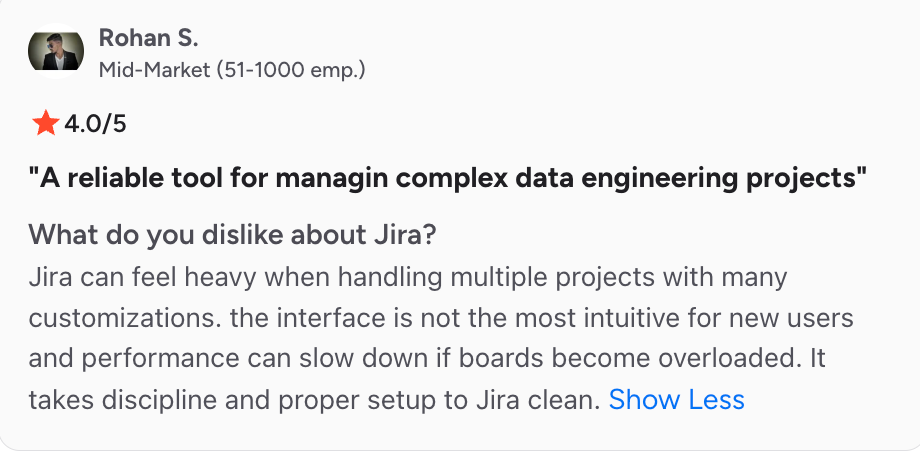
3. Performance and responsiveness issues
Large projects slow down Jira for many users.

Why Jira Ends Up Costing More Than It Looks
Jira’s pricing feels simple at first, but once teams start creating workflows and startb relying on automation, the real cost often looks very different from the base plan price.
1. Lower tiers include only the basics
The Free and Standard plans cover core issue tracking, simple workflows, and limited automation. They do not include the features many growing teams eventually need.
Missing from the lower tiers:
- Advanced automation
- Admin insights
- Dependency and capacity planning
- Sandbox environments
- Stronger governance controls
- Higher uptime SLAs
Most teams upgrade because standard functionality runs out quickly, not because they want more features.
2. Marketplace apps become essential for real workflows
Jira’s strength comes from its Marketplace ecosystem, but many teams quickly discover that several add-ons are not optional.
Time tracking, test management, capacity planning, advanced reporting, and specialized integrations often require separate plugins, each billed per user.
As the team grows to 20 or 50 people, the combined subscription cost of these apps can exceed the price of Jira itself, creating a monthly bill that expands much faster than expected.
3. Automation limits trigger early upgrades
Automation is one of Jira’s most useful features, but the limits on Free and Standard force teams to upgrade sooner than expected.
Automation limits by plan:
- Free: 100 runs per month
- Standard: 1,700 runs per month
- Premium: 1,000 runs per user per month
- Enterprise: Unlimited
Teams that automate sprint rituals, triage workflows, or integrations often exceed Standard limits in the first few months.
4. User-based pricing increases rapidly as you grow
Jira pricing changes at multiple user tier thresholds. A small increase in headcount can lead to a significant rise in overall costs.
Key scale challenges:
- Adding 10 or 20 more users pushes the team into a higher billing band
- Every Marketplace app scales with user count
- Organizations using Jira Software plus Jira Service Management see costs multiply
- Confluence, Bitbucket, or Atlas add more per-user charges
Fast-growing teams feel the impact immediately because pricing compounds with each additional product or service.
5. Real governance and compliance require Enterprise
Large or regulated teams rarely remain on Premium for long. Many governance and compliance features are only available on Enterprise.
Even big mid-market companies sometimes need these features, which raises the long-term cost significantly.
Why Hiver Can Be a Better Alternative for Customer Service Teams?
Many teams use Jira for internal project tracking because it’s flexible and powerful. But when your team grows significantly or if your priority is to manage customer conversations, Jira’s layered pricing, reliance on plugins, and ongoing configuration can feel heavy. Support teams often seek something simpler, faster to set up, and more predictable in terms of cost.
Hiver offers a modern, AI-powered customer service platform that provides this. You can manage email, live chat, WhatsApp, voice, and social channels from one place, without the need for complex setup or add-ons. And if your engineering team still uses Jira, you can integrate Jira with Hiver, allowing both teams to stay aligned without extra effort.
Hiver starts with a Free plan for essential support needs, and the Growth plan at $25/user/month gives SLAs, automations, analytics, and multichannel support, features that usually require multiple upgrades inside Jira.
Every paid Hiver plan includes the core customer service tools upfront, so you avoid surprise add-ons and automation caps. It removes the administrative burden that comes with Jira’s complex setup and replaces it with an intuitive interface that teams can use immediately.
Recommended reading
Jira Review 2025: Is Atlassian’s Project Management Platform Worth It for Modern Teams?
Jira vs Hiver: A Transparent Comparison
Many teams compare Jira and Hiver when they are deciding how to manage customer communication.
While both tools can support operational workflows, they are designed for entirely different purposes.
- Jira excels in engineering, development, and internal project management.
- Hiver is built for customer-facing teams that need a modern, AI-powered helpdesk that handles all channels from one place without complexity.
Here is a clear, side-by-side view of how the two platforms differ for support use cases.
| Feature | Jira | Hiver |
|---|---|---|
| Pricing model | Per-user pricing with limits on automation. Many essential capabilities require paid Marketplace apps or higher tiers. | Predictable, all-inclusive pricing with AI, SLAs, analytics, and multichannel support included in every plan. |
| Interface & ease of use | Powerful but complex. Steep learning curve for non-technical users. | Modern, intuitive interface that teams adopt instantly. Feels as easy as using an inbox, with zero setup friction. |
| Channels supported | Email and request forms are by default. Other channels require separate Jira products or paid apps. | True multichannel support: email, live chat, WhatsApp, voice, text, Facebook, and Instagram. All from one platform. |
| AI capabilities | Limited built-in AI. Advanced automation often relies on Marketplace apps or Premium/Enterprise tiers. | AI embedded across the entire support journey: Reply drafting, deflection, triage, routing, and workflow automation. |
| Setup & configuration | Requires time, training, and admin effort. Teams often need Jira specialists as they scale. | Minimal setup. Teams start responding to customers immediately, with no complex configuration required. |
| Support focus | Best suited for engineering, DevOps, and internal project management. | Purpose-built for customer service teams managing high-volume, multichannel customer communication. |
| Cost predictability | Costs rise quickly with user growth, plugin usage, and tier upgrades. | Transparent, predictable pricing with no surprise add-ons or automation limits. |
Final Verdict on Jira Pricing
What starts as an affordable plan with Jira turns into a much larger investment when plugins, higher tiers, and admin effort enter the picture, especially for customer-facing teams.
If you’re managing conversations across email, chat, WhatsApp, voice, and social channels, Jira often feels heavier than you need, which is why many teams move to support-focused platforms.
Hiver keeps everything in one place with transparent pricing, multichannel support, and AI-powered automation, eliminating plugin dependence, complex setup, and surprise costs.
And if you’re comparing options, you’ll find that different tools lean in different directions; some focus on automation-heavy workflows, others on simple email collaboration, and a few cater more to traditional IT support.
Hiver aims to provide you with a balanced, modern customer service platform that remains easy to manage as your team grows.
If you want a support solution that scales cleanly without overwhelming your budget, Hiver is built for precisely that. See Hiver Pricing.
Frequently Asked Questions
1. How is Jira pricing structured?
Jira uses per-user pricing, with costs increasing at different user tiers. Advanced features and higher automation limits require Premium or Enterprise.
2. Is Jira free for small teams?
Yes. Jira offers a free plan for up to 10 users, but it comes with limited automation, storage, and governance capabilities.
3. What’s the difference between Standard, Premium, and Enterprise?
Standard covers core issue tracking. Premium adds advanced automation, planning, and 99.9% uptime. Enterprise includes governance controls, analytics, multiple sites, and a 99.95% SLA.
4. How much does Jira Data Center cost?
Jira Data Center starts at enterprise-level pricing and is billed annually. Costs vary by user tier and require separate infrastructure and admin resources.
5. Does Jira cost more as the user count grows?
Yes. Jira pricing increases at specific user thresholds, and Marketplace apps also scale with user count.
6. What are the hidden costs in Jira pricing?
Teams often pay extra for Marketplace add-ons, Premium tier upgrades, automation limits, admin time, and additional Atlassian products needed for support workflows.
Start using Hiver today
- Collaborate with ease
- Manage high email volume
- Leverage AI for stellar service













