Skip to content




Formal email writing is a skill that never goes out of style. Whether you’re applying for a job, reaching out to a client, or escalating an issue to a manager. However, the way you structure and phrase your message can make or break the conversation.
In this guide, we’ll walk you through the etiquette of writing a formal email—from choosing the right subject line and greeting to crafting a message that sounds professional and gets results.
Plus, we’ve included templates and real-world examples you can use right away.
Table of Contents
- What Is a Formal Email?
- What Does a Formal Email Look Like?
- When to Write a Formal Email
- 7 Tips to Write a Formal Email
- 10 Tips for Proofreading a Formal Email Before Sending
- 8 Formal Email Examples
- 8 Common Mistakes to Avoid When Writing Formal Emails
- How to Use AI to Write Formal Emails
- Start Writing Better Formal Emails
- Frequently Asked Questions (FAQs)
- Start using Hiver today
What Is a Formal Email?
A formal email is a professional message written with a clear structure, respectful tone, and attention to detail. It’s typically used in workplaces, academic environments, or when reaching out to someone you don’t know well, such as a client, manager, or external partner.
💡How is a Formal Email Different from an Informal Email?
The main differences come down to audience, tone, and format:
| Formal Email | Informal Email |
|---|---|
| For work, business, academics | For friends, team chats, or family |
| Polite, structured, uses titles | Casual, flexible, first names/nicknames |
| Clear subject and formal greeting | May have a casual subject or no greeting |
| No slang or emojis | May use slang, emojis, or abbreviations |
| Professional closing | Often ends casually or skips closing |
What Does a Formal Email Look Like?
In a formal email, the structure is essential for clarity and professionalism. Here’s a standard format you can use:
Subject Line:
- Clearly states the purpose of the email.
- Example: “Meeting Request: Project Update Discussion”
Salutation:
- A polite greeting that addresses the recipient by their title and last name if known, or a general salutation if not.
- Example: “Dear Mr. Smith” or “To Whom It May Concern”
Opening Paragraph:
- Briefly introduce yourself (if necessary) and state the purpose of the email.
- Example: “I hope this message finds you well. I am writing to inquire about…”
Body:
- Detailed information, organized into clear paragraphs.
- Address the main points of your message, providing necessary details or context.
- Be concise and focused, avoiding unnecessary jargon or lengthy explanations.
Closing Paragraph:
- Summarize the main point, express appreciation, or indicate any next steps.
- Example: “Thank you for your attention to this matter. I look forward to your response.”
Closing:
- A polite sign-off followed by your name.
- Typical closings include “Sincerely,” “Best regards,” or “Yours faithfully,”
- Example: “Sincerely, [Your Name]”
Signature:
Include your full name, job title, company name, and contact information. Check the example below for reference.

Attachments (if any):
- Mention any attached files in the body of the email.
- Example: “Please find the attached report for your review.”
- This format helps ensure your email is clear, professional, and easy to read.
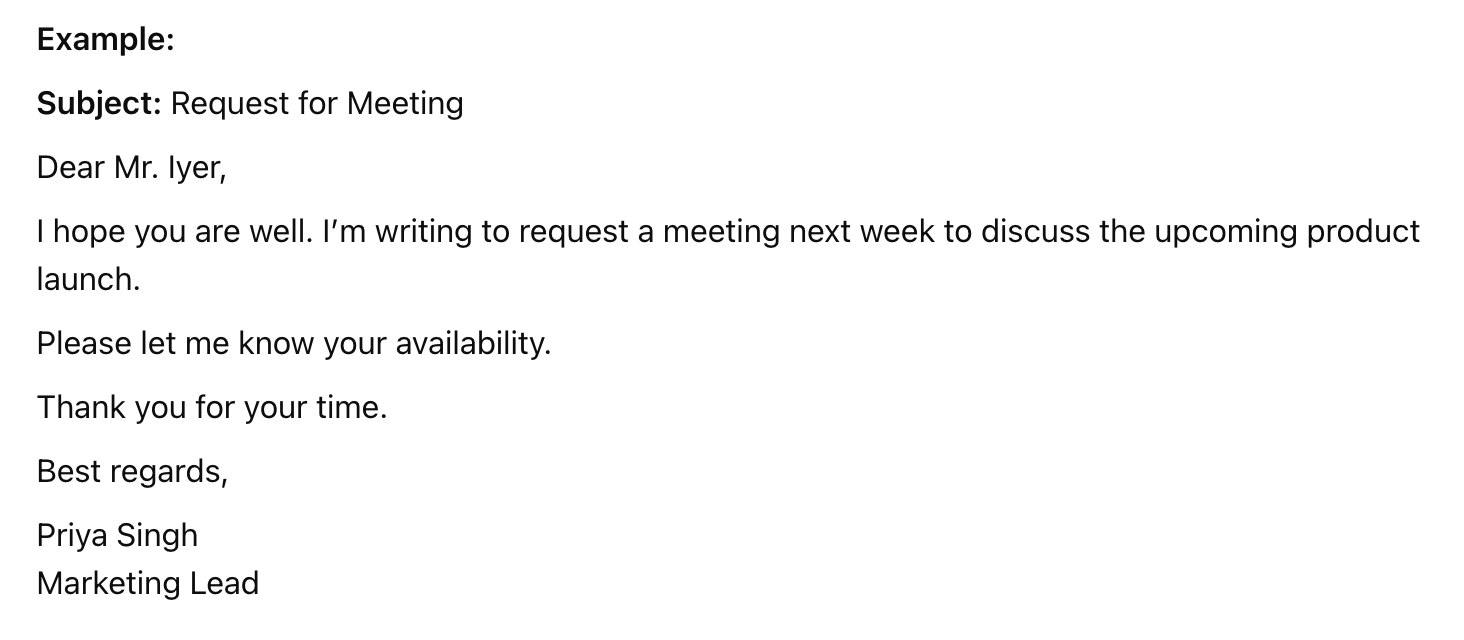
Formal email example
Recommended reading
When to Write a Formal Email
Knowing when to use a formal email can help you build credibility and ensure your message is taken seriously. Formal emails are essential whenever you need to communicate clearly, respectfully, and professionally. For outreach to new contacts, FullEnrich helps verify and identify recipients through reverse email lookup, so your message reaches the right person before you hit send.
Common situations where a formal email is best:
- Professional or workplace communication: Sharing updates, meeting invites, or official feedback.
- First-time communication: Reaching out to someone you haven’t met before.
- Client or customer interactions: Answering queries, handling complaints, or providing service updates.
- Requests or notifications: Asking for approvals, submitting applications, or sending important announcements.
- Sharing key information: Delivering reports, project updates, or policies.
💡Pro tip: If you’re ever unsure, default to a formal tone. It’s always easier to relax your style later if needed.
7 Tips to Write a Formal Email
For some people, writing professional emails comes naturally. But for those who find it difficult to draft such emails, here are some tips you can apply the next time you write an email to a customer, vendor, or colleague:
1. Craft a Clear Subject Line
Remember to use a clear subject line in your email. A clear subject line helps the recipient understand the email’s purpose and decide how to prioritize it. It sets the tone for the email and determines whether or not the recipient will open it. Some examples of formal subject lines include:
- Request for Meeting to Discuss [Topic]
- Application for [Job Title] Position
- Follow-Up: [Specific Topic or Meeting]
- Confirmation of Appointment on [Date]
- Inquiry Regarding [Project/Topic]
- Important Update: [Subject Matter]
- Proposal for [Project/Collaboration]
- Reminder: Upcoming Deadline for [Task/Project]
- Thank You for Your Assistance
- Feedback Request on [Document/Report]
💡Pro Tip: If the matter requires immediate attention, using “urgent” in the subject line can help convey the seriousness of the situation. For example, “Urgent: Immediate Action Required for Compliance Issue.”
2. Use a polite salutation
A polite salutation in a formal email is essential for setting a professional tone and respecting the recipient. Unless you have an established relationship or have been invited to use their first name, stick to their title and last name—for example, Dear Professor Brown.
Also, keep in mind these two scenarios:
- If you know the recipient’s name: “Dear Mr. Smith,”
- If you don’t know the recipient’s name: “To Whom It May Concern,”
💡Pro Tip: If you are unsure of the recipient’s gender or prefer a gender-neutral approach, you can use “Dear Taylor Jordan” or “Dear Alex Morgan.”
3. Write a strong opening paragraph
If you are writing to someone for the first time or someone who may not know you well, briefly introduce yourself and your position. Then, clearly state the purpose of your email. Avoid unnecessary details at the start and focus on why you’re writing the email.
For example:
“Dear Ms. Johnson,
I hope this email finds you well.
My name is Jane Doe, and I am the Marketing Manager at XYZ Corporation.
I am requesting a meeting to discuss the upcoming changes to our project timeline.”
More Examples of Strong Opening Paragraphs:
Introducing yourself:
“My name is John Smith, and I am the new Sales Director at ABC Company. I am writing to introduce myself and to discuss how we can collaborate effectively moving forward.”
Requesting information:
“I am reaching out to request information on the new software implementation scheduled for next quarter. Your insights would be invaluable in ensuring a smooth transition.”
Following up:
“I hope this email finds you well. I wanted to follow up on our previous conversation regarding the marketing strategy for Q4.”
Meeting Request:
“I hope this message finds you well. I am reaching out to request a meeting to discuss Q3 Marketing Strategy. I believe that a brief conversation could help us align our efforts and ensure we are on the same page moving forward.”
Job Application:
“I am writing to express my interest in the Marketing Specialist position at Gartner, as advertised on LinkedIn. With a background in Marketing and proven experience in Digital Marketing and Strategy, I am excited about the opportunity to contribute to your team.”
Introduction of Services:
“Allow me to introduce myself; my name is Alex, and I am the Outreach Specialist at ABC Company. We specialize in link building services, and I am eager to explore how we can assist you in achieving your goals.”
4. Be clear and concise in the body of your email
Break your email into distinct paragraphs, each focusing on a single point or idea. This makes your email easier to read and understand.
You can follow this structure:
- Paragraph 1: State the main point or request.
- Paragraph 2: Provide any necessary details, background information, or context.
- Paragraph 3: Offer a solution or propose the next steps.
Consider using bullet points or numbered lists if you have several points to make. Avoid adding irrelevant details that may confuse the recipient.
For example, instead of writing, “As you know, the meeting is an important part of our project planning and will include various stakeholders,” you could say, “The meeting is crucial for project planning and will include key stakeholders.”
Additionally, mention any actions you want the recipient to take. Make sure to include deadlines if applicable.
Example body:
I am writing to update you on the progress of our marketing campaign for Q3.
As discussed in our last meeting, we have implemented the following strategies:
– Launched a targeted social media campaign that has increased engagement by 15%.
– Expanded our email marketing list, adding 1,000 new subscribers.
– Partnered with local influencers to increase brand visibility.
To maintain this momentum, I recommend the following next steps:
- Increase the budget for social media ads by 20%.
- Schedule a follow-up meeting with the content team to brainstorm new blog topics.
- Review the current email campaign metrics and adjust the strategy.
Please let me know if you agree with these recommendations or have additional suggestions.
5. Conclude with a Polite Closing Paragraph
Wrap up your email politely and summarize what you need. Recap requests or next steps, and thank the recipient for their attention.
For instance, “I would appreciate your feedback on the report and confirmation for next Tuesday’s meeting.” A simple “Thank you for your time and consideration of this request ” goes a long way.
6. Include a Professional Closing
Choose a closing phrase that suits the formality of your email. Common options include:
– “Sincerely,”
– “Best regards,”
– “Yours faithfully,”
Example: “Sincerely, John Doe”
7. Add a Signature
End with your full name and relevant contact info. Include your role, company, and alternative contact methods if the recipient may need them.
Example:
Priya Singh
Customer Support Lead
Hiver
priya.singh@hiverhq.com | +91 90000 00000
10 Tips for Proofreading a Formal Email Before Sending
A well-proofread email shows that you pay attention to detail and respect the person you’re writing to. To make things easier for you, I’ve put together a handy checklist to guide you through the proofreading process before you hit that send button:
- Check Subject Line
- Is it specific and clear?
- Does it match the email’s main point?
- Review the Greeting
- Did you use the right salutation?
- Is the recipient’s name spelled correctly?
- Set a Professional Tone
- Is the language respectful and formal?
- Did you avoid slang or casual words?
- Clarify the Main Message
- Are your key points and requests clear?
- Is your purpose obvious from the start?
- Check Grammar & Spelling
- Did you check for common errors and typos?
- Does everything read smoothly?
- Fix Formatting
- Are paragraphs short and easy to scan?
- Did you use bullet points or numbering if needed?
- Verify Attachments
- Did you attach all the mentioned files?
- Are file names clear and relevant?
- Confirm Recipients (To/CC/BCC)
- Is everyone who needs the email included?
- Did you use BCC when emailing a large group?
- Don’t Forget to Check the Signature & Contact Info
- Is your signature accurate and complete?
- Are all the links in your signature working?
- Do a Final Read-Through
- Read it aloud for awkward phrasing or unclear sentences.
- Does the email sound polite, complete, and professional?
8 Formal Email Examples
1. Requesting a Meeting
Subject: Request for Meeting to Discuss Q4 Marketing Strategy
Dear Mr. Johnson,
I hope this email finds you well.
I am writing to request a meeting to discuss our Q4 marketing strategy and explore potential areas for improvement. Given the importance of this planning session, reviewing the current metrics and aligning our goals for the next quarter would be beneficial.
Could we schedule a time to meet next week? I am available on Tuesday and Thursday mornings. Please let me know if either of these times works for you or if you have another preference.
Thank you for considering this request. I look forward to your response.
Sincerely,
Jane Doe
Marketing Manager
ABC Corporation
2. Submitting a Report
Subject: Submission of Annual Financial Report
Dear Ms. Patel,
As requested, I am pleased to submit the Annual Financial Report for the fiscal year ending June 2024. The report includes a comprehensive overview of our financial performance and a detailed analysis of key metrics.
Please find the report attached to this email. I would appreciate your review of the document and provide feedback by August 30th.
If you require any further information or clarification, please do not hesitate to contact me.
Thank you for your time and consideration.
Yours sincerely,
John Smith
Chief Financial Officer
Innovate Corp
3. Requesting Information
Subject: Request for Information on New Software Implementation
Dear Mr. Clark,
I hope you are doing well.
I am requesting detailed information on the new software implementation scheduled for the upcoming quarter. Specifically, I would like to understand the scope of the project, key milestones, and the support that will be provided during the transition.
Please provide the relevant documentation or arrange a brief meeting to discuss the project in more detail. Your insights would be greatly appreciated as we prepare for this significant change.
Thank you for your time and assistance.
Sincerely,
Rachel White
IT Coordinator
FutureTech Ltd
4. Providing Instructions
Subject: Instructions for Completing the Compliance Training
Dear Team,
I hope this message finds you well.
As part of our ongoing commitment to regulatory compliance, all employees must complete the mandatory compliance training by September 10th. The training modules are available online, and I have attached a step-by-step guide to assist you in completing the course.
Please ensure you finish the training by the deadline, as it is essential to maintain our compliance standards. Should you encounter any issues or have any questions, please contact me.
Thank you for your cooperation.
Best regards,
David Turner
Compliance Officer
SecureTech Inc.
5. Formal follow-up email
Subject: Follow-Up on Proposal Submission
Dear Mr. Anderson,
I hope this message finds you well.
I am following up on the proposal I submitted last week regarding the [Project Name/Topic]. As the deadline for finalizing the project plan is approaching, I wanted to check if you had the opportunity to review the proposal and whether there are any questions or feedback I can assist with.
Your input is crucial to moving forward, and I am happy to make any necessary adjustments to ensure that the proposal aligns with your expectations.
Please let me know if you require any additional information or if we could schedule a brief meeting to discuss the proposal in more detail.
Thank you for your time and consideration. I look forward to your response.
Best regards,
Emily Johnson
Business Development Manager
ABC Solutions
6. Apology Email for a Mistake
Subject: Apology for Invoice Error
Dear Ms. Rao,
I am writing to sincerely apologize for the incorrect invoice sent on July 5th. The error was due to a data entry issue on our end.
We have attached the corrected invoice for your reference. I regret any inconvenience this may have caused and appreciate your patience as we resolve this matter.
Thank you for your understanding. Please let me know if you have any further questions.
Best regards,
Amit Sharma
Accounts Executive
7. Resignation Email to Employer
Subject: Notice of Resignation
Dear Mr. Patel,
I am writing to formally resign from my position as Customer Support Lead at Hiver, effective two weeks from today (August 25th).
I appreciate all the opportunities and support I have received during my time here. I will ensure a smooth handover of my responsibilities before my departure.
Thank you for your understanding.
Sincerely,
Priya Singh
8. Complaint Email to a Vendor or Partner
Subject: Concern Regarding Delayed Deliveries
Dear Mr. Mehta,
I hope you are well. I am writing to express concern about repeated delays in recent deliveries from your team, which have impacted our project timelines.
We value our partnership and would appreciate your prompt attention to this issue. Please let us know the steps you are taking to address these delays and prevent them in the future.
Thank you for your cooperation.
Best regards,
Sunil Desai
Operations Manager
8 Common Mistakes to Avoid When Writing Formal Emails
A single slip, like a typo, missing attachment, or vague message, can hurt your credibility. Watch out for these common mistakes, and you’ll always make a strong impression:

1. Vague Subject Lines: Use a subject line that clearly states your topic. Avoid vague phrases like “Quick Question” or “Important Update.” Instead, use specific subject lines such as “Question Regarding Q4 Marketing Budget Allocation” or “Update on Project Timeline.”
2. Using Complicated or Jargon-Heavy Language: Keep your words simple and direct.
For example, instead of “We need to synergize our core competencies,” just say, “Let’s work together to improve our main skills.”
3. Skipping Grammar and Spell-Checks: Frequent mistakes can undermine your credibility. For instance, ensure you don’t confuse “their,” “there,” and “they’re.” Always proofread your emails; tools like Grammarly can help catch errors before you hit send.
4. Writing Long and Unstructured Emails: Long emails are often skimmed or ignored. Aim for brevity—ideally between 50 to 125 words—and use bullet points for key information. For example, instead of writing a lengthy paragraph about project updates, list them clearly:
– Update on project timeline
– Budget adjustments
– Next steps
5. Attaching Files Incorrectly: Ensure that any attachments are correctly included before sending the email. A common mistake is mentioning an attachment in the body but forgetting to attach it. Always double-check that files are attached and appropriately named (e.g., “Q4_Report.pdf” instead of “Document1.pdf”).
6. Vague Requests or Next Steps: Be specific about what you need and when.
Instead of saying, “Let me know your thoughts,” use phrases that can get you a response, for example, “Can you share your feedback by Friday?”
7. Misusing CC and BCC: Only CC those who need to be involved. Use BCC for large groups to protect privacy. For example, if you’re sending a project update to a team, CC relevant stakeholders but BCC external contacts.
8. Not Setting a Clear Deadline: If you need a reply, set an exact deadline to avoid confusion. Instead of saying, “Please get back to me soon,” try, “Could you please respond by the end of the day Wednesday?” This helps prioritize tasks and manage expectations.
How to Use AI to Write Formal Emails
When using an AI email writing tool, users typically provide essential details such as the subject of the email, the intended recipient, and the desired tone (e.g., formal, casual, urgent). The AI then analyzes this information to generate relevant content that meets the specified criteria. Here are some tips to help you:
Best Practices to Write a Formal Email Using AI
1. Provide Clear Instructions to the AI: To maximize the effectiveness of an AI email writing tool, craft clear prompts:
- State the purpose: (e.g., “Follow-up after our client meeting”)
- Mention the recipient: (e.g., “to a client,” “to my manager”)
- Define the tone: (e.g., “formal and courteous”)
Example prompt: “Write a formal follow-up email to a client after our meeting on project updates. The tone should be professional and courteous.”
2. Review and Edit AI-Generated Content: After receiving the draft, review and edit it:
- Check for accuracy: Make sure all names, dates, and facts are correct.
- Polish the language: Refine any awkward or generic phrases.
- Clarify key points: Ensure your main message stands out.
3. Customize for Personal Touch: Add personal details to make your email more engaging:
- Add personal touches: Reference previous conversations or specific details.
- Give context: Remind the recipient of shared discussions or next steps.
For example, if you’re following up on a meeting about a project, you might add, “I appreciated your insights on the marketing strategy during our discussion last week.”
Top AI Email Writing Tools
AI email writing tools have come a long way, offering everything from instant drafts to tone adjustment. Below are some of the most popular options:
1. Grammarly: Known for its grammar-checking capabilities, Grammarly also features an AI-powered email writer that helps users create well-structured emails effortlessly. By entering basic details about the email’s purpose, users can receive instant drafts tailored to their needs.
2. ToolBaz: This free AI Email Writer is designed for quick email composition without requiring login credentials. ToolBaz supports unlimited usage and offers customizable inputs such as tone and urgency level.
3. Superhuman: Known for its speed and efficiency, Superhuman offers features like AI-powered email composition, instant reply drafts, and conversation summarization. It’s particularly favored by power users who handle large volumes of emails.
4. Hiver’s Free AI Email Writer: Hiver offers a free AI email writer that allows users to generate clear, professional emails in seconds. Users can specify the type of email they want (e.g., sales pitch or follow-up) and provide key prompts. The AI then generates multiple draft options, enabling users to select the best fit and personalize it further.

- Drafting assistance for quick, relevant emails
- Grammar and tone checks for professionalism
- Template and prompt customization for flexibility
- Easy user interface that fits your workflow
- Integration with Gmail, Outlook, or your preferred client
- Affordable pricing (with a free plan or trial)
- Responsive customer support for troubleshooting
💡Pro Tip: Choosing the Right AI Email Writing Tool
The right tool can help you write faster, catch errors, and ensure every email sounds polished and professional. Here’s how to evaluate your options:
Start Writing Better Formal Emails
Writing formal emails doesn’t have to be intimidating. With the right approach, you can communicate clearly, professionally, and confidently every time. Just remember the best practices discussed in this blog.
For example, using a specific subject line, stating your purpose upfront, and keeping the message brief and well-structured. By following these simple steps and leveraging helpful AI tools when needed, you’ll ensure your emails are always effective.
Frequently Asked Questions (FAQs)
1. What is the ideal length for a formal email?
Aim for 50–150 words—enough to cover your main point, context, and action items, but brief enough to be quickly read and acted upon. Use short paragraphs and bullet points to improve readability.
2. Can you use contractions in formal emails?
Yes, but use them sparingly. Contractions (“I’m,” “we’ll,” “can’t”) help your email sound natural and approachable, but don’t overdo it—especially with unfamiliar recipients or highly formal situations.
3. What’s the best subject line for a formal email?
A great subject line is clear and specific about the email’s purpose. Examples:
- “Request for Budget Approval: Q3 Project”
- “Follow-Up: Meeting on August 10th”
Avoid vague lines like “Hi” or “Important.”
4. Is it okay to follow up if you don’t get a reply to a formal email?
Absolutely. Wait 2–3 business days, then send a polite follow-up referencing your previous email. Briefly restate your request or question to help the recipient respond quickly.
5. Do I always need to include a signature in a formal email?
Yes. A signature with your full name, title, company, and alternate contact details is essential for professionalism and clarity, especially when emailing new contacts or external recipients.
Start using Hiver today
- Collaborate with ease
- Manage high email volume
- Leverage AI for stellar service