





How one customer’s candid feedback pushed our AI team to raise the bar — and deliver something that actually met their needs, in just 48 hours.
There’s a particular kind of feedback that most product teams quietly dread.
Not the polite kind that arrives via a survey form, neatly packaged and easy to file away.
The kind that arrives mid-call, or as candid feedback. A customer who’s done the comparison themselves and comes with evidence: your feature has accuracy gaps, and here’s exactly what we want as results.
When that feedback landed at Hiver, we had a choice. Log it, triage it, schedule it for the next sprint. Do what most teams do.
Instead, we called a war room.
What followed in the next 48 hours changed how one of our most important AI features works; and reminded us how some of the best product breakthroughs start with uncomfortable feedback.
The Problem at Hand
The issue was with Ask AI — Hiver’s built-in AI assistant that sits inside every support conversation.

It works pretty simply. Agents can type a question and get an instant, citation-backed answer drawn from their connected knowledge sources, such as help articles, uploaded files, internal snippets, and so on.
Ask AI is designed to cut down the back-and-forth, reduce dependency on chasing down answers, and help agents respond faster without ever leaving the conversation.
In fact, Ask AI is used over 10,000 times every month across Hiver’s users.
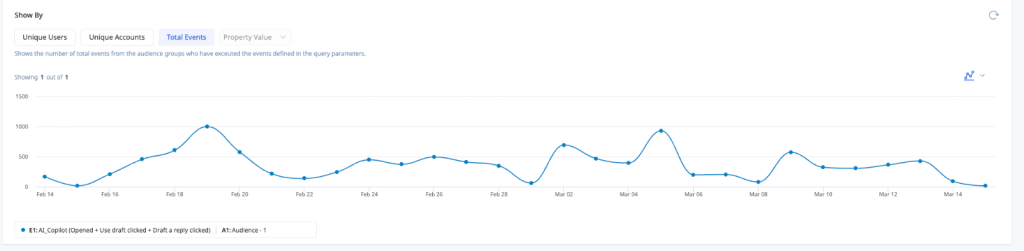
But during a call with a prospect, the gaps were hard to ignore.
The prospect at hand was a technology company whose 25-person technical support team handles hundreds of customer queries across email, phone, and a custom ticketing portal.
During a recent call, the team walked us through a side-by-side comparison. They had run the same questions through Ask AI and their existing agent-assist tool, using identical knowledge sources.
The exercise surfaced a few important opportunities for improvement.
In some cases, Ask AI identified the correct answer but included additional, similar recommendations from other articles in an effort to make the answers more helpful.
In others, straightforward questions returned more detailed explanations than required in the moment. This, the prospect believed, could make it harder for agents to read and understand during live conversations.
So, for a feature that directly shapes how agents work, putting this on the back burner simply wasn’t an option.
A War Room, Not a Ticket
When the feedback landed, Anurag Maherchandani — who leads the AI team at Hiver — didn’t open a Jira ticket. He got the team in a room.

“We set up a war room,” says Pranav Gupta, one of the engineers who worked on the fix. “The path ahead was clear. Day one, all of us were there — first figuring out manually what the exact problem was, then gathering all the data points and building metrics around them to find the root cause. We then experimented with fixes, and finally went ahead with a release.”
The whole team — engineers, the PM, Farhan Khan as engineering lead — worked through the problem in person. At Hiver, the AI team works out of the office five days a week, which made the war room possible. It also made it fast.
“Ask AI is our hero feature — so it needs to work the way agents expect. The same rigour applies to every feature we ship, but when a customer comes with proof of what they need changed, we treat it as a priority”
— Farhan, Engineering Lead, AI
The urgency wasn’t just about the customer’s MRR. It was about what Ask AI represents in the support workflow.
A feature that sits inside every support conversation deserves to work exactly as it should. And when it doesn’t, the solution cannot wait.
Inside the War Room: What 48 Hours of Problem-Solving Actually Looks Like
The Work Behind the Turnaround
Ask AI works through what’s called context-aware RAG — Retrieval-Augmented Generation.
In plain terms: when an agent asks a question, the system doesn’t guess. It searches through the team’s connected knowledge sources first, layers in relevant context, and then generates a clear, accurate answer.

It’s not just a search. It’s search + understanding + response, all in one step.
But the hard part isn’t making it work — it’s making it work well. And “well” turns out to be surprisingly precise.
To figure out where things were going wrong, the team turned to their internal evaluation pipeline.
The AI team maintains what they call a “golden dataset” — a curated list of questions and the answers they should generate. Every time a change is made to Ask AI, they run the feature against this dataset and measure how close the outputs are to what they’d expect.
“We look at things like faithfulness — is the answer actually grounded in the source material? Relevance — is it answering what was asked? Groundedness — is it pulling from the right place?” Pranav explains. “We score all of these, and if the average drops below 0.9 out of 1, we know something needs work.”
Why Compare at All?
If Ask AI works on your own knowledge base, why even compare it with a dataset or with other tools?
The goal was simple. The team wanted to understand what better answers actually look like.
They ran the same questions, with the same knowledge sources, across multiple tools to see exactly where Hiver’s answers were falling short.
And then they asked a bigger question: were they fixing an issue, or building something they could stand behind?
That shift in thinking is what led to the real fix.
What They Found, and What They Changed
The diagnosis was clear. Ask AI was retrieving the right information, but mixing in details from other articles, which it assumed would be helpful.
Even simple questions were getting long answers. The issue was in both the retrieval and how the answer was generated.
So, the team made four concrete changes:
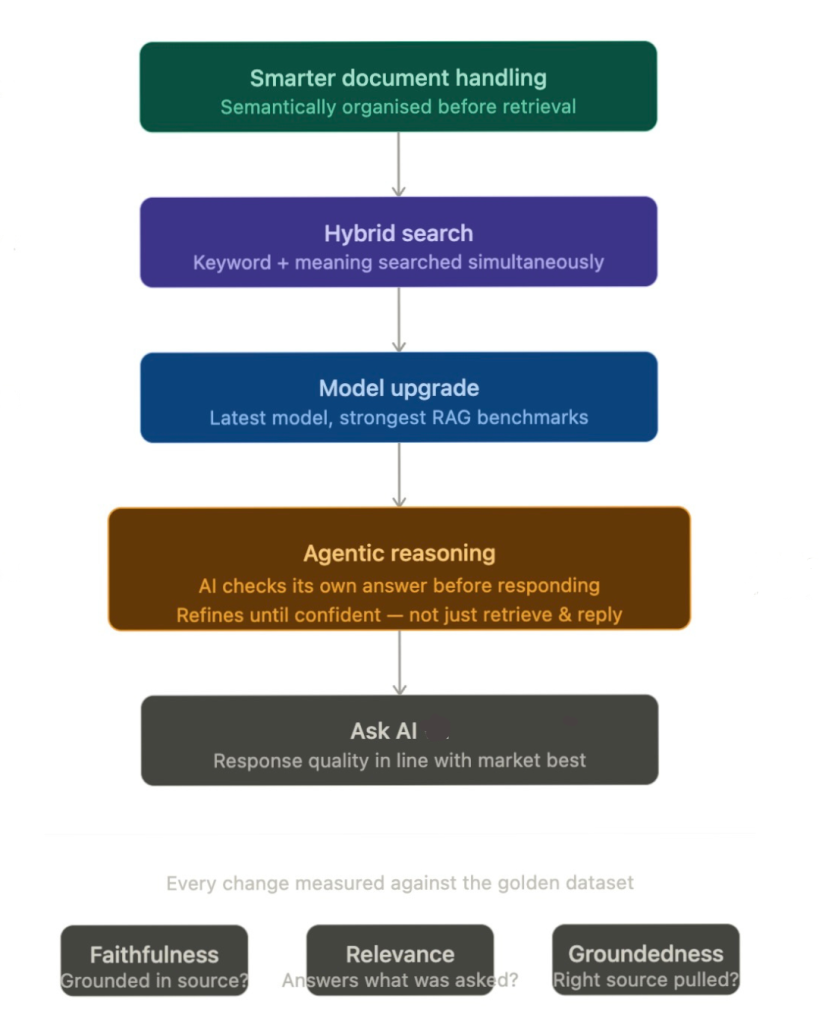
- Smarter document handling
This fix ensured the system understood how a document is structured, so even messy knowledge bases didn’t confuse the AI. - Hybrid search
Ask AI now was programmed to search by keyword and meaning at the same time, making it less likely to miss or misinterpret information. - A model upgrade
The underlying model was upgraded to improve overall answer quality. - Reasoning before responding
Instead of just returning what it finds, Ask AI started checking itself: is this actually answering the question? Is this missing context? If needed, it refines the answer before responding.
And these changes are exactly why we stand out from the crowd today. “A lot of our competitors’ AI features are simply answering from the data it’s trained on,” says Suraj Sharma, AI Product Manager at Hiver. “Ours, on the other hand, is agentic. Ask AI doesn’t just answer from retrieved data. It reasons through the problem before responding. It understands the context, checks if the answer holds up, and refines it until it does.”
The Result
Every change was tested against the golden dataset and competitor data.
The team fixed how information was retrieved, cleaned up how answers were generated, and added a layer of reasoning to make responses more accurate and easier to follow.
“We tried different things. What worked, we shipped,” says Farhan.
That’s it. No drawn-out review cycles, no waiting for the perfect solution.Just a tight feedback loop, running until the product was something the team could stand behind.
The result is a better version of our feature, Ask AI— which, based on benchmarks, delivers clearer, more accurate answers that hold up against the best in the market.
The Culture That Made It Possible
Anurag is candid about what makes this team different: ownership.
“We have eight people on the AI team, and there is no hierarchy between front-end or back-end developers here,” he says. “Everyone is a feature owner.”
That distinction matters more than it might sound. When someone owns a feature — truly owns it — the relationship to feedback changes. A customer saying the feature isn’t performing well doesn’t feel like a bug report to be triaged. It feels personal. And that’s what drives the response.
The other thing Anurag has invested in is making sure his engineers aren’t hearing about customer problems second-hand.
At Hiver, developers regularly join customer discovery calls — not to present or demo, but to listen. Many companies have this as a stated value; fewer make it a consistent practice. At Hiver, it’s simply built into how the AI team operates.
The reason it matters shows up in moments like this one. When a developer has sat on a call and heard a customer explain what they need — in their own words, mapped to their own workflow — something specific changes in how they approach a problem.
They’re not solving an abstract ticket. They know what a correct answer actually looks like for that person, why a vague or bloated response creates friction, and what good genuinely means in that context.
That’s the difference between closing a task and solving the right problem.
“Once they’re able to relate to a problem, their work is completely different,” says Anurag. “They already understand what good looks like from the customer’s perspective — so when they build, they build toward that.”
It’s a small habit with a big payoff. When feedback arrives as clearly as it did on the Digi call, the team already understands what’s at stake and can move quickly to fix it.
The Bar Every Feature Has to Clear
The 48-hour sprint is the shorter version of a longer, more deliberate process that every Hiver AI feature goes through.
Before any feature reaches a customer, it runs through internal evaluation against the golden dataset. If the scores are good, it goes to Hiver’s own support team first — who use it, break it, and report back. “We see Hiver not as our company but as a client,” Pranav says. “We try to use the product the way they would.”
After internal feedback, the feature goes to a small cohort of early access customers — typically around ten, selected because their use case is a strong match for what the feature is designed to do. Their feedback shapes the next iteration before any wider release.

And if something fundamentally doesn’t work? The team scraps it and starts over. No ego, no sunk cost thinking. On the other hand, features that have bugs or accuracy gaps get fixed.
Anurag describes the philosophy simply: “Build quickly, hear feedback, and pivot fast. Don’t spend months perfecting something in a room and then find out it doesn’t add value.”
It’s a process designed to catch problems early — so that by the time a feature reaches you, it’s already been stress-tested by the people who know it best.
Raising the Bar, One Piece of Feedback at a Time
There’s a version of this story where it’s just a case study in fast shipping. A team got feedback, moved quickly, and fixed the issue.
But the more interesting version is about the kind of team that doesn’t just fix problems — they own them. And that distinction makes all the difference.
The war room only works if people want to be in it. The evaluation pipeline only produces a fix if the team actually trusts the metrics. The 48-hour turnaround only happens if the people in the room feel like the problem is personally theirs to solve.
At Hiver, that’s not an accident. It’s been built deliberately through product ownership, through enabling developers access to customer calls, measuring everything before shipping anything, and through a genuine belief that if something isn’t good enough, you find out fast and you fix it faster.
The customer sent a screenshot. The team took it seriously. That’s the whole story — and in our case, it’s a clear window into what it really looks like when a team genuinely cares about what they build.
They had a bar. We met it. And that’s really what the whole 48 hours were about.













