Skip to content





For many agents, solving the problem isn’t the most challenging part- it’s figuring out what to say under pressure. A pause too long, the wrong tone, or an unhelpful phrase can escalate things quickly. That’s where customer service scripts help!
They give agents a starting point, keep conversations structured, and make sure customers feel understood. Instead of looking for words, reps can focus on solving the problem quickly.
Of course, the scripts aren’t rigid. They allow flexibility so agents can personalize responses while still staying on-brand. In this blog, we’ll explore why scripts matter, share 70 examples for real scenarios, and cover best practices to make them work for your team.
Table of Contents
- What are customer service scripts?
- Importance of customer service scripts
- Top 70 customer service scripts for different scenarios
- 🚚 Common Issues & Requests
- 🛠️Troubleshooting & Problem Solving
- 😡 Dealing with Angry or Upset Customers
- 🙌 Closings & Follow-Ups
What are customer service scripts?
Customer service scripts are pre-written responses or templates that guide support agents in different customer interactions. They provide clear phrasing for everyday situations – like handling complaints, answering questions, or greeting customers – so agents don’t have to improvise under pressure.
They can be used across channels, whether answering a phone call, replying to an email, chatting with a customer on your website, or even responding on social media.
Importance of customer service scripts
In tough situations, like dealing with an angry customer, having a customer service script is like a safety net. It doesn’t replace empathy or human connection, but helps agents stay calm and professional.
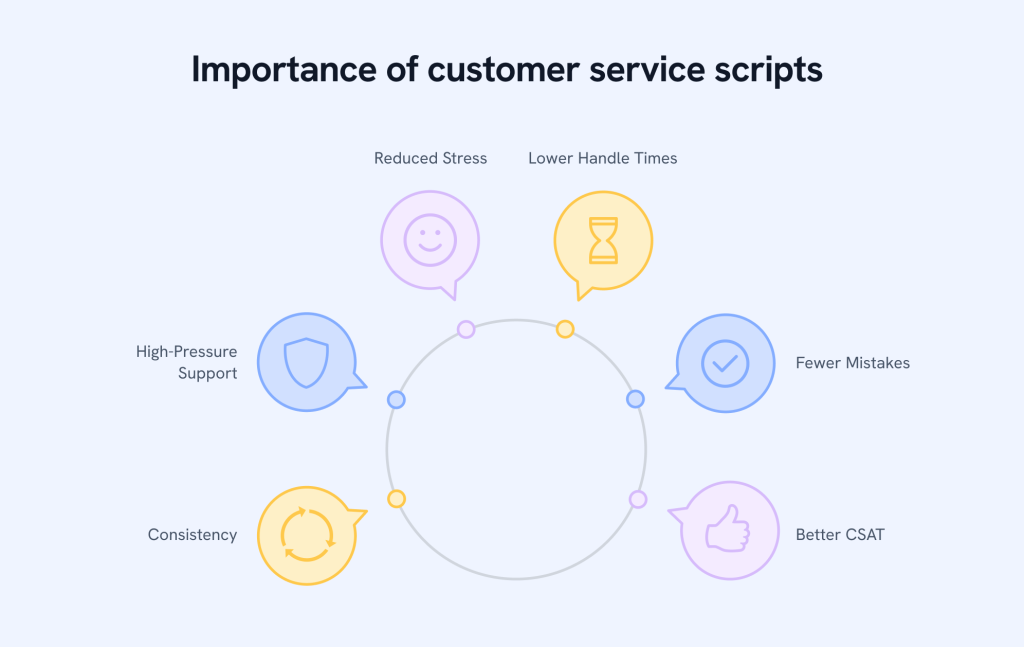
1. Consistency across the team
Scripts ensure that every customer receives the same tone and professionalism, no matter which agent handles their case. This consistency avoids varied messages and helps the brand feel consistent across channels.
📌 Use Case: Standardizing greetings, closings, and FAQ answers across phone, email, and chat ensures customers always receive the same transparent and loyal experience.
2. Faster onboarding for new agents
Scripts give new hires the confidence to handle conversations from their 1st day. Instead of learning endless policies, they have a safety net of ready-made responses to rely on. This makes onboarding quicker and less stressful.
📌 Use Case: Adding scripts into training role-plays helps new agents practice handling angry or confused customers before they ever pick up a live call.
3. Better handling of high-pressure situations
Tough conversations can throw even experienced agents off balance. Scripts provide a calm starting point, guiding them with empathy-driven language that helps de-escalate situations and rebuild trust.
📌 Use Case: Creating a “calm the customer” playbook with empathy-first scripts ensures agents always know what to say when emotions run high.
4. Improved customer satisfaction (CSAT)
Scripts make agents sound more empathetic and solution-focused. This tone comforts customers that they’re being heard, which can completely change how they feel about the interaction, even if the issue takes time to solve.
📌 Use Case: Replacing robotic lines like “We apologize for the inconvenience” with warmer phrasing such as “I know waiting can be frustrating, let me check this right away” boosts CSAT scores by 35%
5. Reduced mistakes and compliance risks
Billing questions, refund policies, and legal terms don’t allow improvisation. Scripts ensure accuracy by giving agents pre-approved, compliant responses, reducing the risk of errors.
📌 Use Case: Finance and insurance teams use standardized scripts when explaining payment terms to ensure compliance and avoid regulatory slip-ups.
6. Shorter average handle times
When agents don’t need to think from scratch, responses are faster and smoother. Scripts reduce hesitation and shorten calls.
📌 Use Case: Many e-commerce teams use templated responses for “Where’s my order?” queries, which speeds up resolutions and gives agents more time for complex issues..
7. Lower agent stress and burnout
Having support scripts makes support work less stressful. Agents don’t have to come up with perfect responses under pressure; they can adapt from a script. This reduces stress and keeps morale steady.
📌 Use Case: Telecom companies share ready-to-use “network outage” scripts so agents can handle repetitive calls without burnout during service disruptions.
🗣️Fact: Customers notice when things don’t line up. In fact, 69% of consumers expect consistent support across channels. Scripts make delivering consistency easier, whether someone reaches out on phone, chat, or email.”
Top 70 customer service scripts for different scenarios
Before we start, remember these scripts are starting points. Feel free to adapt the tone, add personal touches, and adjust them for your industry.
👋 Greetings & Opening Conversations
A customer’s first impression often comes from the way an agent greets them. A friendly and professional opening sets the tone for the entire conversation. The right customer service script helps agents start conversations warmly and make customers feel immediately valued. Below are some examples:
General Welcome
A warm first impression sets the stage for a positive customer service experience. Simple, friendly greetings help customers feel acknowledged right away.
- “Hi [Name], thanks for contacting us. How can I help you today?”
- “Good [morning/afternoon], [Name]. What can I do for you?”
- “Hello! You’ve reached [Company]. How can I make things easier for you?”
- “Hi, this is [Agent]. I’ll be glad to help. What seems to be the issue?”
- “Thanks for reaching out. Tell me what’s happening and we’ll sort it out.”
New vs. Returning Customers
Acknowledging whether someone is new or returning shows you’re paying attention and that you value their relationship with your brand.
- “Welcome to [Company], [Name]. Is this your first time reaching out? If yes, I’ll guide you through everything.”
- “Hi again, [Name]. Would you like me to continue from our last conversation, or start fresh?”
- “If this is your first order, no worries, I’ll walk you through step by step.”
- “I see you’ve contacted us before. Let me quickly review that so you don’t have to repeat yourself.”
Disclosure (e.g., recording notices)
Being upfront about call recording or data usage builds trust and ensures compliance. Scripts make sure agents deliver these disclosures consistently and politely.
- “Just to let you know, this call may be recorded for training and quality purposes. Is that okay?”
- “Quick note: this chat may be saved for future reference. Shall we continue?”
- “This call may be monitored to improve our service. Please let me know if you’re comfortable with that.”
- “For transparency, our conversations are sometimes recorded to help us serve you better.”
🚚 Common Issues & Requests
Most customer conversations start with everyday problems, like delivery delays, payment issues, login trouble, or missing items. Having customer service scripts for common problems and requests helps agents respond quickly, avoid confusion, and reassure customers that their concerns are being handled. Consider using these scripts:
Delivery or Shipping Delays
When orders are late, customers want quick answers and empathy. These scripts help agents provide both:
- “I’m sorry your package is late, [Name]. Could you share the order number so I can check the status?”
- “Thanks for waiting, I’ll track your package now and update you with the latest info.”
- “I know delays are frustrating. I’ll check with the courier and get you a clear update.”
- “I see there’s a delay. I can arrange a replacement or refund—what would you prefer?”
- “Your order is still in transit. I can set up alerts and keep you posted if you’d like.”
- “If it doesn’t arrive by [date], I’ll make sure you get a replacement or a refund.”
Refund & Return Status
Customers can feel stressed and uncertain about refunds and returns. These examples make the process simple and transparent so customers know exactly what to expect and when.
- “I can help with your refund. May I confirm your order ID?”
- “Your return has been processed. You should see the refund in [X days]. I’ll send you an email confirmation.”
- “I’m sorry the product didn’t work out. I’ll share a prepaid return label to make it simple.”
- “Your refund is approved. Would you prefer it as store credit or back to your original payment method?”
- “If you’d rather exchange than refund, I can set that up today.”
Billing & Payment Clarifications
Money-related questions can quickly escalate. These scripts keep explanations simple and avoid unnecessary tension:
- “I can explain that charge. Can I confirm your account details first?”
- “Let’s review your invoice together so nothing feels unclear.”
- “I see a duplicate charge, that’s our mistake. I’ll reverse it right away.”
- “Looks like your payment didn’t go through. I’ll send you a secure link to retry.”
- “We can switch your plan or billing cycle to something that suits you better. Want to see the options?”
Account & Access Issues
Being locked out of an account or unable to log in can be stressful and time-sensitive. These scripts guide agents to troubleshoot quickly, restore access, and reassure customers.
- “Let’s get you back in. What error do you see when you try to log in?”
- “I’ve sent a password reset link to [email]. Let me know once you get it.”
- “Two-factor can be tricky. I can switch it to SMS temporarily if that helps.”
- “I can quickly verify your details and update your login email. Shall we do that now?”
- “Your access should be restored. Can you try again and let me know if it works?”
🛠️Troubleshooting & Problem Solving
When customers face technical glitches or product issues, they want guidance that’s clear, calm, and solution-oriented. The right customer service script helps agents walk them through fixes step by step without overwhelming them.
Symptom Clarification
The best fixes start with the right questions. These scripts help agents collect the right details upfront so they can troubleshoot faster and avoid unnecessary back-and-forth.
- “I can help fix this. What exactly happens when you try to [action]? Any error message?”
- “When did this start, after an update or suddenly?”
- “Does the problem happen on Wi-Fi and mobile data, or just one?”
- “Can you try logging in from another device? That helps us narrow it down.”
- “If possible, could you share a screenshot? It’ll make it easier to troubleshoot.”
📝 Tip: A quick, friendly, personalized response makes a difference – “Hello, Jane! I just need 30 seconds to check this for you.” is better than a generic reply.
Step-by-Step Guidance
Breaking technical solutions into small, simple steps makes them much easier to follow. These examples help agents guide customers without overwhelming them.
- “Let’s try this: Go to Settings → [path] → toggle [option] off and on. Did that help?”
- “Next, clear your app cache and restart. Let me know once you’ve done it.”
- “Could you update to version [X]? It has a fix for this issue.”
- “Try rebooting your device and testing again. If it still fails, we’ll dig deeper.”
- “I’ll email you a quick guide with steps. Follow them and let me know how it goes.”
Escalation Handover Lines
Not every problem can be solved on the spot, and that’s okay. These handover scripts ensure escalations feel smooth and professional, so customers stay confident their issue will be resolved.
- “I’m looping in our specialist who handles this daily. Please stay with me.”
- “I’ve created ticket #[ID] with our tech team. I’ll update you by [time/date].”
- “This needs a deeper check. I’ll escalate now and stay your point of contact.”
- “I’ve marked this as Priority. You’ll hear from me with an update within [X hours].”
😡 Dealing with Angry or Upset Customers
Tense conversations are part of customer service. Scripts here give agents empathetic language to calm emotions, take control of the situation, and turn a negative experience into a positive one.
Initial Empathy & Apology
Acknowledging frustration early shows customers they’ve been heard and understood. These scripts help agents genuinely apologize and start steering the conversation toward solutions.
- “I’m really sorry this happened, [Name]. I understand how frustrating it must feel.”
- “Thanks for telling us. I know this has been a hassle, and I appreciate your patience.”
- “I hear your frustration. Let’s work together to sort this out quickly.”
- “You’re right to be upset. Let me take care of this for you.”
- “I apologize for the trouble—this isn’t the experience we want for you.”
- “I understand how stressful this is. I’ll take ownership and get it resolved.”
De-escalation Reassurances
When emotions run high, calm and reassuring language helps customers feel supported. These examples guide agents to stay composed and offer clarity without sounding dismissive.
- “Let’s take this step by step, I’ll keep it simple and clear.”
- “You don’t need to repeat yourself—I’ve got the details here.”
- “I can offer you two solutions. Which one would you prefer?”
- “I’ll stay with you until we have a clear next step.”
- “If this doesn’t work, I’ll make it right—replacement, credit, or refund.”
🗣️Fact: Positive language isn’t just polite, it’s powerful. Phrasing your script around “what you can do” can boost CSAT by up to 25%.
Ownership & Solution Assurance
Customers feel reassured when they know someone is taking responsibility. These scripts help agents show accountability and outline clear next steps toward a solution.
- “I’ll track this for you and update you by [time/date].”
- “I’ve fixed the issue and added safeguards so it doesn’t happen again.”
- “I’ve shared your feedback with our product team to help improve things.”
- “I’ve sent a replacement with express shipping. You’ll get tracking details shortly.”
- “I’ve added a courtesy credit to your account and sent you confirmation.”
🙌 Closings & Follow-Ups
The way a conversation ends often leaves the strongest impression. Scripts here help agents confirm resolutions, offer additional support, and close interactions in a way that makes customers feel valued and cared for.
Confirming Resolution
It’s important to make sure everything is truly resolved before closing. These scripts guide agents to double-check details and leave no loose ends behind.
- “Before we wrap up, does everything look good now?”
- “Glad we solved it! I’ve sent you a quick summary by email.”
Offering Further Help
Going the extra mile by offering additional help shows genuine care and prevents repeat contacts. These examples make it easy to offer ongoing support in a natural way.
- “If this comes up again, just reply to me directly and I’ll help.”
- “Is there anything else I can help you with today?”
Polite Sign-Off
A thoughtful sign-off leaves customers with a positive final impression of your brand. These scripts help agents end on a warm, professional note that customers remember.
- “Thanks for your time, [Name]. We really appreciate you.”
- “It’s been a pleasure helping you. Have a great day ahead!”
Best practices for creating + using customer care scripts
A good script makes things easier for both the agent and the customer. It keeps consistently, saves time, and helps customers feel supported.

Here are nine practices to ensure your scripts work in real life.
1. Define the goal of each script
Every script should have a clear purpose. Is it meant to resolve a typical query, reassure a frustrated customer, or help guide a purchase? When the goal is clear, the language becomes sharper and more useful.
Example: A “refund script” should focus on reassurance (“I’ve processed your refund, it will be back in your account within 3–5 days”), while a “sales script” should highlight benefits and next steps.
2. Base scripts on real customer needs
Don’t guess. Use FAQs, past chat logs, knowledge bases and call recordings to identify what customers actually ask. This ensures scripts feel relevant and helpful instead of generic.
If 30% of calls are about late deliveries, have a ready-made delivery script instead of improvising each time.
3. Keep language clear and simple
Customers don’t want jargon or complicated sentences, they just want answers. Use plain, everyday language that gets straight to the point.
Say: “Your order should arrive by Friday,” instead of: “Your order has been dispatched and will be delivered within 3–5 business days.”
4. Add personalization and flexibility
Scripts should sound human. Encourage agents to use the customer’s name, show empathy, and adapt the script to the situation.
Instead of: “We apologize for the inconvenience,” say: “I’m really sorry about this, [Name]. I know waiting can be frustrating.”
5. Train agents with scripts
Scripts are most useful when agents know how to use them naturally. Include them in onboarding, role-plays, and refresher training. This helps new hires build confidence and experienced agents polish their tone.
6. Use positive, solution-focused language
The words “can’t” and “won’t” frustrate customers. Teach agents to frame responses around what they can do.
Instead of: “I can’t refund that,” say: “I can issue store credit or send you a replacement, whichever you prefer.”
7. Review and update regularly
Customer expectations change, products evolve, and old scripts can quickly sound outdated. Collect feedback from customers and agents, then tweak scripts to keep them useful and fresh.
8. Measure script effectiveness
Don’t just write scripts and forget them. Track metrics like customer satisfaction (CSAT), average handle time, and first-contact resolution. If a script isn’t improving results, it’s time to rewrite it.
9. Don’t rely only on scripts
Think of scripts as a starting point. They give structure, but it’s up to the agent to listen, adapt, and respond in a genuine way. A rigid script can frustrate customers, but a flexible one helps build trust.
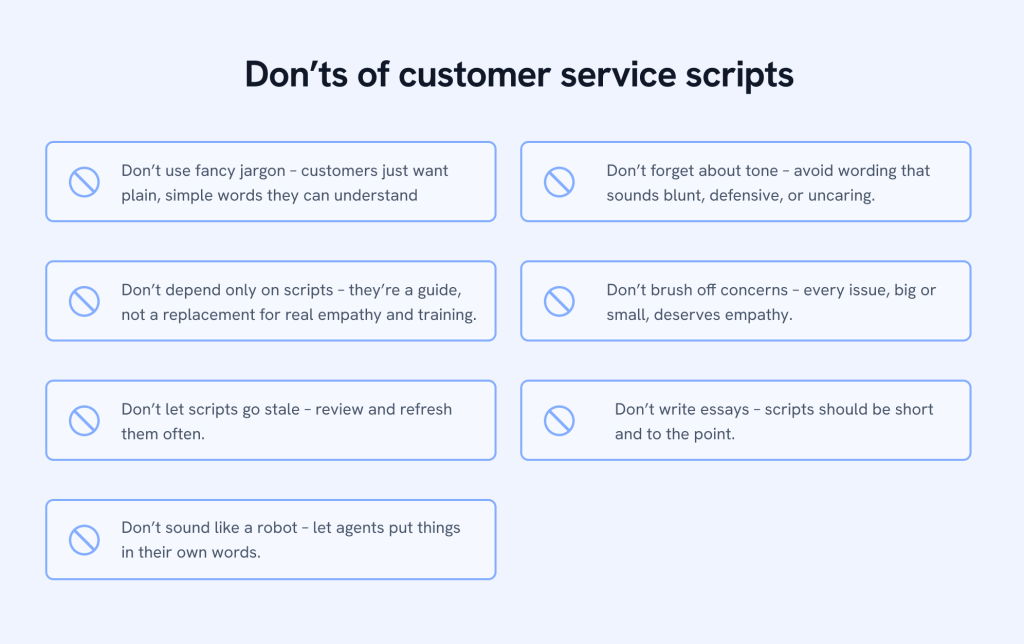
7 Don’ts of Customer Service Scripts
Writing customer service scripts is only half the job. If you don’t avoid common pitfalls, even a well-written script can sound robotic or frustrate customers. Use this list of 7 don’ts to help your team spot mistakes early and keep every conversation natural and effective.
Conclusion
Customer service scripts aren’t about giving agents lines to read word for word. They’re there to provide them with confidence. Sometimes all an agent needs is the correct phrase at the right time to turn a tense moment into a positive one. Scripts help with that.
The 70 examples we’ve shared here should give you plenty to work with, whether it’s greeting a customer, solving a common issue, or calming someone who’s upset. Don’t treat them as one-size-fits-all. Make them your own, keep them updated, and encourage your team to add their personality. That’s when scripts feel natural.
Frequently Asked Questions
1. How do you write a customer service script?
Start with the goal of the script, like solving a refund issue or greeting a customer. Use short and clear sentences. Add empathy (e.g., “I understand this is frustrating”). Test the script with agents and update it regularly.
2. What is a positive script for customer service?
A positive customer service script focuses on what you can do. For example: “I’m sorry your order is delayed, but I’ve already arranged a replacement that will reach you by Friday.” Positive call center scripts keep the tone reassuring and solution-driven.
3. How do you greet customers in a script?
Keep greetings warm and polite. For example: “Hi [Name], thanks for contacting us. How can I help you today?” This works for phone, chat scripts for customer service, and even email support.
4. How to talk with customers in BPO?
In BPO customer service, use simple language, listen carefully, and stick to the call center script as a guide. Always stay polite, keep your tone calm, and focus on solving the problem quickly.
5. How can I talk to my client?
Be clear, respectful, and solution-focused. Start with a greeting, understand their need, and then explain the next steps in simple words. Always confirm if they are satisfied before closing the conversation.
Start using Hiver today
- Collaborate with ease
- Manage high email volume
- Leverage AI for stellar service