About the company
Optica has delivered vision care across East and Central Africa for more than 65 years. The company operates from Nairobi and serves customers across Kenya, Uganda, Rwanda, and Zambia through its network of retail locations. It provides prescription eyewear, sunglasses, contact lenses, eye tests, and is recognized as the leading eye glases stores in Kenya.
We spoke with Wairimu Mathenge, Head of Systems & BI, and Erick Wanjohi, SAP Support Manager. They explained how Optica uses Hiver to manage internal support requests from branch teams and departments to improve visibility, accountability, and response times across departments.
Managing high-volume support without visibility or ownership
Before adopting Hiver, Optica faced challenges managing internal support requests across its growing branch network. Teams did not have visibility to incoming requests, track who owned each ticket, or understand how work spread across the team.
The company had already tried a different tool however it did not meet their needs. Teams still struggled to coordinate work and follow requests across shared email addresses.
Before these challenges became more pronounced, the team handled a wide range of internal requests from branch staff, including SAP-related issues, system errors, and access requests. These requests came in through email and were managed across shared inboxes, where team members had to manually review, pick up, and respond to each conversation.
Without a defined system to manage this flow, teams relied heavily on individual follow-ups and coordination, which made it difficult to maintain consistency as volumes increased.
For the SAP team in particular, three problems stood out. Team members sometimes sent duplicate responses to the same request, could not tell who owned a ticket, and could not track workload across the team. These gaps slowed response times and created confusion.
As request volumes grew—reaching nearly 10,000 SAP inquiries per month and around 200 IT related requests per week—these issues became harder to manage, especially during peak periods.
Without a structured system, the teams could not consistently measure performance, ensure timely responses, or identify recurring issues early. This made it difficult to improve processes and scale internal support effectively.
From reactive handling to a structured support workflow
Optica chose Hiver to bring structure to how teams handled internal support. The team wanted a solution that fit into their existing workflow and did not require a major shift in how they managed conversations.
They rolled out Hiver across back-office and support teams, where most internal requests are directed to. They introduced a Shared Inbox so teams could manage requests in one place instead of across individual inboxes.
Within the SAP team, members review incoming requests in Hiver and assign them to themselves based on availability. This allows the team to dynamically distribute work while ensuring that every request is picked up.
The team adopted Hiver quickly and established a consistent workflow for managing internal requests across departments.
Running a fast, structured support workflow with Hiver
Optica uses Hiver to run a structured, SLA-driven internal support workflow across its back-office teams. The team manages all incoming requests through Hiver’s Shared Inboxes, assigns clear ownership, and uses Tags, Automation Rules, Hiver AI features, SLA policies, and Email Templates to handle requests efficiently and consistently at scale.
When a request comes in from a branch, it lands in a shared inbox where the entire team can view it. From there, the team works within a structured system that brings visibility, ownership, and consistency to how every request gets handled.
Key capabilities that power the workflow:
- Clear ownership and balanced workload with Shared Inboxes
Teams manage all requests in Shared Inboxes instead of individual email accounts. For example, SAP-related requests come into the SAP Shared Inbox, where team members review incoming emails, assign conversations to themselves, and take responsibility for resolving them. This ensures no requests are missed while allowing the team to distribute work based on availability.
- Routing requests efficiently with Tags and Automation Rules
Once a request comes in, the team uses Tags to categorize it based on the type of issue. For example, when a branch reports a backend issue, the team tags the request as “SAP Error,”while they tag report-related issues as “SAPREPORT.”
These tags give agents immediate context and help them understand the next steps. Based on this classification, the team uses Automation Rules to move conversations between Shared Inboxes where required, ensuring that each request reaches the right team without manual forwarding.
This structured tagging and routing workflow helps the team manage high volumes efficiently while maintaining clarity on how each request should be handled.

- Faster responses with AI Compose
The team relies heavily on AI Compose to generate replies and refine them before sending. This helps agents respond within minutes and meet a strict first-response SLA of under five minutes. It also helps maintain consistent, error-free communication across responses.


“AI Compose has made a big difference—the team no longer writes responses from scratch. They generate, refine, and send within minutes.”
Wairimu Mathenge
Head of Systems & BI
- AI Tagging reduced manual effort in classification
The SAP team handles a high volume of requests every day, many of which follow repeat patterns such as credential access or system issues. Instead of manually reviewing and tagging each request, the team uses AI Tagging to automatically classify incoming emails. This gives agents immediate context and helps them move straight to resolution.
“AI Tagging has removed a layer of manual work for us. The moment a request comes in, it’s already classified, which makes our response process much faster.”– Wairimu Mathenge, Head of Systems & BI
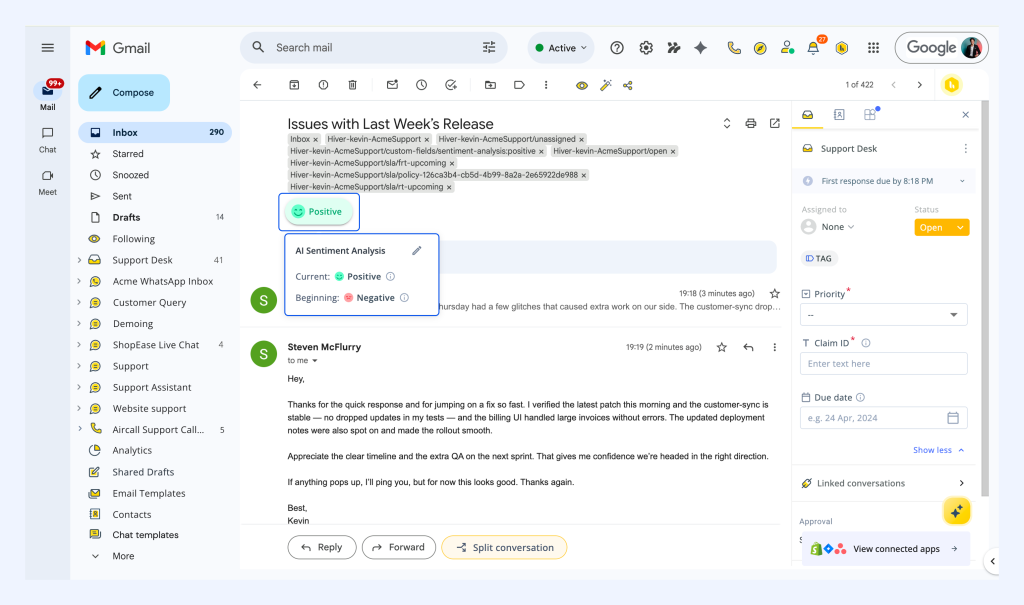
- Understand and prioritize requests with AI Sentiment Analysis
The team uses AI Sentiment Analysis to assess the tone and urgency of incoming requests. This allows them to quickly understand which conversations need immediate attention without manually reviewing every email.
For example, when multiple requests come in—such as routine updates alongside more urgent issues like system errors—the team can quickly identify higher-priority conversations and respond accordingly.
- Meeting strict SLAs with SLA Policies and SLA Alerts
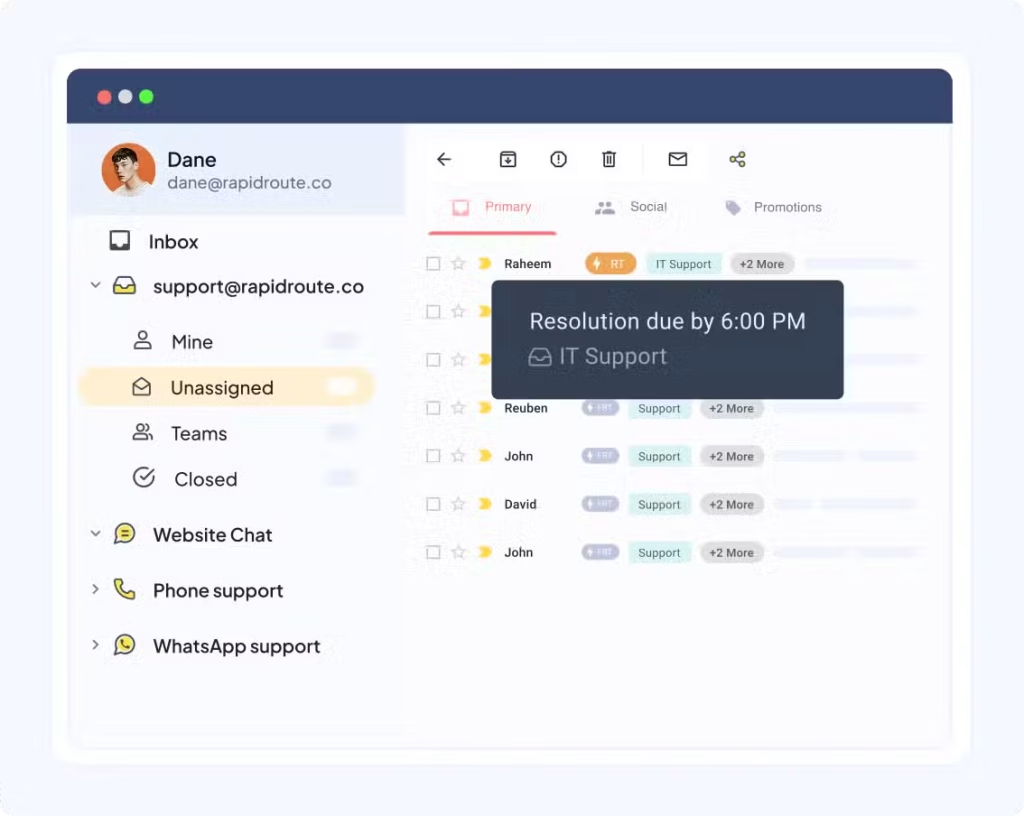
The team sets clear targets using SLA Policies—under 5 minutes for first response and under 10 minutes for resolution. Hiver tracks these timelines automatically and triggers
SLA Alertswhen a ticket approaches a breach, which helps the team prioritize urgent requests and stay consistent at high volumes.
- Responding consistently at scale with Email Templates
The team uses more than 20 Email Templates for recurring requests. Agents select a template, make minor edits, and send responses quickly, helping them handle high volumes while maintaining consistent communication.
- Keep inboxes clean with the AI Thank-you Detector
The team uses Hiver’s AI Thank-you Detector to automatically close conversations when users reply with messages like “thank you” or “got it.” This helps the team prevent resolved tickets from reopening unnecessarily and keeps the inbox focused on active requests. As a result, the team resolves most SAP tickets in a single response and only reopens them when users send a new query that requires further action.
- Track performance with Analytics and reporting dashboards
Managers use Hiver Analytics and Reporting Dashboards to review daily, weekly, and monthly performance. They track first response time across the team and by individual users, which helps them identify delays and improve accountability.

“The biggest shift for us is that Hiver now does the thinking upfront—requests come in already categorized, and responses don’t start from scratch. That’s what allows us to move as fast as we do.” –Erick Wanjohi, SAP Support Manager
Operational impact and efficiency gains
By introducing structure, automation, and AI into their internal support workflow, Optica reduced manual effort and improved operational efficiency across teams.
● The team saved over 390 hours of manual effort using features like Tags, Automation Rules, Shared Drafts, and Email Templates, allowing them to handle high volumes without increasing workload.
● Automation contributed to nearly 13% of total time savings, helping the team reduce repetitive tasks and minimize manual intervention.
● Tags contributed over 11% of total time savings, enabling the team to organize and process incoming requests more efficiently.
● The team saved over 11 hours in 30 days by using AI features to streamline day-to-day support operations. AI Tagging automatically classified over 750 conversations, saving more than 6.3 hours of manual effort. AI Sentiment analyzed over 3,600 conversations, helping them understand and prioritize incoming requests faster.
● The team uses Ask AI’s AI-powered assistance to save nearly 3 hours, allowing agents to retrieve information quickly and respond without manual lookup.
“Hiver gave us visibility we never had before. We can now track response times, hold teams accountable, and consistently meet our SLAs. That shift has directly improved how fast and how effectively we support our branches.” – Wairimu Mathenge, Head of Systems & BI
Looking forward
Optica plans to expand how it uses Hiver, especially by increasing AI adoption across its support workflows. The team has already seen strong results with AI Compose and AI Tagging, and now wants to explore additional AI capabilities to further streamline responses.
Wairimu highlighted a key opportunity to use AI to guide agents in handling specific requests based on past conversations. This would help new team members respond faster and follow established processes without relying on constant support from others. While the team has not yet used features such as AI Tasks or AI Suggested Responses, they plan to explore these capabilities during an upcoming training session.
The team also plans to further refine its automation workflows. One key area of focus is routing emails from personal inboxes into Shared Inboxes based on subject or content. This would ensure that critical requests always reach the right team, even when sent to an individual.

“We’ve built a strong foundation with Hiver. Now, we want to use AI to guide how tickets are handled, so even new team members can resolve requests quickly and follow the same proven processes without relying on others.”
Erick Wanjohi
SAP Support Manager