




Zendesk has been a dominant name in the customer support software space for years, particularly among large enterprises.
But, powerful doesn’t always mean effective. Of late, many customer support teams have started looking for alternatives.
Zendesk requires weeks of configuration just to get workflows running smoothly. For smaller teams or fast-growing companies, that level of operational overhead doesn’t always make sense. Plus, for companies looking to transform customer support with AI, Zendesk AI works only for simple FAQs and may not be the right fit.
Keeping that in mind, I’ve reviewed 15 Zendesk alternatives worth evaluating in 2026.
Short answer –
The best Zendesk alternatives are:
- Hiver – If you want AI across the entire support lifecycle: resolution for complex tickets, real-time assistance, and proactive insights.Not just a chatbot bolted onto a legacy ticketing system
- Intercom – If you want a powerful AI chatbot to deflect a large volume of first-level queries
- Specialized tools – for use cases like knowledge base (Helpjuice), ITSM (Jira Service Management), or ecommerce (Gorgias)
Why Listen to Us
Hiver has helped a lot of teams move off Zendesk specifically, not just shared inboxes in general. At Bynder, a Revenue Operations Manager put it plainly: “Zendesk never fit our team’s needs. We needed a system built for relationships, not requests.” Bynder now automates 2,500 workflows and saves 198 hours a month with Hiver.

Table of Contents
- Why Listen to Us
- Zendesk alternatives compared by key buying criteria
- In-depth reviews of the best Zendesk alternatives
- 1. Hiver (Best for modern, AI-powered customer support)
- 1. Intercom (Best for proactive messaging and AI-powered chat)
- 2. Hiver (Best for modern, AI-powered customer support)
- 3. Freshdesk (Best for a familiar, all-in-one support platform at a lower cost)
- 4. Zoho Desk (Best for teams using the Zoho ecosystem)
- 5. Spiceworks (Best for free, no-frills IT ticketing)
- 6. Tidio (Best for live chat and AI-driven conversations)
- 7. Help Scout (Best for simple, email-first customer support)
- 8. HappyFox (Best for structured workflows and ITSM use cases)
- 9. GrooveHQ (Best for lightweight shared inbox capabilities)
- 10. LiveAgent (Best for live chat and call center support)
- 11. Front (Best for shared inboxes and internal collaboration)
- 12. Helpjuice (Best for advanced knowledge base management)
- 13. Gorgias (Best for ecommerce customer support)
- 14. HubSpot Service Hub (Best for CRM-linked customer support)
- 15. Jira Service Management (Best for IT and engineering teams)
- Why modern support teams are exploring Zendesk alternatives
- Why Teams Leave Zendesk for an Agentic Customer Service Platform
- How did I evaluate and test these tools?
- How to choose the right Zendesk alternative for your team
- Elevate your support quality with the right Zendesk alternative
- Frequently Asked Questions (FAQs)
Zendesk alternatives compared by key buying criteria
Below is a side-by-side comparison of the top Zendesk alternatives, based on the buying criteria teams care about most.
| Platform | Starting price | Add-on costs | Setup | Best fit for | Core strengths | G2 Rating |
| Hiver | Starts at $25/user | None. AI included across plans | Very easy. Set up in minutes | Modern SMBs to enterprises | Omnichannel platform, collaboration, live chat, knowledge base, AI Agents and Copilot | 4.6 |
| Intercom | $29/user; No free plan | Fin AI ~$0.99/resolution; Copilot ~$29/user/mo | Moderate to complex setup | Mid-market and enterprise teams | AI chatbot (Fin), proactive messaging, customer engagement, automation | 4.5 |
| Freshdesk | $15/user; Forever free plan available | Advanced features gated by plans | Easy, can get complex with workflows | SMBs to mid-market teams | Omnichannel support, Freddy AI, automation, parent–child ticketing | 4.4 |
| Zoho Desk | $7/user; Forever free plan available | Advanced automation/reporting in higher tiers | Moderate learning curve | SMBs using Zoho ecosystem | CRM integration, workflow automation, Zia AI, SLA management | 4.4 |
| Spiceworks | Free; $5/user ad-free plan | None | Very easy. Ready in hours | Small IT teams and startups | Basic ticketing, IT workflows, reporting, knowledge base | 4.3 |
| Tidio | $24.17/month; Forever free plan available | Lyro AI usage-based pricing | Very easy. Minutes to set up | Startups and small teams | Live chat, chatbot automation, multichannel inbox, no-code flows | 4.6 |
| Help Scout | $25/user; Forever free plan available | AI Answers ~$0.75/resolution | Very easy. Few hours | SMB support teams (email-first) | Shared inbox, live chat, knowledge base, AI chatbot | 4.4 |
| HappyFox | $24/user; No free plan | None | Easy setup | Mid-market IT and ops teams | Ticketing, ITSM-lite workflows, automation, knowledge base | 4.5 |
| GrooveHQ | $24/user; No free plan | None | Very easy. Few hours | Small to mid-sized teams | Shared inbox, automation, internal notes, lightweight reporting | 4.6 |
| LiveAgent | $9/user; No free plan | None | Moderate setup | SMBs needing chat + voice | Live chat, call center, omnichannel support, ticketing | 4.5 |
| Front | $25/user; No free plan | Copilot $20/user/mo; Smart QA $20/user/mo; Autopilot $0.89/resolution | Moderate setup | Mid-market teams with shared inbox workflows | Shared inbox, collaboration, workflows, optional AI add-ons | 4.7 |
| Helpjuice | $249/month; No free plan | None | Moderate. Few days | Mid-market & enterprise (KB-focused) | Knowledge base software, AI search, analytics, customization | 4.7 |
| Gorgias | $50/month; No free plan | Usage-based (tickets, AI agent) | Easy. Few hours | Ecommerce support teams | Ecommerce integrations, order context, macros, AI agent | 4.6 |
| HubSpot Service Hub | $15/user; Forever free plan available | AI usage via credits | Moderate setup | SMBs using HubSpot CRM | CRM integration, customer portal, conversation intelligence | 4.4 |
| Jira Service Management | $20/agent; Free plan available (up to 3 agents) | None published; Atlassian add-ons vary | Moderate to complex; Atlassian admin experience helps | IT and engineering-adjacent teams | Confluence-linked knowledge base, context-rich sidebar, deep Jira Software integration | 4.3 |
In-depth reviews of the best Zendesk alternatives
Now let’s take a more detailed look at the 15 Zendesk alternatives. I break down their key features, pros, cons, and pricing to show where each one fits best.
1. Hiver (Best for modern, AI-powered customer support)
Hiver is an agentic omnichannel customer service platform built for teams to manage complex support with AI, cross-team collaboration, workflows, and ticketing.
Unlike legacy tools like Zendesk, where AI is built through acquisitions and bolted on, Hiver AI is deeply embedded across every customer touchpoint. AI Agents resolve requests across channels. AI Copilot works with your team to draft replies and execute actions across systems, and AI Insights surface data that helps you analyze and improve support performance.
Hiver’s unified inbox makes multi-channel support simple
What are Hiver’s key features?
- AI Agents: take customer requests from intent to resolution. They understand what’s needed, gather relevant context, follow your team’s procedures, take actions across connected systems, and respond, resolving requests autonomously and bringing your team in only when human judgment is needed.
- AI Copilot: when a request needs a person, Copilot does the groundwork. It finds similar issues, gathers context, drafts replies in your team’s tone, and takes directed actions like updating Salesforce or pulling information from Confluence, while your team stays in control of what actually goes out.
- Customer Intelligence: builds a living understanding of every account through Customer Intelligence that brings together conversations, CRM data, product usage, and calls, continuously assessing health, sentiment, and churn risk so every interaction is more informed and personal.
- Omnichannel support: brings every customer conversation into one omnichannel platform across email, chat, Slack, voice, SMS, and social, with every interaction connected to the same customer record so context carries across channels instead of starting over. You can even manage Slack conversations right inside Hiver in the same queue as all your channels.
- Cross-team collaboration: connects conversation history, private notes, handoffs, and Slack discussions to the customer thread through built-in cross-team collaboration, so everyone involved works from the same picture instead of losing context between teams. Every handoff and escalation retains the entire conversation history and context.
- Self-updating help center: turns every resolution into knowledge that compounds. Hiver AI drafts help center articles from resolved conversations and flags existing content when it goes stale or stops matching how the team actually resolves issues.
Beyond deflection: how Hiver’s AI actually resolves work
Most AI support tools stop at deflection. Catching a question before it reaches a human, usually by matching it to a help center article, is useful, but it’s also where a lot of “AI-powered” tools stop. The customer gets an answer if their question happens to already be documented; if it doesn’t, the request lands back in the queue anyway, just with an extra step in between.
Hiver’s AI Agents are built to go further. Instead of only answering from existing documentation, they read a request, pull the relevant account or order data from a connected system, take a multi-step action, and close the loop without a human touching it, and without stopping at “here’s an article that might help.” That means requests like these get resolved, not just deflected toward a self-serve page:
- A password reset
- A shipping status check
- A refund under policy
The distinction shows up clearly against Intercom, the tool leading this list for AI chatbot strength. Fin is genuinely capable at deflecting first-level queries, resolving roughly half of what reaches it by Intercom’s own numbers, but deflection and resolution aren’t the same claim: a deflected query still needs an answer to already exist somewhere, a resolved one gets acted on.
AI Copilot and AI QA cover the other half of the equation for everything that does need a person. Copilot drafts the reply and pulls context so the agent isn’t starting from a blank screen, and AI QA checks the response before it goes out, so quality doesn’t slip as more of the routine work gets automated away.
What are the advantages of Hiver?
- The biggest advantage Hiver has over Zendesk is AI built for the job, not bolted on through acquisitions. Hiver’s AI Agents are native to the platform, resolving requests end to end rather than just suggesting replies. That’s included on every paid plan: Hiver Pro ($55/user/month) comes with the same AI Agents, Copilot, and Customer Intelligence as every tier, while Zendesk’s most popular plan, Suite Professional ($115/agent/month), still treats AI as an add-on.
Hiver AI’s price is built into its plans and there are no add-ons or training costs you need to worry about. - Where Zendesk requires weeks and months to properly set up, you only need a few minutes to get started with Hiver. There’s no need for extensive training or technical know-how. Because Hiver’s interface is familiar and intuitive, teams can start using it right away without any confusion or delays.
Here’s what a user had to say about her experience onboarding Hiver – “Setting up Hiver was a breeze, even for those of us who aren’t IT experts; onboarding took less than ten minutes.” [Source: G2] - Hiver’s vendor support is the gold standard in the industry. You can connect to trained agents immediately, round the clock, irrespective of what pricing plan you’re on.
Users regularly call out Hiver’s support as one of its strongest advantages – “What completes the package is Hiver’s extremely responsive customer support team, which is usually manned by knowledgeable engineers, with average response times of less than an hour, often 15 minutes.” [Source: G2]
What are the disadvantages of Hiver?
- Hiver is designed to keep support simple, so it may not be the best fit for teams that need highly specialized workflows like ITSM.
- Most teams use Hiver primarily on desktop. While there is a mobile app, the full experience and workflow management are better suited to the desktop interface.
Why are users switching from Zendesk to Hiver?
Teams moving from Zendesk to Hiver are doing so because they want AI built into the platform, not sitting on top of one designed before AI was part of the conversation. That’s the first thing that pushes teams to look elsewhere, but it’s rarely the only one: rising costs, mounting complexity, and a support experience that starts to feel impersonal once a platform gets big enough all compound the same decision.
You see this pattern show up consistently in reviews from teams that have moved away from Zendesk.
itGenius is one example of a team that initially tried Zendesk to help them manage their customer conversations better. But that did not work out very well.
Scott Gellatly from itGenius explained – “Zendesk was expensive, clunky, and had a whole lot of features we just didn’t need. We also had a lot of feedback from people about being treated ‘like a number.’ You know that auto-response “here’s your ticket, now sit back and we’ll get to your email?” Turns out people don’t like that.”
His team has since moved to Hiver and his experience has been remarkably better. In his own words – “Working on customer conversations was a breeze with Hiver. At the same time, moving to Hiver was a painless affair… Hiver helps us have natural conversations with customers.”
Pricing:
Hiver’s paid plans are the Growth plan at $25/user/month, the Pro plan at $55/user/month, and the Elite plan at $85/user/month, with AI included on every tier.
1. Intercom (Best for proactive messaging and AI-powered chat)
Intercom likes to call itself a ‘human-powered and AI-enhanced’ help desk. They’re one of Zendesk’s biggest competitors and boldly claim that – “Customer service has evolved. Zendesk hasn’t.”
It’s a fully integrated, omnichannel help desk known for its in-app chat and proactive communication capabilities.

What are Intercom’s key features?
- Fin AI chatbot: Resolve a large portion of customer queries instantly using your knowledge base and past interactions. Fin also hands off seamlessly to human agents when needed.
- Custom reporting: Build dashboards your way, apply advanced filters, and control visibility to track team performance and uncover improvement areas.
- AI Copilot: Support agents directly in the inbox by drafting replies, summarizing conversations, surfacing resources, and rephrasing messages for clarity.
What are the advantages of Intercom?
- Much more intuitive and quicker to set up than Zendesk, with a lighter interface and minimal technical effort required. Easier for agents to adopt since there’s no steep learning curve.
- Strong automation and AI features, with Fin resolving up to 50 percent of customer queries with clear, accurate responses.
- Powerful proactive support tools that let teams send targeted messages, guide new users, share updates, and prevent issues before they escalate.
What are the disadvantages of Intercom?
- Costs can escalate quickly since pricing combines seat charges with AI usage and resolution-based fees.
- Less flexible for traditional ticketing and reporting compared to dedicated help desks, which can limit structured workflows.
- Fin AI sometimes struggles with nuanced or complex queries, producing generic answers that need manual follow-up.
What users have to say about Intercom:
“It’s been a game changer to have Fin tackle a bulk of those easy, repetitive customer needs so our team can put more time/energy into the more difficult questions”
“The biggest downside is pricing – it can scale up quickly as your user base or contact volume grows.”
“There is so much to the system, and that involves a learning curve. If you don’t have any experience with Intercom, you can’t just dive in right away.”
Pricing
Intercom’s help desk pricing starts at $29/user/month. Fin is billed separately and is priced at $0.99 per resolution i.e. you only pay when it resolves an issue.
2. Hiver (Best for modern, AI-powered customer support)
Hiver is a modern AI customer service platform that empowers teams to deliver stellar service across channels like email, chat, voice, and more – all from one intuitive interface. Unlike legacy tools like Zendesk, it’s easy to get started with and powerful enough for complex workflows.
You can access all the support channels (email, chat, WhatsApp, voice, SMS, and social media) from a left-side panel. In fact, you can even manage both personal and team emails from a single interface, making it easier to stay organized and never miss a customer message.

What are Hiver’s key features?
- AI capabilities: Hiver AI is built into every stage of support. AI Copilot summarizes conversations, suggests polished replies, and surfaces answers from connected tools. AI Agents handle triage, routing, thank-you closures, and multi-step resolutions like refunds. And AI Insights analyzes sentiment, flags churn risks, tracks automation performance, and spots emerging trends.
- Team collaboration: Work with teammates in real time using internal notes, shared drafts, and collision alerts – no need to juggle Slack threads or clumsy email forwards to stay aligned.
- Analytics and reporting: Get a bird’s-eye view of key metrics such as team workload, response times, SLA compliance, and CSAT trends. Build custom reports by filtering individual agents, tags, or time periods.
- Integration: Connect with 100+ tools like Aircall, Salesforce, Asana, and WhatsApp to keep context centralized and reduce tab fatigue.
- Rule-based automations: Free your team from repetitive tasks with rule-based workflows. Auto-tag, prioritize, assign, or close tickets based on conditions that you set. You can also evenly distribute tickets using round-robin assignments.
What are the advantages of Hiver?
- The biggest advantage that Hiver has over Zendesk is the value for money it offers. You get all the features you want at a far more transparent and affordable price point. Zendesk’s most popular plan – the Suite Growth plan, is priced at $89 per user per month. Compare that to Hiver’s Pro plan which costs $55 per user per month and it’s clear there’s a significant difference even without accounting for the hidden costs that come with Zendesk.
Hiver AI’s price is built into its plans and there are no add-ons or training costs you need to worry about. - Where Zendesk requires weeks and months to properly set up, you only need a few minutes to get started with Hiver. There’s no need for extensive training or technical know-how. Because Hiver’s interface is familiar and intuitive, teams can start using it right away without any confusion or delays.
Here’s what a user had to say about her experience onboarding Hiver – “Setting up Hiver was a breeze, even for those of us who aren’t IT experts; onboarding took less than ten minutes.” [Source: G2] - Hiver’s vendor support is the gold standard in the industry. You can connect to trained agents immediately, round the clock, irrespective of what pricing plan you’re on (including the forever free one).
Users regularly call out Hiver’s support as one of its strongest advantages – “What completes the package is Hiver’s extremely responsive customer support team, which is usually manned by knowledgeable engineers, with average response times of less than an hour, often 15 minutes.” [Source: G2]
What are the disadvantages of Hiver?
- Hiver is designed to keep support simple, so it may not be the best fit for teams that need highly specialized workflows like ITSM.
- Most teams use Hiver primarily on desktop. While there is a mobile app, the full experience and workflow management are better suited to the desktop interface.
Why are users switching from Zendesk to Hiver?
Teams moving from Zendesk to Hiver are doing so because they’re looking for a simpler way to manage support. Your support platform should make life easier for your agents and help them focus on customers, not become a project that needs constant managing.
Rising costs, increasing complexity, and the overhead of maintaining the tool are pushing teams away from Zendesk toward modern solutions like Hiver.
You see this pattern show up consistently in reviews from teams that have moved away from Zendesk.
itGenius is one example of a team that initially tried Zendesk to help them manage their customer conversations better. But that did not work out very well.
Scott Gellatly from itGenius explained – “Zendesk was expensive, clunky, and had a whole lot of features we just didn’t need. We also had a lot of feedback from people about being treated ‘like a number.’ You know that auto-response “here’s your ticket, now sit back and we’ll get to your email?” Turns out people don’t like that.”
His team has since moved to Hiver and his experience has been remarkably better. In his own words – “Working on customer conversations was a breeze with Hiver. At the same time, moving to Hiver was a painless affair… Hiver helps us have natural conversations with customers.”
Pricing:
Hiver has a forever free plan with basic features for unlimited users. Its paid plans are – the Growth plan priced at $25/user/month, the Pro plan priced at $55/user/month, and the Elite plan priced at $85/user/month.
3. Freshdesk (Best for a familiar, all-in-one support platform at a lower cost)
Freshdesk is often one of the first names that come up in any discussion about Zendesk alternatives. You can think of Freshdesk as a less complex and more affordable version of Zendesk.
It works well for both – small teams looking for a simple, intuitive tool as well as larger organizations that need advanced workflows and scalability.

What are Freshdesk’s key features?
- Parent-child ticketing – Freshdesk lets you split a larger issue into smaller linked tickets. This helps different teams work on parts of the same problem without losing context.
- Unified workspace – All customer interactions, past conversations, and contact details are visible in one place. You don’t have to switch between tabs to understand what’s going on.
- Freddy AI assistant – Freddy helps with things like identifying intent, suggesting replies or articles, and handling small cases like “thank you” emails so they don’t reopen tickets unnecessarily.
What are the advantages of Freshdesk?
- Freshdesk is generally more affordable than Zendesk. The Pro plan starts at $49 per user per month, and there’s also a free plan that works well for smaller teams.
- The agent inbox is fairly flexible. Teams can adjust how tickets are viewed, prioritize work, and use shortcuts to move through queues faster.
- It also supports proactive communication. You can send bulk updates across channels like email, WhatsApp, or SMS, which is useful during outages or delays when ticket volume tends to spike.
What are the disadvantages of Freshdesk?
- Configuration can feel heavy as you add advanced workflows, which means teams may spend more time tweaking settings than actually using the tool.
- Omnichannel setup can feel fragmented since chat and voice rely on separate products like Freshchat and Freshcaller, creating extra steps in managing conversations.
What users have to say about Freshdesk:
“If there is any confusion on how to do a certain set up in Freshdesk, their support team has been very prompt in helping to get us to where we need to be.”
“The current analytics service feels overly complex, obtaining raw data exports is extremely inconvenient, and it was much easier to obtain key data about groups or agents using the previous reporting tool.”
Pricing:
Freshdesk has a forever free plan. Its paid plans start from $15/user/month.
4. Zoho Desk (Best for teams using the Zoho ecosystem)
Zoho Desk is a great choice for small and mid-sized businesses looking for a complete help desk at a fraction of the cost that Zendesk comes with. And if you’re already using Zoho’s suite of sales, marketing, or productivity tools, the built-in integrations make it easier to keep all the data synced.

What are the key features of Zoho Desk?
- Workflow automation – You can set up rules to handle things like ticket assignment, alerts, and SLA tracking automatically. This helps reduce manual effort, especially as your ticket volume grows.
- CRM integration – Zoho Desk connects directly with Zoho CRM, so agents can see customer details, past interactions, and purchase history in one place instead of switching between tools.
- Zia AI assistant – Zia helps with everyday tasks like understanding ticket intent, suggesting replies, tagging issues, and summarizing conversations. It’s useful for handling repetitive work and speeding up responses.
What are the advantages of Zoho Desk?
- Compared to other platforms I’ve listed here, Zoho Desk is one of the highest value-for-money tools, because you get a lot of features at a fraction of Zendesk’s cost. The Professional plan is priced at $23 per user per month, which makes it accessible for small businesses that want to get started without making a significant investment.
- Includes advanced AI capabilities like sentiment analysis and the answer bot in the Enterprise plan, without the add-on fees Zendesk typically requires.
What are the disadvantages of Zoho Desk?
- There is a bit of a learning curve initially with Zoho Desk. The interface feels busy or cluttered until you get used to it.
- A lot of advanced automation and reporting features sit behind higher-tier plans. For example, round-robin ticket assignment and custom reports only get unlocked in the Professional plan and higher.
What users have to say about Zoho Desk:
“Most of its features are great, the most useful and effective one for us was the automation – it helped us cut down manual work a lot and improve response times based on customer needs.”
“I wish there were more integrations available directly in the Zoho Marketplace. While the core tools are solid, having more ready-to-use apps for third-party platforms (like project management tools, shipping platforms, or chatbots) would make the setup even faster.”
Pricing:
Zoho Desk offers a free plan. Its paid plans start from $7 per user per month.
5. Spiceworks (Best for free, no-frills IT ticketing)
Spiceworks is one of the few help desk tools that’s completely free to use, with its costs covered through ads. It’s a no-frills, get-the-job-done option for teams that want the structure of a support system without adding overhead costs.

What are the key features of Spiceworks?
- Help desk ticketing – Spiceworks covers the basics well. Tickets can be created via email or portal, and teams can track, assign, and respond from a shared inbox.
- User portal – There’s a simple self-service portal where users can raise requests and check updates. It’s not very advanced, but it gets the job done for internal support.
- Basic reporting – You get access to standard reports like ticket volume and response times. It gives a rough view of performance, though it’s not very detailed.
What are the advantages of Spiceworks?
- The biggest advantage is that it’s free. For teams that don’t want to invest in a paid help desk right away, it’s an easy starting point.
- It’s also fairly straightforward to set up. You don’t need a long onboarding process, which makes it useful for smaller teams or internal IT support.
- There’s an active community around Spiceworks as well. Many users rely on forums and shared resources to troubleshoot issues or find answers.
What are the disadvantages of Spiceworks?
- On-prem and ad-supported model comes with a dated UX, offering less flexibility compared to modern cloud help desks.
- Limited AI and automation capabilities, which can slow teams down as their support needs grow.
Pricing:
Spiceworks has a free forever plan. Its paid plan (ad-free) is priced at $5/user/month.
6. Tidio (Best for live chat and AI-driven conversations)
Tidio offers live chat, chatbots, and multichannel support in one easy-to-use tool. Setup is quick, and its free plan makes it a good fit for startups. Its AI chatbot, Lyro, can automate routine questions and reduce the load on small teams.

What are the key features of Tidio?
- Flows: Use Tidio’s no‑code Flows builder to design automated conversational paths. Trigger messages based on visitor behavior or channel type, guide users through FAQs, route requests to the right team, and handle simple tasks without agent intervention.
Example: A visitor clicks “Request quote” → the Flow collects shipment details → visitor is either connected to an agent or receives an automatic quote and a follow‑up message when a human steps in. - Custom analytics: Get visibility into essential support metrics and customer behavior. On higher plans, you can request custom dashboards built around your business goals, giving you deeper insights into performance and trends.
- Live chat: Add Tidio’s live chat widget to your website to connect with visitors instantly. Set personalized greetings, trigger proactive messages based on behavior, and handle queries as they come in – or automate responses when your team is offline.
What are Tidio’s advantages?
- More affordable than Zendesk, with a free forever plan and paid tiers starting at $24.17 per month for up to 100 conversations.
- Flexible AI chatbot pricing, with Lyro billed on a usage basis, which helps smaller businesses control costs without large upfront commitments.
What are Tidio’s disadvantages?
- Conversation caps, trigger limits, and stronger analytics are locked behind higher plans, which can restrict growing teams.
- Doesn’t offer voice, SMS, or HIPAA support, so it may not suit businesses that need broader channels or strict compliance.
What users have to say about Tidio:
“I appreciate how the chatbot features can handle common customer questions 24/7, freeing up time for the team to focus on more complex inquiries.”
“The email marketing tools, while present, aren’t as robust as dedicated platforms – making Tidio more of a chat-first solution.”
Pricing:
Tidio has a forever free plan. Paid plans start from $24.17 per month for up to 100 conversations. The Lyro AI chatbot is billed separately and is usage based.
7. Help Scout (Best for simple, email-first customer support)
Help Scout feels less like a ticketing system and more like a personal email inbox that you can share with your team.

What are the main features of Help Scout?
- Omnichannel support: Serve customers across email, live chat, self-service, and social media from one platform. All these channels are included on every plan, including the free one, and you can add phone, SMS, and community support through integrations.
- Beacon: Get suggestions for relevant help articles, enable live chat, and let customers view their past conversations through an embedded widget for faster, more seamless support.
- AI capabilities: Use AI Answers to automatically respond to common customer questions from your knowledge base, and AI Summarize to condense long conversations into quick, scannable updates for agents.
What are the advantages of Help Scout?
- Extremely easy to get started with an intuitive interface that requires minimal training.
- Teams can ramp up quickly and become power users within days, unlike Zendesk’s steeper learning curve.
- All plans include built-in email and chat support, available 24 hours a day, six days a week, ensuring help is always accessible.
What are the disadvantages of Help Scout?
- Reporting and customization are more basic compared to enterprise-focused tools, which may limit advanced teams.
- Feature depth can feel limiting as operations get more complex, causing some teams to outgrow it.
What users have to say about Help Scout:
“When my customers get an email response, it looks good, like something they’d get from a friend. (Unlike most other help desk software that spits out email that looks like a corporation produced it.)”
“Integration with some channels not available (like Whatsapp) as well as round robins and more complex adjustments not available.”
Pricing:
Help Scout has a forever free plan. The Standard plan starts at $25 per user per month.
8. HappyFox (Best for structured workflows and ITSM use cases)
HappyFox was founded in 2011. Despite the fact it’s been around for a decade and a half now, the team has done a good job of preserving the simplicity of the tool. Alongside your typical help desk features, HappyFox has a blend of ITSM features (like asset tracking and change management).

What are HappyFox’s key features?
- Workflow automation: Reduce manual work by auto-assigning tickets, setting SLA rules, and triggering escalations or reassignments.
- Task management: Break down complex tickets into smaller tasks with due dates, clear ownership, and reusable templates to save time.
- Knowledge base: Create internal resources for agents, external FAQs for customers, and multilingual articles to support global teams.
What are the advantages of HappyFox?
- Very quick to set up, often taking less than an hour, with minimal learning curve compared to Zendesk’s heavier onboarding.
- Includes a free in-app training module to help teams get familiar with the platform.
- Offers dedicated engineering support during setup and onboarding, which reduces friction for new teams.
What are the disadvantages of HappyFox?
- No free plan, and total costs can add up as you scale or add more agents.
- Teams with complex or highly customized workflows may find its capabilities too limited for advanced operational needs.
What users have to say about HappyFox:
“I love how easy and intuitive their software is to set up and configure, including customizing the knowledge base.”
“The tool to build out knowledge Base articles is a little lackluster. It can be tedious to build out the KBs.”
Pricing:
HappyFox’s paid plans start from $24/user/month.
9. GrooveHQ (Best for lightweight shared inbox capabilities)
GrooveHQ simplifies the overhead of traditional support tools by mirroring the feel of an email client –
conversations flow like messages, tags and folders feel familiar, and agents can get productive without any learning curve. Its AI features like sentiment tracking and auto-drafted replies quietly streamline the workflow, keeping support fast, personal, and effortless.

What are GrooveHQ’s key features?
- Automations: Use smart folders and automation rules to auto-tag, sort, and prioritize conversations based on criteria you define – keeping your inbox organized and your team focused. You can also set time-based triggers to send follow-ups or close inactive tickets, ensuring every customer gets a timely response.
- Team collaboration: Assign conversations, leave internal notes, and @mention teammates directly inside a thread to stay aligned without extra CCs or Slack back-and-forth.
- AI assistance: Use built-in AI to summarize long threads, suggest replies, and refine tone so agents can respond faster and more clearly.
What are GrooveHQ’s pros?
- Extremely simple and easy to use, with a clean interface and quick setup that requires minimal training.
- Features are organized clearly, so teams aren’t overwhelmed with unnecessary options. Offers the core essentials – shared inbox, ticketing, and reporting – in one straightforward package.
- A great fit for startups and small businesses that want a complete help desk solution that’s easy to adopt and manage from day one.
What are GrooveHQ’s cons?
- Reporting and filtering options are fairly basic, which can limit deeper analysis for growing teams.
- Limited scalability – great for small teams, but operations with higher ticket volumes may outgrow it.
- Fewer integrations compared to bigger tools, which can make it harder to plug into a larger tech stack.
Pricing:
GrooveHQ’s pricing plans start at $24/user/month.
10. LiveAgent (Best for live chat and call center support)
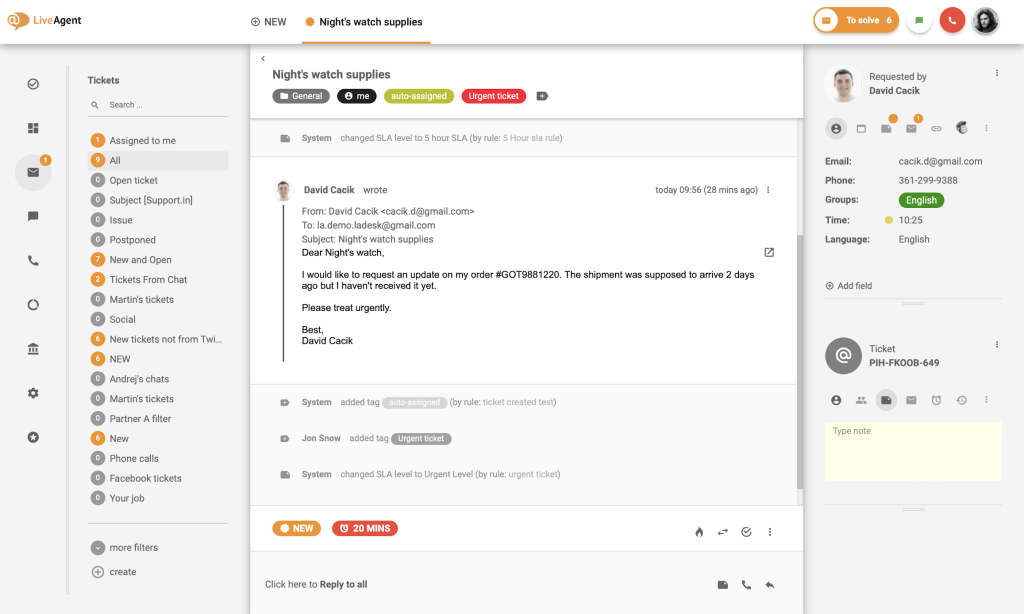
LiveAgent is a customer service platform that began as a live chat tool but has since evolved into a full omnichannel help desk. Its universal inbox brings together tickets, chats, calls, and social messages in one dashboard, so agents don’t have to switch between tools.
What are LiveAgent’s key features?
- Social media: Manage customer messages from Facebook, Instagram, Twitter, Viber, and WhatsApp right inside one unified ticketing dashboard. Unlike Zendesk, where social channels often require separate integrations or paid add-ons, LiveAgent keeps everything connected.
- Advanced live chat: Trigger proactive chats, preview what customers are typing, and escalate chats as needed.
- Automation & ticket routing: Set rules for auto-assigning tickets, merging duplicates, distributing workloads, and applying tags to streamline workflows.
What are the pros of LiveAgent?
- Offers a unified agent view that consolidates ticket history, contact details, and multi-channel interactions into one screen, reducing the need to switch between tabs like in Zendesk.
- Provides full omnichannel support – email, chat, voice, and social – at a flat rate of about $39 per agent per month, avoiding Zendesk’s add-ons and tier-based pricing.
What are the cons of LiveAgent?
- Dated and somewhat cluttered UI, which adds to the learning curve and makes setup feel more complex than modern tools.
- Mobile app performance and analytics customization lag behind competitors, limiting flexibility for on-the-go or data-driven teams.
Pricing:
LiveAgent’s plans start from $9/user/month.
11. Front (Best for shared inboxes and internal collaboration)
Front takes the inbox your team already knows and turns it into a shared space for customer support. It feels just like using email, but with help desk capabilities layered in. What sets Front apart is how naturally it brings collaboration into the inbox, so teams can stay aligned and resolve issues faster without bouncing between tools.

What are Front’s key features?
- Help center: Set up a knowledge base with FAQs and articles so customers can self-serve. You can also connect it directly to Front Chat for seamless support.
- AI add-ons: Use Copilot to draft replies and Smart QA to review conversations for quality insights. These are available as $20/user/month add-ons on all plans, or included in the Enterprise plan.
- Collaborative inbox: Work together in real time with shared drafts, comments, and task assignments – ensuring every customer query gets the right response.
What are Front’s advantages?
- In Front, you can manage all your communication channels in a single inbox, without constant clicking around. Navigation is straightforward, and everything happens in one window. And because of its familiarity, teams can get comfortable with it almost instantly. Zendesk, on the other hand, often requires switching between different modules and comes with a steeper learning curve.
- Provides significantly better product support than Zendesk, with faster responses and real human help across plans.
What are Front’s disadvantages?
- Recent UI updates have led to slowdowns and occasional glitches, causing frustration for some users.
- Certain features and paywalls push teams into higher tiers, which can increase costs faster than expected.
What users have to say about Front:
“I love the labeling feature and the fact that you can add colors and emojis to coordinate emails easily. I’m also a huge fan of the snooze feature and the ease of ability to see archived emails.”
“I could get no useful assistance (at my level, they offer no setup assistance or live help). I attended webinars, watched the online videos, and read the case studies so that I could try to understand what the software could do. Unfortunately, none of this training really explains what level of access you need for the features you want.”
Pricing:
Front’s plans start at $25 per user per month.
Recommended reading
Front Pricing 2026: Plans, Real Costs & What Teams Actually Pay
12. Helpjuice (Best for advanced knowledge base management)
Helpjuice is primarily a knowledge base platform for teams that want to centralize and share knowledge – whether with customers or internally. If your primary goal is to provide customers with a strong self-service option, Helpjuice is far better equipped for the job than Zendesk.

What are Helpjuice’s key features?
- AI-assisted article planning: Use the built-in planner to generate detailed outlines, helping teams stay consistent and publish knowledge base content faster.
- Smart search: Deliver instant answers with AI-powered search that understands context, so customers find the right articles without exact keyword matches.
- Brand customization: Design your knowledge base to look and feel like an extension of your product by customizing colors, layouts, and design elements.
What are Helpjuice’s pros?
- Strong vendor support, with users consistently praising how responsive and hands-on the team is when resolving issues.
- Excellent assistance during customization or feature requests, making setup and ongoing improvements easier.
- Provides deeper knowledge base analytics than Zendesk, including insights into article usage, drop-off points, and unanswered questions to improve self-service content.
What are Helpjuice’s cons?
- Can feel expensive for smaller teams since pricing is designed around higher user counts.
- Focuses primarily on knowledge base management, so it lacks broader help desk or omnichannel capabilities that some teams may need.
Pricing:
Helpjuice’s plans start at $249 per month for up to 30 users.
13. Gorgias (Best for ecommerce customer support)
Gorgias is built with ecommerce in mind. The biggest difference is that support doesn’t sit separately from your store. Agents can see order details, edit them, or issue refunds without leaving the help desk.
This is especially useful if you’re on Shopify or similar platforms, where most support queries are directly tied to orders anyway.

What are Gorgias’s key features?
- Ecommerce integrations: The core of Gorgias is its ecommerce integration. It connects directly with platforms like Shopify and BigCommerce, so agents don’t have to switch tools to check order details or take action.
- Macros and templates: It also supports macros and templates, which help teams handle repetitive queries faster. This becomes important during peak periods when volume spikes.
- Custom dashboards: There’s also a reporting layer through custom dashboards. You can track things like ticket volume, agent performance, and CSAT, although how much you rely on this depends on how deeply you want to analyze support data.
What are Gorgias’s pros?
- Gorgias works well because it is very focused. It is not trying to cover every use case, and that makes it easier to use if you are in ecommerce.
- A lot of the day-to-day tasks feel faster. Agents can respond to customers and take action on orders from the same screen, which reduces back and forth.
- Another thing teams often find useful is the revenue angle. Features like product recommendations or discounts during conversations can directly influence sales, which is not something most help desks are built for.
What are Gorgias’s cons?
- Pricing is one of the bigger trade-offs. Since plans are tied to ticket volume, costs can increase quickly if your store handles a large number of conversations.
- It is also quite specialized. If you are not running an ecommerce business, many of its features may not be relevant, and the tool can feel limited compared to more general platforms.
What users have to say about Gorgias:
“Its integration with our existing tools was seamless, and the customization options mean we can tailor the platform to meet our specific needs.”
“Sometimes it can be slow to load, especially when managing a high volume of tickets.”
Pricing:
Gorgias starts at $50 per month for up to 300 tickets and supports up to 3 users.
14. HubSpot Service Hub (Best for CRM-linked customer support)
HubSpot Service Hub makes the most sense if you’re already in the HubSpot ecosystem. Instead of adding another tool, you’re building on top of what you already use for sales and marketing.
That changes how support works. Conversations, deals, and customer history all sit in the same system, so agents don’t have to piece context together from different tools.

What are HubSpot Service Hub’s key features?
- Customer portal: A big part of Service Hub is the customer portal. Customers can log in, track their tickets, and reply to updates without relying entirely on email threads. It also connects to your knowledge base, so some queries get resolved before they even reach your team.
- Conversation intelligence: There’s also conversation intelligence built into the CRM. Calls can be recorded and analyzed automatically, which helps teams understand patterns without manually reviewing every interaction.
- Customer Success Workspace: Another area HubSpot leans into is customer success. The workspace pulls together things like product usage, feedback, and health scores so teams can spot issues early. This is more useful for companies that manage ongoing customer relationships rather than one-off support queries.
What are HubSpot Service Hub’s pros?
- What stands out is how everything is connected. Support doesn’t operate in isolation. Sales, marketing, and support all work off the same customer record, which makes handoffs smoother.
- It also enables more cross-team workflows. For example, support data can directly inform sales or success teams without needing separate tools or integrations.
- Support quality is generally consistent as well. There’s a lot of documentation, and most teams don’t struggle to find help when they need it.
What are HubSpot Service Hub’s cons?
- Cost can increase quickly as you scale. Many of the more advanced features sit in higher tiers or require bundled HubSpot plans, which can add up.
- It also works best if you are already using HubSpot across your stack. If not, adopting it just for support may feel heavy, since you’re effectively buying into a larger system.
- For smaller teams, the platform can feel like more than what’s needed. There’s a lot built in, and not all of it will be relevant early on.
Pricing:
HubSpot Service Hub offers a free plan. Paid plans start at $15 per user per month.
15. Jira Service Management (Best for IT and engineering teams)
Most people associate Jira with project management, but Jira Service Management is built for support workflows that sit closer to engineering. It’s commonly used by IT teams that need to track incidents, service requests, and internal issues in one place.
If your team already uses Jira or other Atlassian tools, this usually fits in without much friction.

What are Jira Service Management’s key features?
- Knowledge base integration: One of the core pieces is its connection to Confluence. You can turn documentation into a self-service portal, so users can search for answers before raising a ticket.
- Context-rich sidebar: There’s also a context panel that shows past requests and related assets. This is especially useful in IT setups where issues are tied to specific systems or devices.
- Deep Jira integrations: Another important part is how closely it connects with Jira Software. Bugs reported through support can be linked directly to engineering work, so developers and support teams stay aligned without switching tools.
What are Jira Service Management’s advantages?
- It works well for technical teams. The workflows are built around how IT and DevOps teams already operate, so things like incident tracking and change management feel natural.
- The integration with the broader Atlassian ecosystem is also a strong advantage. Support, development, and operations can all work within the same system, which reduces back and forth.
- There’s also a large amount of documentation and community support available. Most issues or edge cases are already discussed somewhere, which helps when teams run into problems.
What are Jira Service Management’s disadvantages?
- The interface can take some getting used to, especially for non-technical teams. It’s not as straightforward as simpler help desk tools.
- Setting up workflows and configurations often requires some level of admin experience. For smaller teams without dedicated resources, this can slow things down.
It’s also more suited to internal support or IT use cases. For customer-facing support teams, it may feel more complex than necessary.
What users have to say about Jira Service Management:
“I especially like how well it integrates with other Atlassian tools – linking tickets to Confluence articles or development issues in Jira Software is seamless.”
“Complex setup and configuration – The initial setup can be intimidating particularly for teams with no prior Jira expertise.The UI and features may be more difficult for non-technical users to understand.”
Pricing:
Jira Service Management offers a free plan. Paid plans start at $19.04 per agent per month.
Why modern support teams are exploring Zendesk alternatives
Before we jump into the list of alternatives, let’s take a look at what’s pushing modern support teams away from Zendesk. From my experience listening to former Zendesk users and reviewing discussions across platforms like Reddit, G2, and LinkedIn, a few consistent themes appear. again and again.
- AI that feels bolted on, not built in – Most AI features in Zendesk are bolt-ons from multiple acquisitions and fail to handle complex requests. Teams don’t set up AI in Zendesk because it’s clunky, takes months of implementation effort, and is hard to maintain. G2’s category summary lists four dislikes: setup that breaks on non-standard workflows, knowledge bases changing too fast to train on, escalations the AI can’t handle alone, a steep learning curve. All four are one problem. The AI handles tickets that look like the documentation and fails the rest, confidently and wrongly.
Here’s what a G2 user had to say about Zendesk AI
- Difficult to set up and manage – Setting up Zendesk requires significant effort and time. Reports indicate that larger teams can take >3 months to fully deploy the platform.
Even after implementation, the platform can be difficult to navigate and learn. Configuring workflows, triggers, and automations often requires technical expertise, which means many organizations end up relying on external consultants or dedicated admins to manage the system.
- Collaboration that feels broken – Collaborating across teams in Zendesk can be hard especially when different teams live in separate Zendesk instances. Moving a ticket from Tier 1 to Tier 2, or from support to billing creates a new ticket without the original context attached. Your team rebuilds the case from scratch, and your customer explains the problem a second time. Here’s how a Zendesk user described his personal experience setting up the platform:
“It took me probably 3 to 4 weeks to learn Zendesk. Then another couple of weeks to meet with the various department leaders to help refine their processes and design workflows. It took me 3 weeks to build the whole thing out in the production environment and test everything. Then we spent a week migrating our tickets over from the old system and training all the agents. We switched over and it launched without a single issue.
That’s just for launching it. I’ve spent the last 8 months adding more functionality and features and implementing new workflows.” [Source: Reddit]
- You have to leave Zendesk to manage Slack conversations – For customer conversations happening over shared customer channels, Zendesk’s slack integration can feel limiting. Agents can’t message customers in a Slack channel without leaving Zendesk, which turns Slack into a second queue with no owner and no SLA.
- Steep, unpredictable pricing – Zendesk’s plans are expensive on their own. For example, the Suite Professional plan costs $115 per user per month. But when you factor in setup and training costs, add-on fees, and other hidden expenses, the total quickly balloons.
For example, your team will require dedicated training to get comfortable with the platform, and Zendesk’s structured training programs, which are priced separately, can run north of $2,000. As I mentioned earlier, many teams also have to bring in external Zendesk specialists to set up workflows like automations, since they can be complex to configure.
On top of that, several high-impact capabilities like advanced AI and 24×7 support are only available as paid add-ons, making it difficult to predict your actual cost upfront.
- Slow, inconsistent product support – Product support is another issue frequently brought up by users. Zendesk doesn’t provide 24×7 support in any of its pricing tiers, including the highest one. Chat support is bot-first, and reaching a human can take time. If your team needs help outside regular business hours, you’ll need to purchase their Premier Support add-on.
This add-on doesn’t have a flat fee. It’s usually priced as a percentage of your annual Zendesk license cost: typically 20–35%. A user also mentioned that there are ‘floor prices’ or a minimum fee you’d have to pay irrespective of your annual contract value. This means smaller teams run the risk of paying significantly more than expected just for timely support.
Even with the Premier Support add-on, the promised response time is ∼1 hour. Check out what a user had to say about her support experience with Zendesk:
“One area that could be improved is the support experience. It can sometimes be difficult to get in touch with a live support agent, and response times can be slower than expected. The automated bot is helpful for basic questions, but it can be challenging when you need to speak with a real person about a more complex issue.
When I do connect with support, the responses often rely on sending help articles rather than working through the issue directly. While the documentation is useful, more hands on troubleshooting would make the experience feel more supportive and efficient.” [Source: G2]
In this guide, I’ve reviewed 15 Zendesk alternatives to see which tools reduce setup effort, are easier for agents to use, and don’t require a full-time admin to manage.
Why Teams Leave Zendesk for an Agentic Customer Service Platform
Not every team that leaves Zendesk moves to another ticketing system. A growing number move to something structurally different: a platform that combines powerful ticketing with AI built in natively. For a large number of tickets, AI Agents can handle the request itself, without handing off the work to your team.
Most AI in this category is bolted on, not built in. Zendesk’s AI capabilities were layered onto a platform originally designed around manual ticket routing, largely through acquisitions over the years. That shows up in how it behaves day to day: AI sits as an additional layer requiring its own setup and its own maintenance, on top of the triggers, macros, and routing logic a team already has to build by hand.
Agentic platforms are built the other way around. Instead of AI assisting a human through a workflow, AI Agents run the workflow itself. They read a request, reason across account history and the knowledge base, take the action the request actually needs, and hand off to a person only when something genuinely requires judgment. When that handoff happens, it’s a relay, not a restart, the support rep walks in already knowing the account, with a drafted response and suggested next steps waiting, not a blank ticket and a customer’s message to decode from scratch.
The gap compounds over time. A platform with AI genuinely built into the resolution loop gets better at the thousandth ticket than the tenth: every correction an agent makes on a draft, and every gap the AI flags in the knowledge base, feeds back into how the next request gets handled. A platform where AI sits beside the workflow instead of inside it doesn’t compound the same way. The team’s real expertise stays locked inside individual agents’ heads instead of building into the system.
This matters most for teams already past the basics. If your team’s real bottleneck is a handful of straightforward FAQs, most tools on this list handle that fine, agentic or not. But for teams handling genuinely complex, multi-step requests, the difference between “AI drafts a reply” and “AI Agents resolve the request end to end, and hand off cleanly when they can’t” is the difference that shows up in the numbers each month:
- Refunds that need policy judgment
- Account issues that touch billing and product both
- Escalations that need context pulled from three different systems
Hiver is built specifically around this model: the agentic omnichannel platform where AI Agents resolve requests from intent to action across every channel, not just suggest what to type next.
How did I evaluate and test these tools?
I’ve been researching and writing about customer support software for some years now. For this guide, I:
- Went through product demos, feature pages, pricing pages, and help documentation for all 15 tools
- Dug through community forums like Reddit and review sites like G2 to understand where Zendesk falls short and where each alternative genuinely delivers
- Cross-referenced pricing and feature claims against each vendor’s own current pricing page rather than relying on older comparison articles
Full disclosure: I work at Hiver and I have evaluated it against the exact same criteria as every other tool here and I’ve been direct about where it falls short.
How to choose the right Zendesk alternative for your team
In the list above I’ve covered 15 tools, and each of them brings something different to the table. Many of them can work well depending on your use case. But even with that, narrowing it down to one tool can still be difficult.
So how do you actually choose? What should you look for? Here are a few things that are worth evaluating.
- Pricing – Start with what you are comfortable spending. Then go a level deeper. Look at what is included in that price and what is not. Many tools charge extra for add-ons like AI, additional channels, or onboarding. The total cost is often higher than it first appears.
- Reviews and ratings – User reviews can give you a clearer picture than feature lists. Look for patterns. If multiple users are pointing out the same issue, it’s likely valid. Focus on comments around usability, reliability, and support quality rather than just the overall rating. Platforms like G2, Capterra, Reddit, and even LinkedIn are good platforms to vet the tools.
- Scalability – Think about your team six to twelve months from now. The tool should be able to handle more tickets, more agents, and slightly more complex workflows without forcing you to switch later. You don’t want to have to migrate systems again as that will be an unnecessary hassle for your team.
- Support and onboarding – The initial setup phase can shape your entire experience with the tool. Good onboarding and accessible support make a noticeable difference. If help is hard to reach, even simple issues can take longer to resolve. If there’s ever a major issue like a downtime, you don’t want to be stuck without any quick means to get help.
- Internal team needs – Every team works differently. Some need structured workflows and detailed reporting. Others care more about speed and ease of use. The tool should align with how your team already operates, instead of forcing you to adjust your process.
- Knowledge base and self-service – A well-maintained knowledge base reduces repetitive queries and therefore overall volume. It also gives customers a way to find answers on their own without needing to contact support at all. Look for a tool that makes it easy to create and update articles without too much effort.
- Omnichannel support – If you are managing support across multiple channels, it helps to have everything in one place. This reduces context switching and keeps conversations connected. While most tools I’ve mentioned do offer omnichannel support, some like Gorgias and Helpjuice are more catered to specific use cases so look out for that.
- Personalized support capabilities – Support today is not just about closing tickets. It is about responding with context. The tool should give your team access to customer history and relevant details so responses are more accurate and useful and feel personal.
Elevate your support quality with the right Zendesk alternative
Zendesk has been around for a long time and was one of the earliest help desk platforms to gain traction. But in trying to keep pace with growing customer needs and new technology, the product has become bloated.
Over the years, Zendesk has stitched together acquisitions and add-ons, creating a patchwork of features that feel clunky and fragmented.
Today, as you can see from the list above, there are modern, purpose-built tools that are sleeker, more intuitive, and better suited for the way teams work.
If Zendesk’s AI feels bolted on rather than built in, Hiver is the agentic alternative. AI Agents resolve requests end to end across every channel, with cross-team collaboration and customer intelligence built into the same platform, not stitched on top of it. Teams get all of that at a lower, more predictable cost than most traditional platforms.
If you want to check out Hiver:
Frequently Asked Questions (FAQs)
1. What are some good AI alternatives for Zendesk?
Some of the most complete AI-powered Zendesk alternatives are Hiver, Freshdesk, Intercom, Zoho Desk, and Help Scout. These tools offer all of the useful capabilities teams would need such as ticket routing, automation, chatbots, analytics, and AI capabilities. They’re also easier to set up, use, and more cost effective.
2. What should I prioritize when choosing a Zendesk alternative?
When choosing a Zendesk alternative, apart from the core features you want (such as automation, AI, omnichannel support, and detailed reporting) you’ll want to prioritize things like ease of use, affordability and pricing transparency, and the quality of support they offer,
3. What about pricing differences between Zendesk alternatives?
All of the alternatives listed above are generally more affordable and flexible in pricing. Among them there are some on the lower end like LiveAgent ($9/user/month) and Spiceworks ($5/user/month), but they’re a little limited in what they offer. There are also some more complete alternatives like Hiver or Front or Intercom which cost around $25/user/month.
4. Do Zendesk alternatives offer free options?
Yes, several Zendesk alternatives offer free plans or free trials. Tools like Hiver, Freshdesk, and Zoho Desk, all provide free forever plans, while the others like Intercom or Tidio offer time-limited trials so teams can test features before committing.
5. Which Zendesk alternative is best for my business?
You can narrow down the best Zendesk alternative from the above list based on what the size of your team is, the scale at which you operate, which capabilities you need like automations, AI, reporting, and finally how much you’re willing to invest in your support platform.