





TLDR
- Hiver: Unlimited users, email ticketing and knowledge base.
- HubSpot: CRM-native, tickets and live chat in one free workspace
- Spiceworks: Built for IT teams, ad-supported, Power BI reporting
- Zoho Desk: 3-agent cap, email and web forms, no SLAs
- Freshdesk: Channels include email, social, knowledge base. Expires after 6 months.
A help desk is one of the simplest ways to keep customer support organized. It brings structure to incoming queries, gives you visibility into every conversation, and helps your team respond on time even when volumes spike.
Many of these tools also automate repetitive work with or without AI so your team isn’t spending hours on tasks that don’t need manual effort.
The challenge is cost. Not every small business or early-stage team can commit to a full paid help desk. That’s where they start evaluating free help desk tools.
For this guide, I evaluated the free versions of top 11 help desk ticketing tools in a detailed way. I’ve also provided 10 bonus options.
How do the top free help desk tools stack up in 2026?
| Platform | Best fit for | Free user limit | Core perception (Reddit/reviews/social) | G2 Rating | Pricing (Paid) |
|---|---|---|---|---|---|
| Hiver | Managing customer emails through shared inboxes, with clear ownership and internal collaboration | Unlimited | “Zero learning curve; doesn’t feel like a heavy or clunky help desk.” | 4.6/5 | Starts at $25/user/month |
| HubSpot Service Hub | Handling customer support inside the HubSpot CRM ecosystem | Unlimited | “Easy CRM integration; good for email & chat” | 4.4/5 | Starts at $9/user/month |
| Spiceworks | Managing internal IT help desk requests for small teams | Unlimited | “Reliable help desk; ad-supported but truly free for IT teams.” | 4.3/5 | Starts at $5/seat/month |
| osTicket | Running a self-hosted help desk with full control over ticket workflows | Unlimited | “If you can host it, it’s the best total-control tool.” | 4.4/5 | Free |
| HelpDeskZ | Operating a lightweight, self-hosted help desk for basic ticket handling | Unlimited | “Super lightweight; no-frills ticketing for developers.” | 4.1/5 | Free |
| ProProfs Help Desk | Small teams wanting a simple email help desk | Up to 5 users | “Excellent for 1-2 people; feels like an intuitive shared inbox.” | 4.5/5 | Starts at $19.99/user/month |
| Zoho Desk | Automating ticket workflows using rule-based and AI-assisted actions | Up to 3 agents | “Solid features for $0; UI can feel a bit dated but reliable.” | 4.4/5 | Starts at $14/user/month |
| Jira Service Management | Managing internal support requests and changes that require multi-step approvals | Up to 3 agents | “Powerful for IT; powerful but complex to set up.” | 4.3/5 | Starts at $20/user/month |
| Desk 365 | Managing internal support and service requests directly from Microsoft 365 | Up to 3 agents | “Clean and simple; the best choice for MS teams-based work.” | 4.8/5 | Starts at $12/user/month |
| Freshdesk | Handling multi-channel customer support with basic automation and ticket tracking | Up to 2 agents | “Intuitive interface; very fast to get up and running; limited free features” | 4.4/5 | Starts at $15/user/month |
| LiveAgent | Managing real-time customer support across email, live chat, and call center channels | 1 agent | “Excellent chat widget; the 7-day ticket history is the main limit.” | 4.5/5 | Starts at $15/user/month |
How Did We Evaluate These Help Desk Tools?
Every tool in this list was evaluated using the same criteria. We reviewed free plan details directly from each product’s pricing page to understand exactly what’s included and what’s gated behind paid tiers. We read through 100+ user reviews across G2, Capterra, and Reddit to understand how real teams experience these tools day to day, where the free plans fall short, and what typically pushes teams to upgrade. We also looked at onboarding documentation and setup guides to assess how much work is involved in getting started.
No single tool was ranked on any one factor. We weighed user limit, channel availability, collaboration features, automation, and how honestly each tool’s free plan holds up against what it advertises.
Table of Contents
- How do the top free help desk tools stack up in 2026?
- 11 free help desk software worth considering in 2026
- 10 bonus free help desk tools to keep on your radar
- How do I choose the right free help desk for my business?
- What are the limitations of free help desk software?
- 1. Do free help desk plans limit the number of agents or users?
- 2. What ticketing features are missing from free help desk plans?
- 3. Do free help desk plans include automation?
- 4. Can you get reporting and analytics on a free help desk plan?
- 5. Do free help desk tools Include AI Features?
- 7. How many integrations do free help desk plans support?
- 8. Do free help desk plans include SLAs and vendor support?
- Why do teams prefer Hiver when they want a free help desk?
- Frequently asked questions
11 free help desk software worth considering in 2026
I shortlisted these 11 tools after digging into real user reviews, trying a few of them personally, and comparing what each one truly offers in its free plan. Here’s a quick comparison:
1. Hiver
Ideal for: Companies that are setting up their customer service function but don’t want to compromise on support channels and collaboration features.
Hiver is an AI-powered customer service platform that helps teams manage customer emails through shared inboxes, with clear ownership, internal collaboration, and a knowledge base built in. The free plan is focused on email support, which is where most support teams start.
face.
What also stands out is how quickly teams get up and running. There’s no complex onboarding, no migration headache, and agents don’t need training to start handling tickets from day one.

Hiver offers two products. Hiver in Gmail is built for teams that run support out of Gmail and want to turn their inbox into a proper helpdesk. Shared inboxes, AI, ticket tracking, and collaboration all sit inside Gmail itself, so agents never have to switch tools or learn a new interface. Hiver Omni is a standalone platform for teams running more complex support operations across multiple channels, workflows, and departments. The free plan is available on both.
The free plan includes email ticketing, shared inboxes for addresses like support@, billing@, or info@, a customer-facing knowledge base, Slack integration, and collaboration features. Most free plans either cap the number of agents or strip out anything beyond basic ticketing. Hiver’s free plan skips the agent limit entirely and keeps the collaboration layer intact.
More than 10,000 teams, including Flexport, Harvard University, Upwork, and Epic Games, use Hiver to manage their support operations.
Key features of Hiver:
- Turn incoming customer emails into trackable tickets so your team always knows what needs attention and who’s handling what.
- Use notes, @mentions, and shared drafts to discuss customer issues internally, ask for help, and align on responses before they go out.
- Create custom views to sort and filter conversations by priority, category, or status.
- With the Out-of-office feature, mark yourself unavailable so conversations don’t get assigned to you when you’re offline or away.
- Publish help articles customers can access anytime, reducing repetitive questions and giving them a self-service option.
- Receive Slack alerts for new tickets, assignments, mentions, and updates so the team stays aligned without switching between tools.
- A strong AI feature set (AI Agents, AI Copilot, AI QA) is available if you decide to move to a paid plan later.
Hiver Pros (free plan):
- Unlimited users means no per-agent cost as your team grows.
- Fast setup with minimal configuration and no training required.
- 24/7 email and live chat support included, even on the free plan.
- Collaboration features like notes, assignments, and shared drafts are included, not gated.
- Knowledge base included, so you can start building self-service content without upgrading.
Hiver Cons (free plan):
- No automations included.
- No analytics or performance reports.
Limited to one shared inbox. Teams managing multiple support addresses will need to upgrade. See pricing plans.
2. HubSpot Service Hub
Ideal for: Early-stage teams that want basic ticketing, email support, and live chat built directly into their CRM timeline.
HubSpot Service Hub is the support layer built directly into HubSpot’s CRM. The free plan gives you ticketing, a shared inbox, live chat, and basic AI routing.
Every ticket automatically displays the customer’s full CRM record — past emails, form submissions, notes, and deal history — which makes follow-ups faster and more accurate.
Its free plan bundles 30+ CRM and support tools, so you can track tickets and customer data in one place without paying for extras.

Key features of HubSpot Service Hub:
- Shared inbox for email + live chat, though both include HubSpot branding.
- AI chatbot routing, useful for simple triage.
- Email tracking + notifications capped at 200 per month.
- Templates and meeting scheduling, with limits (3 email templates + 1 personal booking link).
- Basic reporting widgets.
HubSpot Service Hub Pros (free plan):
- Most free help desk tools require you to manage chat and email separately. HubSpot funnels everything into one queue, which keeps the workflow clean for small teams that don’t want multiple tabs to monitor.
- Any HubSpot form (newsletter, signup, contact form) can instantly create a ticket. This is something other free help desks rarely offer without paid automation.
- Most free help desks cap contacts or limit visibility. HubSpot lets you store and view an unlimited number of customers.
HubSpot Service Hub Cons (free plan):
- Emails, chat, templates, and meeting links carry HubSpot branding, which limits customization.
- No knowledge base on the free plan.
- Reporting is extremely limited, and advanced automation (workflows) is locked behind paid tiers.
- Support is community-only, with no direct email, chat, or phone support for free users.
Recommended reading
3. Spiceworks
Ideal for: Small teams managing internal IT help desk requests that want a completely free, cloud-based help desk.
Spiceworks is one of the few help desks that’s genuinely free. You can add unlimited users and there’s no cap on the number of tickets you can handle.
The platform comes with automated ticket sorting, customizable queues, and reporting that connects with Power BI for deeper insights.
However, the interface isn’t as clean or modern as other tools on this list.
Note: Ads can appear in agent screens, customer emails, and even exported PDFs.

Key features of Spiceworks:
- Automated ticket sorting and assignment based on priority and category.
- Custom ticket queues for different teams, issues, or urgency levels.
- Reporting + Power BI integration for deeper ticket analysis.
- Task organization and ticket categorization for cleaner workflows.
- Knowledge center, email support, and forums included for free.
Spiceworks Pros (free plan):
- Completely free with no usage limits.
- Huge user community (8M+ IT pros) available for troubleshooting.
- Good for basic IT help desk workflows.
Spiceworks Cons (free plan):
- The platform shows ads everywhere.
- Old-school user interface.
- Search filters can be frustrating to configure.
4. osTicket
Ideal for: Small to mid-sized teams that want a powerful, cost-effective help desk they can fully customize.
osTicket is a popular open-source ticketing platform that lets you customize every part of your support operation.
The platform pulls customer requests from email, web forms, and phone calls into a simple, web-based dashboard that teams can manage with ease. Here, you can customize everything — workflows, forms, automation rules, UI elements, and even backend logic.
The free version is strong on core functionality but requires some technical expertise to get it up and running. Also, keep in mind that you’ll need to handle installation, hosting, updates, and troubleshooting yourself.
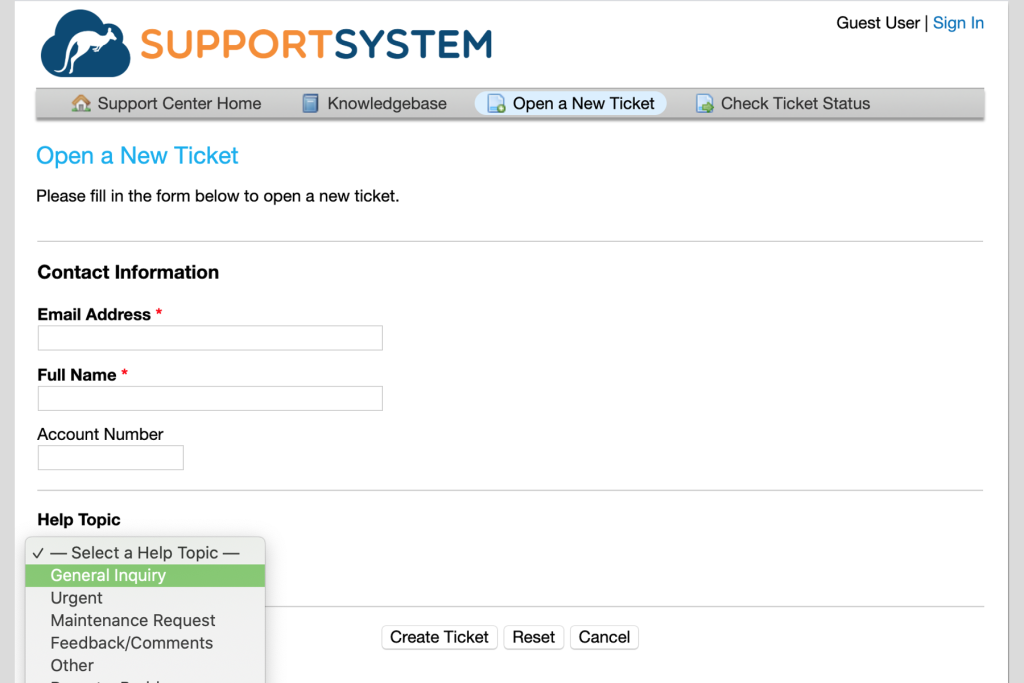
Key features of osTicket:
- Create, track, and organize tickets with clear status and priority controls.
- Capture specific data and automate routing based on categories, keywords, or rules.
- Build and publish guides, FAQs, and how-to articles for customers and agents.
- Prevent duplicate responses by showing when another agent is viewing or replying to the same ticket.
- Community-powered support: Access a forum of developers and users (no official support in the free version).
osTicket Pros (free plan):
- Completely free and open-source, giving full control over customization and deployment.
- When someone emails your support address for the first time, osTicket automatically creates a user for them. Any future emails they send get linked to that same profile; no manual setup needed.
- A large community of developers and users can help troubleshoot issues, share fixes, and offer configuration advice.
osTicket Cons (free plan):
- The UI looks outdated and customizing it requires editing PHP files.
- Built-in reports and graphs are basic; custom reports require technical skills or paid versions.
5. HelpDeskZ
Ideal for: Small businesses and IT teams that prefer full control over data, customization, and server infrastructure.
HelpDeskZ is a free, open-source help desk built with PHP. Because it’s self-hosted, you decide where it lives, how it performs, and how deeply you want to customize it (from the interface to the ticket forms to the backend behavior).
You can add unlimited agents, build out your entire knowledge base, and manage tickets end-to-end without worrying about seat restrictions or monthly bills.
Important: HelpDeskZ runs on PHP 7.x+, so hosting requirements are minimal and compatible with most shared providers.

Key features of HelpDeskZ:
- Knowledge base + FAQ builder to help customers self-resolve common issues.
- Self-hosted environment, giving you full access to code, database, and server configuration.
- Customizable UI and workflows, ideal for teams that want to tailor every part of the support experience.
- Community-driven support, with forums for troubleshooting and shared fixes.
- Basic ticket management, including priorities, assignments, and tracking.
HelpDeskZ Pros (free plan):
- Free and fully open-source, making it a strong option for teams on tight budgets.
- Unlimited staff accounts, which is rare for free help desk tools.
- Easy to integrate into existing websites, since it’s PHP-based and lightweight.
HelpDeskZ Cons (free plan):
- No official support team, so you rely on community forums for help.
- Lacks advanced features like automation, custom analytics, or performance dashboards.
- Performance can depend on your server setup
6. ProProfs Help Desk
Ideal for: Ideal for freelancers, solo founders, and single-agent support environments.
ProProfs Help Desk is a simple, cloud-based ticketing tool that has a very interesting free plan. Instead of giving you a stripped version with locked features, it lets you use all premium capabilities, like automation, canned responses, analytics, ticket routing, SLAs, and more.
But there’s one major catch: the free plan supports only one user.

Key features of ProProfs Help Desk:
- Unlimited tickets and customer interactions with no volume caps.
- Access to all premium features, including automation, workflows, and canned responses.
- Analytics and reporting tools to understand trends and performance.
- Ability to manage inboxes like info@ and support@.
ProProfs Help Desk Pros (free plan):
- Cloud-based platform. No setup, hosting, or technical configuration needed.
- Pairs well with other ProProfs tools like chat, surveys, and training if you want an all-in-one ecosystem later.
- Helpful for process testing. You can build workflows, macros, and rules before adding more agents.
ProProfs Help Desk Cons (free plan):
- Handling all incoming tickets as the sole user can get overwhelming.
- Lack of multi-agent visibility (queues, assignment load, activity) since free plan is strictly single-user.
7. Zoho Desk
Ideal for: Ideal for small teams that want email-based ticketing with basic automations.
Zoho Desk is Zoho’s flagship support platform, now positioned as an agentic-AI powered system for managing customer queries.
The platform leans on its AI assistant, Zia, to guide agents with ticket suggestions, sentiment cues, and automations that make support work easier.
Their free plan comes with three user licenses, which is a comfortable starting point for any small team. Getting started is fairly easy;
I added a few basic details (like name, email, contact), verified the account, and the dashboard opened up without any fuss.
Once you’re inside, Zoho Desk neatly pulls your customer emails into one place and gives you a clean timeline to work through.

Key features of Zoho Desk:
- Omnichannel basics: 1 email-based support address, a help center, and web forms for capturing requests.
- Two macros to automate repetitive tasks (like tagging, status changes, or assignment updates).
- Private knowledge base for internal documentation and agent collaboration.
- Zoho Desk Radar app to monitor ticket traffic, trends, and workloads on mobile.
- Multilingual support in 9 languages.
- Email support which is available 24/5.
Zoho Desk Pros (free plan):
- Users say the free plan is more powerful than managing support from Gmail or Outlook.
- Works well within Zoho’s ecosystem. Great if you plan to adopt CRM, Projects, or Zoho One later.
- Easy to use for agents who are new to help desk tools.
Zoho Desk Cons (free plan):
- The free plan is too limited for growing teams. Essential features like contact import, advanced automation, and SLAs are locked.
- No public knowledge base on the free tier. You can create internal articles, but nothing customer-facing.
- Very little customization – layouts, views, reporting, and dashboards are restricted on the free plan, so you can’t tailor the workspace much.
Recommended reading
8. Jira Service Management
Ideal for: Teams that already use Jira and want a free help desk that connects engineering, IT, and internal service processes.
Jira Service Management is Atlassian’s support platform that helps businesses handle both customer and internal requests in a structured way.
The free plan lets you manage up to 10 agents, create unlimited projects, and track requests through different views like boards, timelines, and backlogs.
You can turn a ticket into a task, link it directly to engineering work, and create up to 100 automations per month.
If your team already uses Jira, this is one of the easiest “free” help desk setups to start with.

Key features of Jira Service Management:
- Multiple work views such as Backlog, List, Board, Timeline, Calendar, and Summary to monitor requests.
- 100 automation rules per month per site, ideal for routing, notifications, tagging, other repetitive tasks.
- Basic reports and dashboards to track request volume, workload, and progress (though customization is limited).
- 2 GB of storage, enough for small teams but limited for heavy file usage.
- Access to the Atlassian Community, which genuinely helps troubleshoot issues and workflows faster than most vendor support channels.
Jira Service Management Pros (free plan):
- Excellent for technical teams. Users love how easily they can link support tickets to Jira issues, dev tasks, or bug reports.
- Multiple project views help teams visualize work the way they prefer, from agile boards to timelines.
Jira Service Management Cons (free plan):
- Reporting feels clunky. Many users mention that customizing dashboards or pulling the exact metrics they need takes effort.
- Free plan email notifications are capped at 100/day, which can become restrictive as ticket volume grows.
- No built-in knowledge base. You must integrate Confluence, which is a paid tool.
9. Desk 365
Ideal for: Small teams (up to 3 agents) that work heavily inside Microsoft Teams and want a help desk that fits into their existing workflow.
Desk365 is a budget-friendly help desk built for Microsoft-centric teams. That’s because it sits right inside Microsoft Teams, allowing users to create, update, assign, and collaborate on tickets without leaving their workspace.
As part of the free plan, you get multi-channel ticketing, SLAs, workflow automation, a shared knowledge base, and Microsoft SSO.
Another advantage: Desk365 offers HIPAA and GDPR compliance even on the free plan, which is rare among free help desk tools.

Key features of Desk 365:
- Manage tickets from multiple channels, including Microsoft Teams, email, web forms, and support portals.
- Automate routine tasks like assigning tickets to specific agents, updating statuses, or tagging issues.
- Build and maintain a repository of solution articles for both agents and customers.
- Set and track service level agreements to ensure timely responses and resolutions.
- Seamless Microsoft Single Sign-On (SSO) support for secure, one-click access.
Desk 365 Pros (free plan):
- Stronger free-plan inclusions than most competitors, especially with SLAs and automation.
- Focus on security is strong.
- Straightforward onboarding since the platform works inside Microsoft Teams.
Desk 365 Cons (free plan):
- Hard limit of 50 tickets per month.
- No custom ticket fields, forms, roles, or advanced reporting tools.
10. Freshdesk
Ideal for: Very small teams and early-stage startups that need a structured ticketing system for 1-2 agents.
Freshdesk is a collaborative, multi-channel platform that helps teams manage customer queries with structure and clear ownership.
Previously known as Sprout, its free plan gives businesses access to 35+ core features. That includes email and social ticketing, basic automation, collaboration tools, and ticket trend insights. The plan supports up to 2 agents, and serves as an entry point for teams looking to experience Freshdesk.
Important: The free plan expires after 6 months.
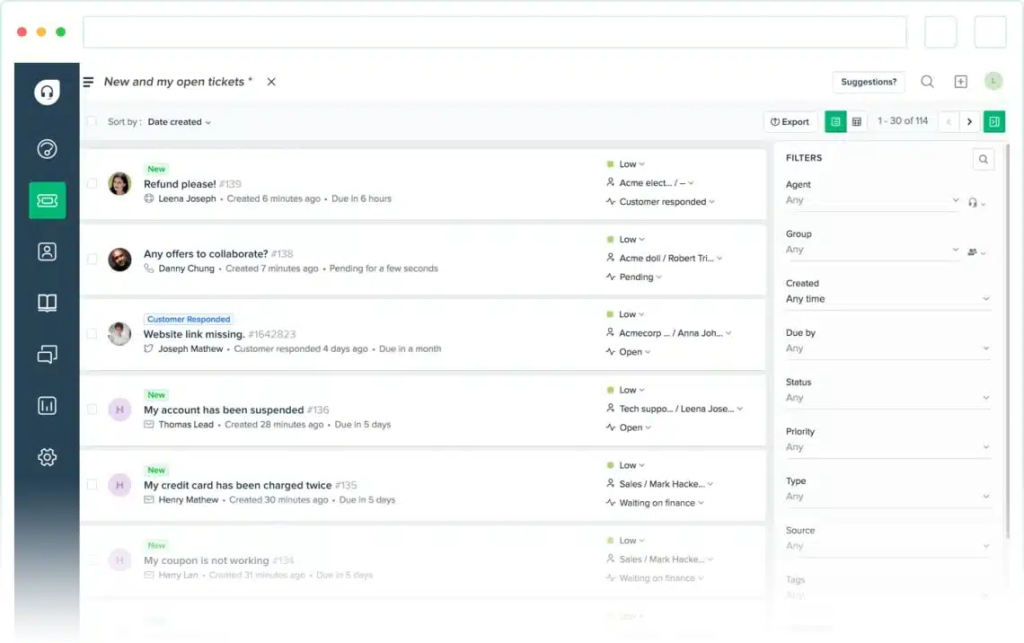
Key features of Freshdesk:
- Integrated email + social ticketing to manage queries from multiple channels.
- Assign tickets automatically by creating rules.
- Ticket merging, notifications, exporting, and priority/status controls.
- Shared canned responses, internal notes, tags, to-dos, and dynamic placeholders.
- Private knowledge base for internal documentation.
- Default dashboard + ticket trend reports (no custom reporting).
- 24×5 email support from Freshdesk.
Freshdesk Pros (free plan):
- Email ticketing, merging, exporting, and status controls cover everything a small team needs to stay organized.
- Default reports give you enough visibility into ticket volume.
Freshdesk Cons (free plan):
- Strict limit on number of users: 2
- The free plan expires after 6 months.
- Automation is limited. No round-robin, no SLA workflows, no skill-based routing.
- Freshdesk’s AI capabilities (including Freddy AI or Thank You Detector) are not included.
Recommended reading
11. LiveAgent
Ideal for: Early-stage support teams that need a basic multi-channel help desk with unlimited agents, a customer portal, and live chat.
LiveAgent is a full-fledged help desk that brings email, chat, and portal-based support into one workspace.
The free plan gives you unlimited agents, two email accounts for ticketing, a customer portal with a forum, and one live chat channel. You also get essential security controls like restricted access, password rules, 2FA, and HTTPS.
Note: Ticket history is limited to 7 days. That means older conversations disappear from your view unless you upgrade.

Key features of LiveAgent:
- Basic ticketing workflow for handling email and chat queries.
- Unlimited agents; add as many team members as needed at no cost.
- Two email accounts for tickets and one for live chat.
- Customer portal + community forum for basic self-service and user discussions.
LiveAgent Pros (free plan):
- The free plan holds up well for low to moderate ticket volume
- The UI is straightforward.
LiveAgent Cons (free plan):
- No reporting or analytics, which limits visibility into trends and agent performance.
- No social media or voice call integrations, making the free plan limited for multi-channel support.
- Ticket history is limited to 7 days, which is restrictive for any team handling recurring or long-term issues.
Recommended reading
10 bonus free help desk tools to keep on your radar
Here are 10 additional free help desk options with quick snapshots of what they offer. Helpful if you want to widen your research without going into full reviews.
- Zammad: Open-source help desk with email, chat, and phone integration. Comes with a clean interface, and fast, advanced search. Supports groups, roles, and dashboards without licensing fees.
- UVdesk: Self-hosted help desk with email-to-ticket conversion, knowledge base tools, and multi-brand support. Built around Symfony + Backbone.js, giving developers flexibility to extend it.
- ZOHO Assist: While primarily a remote support tool, it includes session-based ticket handling and technician management. Helpful for teams managing customer issues that require remote troubleshooting.
- Odoo Helpdesk: Part of the open-source Odoo suite; includes email ticketing, assignments, SLA tracking, and canned responses. Useful when paired with Odoo CRM or website apps.
- Help Scout: An easy-to-use customer service platform with a free plan for up to five users, including one shared inbox, one Docs site, and support for up to 100 contacts per month.
- Request Tracker (RT): A robust open-source ticketing system widely used in universities and government organizations. Email-driven workflows, custom queues, dashboards, and extensive configuration options.
- Liberum Help Desk: Windows-based help desk tool for internal IT support. Includes ticket assignment, AD authentication, and simple reporting.
- FreeScout: A lightweight, self-hosted help desk that mirrors the core experience of email-based ticketing systems. Supports modules for chat, CRM-style insights, and collaboration.
- Helpy: Self-hosted platform that provides ticketing, multilingual knowledge bases, communities, and customer threads. Supports API integrations and theme customization.
- YetiForce: An advanced CRM with a built-in help desk module offering ticketing, SLAs, and detailed workflow automation.
How do I choose the right free help desk for my business?
Here’s a step-by-step approach:
1. Understand who will use it
Ask yourself:
- Is this for customer support
- Or internal IT/operations
- Or both?
Some tools (like Jira Service Management) are built for internal requests, while others (like Hiver or Freshdesk) are better for customer support.
2. Check how many agents you need
Free plans often limit the number of support agents who can use the tool.
- Small team (1–3 agents) → Most free plans work.
- Larger support team → Look for tools with a higher limit on free seats or easier upgrade paths.
3. Look at the channels you need
Decide where your customers reach out from:
- Live chat
- Phone
- Social/WhatsApp
Not all free help desks support all channels. Pick one that offers channels where your customers reach out. For instance, Hiver includes email ticketing, live chat, and a knowledge base even on its free plan.
4. Consider ease-of-use
Some tools are ready to use in minutes (like Hiver, Freshdesk). Others require installation, hosting, or admin setup (like osTicket, UVDesk). You can also check review sites like G2, Caterra, Reddit, to get authentic user feedback about each tool.
5. See what features you’re really getting
Free plans vary a lot. Check whether they include:
- Ticket automation (assigning, tagging)
- Knowledge base
- Reporting and dashboards
- SLA tracking
- Integrations (CRM, email, calendar)
Make sure the free plan includes features you actually need to run support. For instance, if you need a knowledge base, tools like Zoho Desk and Freshdesk allow you to build a public help center for free.
6. Consider integrations
Some help desks connect easily with tools you already use (CRM, communication tools, analytics). If this matters, prioritize tools with integrations, not just features.
For example:
- Hiver offers an integration with Slack, in the free plan
- HubSpot Service Hub works well if you already use the HubSpot CRM
7. Check upgrade paths
A free plan is great to start, but what happens as your team scales? Some free help desks, like Hiver and Zoho Desk, allow you to:
- Add more agents without losing data or changing how you work
- Unlock features (like automation, reporting, or multi-channel support) by upgrading within the same system
What are the limitations of free help desk software?
Free help desk tools offer a good starting point for small customer support teams. But, most come with trade-offs that become clear as ticket volume or team size grows.
1. Do free help desk plans limit the number of agents or users?
Most free plans restrict how many people or conversations you can handle.
For example, Zoho Desk’s free plan is capped at three agents, while Freshdesk limits teams to two agents. HubSpot Service Hub allows unlimited contacts but restricts teams to just one shared inbox.
2. What ticketing features are missing from free help desk plans?
Free plans usually cover simple email-to-ticket workflows and do not offer advanced features. Tools like LiveAgent and HelpDeskZ support basic ticket handling, but features such as SLAs, escalation rules, or priority-based routing require an upgrade.
3. Do free help desk plans include automation?
Automation is one of the main functionalities restricted on free tiers.
For instance, Jira Service Management allows up to 100 automation rules per month on its free plan, while Zoho Desk limits teams to just two macros (templates).
4. Can you get reporting and analytics on a free help desk plan?
Free plans of help desks often provide extremely basic reporting. It’s usually just ticket volume.
In tools like Freshdesk and LiveAgent, advanced reporting, which offers insight into agent performance, response trends, and SLAs, is locked behind paid plans. This makes it harder to spot issues early as support volume increases.
5. Do free help desk tools Include AI Features?
While many tools mention AI, free plans rarely include these capabilities.
For example, HubSpot Service Hub offers basic AI chatbot routing, but more meaningful AI-driven workflows sit behind paid tiers.
7. How many integrations do free help desk plans support?
Free plans usually come with integration limits. HubSpot Service Hub is ideal for teams already on HubSpot, while Desk365 is built around Microsoft Teams. If your workflow spans multiple tools, these limitations show up quickly.
8. Do free help desk plans include SLAs and vendor support?
Vendor support is usually minimal on free plans. Most tools, including Freshdesk, Zoho Desk, and LiveAgent, rely on community support or limited email assistance for free users.
Why do teams prefer Hiver when they want a free help desk?
The best way to see what works for your team is to try a help desk in your real support workflow. Most free plans don’t lock you into long-term commitments, so you can test one that meets your basic requirements for a couple of weeks.
You’ll quickly learn where a tool holds up and where it starts to feel limiting.
Hiver is a good starting point if you want a free help desk that’s quick to set up and easy to use. Most teams can get started in under 15 minutes, without complex configuration or technical setup.
👉 Book a free demo
Frequently asked questions
1. What is a help desk solution?
A help desk solution is a system that helps teams manage customer conversations in a structured way. Instead of handling emails, chats, and requests across scattered tools, everything comes into one place as tickets. It helps you track who’s handling what, collaborate internally, avoid missed responses, and understand how your team is performing over time.
2. How can I create a help desk software for free?
You can create a free help desk by signing up for a platform that offers a forever-free plan. Tools like Hiver, Zoho Desk, HubSpot Service Hub, Freshdesk, and Desk365 let you manage tickets, assign conversations, and track issues without paying anything upfront.
Most of them support email-to-ticket conversion, basic automation, and shared inboxes. If you prefer more control and don’t mind some technical setup, open-source options like osTicket or Zammad let you host your own help desk entirely free.
3. Is Zendesk free to use?
No. Zendesk does not offer a free plan (yet). They provide only a 14-day free trial, after which you must upgrade to a paid plan to continue using their ticketing system. This makes Zendesk less suitable for early-stage teams or small businesses trying to keep costs low.
4. What’s the easiest free helpdesk to set up?
If you want zero setup hassle, Hiver and Freshdesk are the easiest to get started with.
👉Hiver is a modern, AI customer service platform that brings email, chat, voice and other channels into one clean interface. Set up in 15 minutes, and extremely intuitive interface.
👉Freshdesk has a straightforward onboarding flow: sign up, connect your support email, and you’re ready to take tickets.
If you prefer a self-hosted option and don’t mind some technical work, osTicket is fairly simple to install compared to other open-source tools, but you’ll still need basic server knowledge.
5. Are there any hidden costs with free help desk software?
The software itself may be free, but there can be indirect costs:
1. User limits: Many free plans restrict the number of agents (e.g., Zoho Desk allows only 3).
2. Branding: Some tools add their logo to your emails or chats; removing it often requires a paid plan.
3. Feature caps: Automations, reporting, SLAs, and integrations are commonly locked behind higher tiers.
4. Storage limits: Free tiers may cap file uploads or attachment storage.
5. Support limitations: Free users often get community-only support, not live or email support.
Nothing is “truly unlimited,” so review what’s included before committing.
6. What is the difference between a help desk and a ticketing system?
A ticketing system is one part of a help desk.
1. Ticketing system: Focuses on capturing, organizing, assigning, and tracking customer issues. It’s the workflow engine that turns messages into tickets.
2. Help desk: Includes the ticketing system plus additional features like a knowledge base, automations, reporting, SLAs, AI tools, and customer communication channels.
7. Which free help desk software offers unlimited agents and tickets?
Some free help desk tools do not cap the number of agents or tickets you can handle. For instance, Hiver, HubSpot Service Hub, Spiceworks, osTicket, and HelpDeskZ all offer free plans that allow unlimited agents and unlimited tickets.
8. Are there any free ticketing systems available for small teams or startups?
Yes, several free ticketing systems work well for small teams and early-stage startups. Tools like Hiver and Help Scout are commonly used by small teams to handle basic customer support operations without upfront cost.
9. When should I move from a free to a paid help desk?
You’ll feel the need to upgrade when things stop being easy to manage manually. If tickets are piling up, responses are getting delayed, or your team is relying on Slack, CCs, and spreadsheets to stay aligned, a free tool has likely reached its limit. The shift usually happens when you need automation, clearer ownership, better reporting, and the ability to handle multiple channels without losing context.








