




Quick summary
- Zendesk AI agents can answer customer questions and resolve requests across messaging, email, and voice.
- They come with every Zendesk Suite and Support plan. Once you use the AI allowance included with your plan, you pay for additional resolutions.
- We think Zendesk is a strong option for teams that already use its helpdesk and want to automate more of their support work. But configuring and maintaining its AI agents at scale may require additional expertise. You’ll also need to account for separate costs if you want the full range of AI assistance for your support reps.
Why listen to us?
We’ve spent more than a decade building Hiver, and more than 10,000 teams use it today. That has given us a close look at what actually goes into resolving customer issues, especially when the work stretches across several tools and teams.
We’ve seen how much time support reps spend looking for context, checking different systems, coordinating with colleagues, and taking actions outside the helpdesk. That’s also the lens we used to review Zendesk’s AI agents: how much of that work can the AI actually take on?
Bynder is a good example. Its customer success managers used to move between Zendesk, Gmail, and Salesforce to help a single customer. Since moving to Hiver, the team saves 198 hours and runs more than 2,500 automated actions every month.

What are Zendesk AI agents?
Zendesk AI agents are AI agents that talk directly with customers and try to resolve their requests without involving a support rep.
They can answer questions using information from your help center and other knowledge sources. They can also follow procedures your team defines and take actions in connected systems.
For example, if a customer asks to return an order, the AI agent can check whether the order is eligible before responding. If it can’t resolve the request, it hands the conversation to your team.
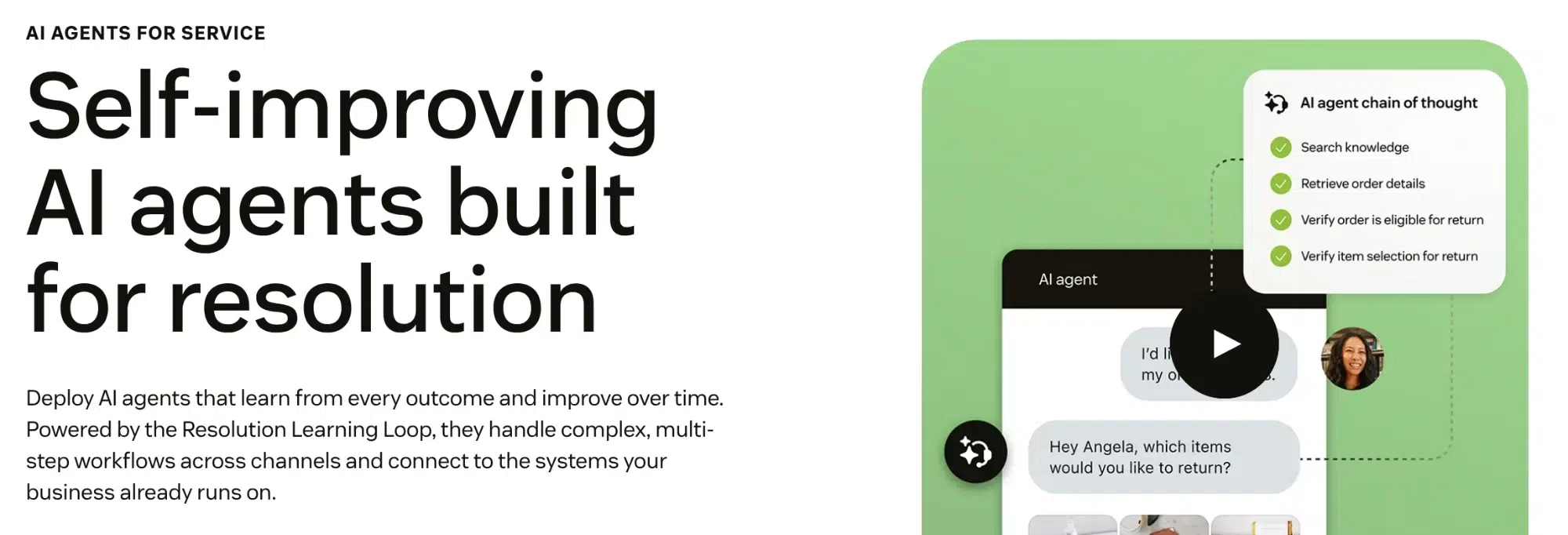
Zendesk offers AI agents for messaging, email, and voice, but each channel uses a separate agent setup.
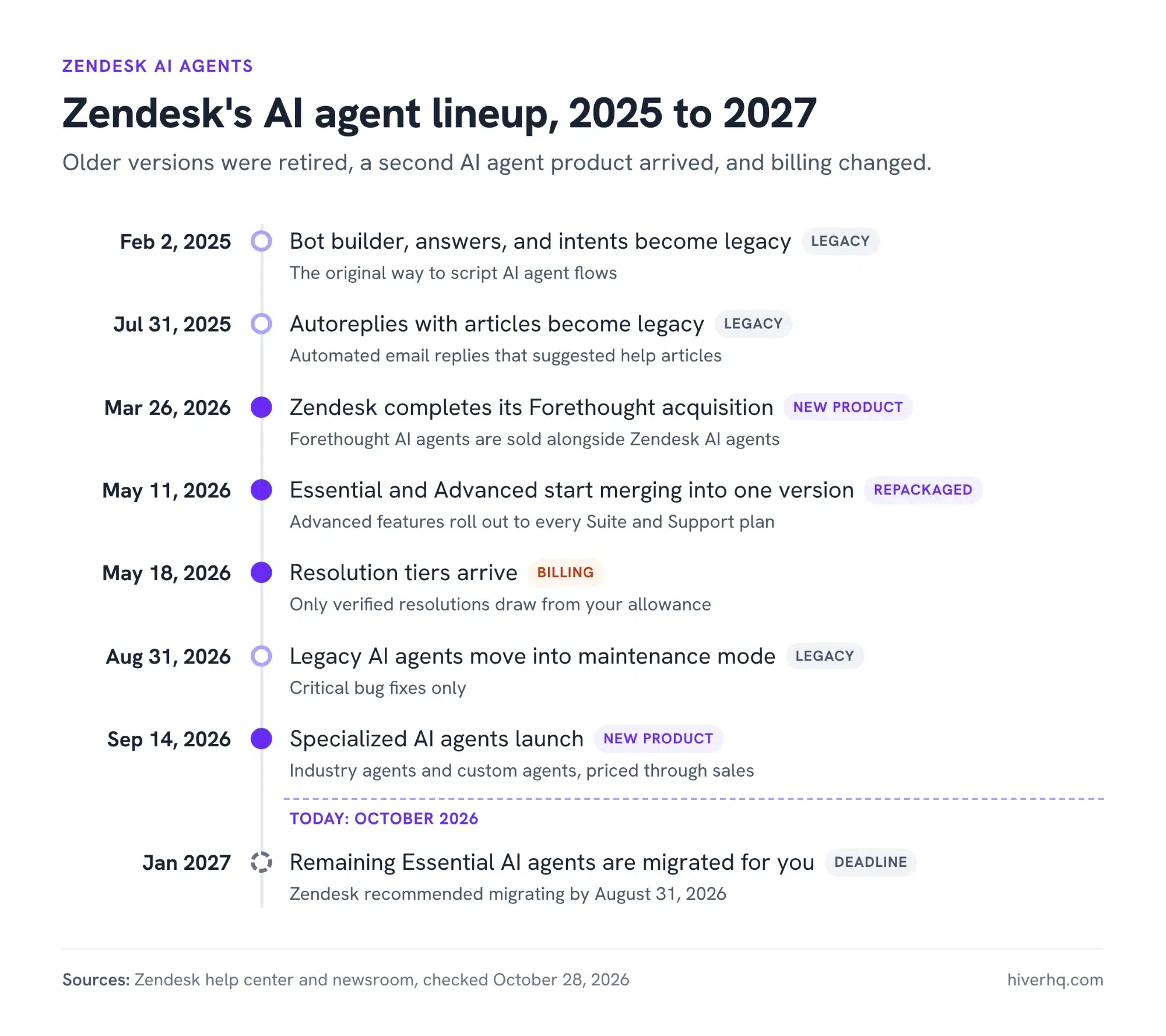
Zendesk has also changed its AI agent lineup several times since 2025, which we’ll get into below.
Key features of Zendesk AI agents
- Generative procedures: Describe how your team handles a type of request, and Zendesk turns it into a procedure the AI agent can follow.
- Actions and integrations: Action builder connects AI agents to dozens of tools, including Salesforce, Shopify, Jira, HubSpot, and Stripe. An AI agent uses these connections to look up and update data during a conversation.
- Messaging, email, and voice: You can put AI agents on web and in-app messaging, on email and web forms, and on phone calls.
- Reasoning logs: You can see the reasons behind each action and decision, so admins can see why an AI agent answered the way it did.
Pricing
Zendesk charges for support seats, with AI usage billed separately based on the number of customer requests its AI agents resolve without involving your team. Zendesk calls these automated resolutions.
Here’s what Zendesk lists on its pricing page, per user per month:
| Plan | Billed annually | Billed monthly | Included AI resolutions |
| Support Team | $19 | $25 | 5 per user per month |
| Suite Team | $55 | $69 | 5 per user per month |
| Suite Professional | $115 | $149 | 10 per user per month |
| Suite Enterprise | Quoted by sales | Quoted by sales | Not listed |
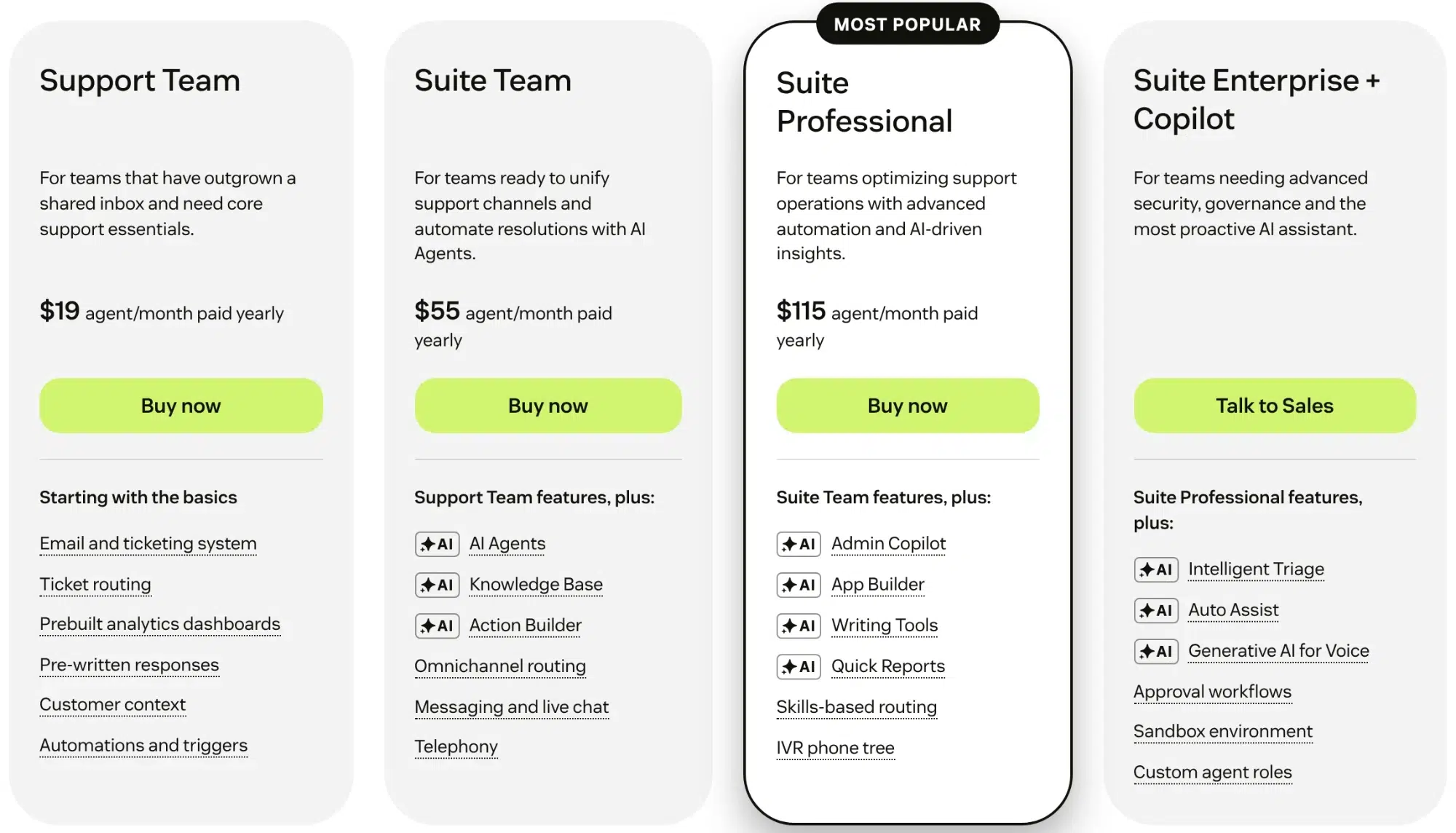
Once you use the resolutions included with your plan, additional resolutions cost $1.50 each if you commit to a volume upfront. Without that commitment, the price increases to $2.00.
There’s another model to know about. Since May 18, 2026, Zendesk has been moving customers to what it calls resolution tiers when their contracts renew. With this model, you get a monthly AI budget instead of a fixed number of resolutions. For example, Suite Professional includes $5 per user per month.
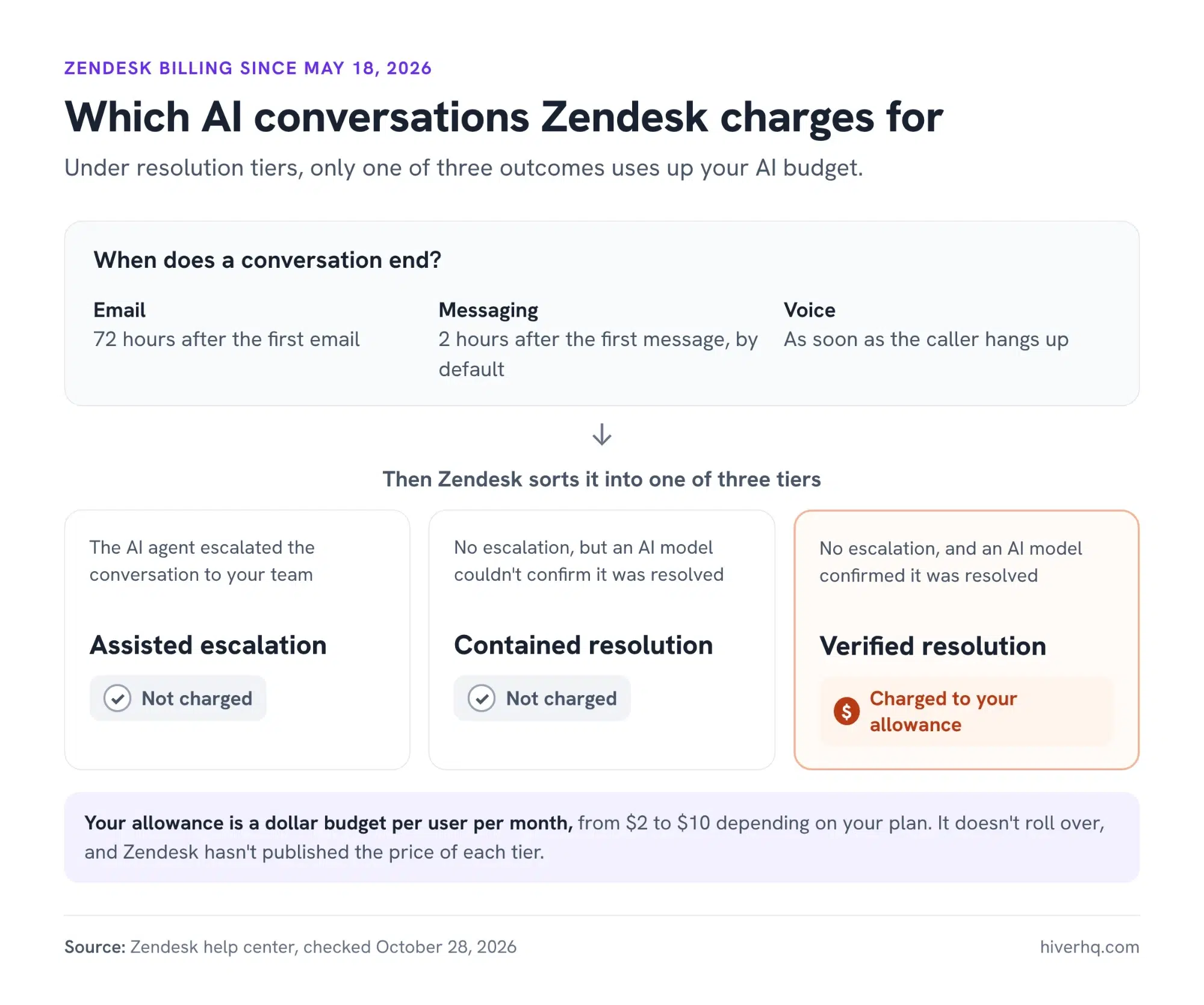
Zendesk only deducts from that budget when a resolution is verified. That means an AI model reviews the completed conversation to check whether the customer’s issue was actually resolved.
How Zendesk’s resolution tiers decide which AI conversations you’re charged for
Zendesk’s Copilot add-on is $50 per user per month, billed annually, and is only available on Professional plans and above. You’ll also need a separate QA add-on if you want to review the quality of your team’s conversations.
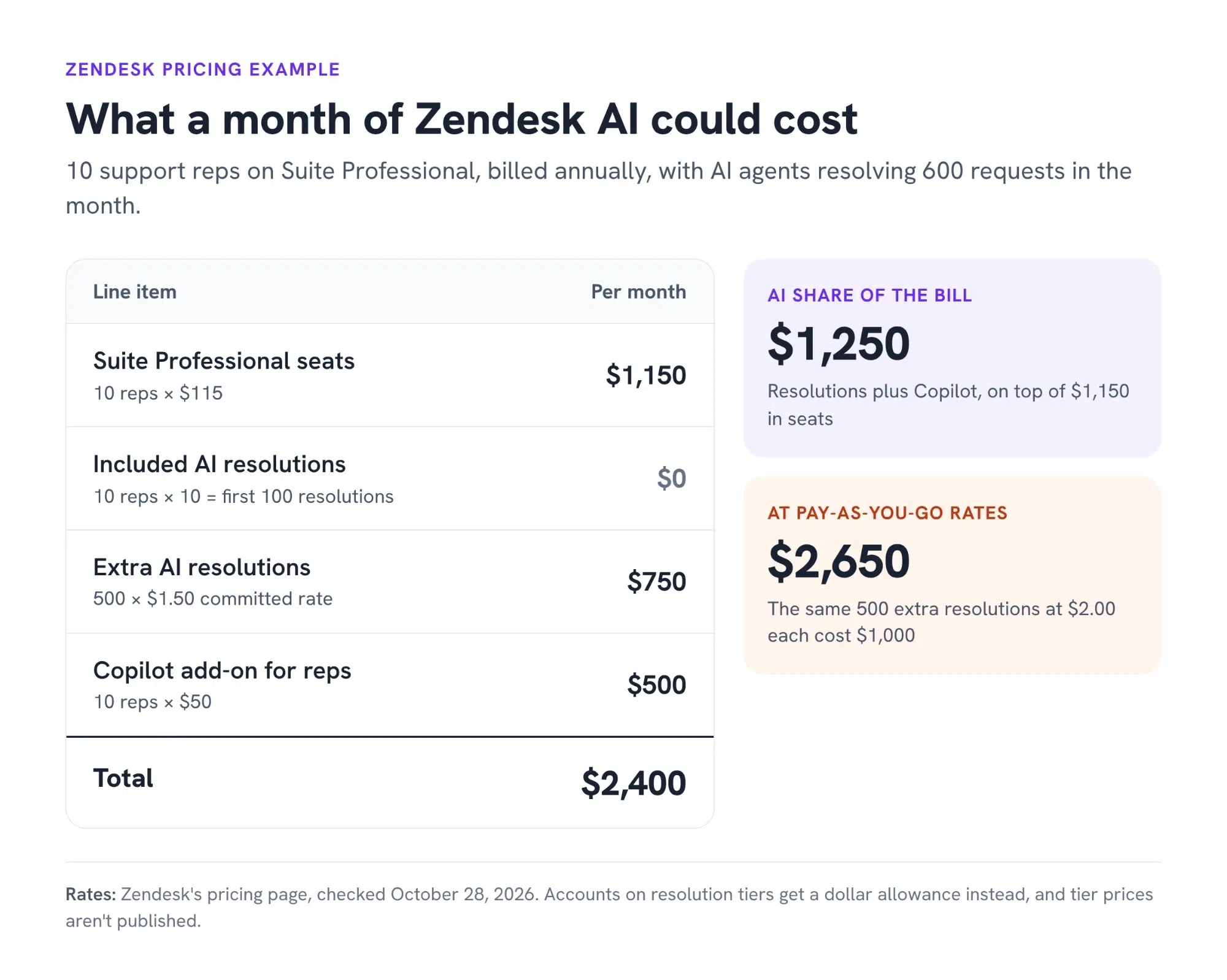
To put the costs into perspective, say you have 10 support reps on Suite Professional, billed annually. Your seats alone cost $1,150 a month, and you get 100 AI resolutions included.
Now, say your AI agents resolve 600 customer requests that month. That’s 500 resolutions over your allowance, adding $750 at the $1.50 committed rate. If you also give all 10 reps Copilot, that’s another $500.
Your total monthly bill comes to $2,400, assuming the included-resolution pricing model.
Rating
Zendesk Suite has a 4.4 out of 5 rating on Capterra.
What we like
Advanced AI features are now included on every plan
Until recently, Zendesk’s more capable AI agents required its Advanced AI add-on.
That changed in May 2026. Zendesk now gives Suite and Support customers access to AI agents that can follow multi-step procedures and connect to other tools without requiring that separate add-on.
That makes its more useful AI capabilities available to a much wider range of customers.
You don’t pay when AI hands off to your team
Under Zendesk’s resolution-tier model, you’re charged only when a resolution is verified.
If the AI agent can’t resolve the issue and hands it to a support rep, it doesn’t use your AI budget. The same is true if Zendesk can’t verify that the issue was resolved.
That’s a sensible approach because you’re paying for completed resolutions rather than every AI interaction.
It supports 80 languages
Zendesk’s AI agents can respond in 80 languages and automatically switch to the language the customer is using. Voice agents support 53 languages, too. That makes Zendesk a strong option for teams supporting customers across several countries and languages.
Your reps can see what happened before the handoff
When an AI agent hands a messaging conversation to a support rep, the full conversation history stays with the ticket.
The rep can see what the customer has already said and what happened before the handoff, rather than making them explain everything again.
For voice conversations, reps also receive a transcript, summary, and the reason for the call.
What we don’t like
Its AI is stitched together from multiple acquisitions
Zendesk has built much of its AI through acquisitions. It bought Ultimate for AI agents and Klaus for quality reviews in 2024. Then in March 2026, it completed its acquisition of Forethought, adding another AI agent product to its offering.
The challenge is getting all these capabilities to work smoothly with your existing support workflows. For example, Zendesk’s newer AI agents are managed in a separate workspace from its main Admin Center. You also need to configure separate agents for different channels, rather than having one agent handle everything.
And while Zendesk supports multi-step procedures and connections to external systems, getting those more complex workflows running properly takes additional configuration. Zendesk itself acknowledges that more complex implementations may need expert guidance.
So while the AI is capable, you may find yourself spending more time configuring and managing it alongside your existing ticketing workflows than you’d expect from a single support platform.
Your monthly AI bill can be hard to predict
With resolution tiers, your AI budget resets every month. If you don’t use the full budget, it doesn’t carry over. If you go over it, you’re charged for the additional usage even if you’re already on an annual contract.
You can set your AI agents to pause once the budget runs out, but that also means they stop handling requests till you top up your budget.
What makes budgeting harder is that Zendesk hasn’t published its pricing for the different resolution tiers. That makes it difficult to know exactly how much it will cost before you sign up.
Email AI agents need careful setup
Getting Zendesk’s email AI agents to respond to the right requests isn’t always straightforward.
One admin shared that their AI agent started replying to every incoming email, even though they had only intended to enable it for a few types of requests.
There’s also a potential issue with SLA reporting. Another admin found that when an AI agent replies to an email before handing it to a human, Zendesk counts the AI response as the team’s first reply.
That means your first-response SLA could appear to have been met even if a support rep hasn’t looked at the ticket yet.
There’s a lot to keep up with as Zendesk changes things
Zendesk is retiring its Essential AI agents, and moving to the newer version may mean rebuilding agents you’ve already set up. If you haven’t migrated by January 2027, Zendesk says it’ll move them automatically.
One admin on that plan pointed out that they’d have to make the switch directly in their live account. That’s a fair concern when you’re changing something that could affect how customer conversations are handled.
Testing changes can also be difficult depending on your plan. Suite Professional, for example, doesn’t include a sandbox. That means teams on that plan may need to make some changes directly in their live support environment.
When AI is responding directly to customers, that’s not something you want to do casually.
A better alternative: Hiver
Zendesk AI can easily resolve the straightforward informational queries. But what about complex issues when there’s no defined path to resolution? These are a small percentage of your queue, but they consume a disproportionate share of your team’s time.
Someone has to investigate what happened, look through different systems, coordinate with other teams, follow company policies, take actions, and eventually get back to the customer.
That’s where Hiver comes in.
Hiver is the agentic customer service platform built for complex support. It brings AI, omnichannel support, ticketing, and cross-team collaboration together in one place. Unlike legacy support platforms, where much of the work behind resolving complex customer issues still falls on people, Hiver puts AI to work from investigation to resolution. Your team can direct AI to investigate issues, pull context from connected systems, coordinate across teams, and take action to resolve requests end to end.
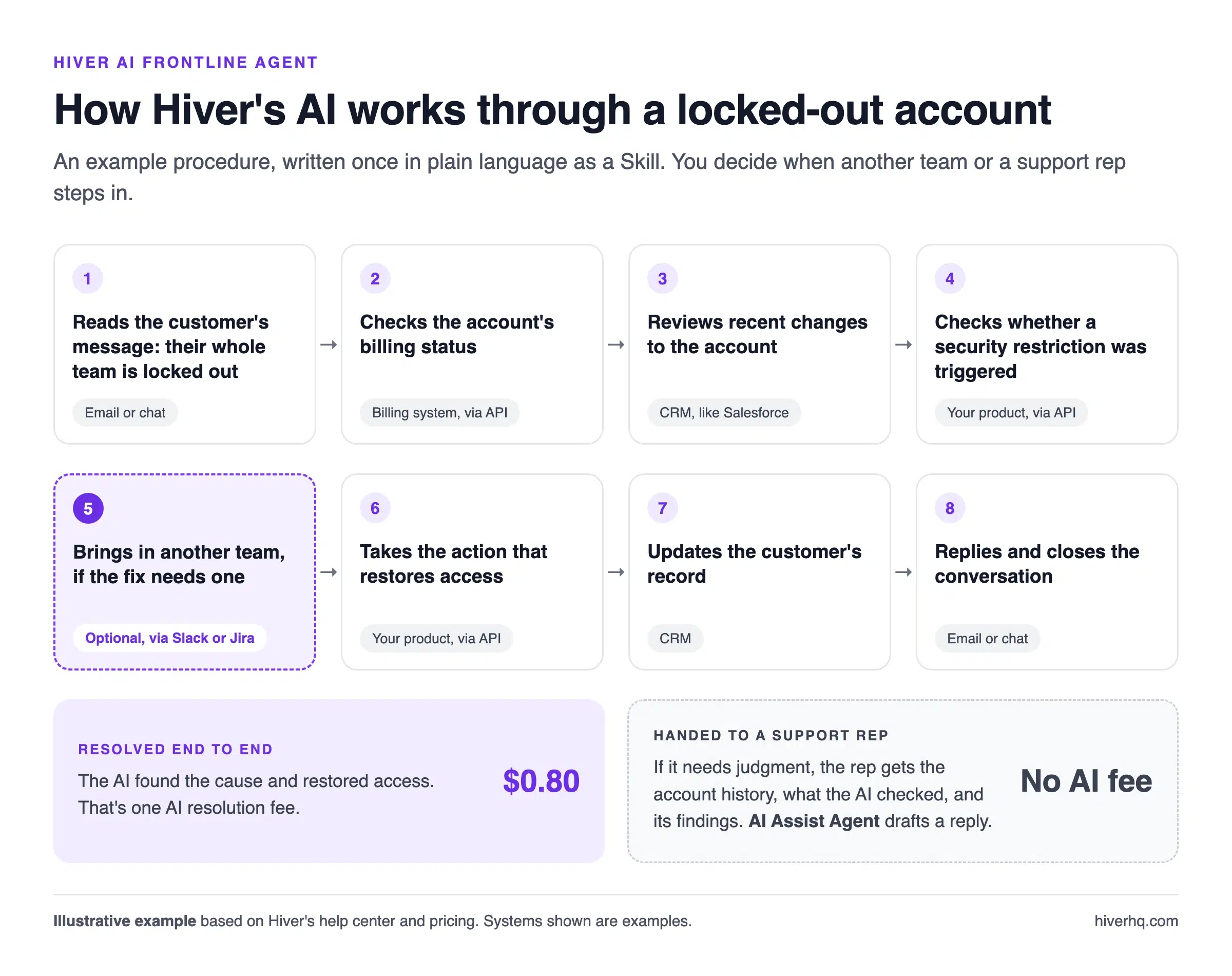
Take a customer whose entire team is suddenly locked out of their account.
The cause isn’t immediately obvious. It could be a billing issue, a permissions problem, or a security restriction. Someone has to investigate across systems, check the account history, figure out what went wrong, and involve the right team if needed.
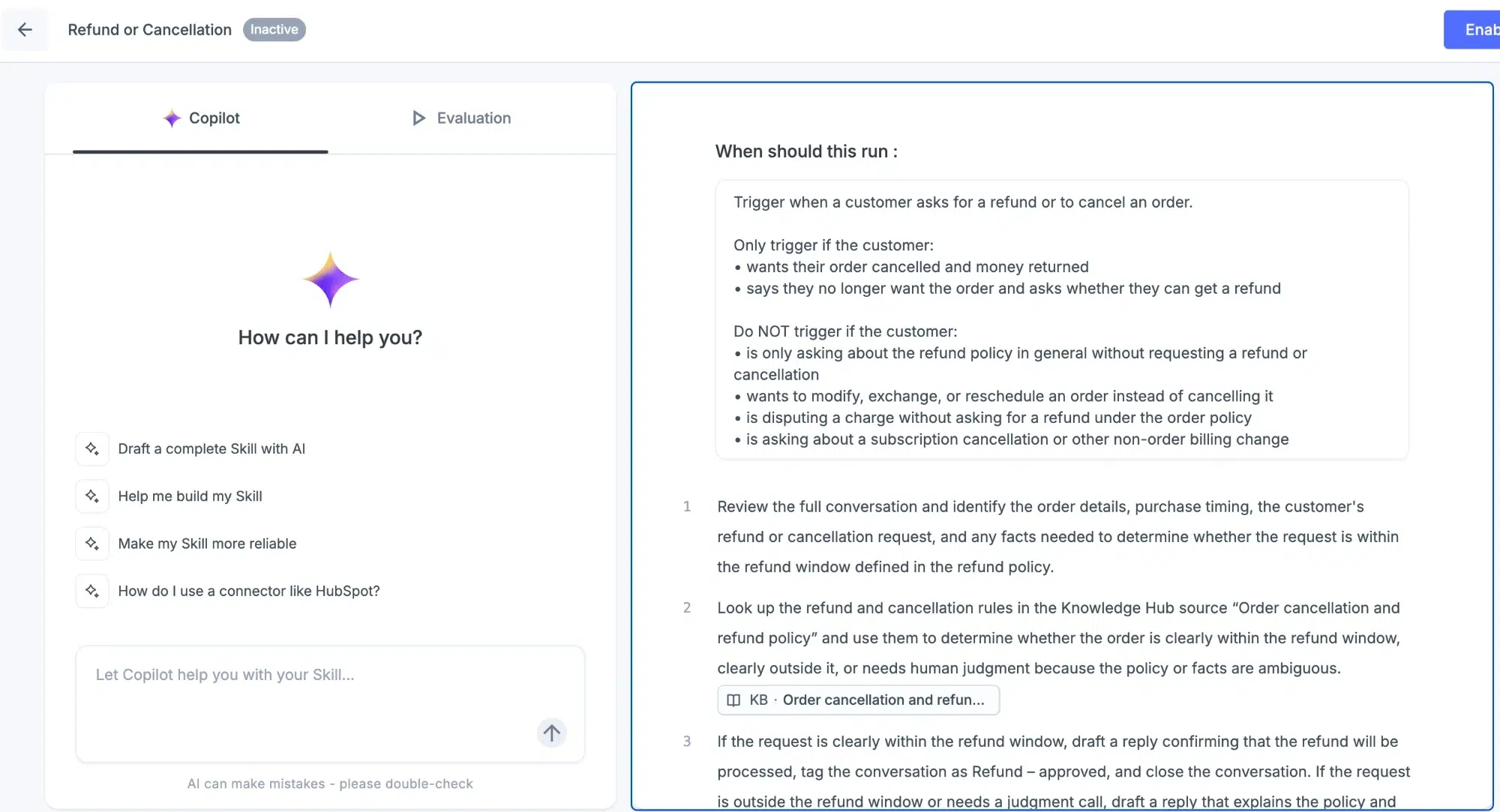
With Hiver, you can define these procedures as a Skill for AI to follow.
Hiver’s AI Frontline Agent can investigate the issue, pull information from connected systems, and follow the right path based on what it finds. It might check the customer’s billing status, review recent account changes, or verify whether a security restriction was triggered.
If resolving the issue requires another team, the AI can bring them in without losing the context it has already gathered. It can then take the necessary actions across systems and keep the customer updated along the way.
If the issue needs human judgment or falls outside the process you’ve defined, the AI hands it to a support rep with the investigation and context already in place. The rep can pick up from there instead of starting from scratch.
When a support rep takes over, Hiver’s AI Assist Agent does the groundwork. It investigates the request using connected tools, past conversations, and similar tickets. It can also recommend next steps, draft replies in your team’s tone, and take actions once the rep approves them.

Hiver’s AI also learns from every resolution, so your support operation keeps improving.
Hiver also handles the problems we raised with Zendesk’s AI agents differently:
- One procedure across channels: You write a procedure once, and the AI Frontline Agent follows it on every channel you deploy it to. It works in the same workspace as your support reps, so there’s no separate AI agent to build and maintain for each channel.
- Control over what the AI answers: Guardrails let you decide when AI steps in, when it hands off, and which requests need human review. So it only takes on the requests you’ve set it up for.
- An AI bill you can work out in advance: Hiver publishes its AI rate. Each successful AI resolution costs $0.80, and a handoff to a support rep costs nothing, so you can estimate a busy month before you sign.
- Changes you can test first: Your team can test and rewrite a procedure before customers see it. You can also see every conversation the AI works through and every action it takes.
Key features
- AI Frontline Agent: Follows procedures you define, investigates issues, takes action across connected tools, and resolves multi-step requests, with human oversight when needed.
- AI Assist Agent: Investigate issues, pull relevant context, take approved actions, suggest next steps, and draft replies.
- AI Help Center: Detect missing knowledge and get recommended updates across your help center, Notion, and other sources.
- AI QA: Review every conversation for accuracy, tone, and compliance with your team’s standards.
- Omnichannel workspace: Manage email, live chat, Slack, WhatsApp, voice, and SMS in one workspace with a shared customer history.
- Integrations: Connect Salesforce, HubSpot, Jira, NetSuite, and Asana so AI and support reps work from the same context.
Pricing
Hiver’s pricing page lists three plans, per user per month:
- Growth: $25 billed annually, or $35 billed monthly. Includes the AI Frontline Agent, AI Assist Agent, Skills, and AI Help Center.
- Pro: $55 billed annually, or $65 billed monthly. Adds SLAs, advanced analytics, and Slack as a support channel.
- Elite: $85 billed annually, or $95 billed monthly. Adds AI QA, skills-based routing, and SSO.
On top of seats, Hiver charges $0.80 for each successful AI resolution. If the AI hands the conversation to a support rep instead, there’s no fee for it.
Test your most complex support requests before deciding
Before you migrate your AI agents or renew your Zendesk plan, see how both platforms handle the requests that take up the most time for your team. Use a request that requires several steps: pulling customer context from a CRM, checking a policy, updating another system, involving a different team, or waiting for approval. Then compare how much of that work the AI completes, where a support rep has to step in, how much configuration the workflow requires, and how the pricing changes as AI usage grows.
Want to see how Hiver’s AI Frontline Agent would handle a request like this? Book a demo, and we’ll walk you through it.
FAQs
What exactly is Zendesk used for?
Companies use Zendesk to run their customer service. Support teams use it to manage tickets from email, messaging, voice, and social channels, publish help centers, and automate replies with AI agents. Zendesk also sells versions for employee service and contact centers.
Who is Zendesk’s biggest competitor?
Salesforce Service Cloud, Freshdesk, and Intercom are among Zendesk’s main competitors. If you run complex support across teams and systems, it’s worth looking at Hiver too. Our guide to Zendesk alternatives compares the main options side by side.
Can ChatGPT integrate with Zendesk?
Yes. Zendesk’s generative AI already runs on models from OpenAI, the company behind ChatGPT, and Zendesk says OpenAI doesn’t keep your data. It also uses models hosted on Microsoft Azure, Amazon Bedrock, and Google Cloud. So you don’t need a separate ChatGPT connection.
Is Zendesk legitimate?
Yes. Zendesk was founded in Copenhagen in 2007 and says more than 80,000 companies use its products. In 2022, investors led by Hellman & Friedman and Permira bought Zendesk. The all-cash deal valued the company at $10.2 billion.