

Our June releases unify your fragmented context. Calls, CRM records, scattered threads, task boards, and knowledge sources are now in one place. Your team spends less time hunting and more time resolving.
Let’s get into it.
Voice as a native channel
Available in Hiver Omni
Most teams bolt a phone tool onto their helpdesk and live with the consequences: calls logged by hand, integrations that break and take the call history with them, support reps answering the phone with zero context on who’s calling or why.
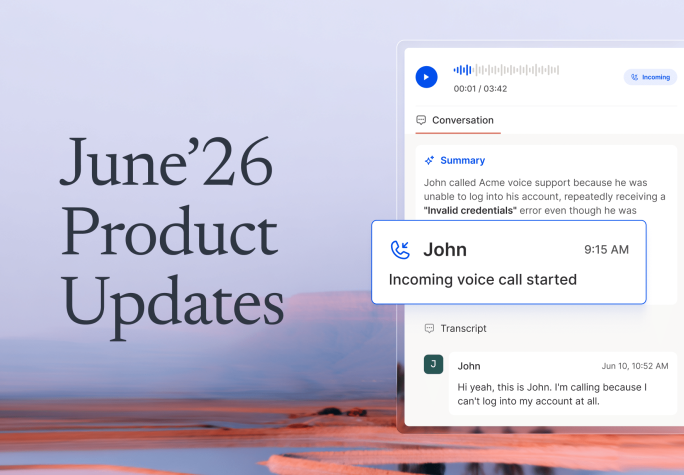
In Hiver, voice is native. Every call and voicemail lands as a conversation in Omni, with the recording, an AI-generated summary, and the full transcript attached automatically. Calls get the same assignment, tagging, and reporting capabilities as the rest of your channels like email, chat, and Slack.

AI Help Center Builder
Available in Hiver in Gmail
Writing a help center from scratch is slow, and most teams never quite get around to it. Meanwhile, the answers already exist, buried in thousands of conversations your team has resolved.
AI Help Center Builder reads your past resolved conversations and turns them into organized Help Center articles: categorized, drafted, and ready for you to review, edit, and publish. Nothing goes live without your sign-off, but the blank page is gone. Even teams with no existing knowledge base can get accurate AI answers from day one.

Real-time CRM sync
Available in Hiver Omni
Customer data drifts the moment it lives in two places. An account updates in Salesforce or HubSpot, and support keeps working off the old version until someone remembers to re-import it.
Real-time CRM sync closes that gap. Accounts and contacts from HubSpot and Salesforce flow into Hiver automatically and stay current as records change, surfacing directly in the Customer Module. When a support rep picks up a conversation, the revenue, the renewal date, the account owner: all of it reflects what’s true right now, not last month’s import.

Linked Conversations
Available in Hiver Omni
One issue rarely stays in one thread. There’s the original email, a follow-up chat, a colleague looped in on a separate ticket, and eventually someone on your team asks the customer to explain something they’ve already explained. That’s how trust erodes, one repeated question at a time.
Linked Conversations groups related threads together. Connect them by subject, search by keyword across inboxes, or keep them bundled as they move through open, pending, and closed. Everyone working the issue sees the whole issue.

Task status sync for app tasks
Available in Hiver Omni and Hiver in Gmail
Updating a task in ClickUp, Jira, or Asana used to mean leaving the conversation, opening the app, making the change, and coming back. A small trip that your teams make dozens of times a day, and occasionally forget to make at all.
Now you can update task status right from the conversation’s right panel, without ever switching tools.

Knowledge Hub
Available in Hiver Omni and Hiver in Gmail
Your AI is only as reliable as the knowledge behind it, and managing that knowledge shouldn’t be cumbersome. Knowledge Hub gives you a single place to connect your website, Notion, Confluence, or Google Drive, and decide whether each source feeds AI Copilot, AI Agent, or both.
One hub, full control over what your AI knows and where it uses it. No uploading the same material twice.

Zendesk Help Center import via OAuth
Available in Hiver Omni
Moving off Zendesk has always come with a tax: rebuild every help center article by hand, or wrestle a CSV export into shape. Neither is a good use of anyone’s week.
Now it’s one OAuth flow. Connect your Zendesk account, and your entire help center imports into Hiver: articles, categories, subcategories, and images included. Your knowledge comes with you, intact.

Hiver Omni has a fresh new look
We’ve redesigned Omni’s navigation, conversation list, and right panel. The left panel now carries clearer icons and colors. Email, chat, Slack, and voice sit together in one unified conversation view. And the right panel is no longer one rigid layout. It’s built from customizable, expandable widgets, so the context your team needs most is the context they see first.
Early Access is rolling out in waves. If you’d like your team moved up the list, write to us.

Coming Soon
That’s not all. Here’s what’s in testing ahead of upcoming releases:
- Task generation via automations: Automations will create tasks directly in ClickUp, Jira, and Asana, using system variables, AI-extracted data, and custom objects to fill in fields like list names automatically.
- Unified inbox setup: Combine Microsoft OAuth, Google OAuth, and forwarding-based inboxes within a single account, unlocking multi-domain, multi-provider setups for enterprises with subsidiaries or acquisitions.
- Web Forms in Hiver in Gmail: Build a form, embed it anywhere, and have every submission land as a structured message in the right shared inbox.
- Conditional custom fields: Show or hide a field based on what’s picked in another, so forms only ask for what’s relevant.
- Agent Operating Procedures (AOP): Define how your AI Agent should handle a process end to end, and it carries out every step the way a trained teammate would. For a refund, that might mean following up with the customer for missing details, checking your internal documentation to confirm if the order qualifies, then pulling the order status from NetSuite and triggering the refund in Stripe. One procedure, fully executed, within the boundaries you set.
If you have questions about any of these features or want help getting them set up for your team, write to us at support@hiverhq.com.