Quick summary
Freshdesk has three main plans: Growth ($19/agent/month), Pro ($55), and Enterprise ($89), all billed annually. They don’t have a free tier anymore.
Their AI features are sold separately:
- Freddy AI Agent: Comes with 500 free sessions, then costs $49 for every extra 1,000 sessions.
- Freddy AI Copilot: $29 per agent/month (only available on Pro and Enterprise).
- Freddy AI Insights: Available only on Enterprise.
Most teams end up upgrading when they need SLA management, skill-based routing, or the Copilot AI, since those are locked behind the pricier plans.
This guide breaks down each Freshdesk plan, what you get at each tier, and where the limitations start to bite.
Why listen to us
We have been building Hiver for over 10 years, earning the trust of more than 10,000 teams along the way.
Because we compete in this space (and talk to dozens of teams switching over from other tools including Freshdesk), we pay close attention to how platforms price their software. We know where the unexpected costs hide, which features get locked behind upgrades, and what actually happens once you start using them day-to-day.
Freshdesk plans and pricing at a glance
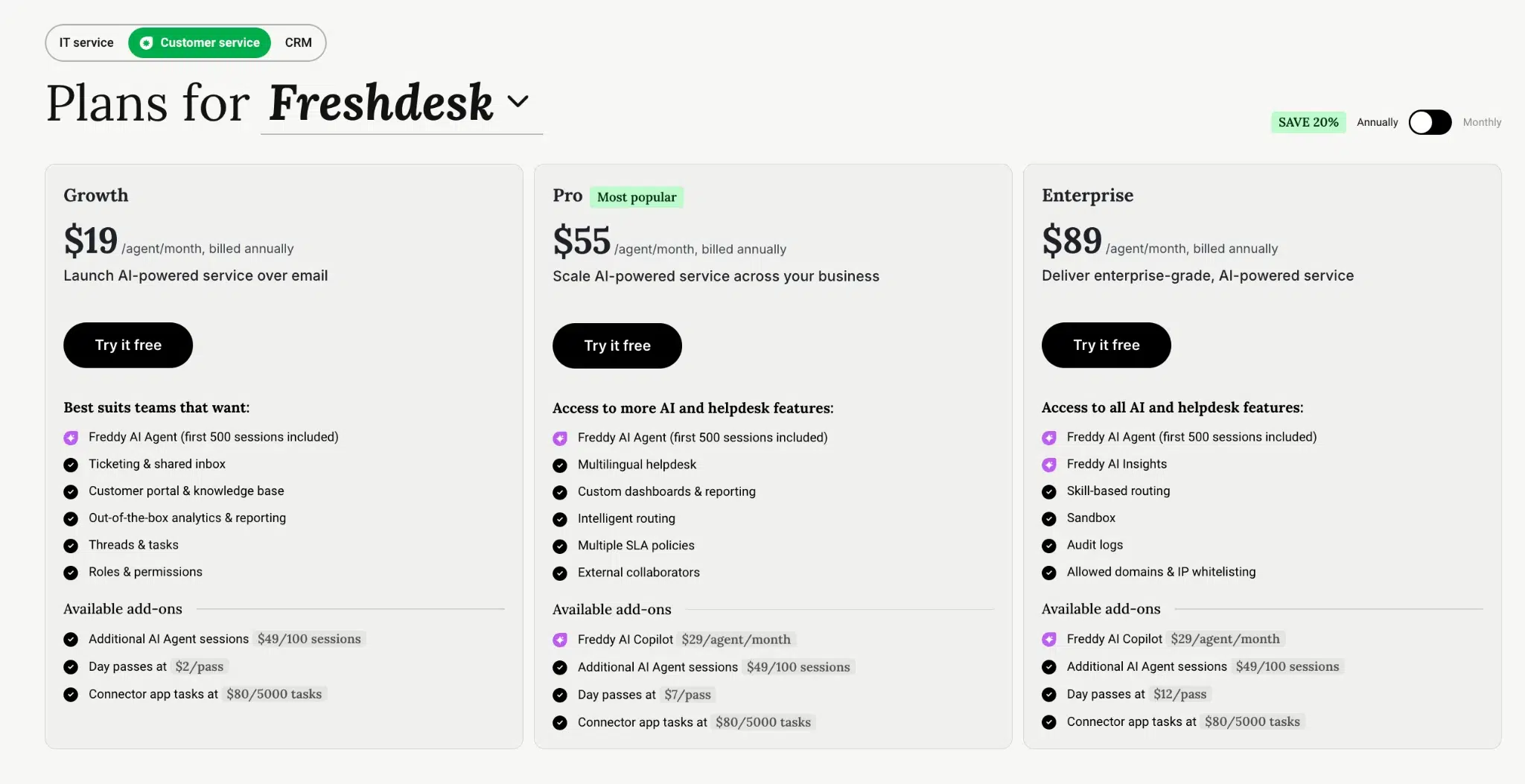
| Plan | Annual price (per agent/mo) | Monthly price (per agent/mo) | Best for |
|---|---|---|---|
| Growth | $19 | $23 | Small teams with basic ticketing needs |
| Pro | $55 | $66 | Mid-size teams that need SLAs, custom dashboards, and multilingual support |
| Enterprise | $89 | $107 | Large teams that need skill-based routing, audit logs, and sandbox |
Growth plan ($19/agent/month)
Growth is Freshdesk’s entry-level paid plan. You get a shared inbox, basic ticketing, a customer portal with a knowledge base, and standard reporting.
Every plan includes 500 Freddy AI Agent sessions. That covers basic automated responses. But at the Growth level, you don’t get Freddy AI Copilot, custom dashboards, or multiple SLA policies.
What you get:
- Ticketing with intelligent prioritization
- Shared inbox and threads
- Customer portal and knowledge base
- 500 Freddy AI Agent sessions
- Standard reports and real-time dashboards
- Single sign-on and role-based access
- Business hours configuration
- Basic ticket dispatch and automations
What you don’t get:
- Multiple SLA policies (Pro and above)
- Custom dashboards (Pro and above)
- Multilingual helpdesk (Pro and above)
- Freddy AI Copilot (Pro and above, plus $29/agent/month)
- Agent shifts and out-of-office scheduling (Pro and above)
- Round-robin or load-balanced assignment (Pro and above)
Best for: Teams of fewer than 10 agents who need a straightforward ticketing system without heavy automation or SLA tracking. If you’re running one product, one language, and one set of business hours, Growth covers it.
Pro plan ($55/agent/month)
Pro is Freshdesk’s most popular plan and the first tier where the platform starts to feel like a full helpdesk for a growing team. You get multiple SLA policies, custom dashboards, round-robin assignment, and agent availability tracking.
This is also where Freddy AI Copilot becomes available as an add-on at $29/agent/month. Copilot offers response suggestions, sentiment analysis, and live translation. But it’s not included in the Pro price. You pay the $55 base plus $29 per agent for anyone who needs it. That puts the actual per-agent cost for a Pro + Copilot seat at $84/month.
What Pro adds over Growth:
- Multiple SLA policies
- Custom real-time dashboards
- Multilingual helpdesk
- Round-robin and load-balanced ticket assignment
- Agent shifts and out-of-office scheduling
- Agent availability dashboard
- Portal customization and community forums
- Article versioning and ticket templates
- Advanced custom fields
- 5,000 external collaborators included
- Freddy AI Copilot eligible ($29/agent/month add-on)
What you still don’t get:
- Skill-based ticket assignment (Enterprise only)
- Freddy AI Insights with root cause analysis (Enterprise only)
- Sandbox environment (Enterprise only)
- Audit logs (Enterprise only)
- IP whitelisting and allowed domains (Enterprise only)
Best for: Teams of 10 to 40 agents managing support across multiple products or languages. If you need SLA tracking, reporting beyond standard dashboards, or you want the Copilot add-on, Pro is the entry point. But budget for the full cost with Copilot, not just the base price.
Enterprise plan ($89/agent/month)
Enterprise gives you the full Freshdesk feature set. Skill-based routing sends tickets to agents with the right expertise. A sandbox environment lets you test workflow changes without affecting live operations. And audit logs track every modification.
Freddy AI Insights is exclusive to Enterprise and surfaces root cause analysis and proactive alerts across your ticket data. It’s included in the Enterprise price. Copilot, by contrast, is still a $29/agent/month add-on even at this tier.
What Enterprise adds over Pro:
- Skill-based ticket assignment
- Freddy AI Insights (conversational insights, root cause analysis, proactive alerts)
- Custom object analysis
- Approval workflows for the knowledge base
- Flexible knowledge base hierarchy
- Sandbox environment
- Audit logs
- IP whitelisting and allowed domains
Best for: Teams of 40+ agents, or smaller teams with strict compliance needs (audit logs, IP restrictions). If you need granular routing and AI-driven analytics, this is the only tier that has them.
Freshdesk AI costs explained
Freshdesk splits its AI into three products, and they’re priced differently.
Freddy AI Agent (all plans, 500 sessions included)
Every Freshdesk plan includes 500 AI Agent sessions. A session is a unique interaction between a customer and the AI, defined as a 72-hour window from the customer’s first email. So if a customer replies three times within that window, it still counts as one session.
Once you pass 500 sessions, additional sessions cost $49 per 100. Say your team handles 2,000 tickets a month and 25% go through the AI Agent. You’d burn through the free sessions in month one and spend roughly $350/month on overages.
Freddy AI Copilot ($29/agent/month, Pro and Enterprise only)
Copilot sits alongside your agents and provides response suggestions, sentiment analysis, and live translation. It’s a per-agent add-on, so it scales with your team. A 20-agent team on Pro paying for Copilot across the board spends $580/month on Copilot alone, on top of the $1,100 Pro base. That brings the total to $1,680/month.
Whether that cost pays off depends on what Copilot actually does for your team. According to our guidebook for support leaders managing complex operations, the harder tickets are exactly where most AI assistants stop being useful. The ones that cross teams and need real judgment fall outside what a copilot can draft for you. If your agents’ toughest work fits that description, a $29/agent add-on that mainly speeds up straightforward replies may not justify the spend.
Freddy AI Insights (Enterprise only, included)
AI Insights surfaces patterns in your ticket data, flags root causes, and sends proactive alerts. It’s the only AI component included in a plan’s base price, but it’s locked to Enterprise at $89/agent/month.
Add-ons and hidden costs
Beyond the AI add-ons, Freshdesk has a few other costs that don’t always show up in the initial quote.
- Day passes: Occasional agents or cross-functional team members can get one-day access. Passes cost $2 on Growth, $7 on Pro, and $12 on Enterprise. A team that regularly loops in five engineers a month on Pro spends $35/month on passes alone.
- Connector app tasks: Integrations that sync data between Freshdesk and other tools (CRMs, project management platforms) cost $80 per 5,000 tasks across all plans. If you’re running a busy Salesforce or Jira integration, these tasks add up quickly.
- No free plan: Freshdesk previously offered a free plan for small teams. That’s gone. The 14-day free trial gives you Enterprise access, but once it ends, Growth at $19/agent/month is the floor.
Limitations worth knowing before you commit
A pricing page tells you what each plan includes. It doesn’t always tell you what’s missing. These are the limitations that tend to catch teams off guard.
- SLA management is gated to Pro and above. On Growth, you get one SLA policy. If you support multiple customer tiers with different response time expectations, you’ll need Pro at minimum. For support teams managing B2B accounts with contractual SLAs, this is a dealbreaker on the lower plan.
- Skill-based routing is Enterprise only. If your team has specialists (billing experts, technical agents, product-specific reps), you can’t route tickets to them automatically unless you’re on Enterprise. On Pro, you get round-robin and load-balanced assignment, but not skill-based.
- AI Copilot costs add up fast. At $29/agent/month on top of Pro ($55) or Enterprise ($89), the per-agent cost with Copilot ranges from $84 to $118. For a 25-agent team on Pro, that’s $2,100/month for Copilot alone, or $25,200/year.
- Sandbox is Enterprise only. If you want to test automation changes, workflow updates, or configuration tweaks without risking your live environment, you need the $89/agent/month tier.
- No native voice on the base Freshdesk product. The pricing page covers Freshdesk (the support desk). For phone support, you need Freshdesk Omni or a separate Freshcaller integration, both of which come with their own pricing.
When Freshdesk works well and when it doesn’t
Freshdesk fits well when:
- You’re a small to mid-size team primarily handling email and chat support
- You want a familiar, widely adopted ticketing system
- You need basic AI agent automation without heavy customization
- Your compliance needs are covered by Enterprise-tier audit logs and IP restrictions
Freshdesk gets harder to work with when:
- Your support spans multiple teams and requires cross-team collaboration on tickets. Freshdesk’s collaboration features (shared inbox, threads) are basic compared to platforms built for complex, multi-team support operations.
- You need AI that goes beyond deflection. Freshdesk’s AI is split across three separately priced products. Even at the highest tier, the focus is on agent productivity and basic automation, not end-to-end resolution.
- Pricing predictability matters. Add up the base plan, Copilot, extra AI Agent sessions, connector tasks, and day passes. The actual monthly bill can run significantly higher than the per-agent price suggests.
Hiver offers the strongest value for complex support
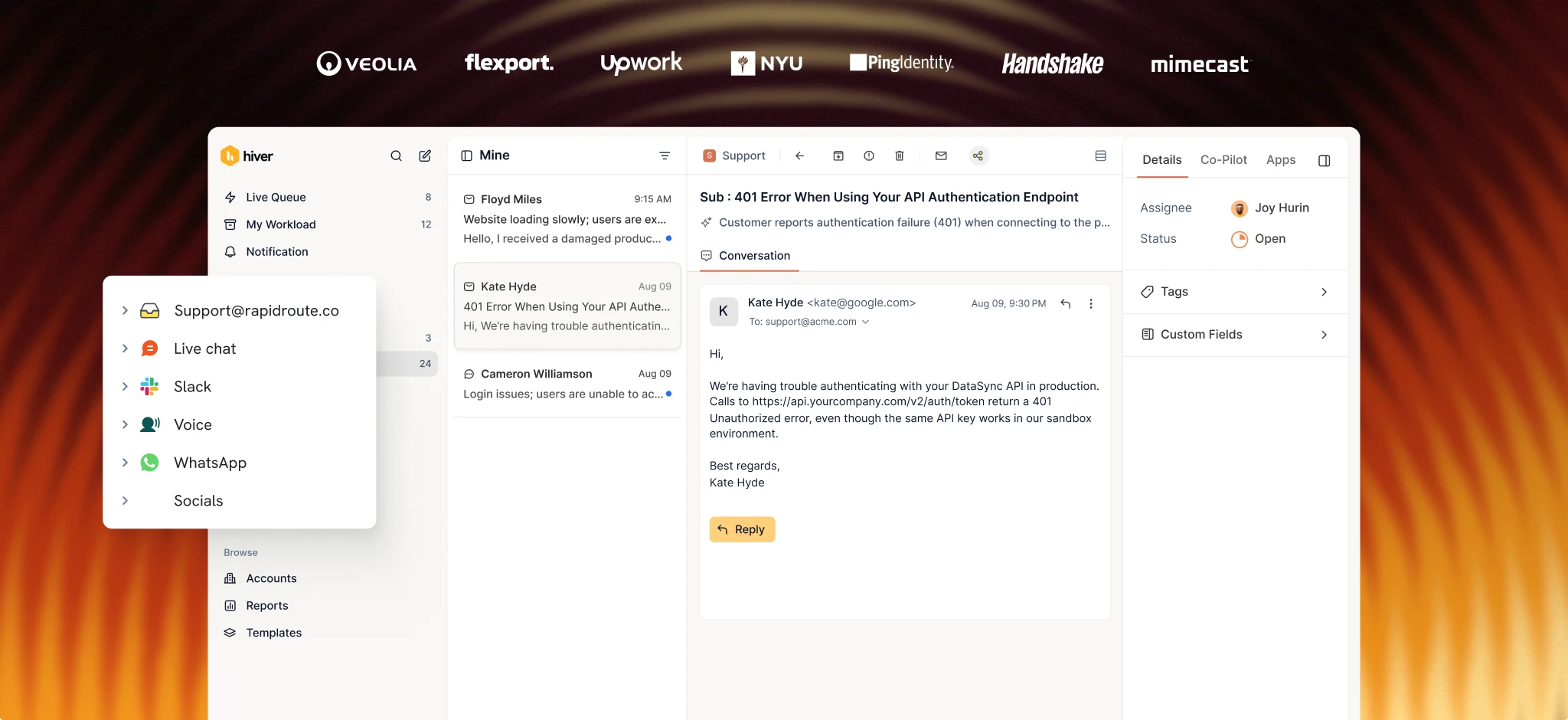
Hiver is an agentic omnichannel customer service platform built for teams handling complex support. It brings conversations, teams, and tools into one workspace, so agents can manage requests across channels, triage them, assign owners, and set priorities. When a request needs input from multiple departments, teams can collaborate through @mentions, internal notes, or Slack without losing the conversation history. As requests move between teams and channels, the context stays with them.

Here’s how our pricing works:
- Growth: $25/user/month
- Pro: $55/user/month
- Elite: $85/user/month

Teams can also use custom fields, SLAs, and workflows to route, tag, and escalate requests based on their processes. Hiver plugs into 1000+ tools like HubSpot and Salesforce, so your team can see the full customer picture without leaving the conversation. You can then set up workflows to route requests, update records, and keep everything in sync across the tools you’re already using.
AI is also part of that same setup (you won’t get billed extra for it). This is especially worth considering when you compare Hiver with Freshdesk’s AI. Freshdesk includes 500 Freddy AI Agent sessions, with additional sessions priced separately, while Freddy AI Copilot is a paid add-on. Hiver includes AI Frontline Agents and AI Assist Agent in all paid plans, including the base plan. That means teams handling a high volume of requests can use Hiver’s AI capabilities without having to add separate AI usage costs to their budget.
So what are these AI capabilities?
- AI Frontline Agents can investigate requests, follow your procedures, pull information from connected systems, and take actions to resolve issues.
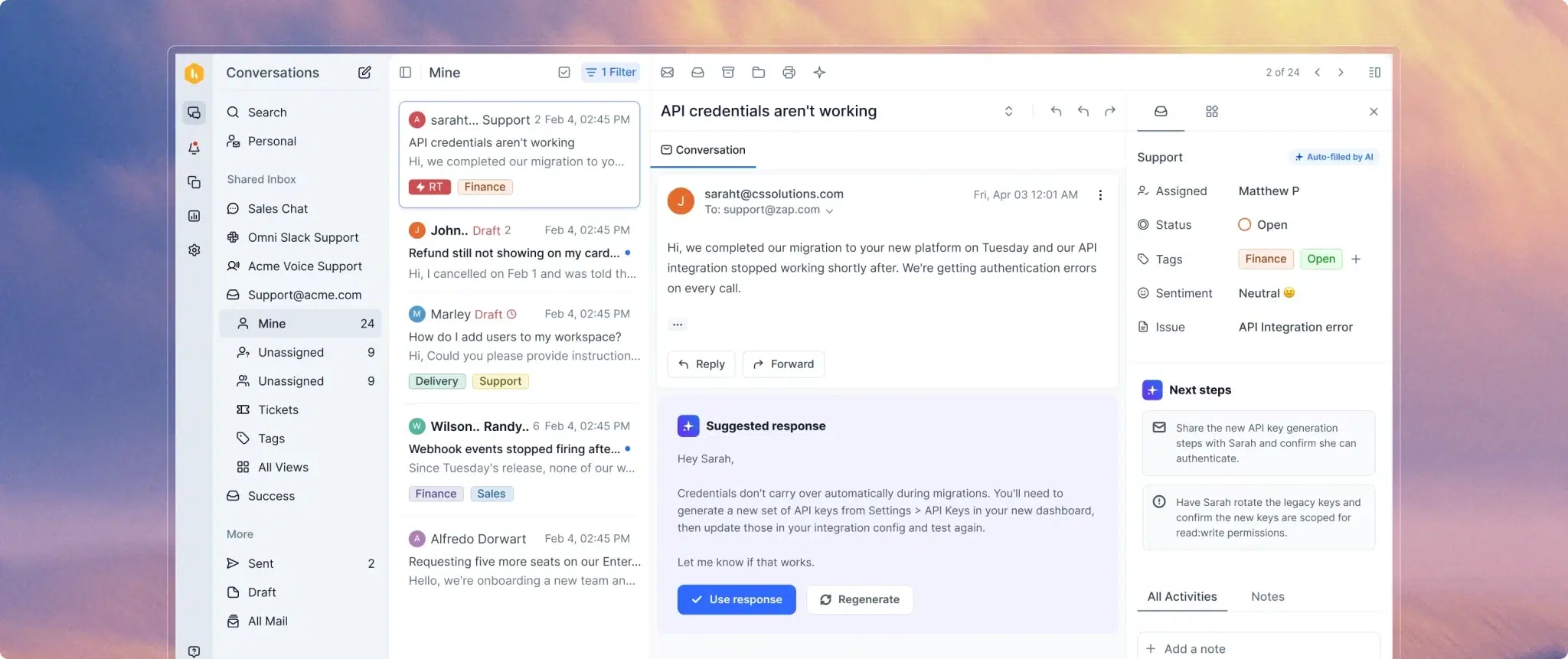
- AI Assist Agent helps agents with requests that still need a human by surfacing relevant information, finding similar past tickets, drafting replies, and suggesting next steps.
Your Freshdesk pricing decision comes down to AI costs
Freshdesk’s plans run from $19 to $89 an agent per month, but those numbers rarely reflect what you actually end up paying. Your real total comes down to how many Freddy AI sessions your team burns through, whether you buy the Copilot add-on, and which core features are locked behind higher tiers.
Before signing a contract, price out your entire stack based on real usage—not just raw seat count. Factor in extra AI usage, add-ons, and the exact plan level required for the features your team needs every day, then compare that total against other tools on the market.
If the math starts climbing way past the advertised starting prices, it pays to look at platforms that include those features out of the box. Hiver’s Growth plan includes AI Frontline Agents and AI Assist Agent from day one at $25 a user per month. Start a free trial or book a demo to see how it fits your team.
FAQs
Does Freshdesk have a free plan?
Not anymore. Freshdesk previously offered a free plan, but the current pricing starts at $19/agent/month on the Growth plan (billed annually). You can try the Enterprise plan free for 14 days, but there’s no ongoing free tier.
How much does Freddy AI Copilot cost?
Freddy AI Copilot is $29/agent/month, billed annually. It’s available only on Pro ($55/agent/month) and Enterprise ($89/agent/month) plans, so the per-agent cost with Copilot is $84 to $118/month.
What’s the difference between Freshdesk and Freshdesk Omni?
Freshdesk (sometimes called Freshdesk Support Desk) covers email and web-based ticketing. Freshdesk Omni adds native voice, messaging channels (WhatsApp, Facebook Messenger, Instagram), and a unified agent workspace. Omni has its own pricing structure, which is separate from the plans covered in this guide.
Is Freshdesk’s AI included in the base price?
Partially. Every plan includes 500 Freddy AI Agent sessions. But the AI Copilot ($29/agent/month) and AI Insights (Enterprise only) are either add-ons or tier-locked. The 500 included sessions cover light automation, but teams with meaningful AI needs will spend extra.