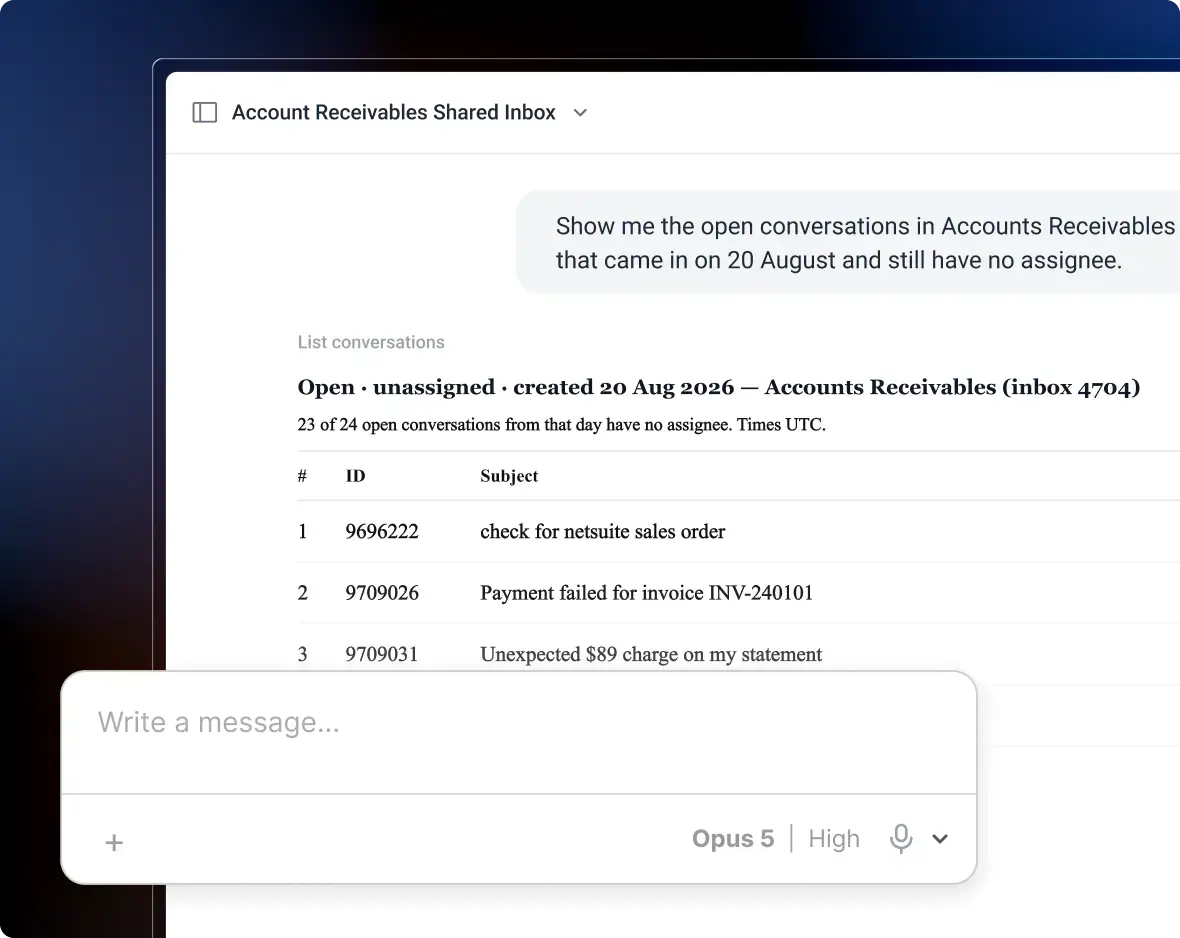


Support teams today handle conversations across multiple channels. But most setups still treat each one separately. Emails live in a shared inbox. Chat runs on a separate platform. Social messages show up somewhere else. Agents are forced to switch between tabs just to understand what’s going on.
As a result, customers repeat themselves and conversations lose context.
An omnichannel helpdesk brings everything into one place. Agents can see the full history before replying, and teams get better visibility into performance.
In this guide, I’ll break down how it works. I’ll also share the 9 best platforms for 2026, based on my evaluation of 30 tools, plus 6 additional tools suited for specific use cases.
Best Omnichannel Helpdesks at a Glance
I tested 30 omnichannel helpdesk tools and narrowed it down to 9 strong options.
- Hiver works best for teams that want a simple, fast setup. It brings email, chat, WhatsApp, and voice into one workspace without heavy implementation.
- Zendesk and Salesforce Service Cloud are better suited for large teams. They offer deep automation, customization, and scalability for complex workflows.
- Freshdesk, Zoho Desk, and Tidio work well for SMB and mid-sized teams. They balance features, ease of use, and pricing.
- Tools like Gorgias, HubSpot Service Hub, and Front fit more specific workflows. They stand out for Shopify integrations, shared CRM context, or strong internal collaboration.
9 Best Omnichannel Helpdesk Software for 2026
Modern support teams have to manage conversations across email, live chat, phone, social media, and messaging apps. Omnichannel helpdesks bring these channels into one system so agents can respond with full context without switching tools.
Below, I compare nine omnichannel helpdesk platforms.
| Tool | Best For | Channels Supported | Starting Price | G2 Rating |
|---|---|---|---|---|
| Hiver | Teams that need a single view of customer conversations across channels | Email, liveChat, Voice, WhatsApp, Slack, socials | Free plan available; Paid starts at $25/user/month | 4.6⭐ |
| Zendesk | Large teams with complex workflows | Email, Chat, Voice, Social | Omnichannel support is only available in Suite plan and above, beginning at $55/agent/month | 4.3⭐ |
| Freshdesk | SMB and mid-market teams | Email, Chat, Phone, Social | $15/agent/month | 4.4⭐ |
| HappyFox | Small to mid-sized support teams | Email, Chat, Phone, Social | $29/agent/month | 4.5⭐ |
| Tidio | Small businesses and e-commerce teams | Chat, Email, Messenger, Instagram | $24.17/user/month | 4.6⭐ |
| Zoho Desk | Teams already in the Zoho ecosystem | Email, Chat, Phone, Social | $7/agent/month | 4.4⭐ |
| Gladly | Retail and e-commerce brands | Voice, Chat, SMS, Social | Custom pricing | 4.7⭐ |
| Kustomer | Teams needing a 360° customer view | Email, Chat, Voice, Social | $89/agent/month | 4.4⭐ |
| Salesforce Service Cloud | Large enterprise support teams | Email, Chat, Voice, Social | Free plan available; Paid plans start at $25/agent/month | 4.4⭐ |
How I Evaluated these tools
Instead of reviewing feature lists, I focused on how each tool performs under real support conditions. That meant assessing:
- How well it brings email, chat, voice, social, and messaging conversations into a single customer view
- Whether agents can see the full conversation history without switching tools
- How effectively AI assists with triage, drafting, summarization, and routing
- Whether leaders can track SLA risk, backlog, and channel performance without exporting data
- How costs change as you add agents, channels, AI features, or higher ticket volume
- Whether our findings align with real customer feedback, cross-checked against user reviews on G2 and Capterra
In‑Depth Reviews: 9 Omnichannel Helpdesks for Customer Support
Here’s a closer look at how each helpdesk performs in real support scenarios. I tested 30 helpdesk tools and shortlisted these 9 based on how well they handle conversations across channels, maintain context for agents, and scale as support volume grows.
1. Hiver
Hiver is an AI-powered omnichannel help desk that lets teams manage customer conversations across email, live chat, WhatsApp, and voice from a single workspace. Conversations from every channel appear in one shared queue. Agents don’t have to jump between tools.
What I like is how the workflows stay consistent across channels. Teams can assign conversations, track SLAs, add notes, and collaborate internally the same way. It doesn’t matter whether the request came from email, chat, or WhatsApp.
The platform is also easy to adopt. Most teams can get started in a few hours without long implementation cycles.
Hiver includes automation, integrations, analytics, and AI Copilot. Agents can prompt Ask AI to draft replies based on conversation context or use suggested responses for common questions, helping teams handle tickets faster without writing responses from scratch.
Key Omnichannel Features of Hiver
- Shared inbox for email support: Hiver lets teams manage shared email IDs like support@ or info@ from a shared inbox. Incoming emails can be automatically assigned, tagged, prioritized, or routed to the right team based on rules like keywords, sender domain, or ticket type.
- Live chat for real-time support: Teams can respond to website visitors instantly through live chat. Incoming chats can be routed automatically, and agents can use templates or AI-assisted replies to handle common questions faster.
- WhatsApp conversation management: Hiver brings WhatsApp for Business conversations into the same workspace as other support channels. Teams can assign conversations to specific agents, track ownership, and monitor the status of every request.
- Voice support through Aircall integration: Through its Aircall integration, Hiver allows teams to log and manage customer calls alongside other conversations. Agents can access call recordings, notes, and tags directly from the support workspace.
- Knowledge base for self-service: Teams can create and manage help articles that allow customers to find answers on their own. This reduces repetitive tickets and allows agents to focus on more complex issues.
Pricing for Hiver
- Free plan: Free forever.
- Growth: $25/user/month, billed annually.
- Pro: $65/user/month, billed annually.
- Elite: $95/user/month, billed annually.
Pros of Using Hiver
- Intuitive interface.
- Fastest setup among all tools listed.
- Excellent analytics and collaboration.
- AI-driven ticket management.
Cons of Using Hiver
- Automation isn’t as deep as what some big-ticket enterprise tools offer.
- Reporting dashboards could be more flexible.
2. Zendesk
Zendesk is an enterprise-level omnichannel help desk designed for large support teams. It enables agents to manage conversations from email, chat, voice, and social messaging in one workspace.
What caught my attention is that Zendesk gives teams a high level of control over automation. You can set rules to automatically categorize, prioritize, and route tickets based on conditions like tags, priority levels, or customer attributes. This helps large teams manage ticket flow without constant manual triage.
Its AI capabilities are also fairly extensive. Generate reply drafts, summarize long conversations, and get suggested responses directly within tickets. You also have the option to deploy AI bots to answer common questions and route conversations before an agent steps in.
Key Features of Zendesk
- Automated ticket routing and prioritization based on channel, issue type, or predefined rules.
- Shared customer history that keeps conversation context intact across channels.
- Reporting dashboards to track response times, ticket volume, and agent performance.
- Workflow automation that reduces manual triage and repetitive support tasks.
Pricing for Zendesk
- Suite Team: $55/user/month, billed annually
- Suite Professional: $115/user/month, billed annually
- Suite Enterprise: custom pricing
Pros of Using Zendesk
- Enterprise-grade scalability
- Rich analytics
- Huge integration marketplace
- Mature workflows & automations.
Cons of using Zendesk
- Pricing stacks up with add-ons
- Steeper learning curve
- Admin complexity for smaller teams.
Recommended reading
3. Freshdesk
Freshdesk first gained popularity as an affordable alternative to tools like Zendesk. That positioning still holds today, with pricing that remains accessible for growing support teams (starting at $15/user/month).
Beyond pricing, Freshdesk offers omnichannel support capabilities.
Teams can manage customer requests from channels such as email, chat, phone, and social media within a single system. The platform also includes automation tools, SLA tracking, reporting dashboards, and a knowledge base for self-service. These features help teams organize conversations, monitor performance, and reduce repetitive tickets.
Key Features of Freshdesk
- AI bots and agent assist features help handle common questions and speed up replies.
- Automation rules that can tag, prioritize, and route tickets based on conditions like keywords, customer type, or channel.
- Collision detection and internal collaboration tools (notes and @mentions) to reduce duplicate replies and support smoother handoffs.
- Custom fields and workflows that let teams tailor forms, categories, and processes to match how they run support.
- An integrations marketplace to connect Freshdesk with CRM, chat, and other business tools.
Pricing for Freshdesk
- Growth: $15/user/month, billed annually
- Pro: $49/user/month, billed annually
- Enterprise: $79/user/month, billed annually
Pros of Using Freshdesk
- Clean and user-friendly interface that’s easy for support teams to navigate
- Strong automation tools and workflow rules for faster ticket resolution
- Affordable pricing tiers with a forever-free plan for small teams
- Integrates well with other Freshworks products like Freshcaller and Freshchat
Cons of Using Freshdesk
- Voice and chat features require separate subscriptions
- Limited social media integrations (restricted to Facebook and WhatsApp)
- Advanced customization options are locked behind higher-tier plans
4. HappyFox
If you’re looking for a help desk with structured ticket management, HappyFox is a strong option. It brings conversations from different channels – email, live chat, phone integrations, and social media – into one workspace.
It’s clear ticket workflows help teams organize incoming requests by assigning tickets, setting priorities, and tracking ownership. It also includes a knowledge base that lets customers find answers on their own.
Key Features of HappyFox
- Rule-based automation (Smart Rules) that can automatically assign, prioritize, and update tickets based on conditions such as category, priority, or agent availability.
- SLA management tools that track response and resolution targets and alert teams when tickets are approaching SLA breaches.
- A built-in knowledge base that allows teams to publish help articles and FAQs so customers can resolve common issues without contacting support.
- Ticket management tools such as merging related tickets, creating tasks, and tracking conversations within a single threaded view. Merging combines duplicate or related requests into one thread, keeping updates in one place.
- Reporting dashboards that help managers monitor ticket volume, agent activity, and overall support performance.
Pricing for HappyFox
- Basic: $24/user/month, billed annually
- Team: $49/user/month, billed annually
- Pro: $99/user/month, billed annually
- Enterprise PRO: custom pricing
Pros of Using HappyFox
- Intuitive interface with straightforward ticket management and automation
- Strong integration options with tools like JIRA, Slack, and Aircall
- Flexible omnichannel support covering email, chat, voice, and social media
- Excellent scalability for mid-sized teams expanding their support operations
Cons of Using HappyFox
- Minimum 5-agent requirement increases entry cost for small teams
- Live chat and voice features come as paid add-ons
- Limited AI capabilities compared to newer platforms
5. Tidio
Known for its live chat and chatbot automation, Tidio helps businesses manage website conversations more efficiently. It combines live chat with channels like email, Messenger, and Instagram in a single inbox. This makes it a practical option for small and midsize teams.
What works well in Tidio is how the chat workflow is structured. Chatbots handle common questions first. When a request needs human support, the conversation is handed off to an agent in the same conversation thread.
Key Features of Tidio
- AI-powered Lyro chatbot that can answer common customer questions using your support content and past conversations.
- A shared inbox that lets teams manage chat, email, and social messages from one workspace.
- Canned responses and conversation templates that help agents reply faster to frequently asked questions.
- Customer data and conversation history give teams context about previous interactions and user activity.
- Integrations with e-commerce platforms like Shopify and WooCommerce to show order details and customer information inside the chat interface.
Pricingfor Tidio
- Starter: $24.17/month
- Growth: $49.17/month
- Plus: $749/month
- Premium: custom pricing
Pros of Using Tidio
- Strong support for chat and messaging channels
- Affordable for small and growing teams
- Quick setup with automation templates
Cons of Using Tidio
- No native voice support
- Limited advanced omnichannel tools compared to larger suites
Recommended reading
6. Zoho Desk
Zoho Desk can be a good choice if your team already uses Zoho tools like Zoho CRM and Zoho SalesIQ. Agents can view customer information from the CRM while handling support conversations. This additional context helps them respond more effectively.
Zoho Desk also stands out among omnichannel helpdesks for offering multi-channel support at a relatively lower price. The platform offers a free plan with upto 3 agents, and paid plans start at $7/agent/month. You can manage conversations across channels such as email, live chat, social media, and self-service portals from a single interface.
Key Features of Zoho Desk
- AI assistant (Zia) that suggests replies, highlights urgent tickets, and helps agents find relevant knowledge base articles while responding to customers.
- Automation tools such as workflows, assignment rules, and time-based triggers help teams route tickets and manage repetitive tasks.
- Custom fields that let teams capture specific details about each request. For example, you can add fields like product type, issue category, or priority level to organize tickets and route them to the right agents.
- Blueprint workflows that guide agents through predefined support processes. For example, a ticket can be required to move through steps like triage, investigation, and resolution, ensuring agents follow the same process for complex issues.
Pricing for Zoho Desk
- Free: Free up to 3 agents, but limited omnichannel capabilities
- Express: $7/user/month, billed annually.
- Standard: $14/user/month, billed annually.
- Professional: $23/user/month, billed annually.
- Enterprise: $40/user/month, billed annually.
Prosof Using Zoho Desk
- Comprehensive channel coverage, including email, phone, chat, and social media
- Smooth integration with other Zoho products like CRM and SalesIQ for a unified ecosystem
- Affordable pricing tiers suitable for startups and mid-sized businesses
- Customizable workflows and automation rules for streamlined operations
Cons of Using Zoho Desk
- Live chat is available only as a paid add-on
- The interface can feel cluttered with advanced customization options
- Limited third-party integrations compared to other large competitors
7. Salesforce Service Cloud
One area where Salesforce Service Cloud stands out is its tight integration with CRM data. Agents can see details like a customer’s purchase history, account status, and previous sales conversations while handling a support ticket.
The platform also supports deep customization. Teams can build complex workflows, automate case routing, and manage customer interactions across channels like email, live chat, phone, and social media.
Key Features of Salesforce Service Cloud
- Use Einstein AI to suggest replies, classify cases automatically, and power chatbots that handle common customer questions.
- Automation tools such as workflows, macros, and routing rules help teams assign cases and manage repetitive support tasks.
- Track customer issues with case management tools that let agents link related cases and maintain a complete interaction history.
- Omnichannel routing that assigns incoming cases to the most appropriate agent based on availability, skills, or workload.
- Monitor support performance with analytics dashboards that show case volume, service metrics, and agent productivity.
Pricing for Salesforce Service Cloud
- Free suite: Free plan limited to 2 users
- Starter suite: $25/user/month, billed annually.
- Professional: $100/user/month, billed annually.
- Enterprise: $175/user/month, billed annually.
- Unlimited: $330/user/month, billed annually.
- Agentforce 1 service: $550/user/month, billed annually.
Pros of Using Salesforce Service Cloud
- Robust omnichannel coverage, combining email, chat, voice, social media, and SMS in one dashboard
- Advanced AI capabilities through Einstein Bots to automate repetitive queries and workflows
- Highly customizable to fit enterprise workflows and complex support needs
- Strong integration ecosystem with Salesforce CRM and third-party tools
Cons of Using Salesforce Service Cloud
- Pricing scales quickly with AI add-ons
- Requires technical setup and customization for optimal performance
- Can feel complex for smaller teams or those without admin expertise
Recommended reading
Zoho vs. Salesforce: Which Platform Actually Fits Your Business?
8. Gladly
Gladly takes an extremely customer-centric approach to customer service. Instead of organizing conversations as tickets, it centers them around the customer.
All interactions appear in a single timeline, including voice, chat, email, SMS, and messaging. Agents can review the full interaction history before answering questions.
Since everything is tied to the same customer record, conversations don’t get split into separate tickets. Agents can see the full interaction history in one place, which makes it easier to understand context when handling requests.
Key Features of Gladly
- Customer profiles that store purchase history, preferences, and past interactions. It allows agents to personalize responses during support conversations.
- Handle phone calls directly within the same interface using built-in voice support alongside other channels.
- Internal notes and @mentions help teams collaborate and hand off conversations when multiple teams are involved.
- Workflow automation that routes conversations to the right team or agent based on predefined rules.
- Track support performance through reporting and analytics dashboards that show conversation volume, resolution times, and agent productivity.
Pricing for Gladly
- Hero: $180/user/month
- Premium: $210/user/month
Pros of Using Galdly
- Strong multichannel integration
- Ideal for premium service teams
- Excellent collaboration tools
Cons of Using Gladly
- High pricing for smaller teams
- Enterprise setup may require onboarding assistance
9. Kustomer
Built around a unified customer timeline, Kustomer lets teams manage conversations across channels. It brings chat, email, social messaging, and voice into one interface.
Similar to Gladly, Kustomer organizes conversations around the customer rather than individual tickets. Agents can view the full interaction history across channels before responding, which helps them understand context.
The platform also includes AI features that classify conversations and detect customer intent. Based on this, workflows can automatically route tickets to the right queue or agent.
Key Features of Kustomer
- Organize conversations with customizable queues based on priority, issue type, or customer segment.
- Internal collaboration tools such as notes and team mentions for coordinating responses and managing handoffs.
- Track support performance through reporting dashboards that show conversation volume, response times, and agent workload.
- Integrations with e-commerce, CRM, and messaging platforms to connect support with other business systems.
- Customize workflows using custom objects and fields to store additional customer data, such as order IDs, subscription plans, account status, or product details.
Pricing for Kustomer
- Enterprise: $89/user/month
- Ultimate: $139/user/month
- Custom: For large-scale deployments
Pros of Using Kustomer
- Robust customer context view across all channels
- Advanced automation and workflow tools
- Great for teams focused on personalization
Cons of Using Kustomer
- Expensive for small businesses
- Requires more time for onboarding and setup
Recommended reading
Zendesk vs Kustomer: Which Support Platform Is Better in 2026?
6 Additional Omnichannel Helpdesk Tools Worth Considering
Several other platforms also support omnichannel customer communication. During my research, I reviewed a few additional options that are worth exploring.
- Front – Front combines a shared inbox with internal team collaboration. Teams can assign email threads to specific agents, leave internal comments on conversations, and discuss replies before sending them to customers.
- Gorgias – Designed for e-commerce support, Gorgias integrates deeply with platforms like Shopify. Agents can view order details, check shipping status, cancel orders, or issue refunds without leaving the helpdesk.
- HubSpot Service Hub – Works best for companies already using HubSpot. Support tickets are linked to the same customer record used by marketing and sales. This means agents can see past emails, deals, and contact history while responding.
- HaloCRM – Works well for IT and service teams handling internal requests like access issues, hardware tracking, or incident management. It adds structure with ticketing, asset tracking, and workflow automation.
- Vivantio – A strong fit for enterprises running multiple service desks. For example, IT, HR, and customer support often operate in separate systems. Vivantio brings these into one unified workflow, so requests can be managed and tracked in a single place.
- Capacity – Useful when your team deals with a high volume of repetitive questions. It can automatically answer common queries, route requests to the right team, and pull information from your knowledge base without agent involvement.
Features to Look for in an Omnichannel Helpdesk Software for Customer Support
Not every helpdesk that supports multiple channels qualifies as a true omnichannel platform. When evaluating options, it’s important to look beyond channel coverage and focus on features that help teams manage conversations, maintain context, and scale support operations.
1. Centralized inbox
Make sure the helpdesk brings conversations from email, chat, voice, and social messaging into one workspace. Agents should be able to view, assign, and respond to requests without switching tools.

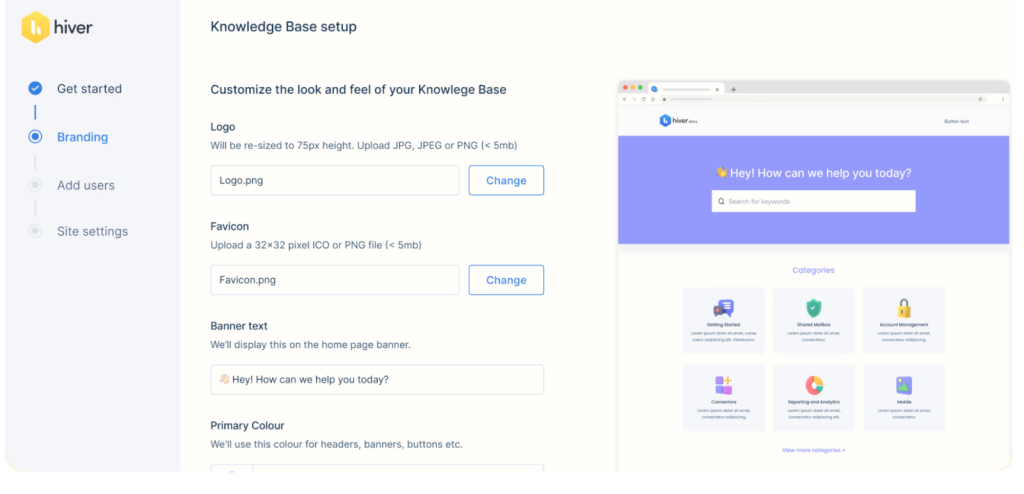
2. Self-service knowledge base
Choose a helpdesk that includes a built-in knowledge base. Well-organized help articles and FAQs allow customers to resolve common issues on their own and reduce repetitive support tickets.
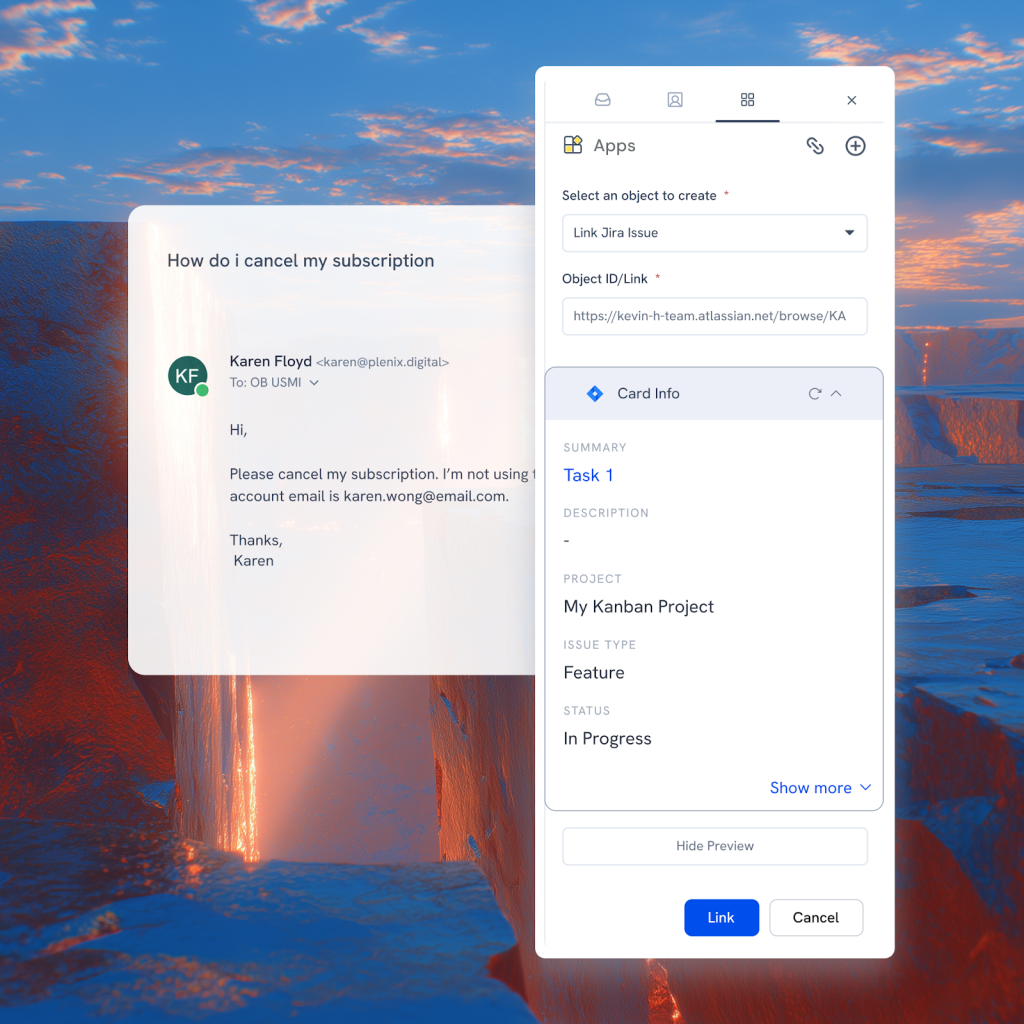
3. Integrations with business tools
Verify that the helpdesk integrates with the systems your team already uses. Integration with tools like Salesforce, Slack, and Jira allows agents to access customer data and coordinate with internal teams without leaving the platform.
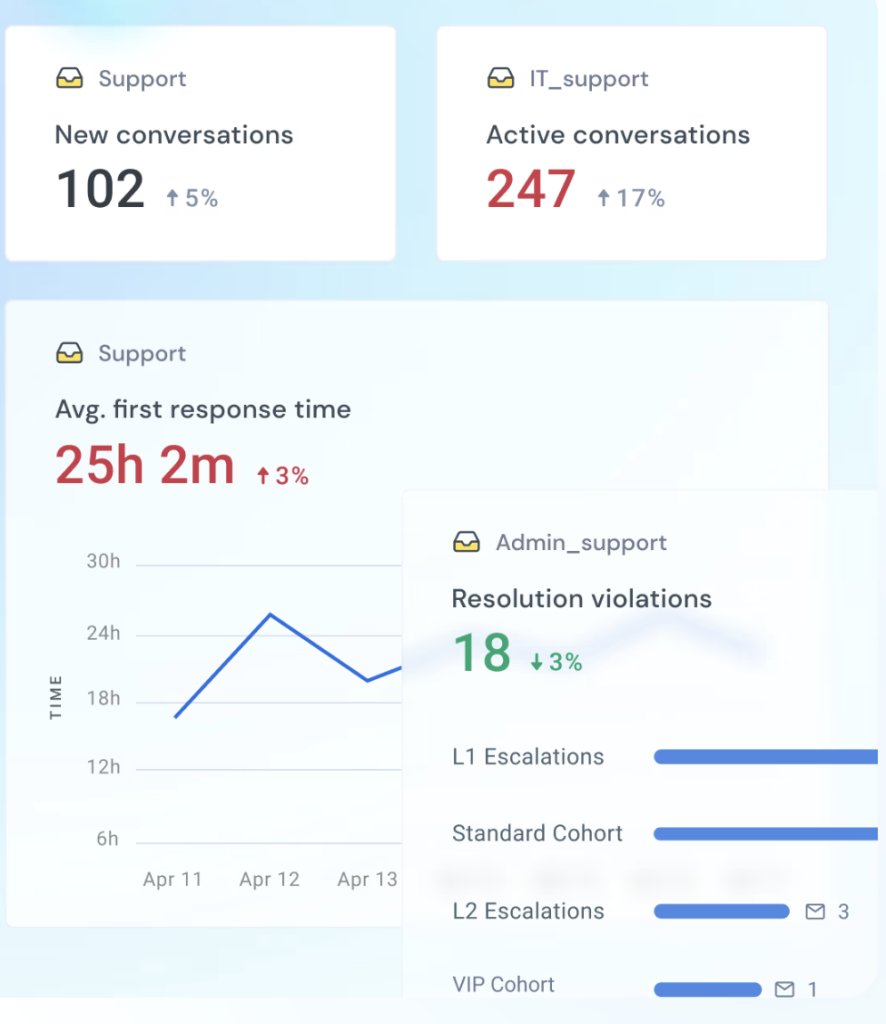
4. Analytics and reporting
Your helpdesk should provide dashboards for key support metrics. This typically includes response times, ticket volume, resolution rates, SLA compliance, and customer satisfaction. These insights help leaders identify bottlenecks and manage team workload.
5. Workflow automation
Look for automation features that handle routine tasks such as ticket assignment, tagging, and prioritization.

6. Internal collaboration tools
Choose a platform that supports internal notes, mentions, and shared conversation threads. These features allow agents to collaborate and resolve issues without switching tools.

Recommended reading
Benefits of Using an Omnichannel Helpdesk Solution
An omnichannel helpdesk changes how support teams manage conversations. Instead of switching between tools and losing context, teams handle every interaction in one system. This improves both operational efficiency and customer experience.
Here are the benefits of using an omnichannel helpdesk:
- Faster resolution times: Agents can see the full conversation history across channels in one place. For example, if a customer starts a conversation through live chat and later follows up by email, the agent can view both interactions in the same thread. This eliminates tool switching and prevents customers from repeating information.
- Better agent productivity: Automation handles routine tasks like ticket assignment and tagging. For instance, a billing-related email can be automatically routed to the finance support queue, while product questions go to the technical team. AI tools can also draft replies or summarize long conversations, helping agents respond faster.
- Stronger executive visibility: Centralized reporting provides insights into response times, ticket volume, SLA compliance, and agent workload. For example, support leaders can quickly identify if WhatsApp requests are increasing or if a specific queue is missing SLA targets. This helps teams identify bottlenecks and adjust staffing or workflows accordingly.
How to Implement an Omnichannel Helpdesk: Checklist
Once you’ve shortlisted a tool, use this checklist to set up your workflows, channels, and reporting before going live. This is what ensures conversations stay connected, ownership is clear, and agents have the right context when responding.
1. Know your customer and how they reach you
Start by mapping how customers actually contact your team and what they expect when they do.
- List your most common queries. For example, billing issues, delivery delays, login problems, or cancellations. This helps you understand what types of conversations your system needs to handle.
- Map how conversations move across channels. A customer might start on live chat, then follow up via email if the issue isn’t resolved. Your setup should ensure both interactions show up in the same thread.
- Define what context agents need before replying. For instance, when handling a refund request, agents should see order details, past conversations, and payment status without asking the customer again.
If you skip this step, customers will still have to repeat information even after you implement an omnichannel tool.
2. Choose and configure the right technology
The tool should match how your support actually works, not the other way around.
- Connect all the channels your team actively uses. This includes email, live chat, WhatsApp, phone, and social messaging. Avoid adding channels you don’t actively support yet.
- Integrate backend systems that agents rely on. Make sure to connect your CRM to show customer history or your order system to check delivery status directly inside the ticket.
- Test real support scenarios before going live. The best way to do this is to create a test case where a customer starts on chat and follows up on email. Check if the agent can see the full conversation in one place without switching tools.
If conversations don’t stay connected here, the setup will break under real usage.
3. Train agents on real support scenarios
Training should reflect how conversations actually happen, not just how the tool works.
- Use actual tickets for training. Take a few recent conversations and ask agents to handle them inside the new system from start to finish.
- Show how AI fits into daily work. Use a common query like delivery timelines to show how suggested replies speed things up. Then walk through a more complex issue that requires a custom response.
- Define how collaboration should work. An easy way to do this is to pick a ticket that needs input from another team, like billing or engineering. Then walk through when to assign it, add notes, or escalate.
This ensures agents handle conversations consistently, regardless of the channel.
4. Monitor the right metrics from day one
Don’t wait until after launch. Set up reporting beforehand so you can track how the system performs in real conditions.
- Set up your core metrics before launch. Create a basic dashboard with response time, resolution time, open tickets, and SLA breaches so you’re not starting from scratch later.
- Review performance by channel. Compare how quickly chat vs email queries are being handled. This helps you spot imbalances early and reassign workload before backlogs build up.
- Run a short test period and review gaps. Let the system run for a day or two, then check where tickets are getting stuck, which queues are overloaded, and where SLAs are being missed.
This helps you catch issues early instead of reacting after performance drops.
Create Your Omnichannel Support Strategy with Hiver
Choosing the right omnichannel helpdesk comes down to how well it fits your team’s workflow.
Evaluate factors such as channel coverage, integrations, pricing, reporting, and ease of adoption. Most importantly, the platform should allow your team to manage conversations across multiple channels without adding operational complexity.
The best way to evaluate a helpdesk is to test it. Use free trials, schedule product demos, and involve your support team in the process. Observe how each platform handles conversations from email, chat, voice, and messaging channels in real scenarios.
One solid contender on your list should be Hiver. It’s built for teams that want powerful support capabilities without the complexity of traditional help desks.
Frequently Asked Questions (FAQs)
1. What is an omnichannel helpdesk?
An omnichannel helpdesk brings all customer conversations into one place. This includes email, chat, phone, and social. Agents see the full conversation history in a single thread, regardless of where it started.
2. What is the difference between an omnichannel and a multichannel help desk?
A multichannel helpdesk manages each channel separately. Conversations stay disconnected across email, chat, and social. An omnichannel helpdesk connects everything into one timeline. Agents can see past interactions and respond with full context.
3. What are the benefits of using an omnichannel helpdesk?
It improves both speed and quality of support. Agents don’t switch tools to gather context. Customers don’t repeat information when they switch channels. Managers get clear visibility into performance, which helps identify bottlenecks and manage workload.
4. What features should I look for in an omnichannel helpdesk?
Look for a centralized inbox and unified conversation history. You also need automation for routing and prioritization. Integrations with CRM or order systems are important. Reporting dashboards help track performance. AI features like reply suggestions can reduce manual work.
5. How does an omnichannel help desk provide personalized customer service?
It links all interactions to a single customer profile. Agents can see past conversations, purchases, and issues before replying. This helps them respond with context and continue conversations without asking customers to repeat details.
6. How to implement omnichannel customer support / an omnichannel helpdesk?
Start by mapping your customer queries and how they move across channels. Connect your main channels like email and chat into one system. Set up routing based on query types. Train agents using real scenarios. Test cross-channel conversations before going live. Set up reporting from day one to track performance.
7. Is an omnichannel help desk suitable for all kinds of businesses?
Yes, if you handle queries across multiple channels. Even small teams benefit as volume grows. The setup should match your needs. Smaller teams need simplicity. Larger teams may need more automation.
8. What are the KPIs and metrics to track in omnichannel helpdesk software?
Track response time and resolution time to measure speed. Monitor SLA breaches to ensure commitments are met. Look at ticket volume by channel to understand demand. Track first contact resolution and CSAT to measure quality. Also monitor backlog and agent workload to identify bottlenecks.