




Quick summary
Customer self-service software lets customers find answers, troubleshoot common issues, and complete simple tasks without waiting for a support rep. Looking for the right option for your team? Start with these 3 platforms:
| Tool | Best for | Starting price | G2 rating |
|---|---|---|---|
| Hiver | Teams managing complex support that need self-service, ticketing, and AI in one platform | $25/user/mo | 4.6/5 |
| Zendesk | Large teams that want a mature help center ecosystem | $55/user/mo | 4.3/5 |
| Freshdesk | Mid-size teams that need a multilingual knowledge base with AI | $19/user/mo | 4.4/5 |
Is your help center always out of date?
Your team spent weeks writing help articles, organizing them into categories, and publishing a branded portal. But customers still search, don’t find what they need, and open a ticket anyway. Or they stop searching altogether, because the last time they tried, the article they found was out of date.
Most help centers still rely on manual writing and go stale when your team is too busy to keep them updated. And a chatbot can only surface the information you’ve added, so gaps in your knowledge base become gaps in the customer experience.
This article helps you avoid that by reviewing five customer self-service software platformswhich uses AI to keep your help center current.
Let’s see what each platform offers and how they compare.
Why listen to us?
At Hiver, we’ve worked with over 10,000 support teams, including Gusto, Epic Games, and Ping Identity.
That experience shapes our view of what self-service software needs to do for a support team, and informs how we evaluate the platforms in this guide.
What is a customer self-service software platform?
A Customer self-service software platform gives your customers a way to find answers, track requests, and resolve issues without contacting your team.
Most platforms include a knowledge base, which gives customers a searchable library of help articles. Some also include a customer portal where customers can submit tickets and track their progress. AI agents take self-service a step further by understanding context, answering questions and completing actions, like processing a refund autonomously, then bringing in your support reps when human judgment is needed.
Why is a customer self-service software platform important?
- Customers get answers faster: A knowledge base or AI agent can respond in seconds. Even with a great process, your human reps will still take minutes or hours to respond.
- Your team gets time back: Repetitive questions eat into your support reps’ day. When self-service handles the common ones, your team can focus on requests that need their judgment.
- It works around the clock: A knowledge base doesn’t take a lunch break or clock out. Customers outside your time zone or working hours can still find what they need, even when your reps aren’t on seat.
- It costs less per resolution: Self-service handles a request at a fraction of the cost of a human-handled ticket. As volume grows, you’ll appreciate the difference.
- It scales without adding headcount: As Daniel Allen, CX Manager at Airportr, puts it in Hiver’s Mastering AI in Customer Support report, “Businesses are now able to scale their support teams without increasing headcount.” When self-service handles routine questions, your hiring doesn’t have to match ticket growth.

The 5 best customer self-service software platforms: detailed reviews
| Tool | Best for | Starting price | G2 rating |
|---|---|---|---|
| Hiver | Teams managing complex support and that need self-service, ticketing, and AI in one platform | $25/user/mo | 4.6/5 (1,283 reviews) |
| Zendesk | Large teams that want a mature help center ecosystem | $55/user/mo | 4.3/5 (7,075 reviews) |
| Freshdesk | Mid-size teams that need a multilingual knowledge base with AI | $19/user/mo | 4.4/5 (3,771 reviews) |
| Intercom | Teams prioritizing AI-first resolution with Fin | $29/seat/mo | 4.5/5 (3,912 reviews) |
| Help Scout | Small teams that want clean, docs-based self-service | $25/user/mo | 4.4/5 (431 reviews) |
1. Hiver
Hiver is an agentic omnichannel customer service platform. Apart from ticketing, cross-team collaboration, and AI, Hiver also gives customers more ways to find answers and get help on their own, while keeping your support team in control when human help is needed.
Customers can get instant answers through live chat with AI Agents that can understand requests, find relevant information, follow your procedures, and resolve issues without waiting for a support rep. Live chat can also be embedded directly inside your product, so customers can get help without leaving what they are doing.
For customers who prefer to find answers themselves, Hiver’s help center can identify knowledge gaps and turn insights from resolved conversations into new or updated content, so answers get more accurate over time without constant manual upkeep. .
Customers can also use the customer portal to submit requests, track their status, and follow ongoing conversations. They get clear visibility into what they’ve asked for and where each request stands.IYour team can also see how customers are using these self-service options in one place. That makes it easier to understand what customers are finding on their own, where they are getting stuck, and where your team may need to step in.
Key features
- AI-powered live chat: AI Agents handle customer requests directly in chat, including inside your product.
- Self-updating help center: Identifies knowledge gaps and turns resolved conversations into new or updated help content.
- Customer portal: Gives customers one place to submit requests, track their status, and follow conversations.
- Self-service analytics: Shows how customers use self-service channels and where they still need help.
- AI Agents: Resolve customer requests end-to-end by understanding intent, gathering context from connected sources, following procedures, taking actions across systems and pulling in your team when human judgment is needed.
Pricing

Hiver has 3 paid tiers:
- Growth: $25/user/mo
- Pro: $55/user/mo
- Elite: $85/user/mo
G2 rating
4.6 out of 5 (1,283 reviews)
Pros
- Full ticketing, collaboration, workflows, and integrations alongside the self-service layer
- Help center updates itself from resolved conversations without manual article rewriting
- Live chat powered by AI Agents that can resolve even complex customer requests
Cons
- Voice channel costs extra as an add-on
- Smaller integration marketplace (100+ apps) compared to Zendesk and Freshdesk
2. Zendesk
Zendesk is one of the most established names in customer service software. Its self-service layer centers on Zendesk Guide, a help center and knowledge base with a large library of community themes.

With Guide, you get categorized articles, community forums, and a customer portal, all customizable to your brand. Content Cues uses AI to flag knowledge base gaps, so you know which articles are missing or underperforming. For large teams that have already built a substantial article library, Zendesk is a strong fit.
Key features
- Zendesk Guide: Build a searchable help center with categorized articles, community forums, and custom themes.
- AI Agents: Resolve customer questions across channels using your knowledge base content, powered by the Ultimate platform.
- Content Cues: Spot knowledge base gaps with AI analysis of common questions and underperforming articles.
- Customer Portal: Give customers a branded space to submit requests, track progress, and search your help center.
Pricing

- Support Team: $19/user/mo
- Suite Team: $55/user/mo
- Suite Professional: $115/user/mo
- Suite Enterprise + Copilot: custom pricing
- Copilot add-on: $50/user/mo
G2 rating
4.3 out of 5 (7,075 reviews)
Pros
- One of the deepest help center ecosystems, with thousands of community themes and integrations
- Content Cues identifies knowledge base gaps from your customer questions automatically
- Massive G2 review base gives you plenty of peer feedback you can review before buying
Cons
- Initial setup can take weeks for teams new to the platform
- Advanced AI features add to the cost and are priced separately from the core platform
- The platform can be more complex than smaller teams need, particularly when configuring advanced workflows and reporting
3. Freshdesk
Freshdesk is a help desk platform from Freshworks that covers ticketing, a knowledge base, and AI-powered self-service. Its knowledge base stands out for multilingual support, letting you publish articles in 40+ languages from a single portal. That saves you the overhead of maintaining separate help centers per region.
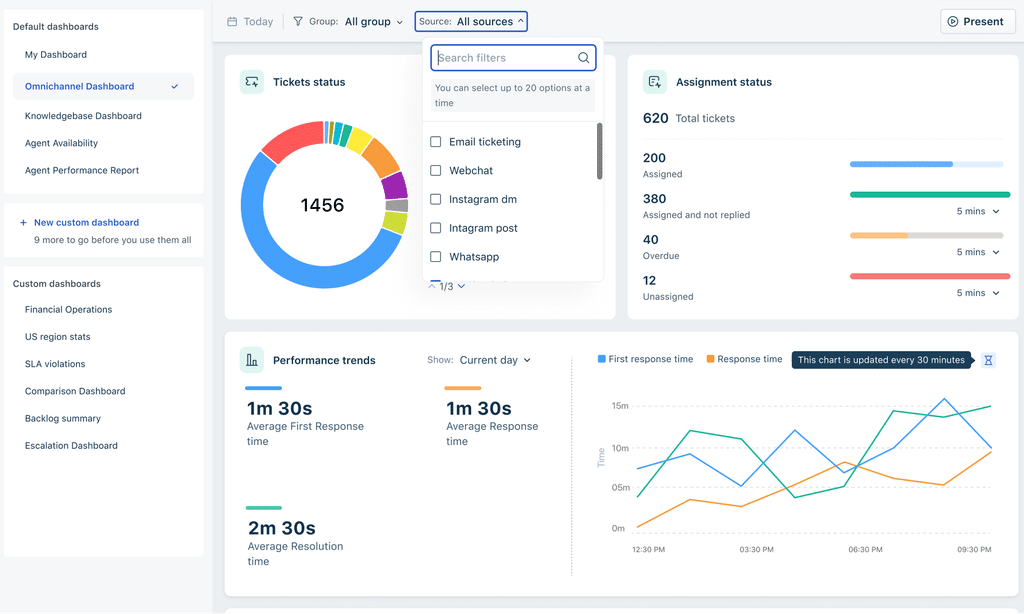
Freddy AI Agent handles repetitive questions autonomously by pulling answers from your knowledge base. Pro and Enterprise plans include 500 AI sessions, with additional sessions available at $49 per 100. Freddy AI Copilot is a separate add-on at $29/user/mo for reply drafting and conversation summaries.
The base plan is affordable, but costs can add up as you layer on Copilot and extra Freddy AI sessions.
Key features
- Knowledge Base: Publish a searchable help center in 40+ languages from a single portal with article versioning and approval workflows.
- Freddy AI Agent: Resolve repetitive queries across chat and messaging from your knowledge base.
- Customer Portal: Let customers submit tickets, check status, and browse your knowledge base from a branded self-service page.
- Freddy AI Copilot: Draft replies, summarize threads, and surface relevant articles for support reps handling live requests.
Pricing

- Free: $0 (Limited to 6 months, up to 2 users)
- Growth: $19/user/mo
- Pro: $55/user/mo
- Enterprise: $89/usermo
- Freddy AI Copilot: $29/user/mo
- Additional Freddy AI sessions: $49 per 100 sessions
G2 rating
4.4 out of 5 (3,771 reviews)
Pros
- Knowledge base supports 40+ languages from a single portal
- Pro and Enterprise plans include 500 Freddy AI sessions at no extra charge
- Growth plan at $19/user/mo is one of the most affordable entry points with a knowledge base included
Cons
- Freddy AI Copilot costs an additional $29/user/mo on every plan
- Additional Freddy AI sessions beyond the included 500 cost $49 per 100 sessions
- Reporting dashboards can feel limited for teams that need deep custom insights
4. Intercom
Intercom is a customer messaging platform that has leaned heavily into AI-first self-service. Fin is the centerpiece: an AI agent that resolves questions across chat, email, WhatsApp, SMS, and phone using your knowledge base. Intercom says Fin resolves up to 87% of common support questions.

The Help Center lets you publish public and private articles, and the same content feeds Fin’s answers. Copilot surfaces relevant answers and drafts replies for your support reps.
Salesforce is in the process of acquiring Intercom, which could affect future pricing or product direction.
Key features
- Help Center: Publish public and private articles that power both customer self-service and Fin’s AI-driven answers.
- Fin AI Agent: Answer questions across chat, email, WhatsApp, SMS, and phone using your knowledge base and connected data sources.
- Copilot: Surface instant answers, suggested replies, and conversation summaries for support reps inside the inbox.
- Fin Voice: Extend AI resolution to phone calls using the same AI that powers chat and email.
Pricing
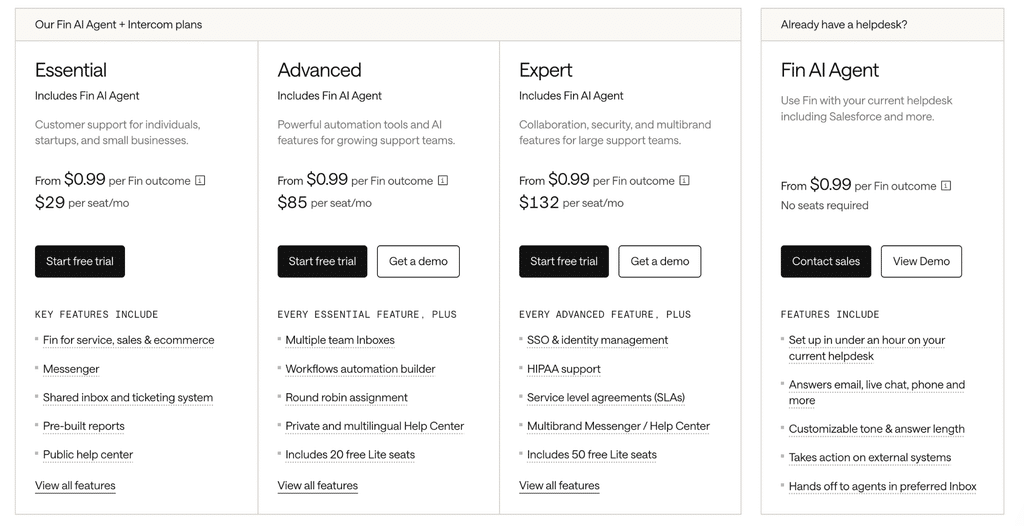
- Essential: $29/seat/mo
- Advanced: $85/seat/mo
- Expert: $132/seat/mo
- Fin AI Agent: $0.99 per resolution
G2 rating
4.5 out of 5 (3,912 reviews)
Pros
- Fin works across chat, email, phone, WhatsApp, and SMS from a single setup
- Per-resolution pricing ($0.99) lets you pay based on AI volume, not seat count
- Copilot gives support reps instant access to relevant answers and drafts inside the inbox
Cons
- Fin’s $0.99 per resolution can scale costs on high-volume teams
- Multilingual knowledge base features require higher-tier plans
- The Salesforce acquisition may change pricing or product direction
5. Help Scout
Help Scout is a help desk built around a shared inbox and a clean knowledge base called Docs. You organize articles into collections and categories, then publish them as a branded help center. The same content feeds Beacon, a widget that gives customers search and live chat directly on your site.

AI Answers uses your Docs content to answer common questions through Beacon. Help Scout says it can resolve up to 70% of questions automatically, at $0.75 per resolution, with a three-month free trial on every tier.
The customer portal, available on the Plus plan at $45/user/mo, gives customers a space to view conversations and open tickets. For smaller teams that want self-service without a heavy platform, Help Scout keeps things simple.
Key features
- Docs: Build a searchable knowledge base organized into collections and categories that feeds your help center and AI-powered answers.
- AI Answers: Resolve common questions through Beacon using your Docs content.
- Beacon: Embed an in-page widget where customers search your knowledge base, start a live chat, or get AI-powered answers.
- Customer Portal: Give customers a secure space to view past conversations and open tickets.
Pricing
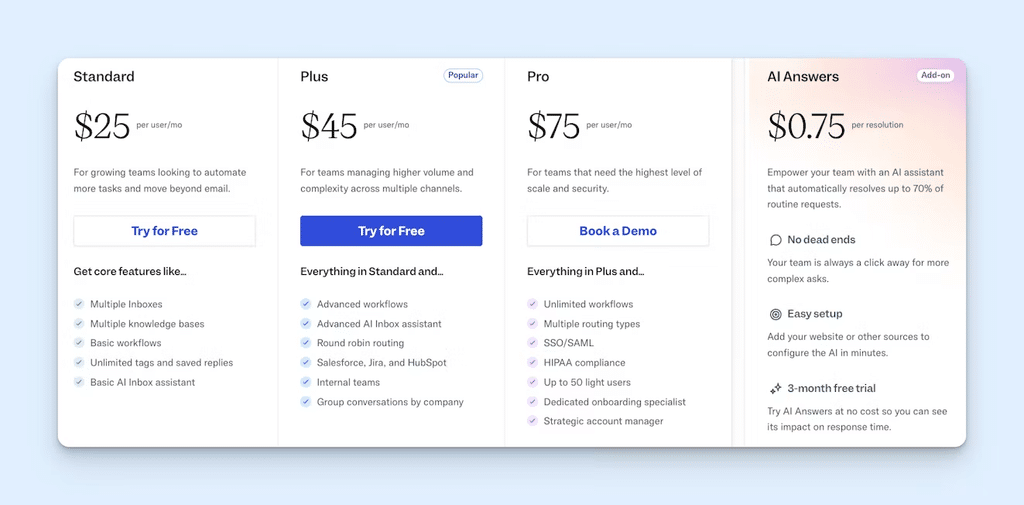
- Free: $0 (up to 5 users)
- Standard: $25/user/mo
- Plus: $45/user/mo
- Pro: $75/user/mo
- AI Answers: $0.75 per resolution (add-on, 3-month free trial for all new users)
G2 rating
4.4 out of 5 (431 reviews)
Pros
- Free plan includes up to 5 users, a shared inbox, and one Docs knowledge base
- Docs, Beacon, and AI Answers work together so the same content powers self-service and AI resolution
- Clean, minimal setup that doesn’t require weeks of configuration
Cons
- AI Answers costs $0.75 per resolution as an add-on to every plan
- Customer portal requires the Plus plan ($45/user/mo) or higher
- Smaller G2 review base (431 reviews) means less peer feedback than larger platforms
How to choose the right customer self-service software
The right choice depends on the kind of support your team handles and what you need self-service to do:
- If your team manages complex support requests, you’ll want self-service built on top of your ticketing and collaboration workflow. Hiver’s self-updating help center and AI Agents fit that.
- If you’re a small team on a tight budget, Help Scout’s free plan gives you a simple way to get started. Freshdesk is another affordable option at $19/user/mo, with built-in multilingual support.
- If you want to automate a large share of your support volume with AI, Intercom’s Fin is built around AI-powered resolution. But keep an eye on your total costs as volume and resolution rates grow.
- If you’re a large team with an extensive knowledge base, Zendesk offers a mature help center ecosystem with extensive integrations, community themes, and tools for managing self-service at scale.
Adopt the self-service platform that fits your team
The right pick depends on your team’s size, ticket volume, and how much you want AI to handle.
For teams managing complex support, self-service works best when it’s connected to the rest of your support workflow. Hiver brings ticketing, collaboration, workflows, and integrations together on one platform. AI Agents resolve requests end to end, while the help center keeps itself current using your team’s resolved conversations.
Sign up for a plan and see Hiver working in minutes.
FAQs
1. What is the difference between a knowledge base and a customer self-service software?
A knowledge base is one piece of the customer self-service software. It is the searchable library of help articles your customers browse. Customer self-service software is the broader category, including customer portals, AI agents, and automated resolution tools. Think of the knowledge base as the content layer and self-service software as the system that delivers it.
2. Do I need AI Agents, or is a knowledge base enough?
A well-organized knowledge base handles a lot on its own, especially for teams with fewer than a few hundred tickets per month. AI agents become valuable as volume grows. When you are fielding hundreds or thousands of repetitive questions, AI agents will resolve those automatically and free your team for requests that need human judgment.
3. How much does customer self-service software cost?
Free plans are available with Help Scout (up to 5 users), so you can start at $0. Paid plans range from $19/user/mo (Freshdesk Growth) to $132/seat/mo (Intercom Expert). But check for add-on costs like Intercom’s Fin ($0.99/resolution) and Freshdesk’s AI Copilot ($29/user/mo) that can change your total bill.
4. What happens when the knowledge base can’t answer a customer’s question?
A good self-service platform detects when a question falls outside coverage and routes it to a human with full context. Hiver’s AI Agents hand off unresolved requests with a summary of what the customer asked and what the AI checked. Your human rep picks up the conversation without making the customer repeat anything.