







Think about your worst customer service experience.
The one where you swore you’d never do business with that company again—and actually meant it.
Now that’s a reputation you wouldn’t want for your own brand or support team.
Support slip-ups are a part of running a business, and while they’re inevitable, how you handle them makes all the difference.
So how do you consistently deliver great customer service? Start by understanding what bad service looks like—and how to avoid it.
And in this article, we’ll go through exactly that.
What Does Bad Customer Service Actually Look Like?
Bad customer service is when a customer feels undervalued, unheard, or poorly treated.
It isn’t always about one significant mishap. More often than not, it’s the small frustrations that wear customers down.
Think slow replies, vague or copy-paste answers, or issues marked “resolved” that clearly aren’t. When support feels rushed, impersonal, or confusing, customers walk away feeling like their time and concerns didn’t matter.
Now let’s look at real examples of when customer service goes wrong—and what you can do about it.
10 Examples of Poor Customer Service (+How to Fix Them)
1. Problem: Your callers spend more time on hold than getting help
“I called support for a simple issue and was told the wait time would be a few minutes. Forty-five minutes later, I was still on hold with no update, wondering if anyone would ever pick up.”
According to Hiver’s State of Customer Support Report, 3 out of 4 customers get frustrated with long hold times. And with rising expectations, most customers simply won’t wait if they don’t have to.
Long waits often indicate deeper issues, such as understaffing, inadequate shift planning during peak hours, or agents unsure of how to handle certain queries. Whatever the reason, the message to your customers is the same: you’re not a priority.
The solution
- Implement a call-back system. Many companies offer a call-back system, so customers don’t have to wait on hold for long.
- Offer self-service options. Redirect customers to a knowledge base or FAQ section. This approach frees the customer service team from having to repeatedly solve similar queries, allowing them to dedicate more time to addressing more complex problems.
- Set clear expectations. Create automated responses to inform callers of the estimated wait time and provide an easy way to request a callback or leave a message.
Recommended reading
2. Problem: You transfer customers so often that they lose patience
“I called customer support about a charge I didn’t recognize. I was transferred three times, and each time I had to explain the issue from the beginning. By the end of the call, I was more exhausted than helped.”
I’m sure we’ve all experienced this. Being transferred between agents and departments, only to keep repeating our issue, can be incredibly frustrating.
Frequent call transfers suggest that agents are unsure who handles what on their team. It also shows a lack of understanding of the customer’s issue or the company’s products, services, and policies.
In fact, most customers don’t call support right away. They try to fix the problem themselves first. They search your website, skim the help center, and only reach out when nothing works.
By the time they talk to an agent, they’re already frustrated. That’s why every extra transfer or repeated explanation matters. The goal is simple: make that last step easy, not exhausting.
The solution
- Implement skill-based routing. Start by tagging agents based on strengths like technical know-how, language skills, or product expertise. Then route each query to the person best equipped to handle it right away.
🌞Pro Tip:
You can use a tool like Hiver to implement this. Customer queries can be routed to specific agents based on certain triggers—keywords in subject lines, from address, and more.

- Use a knowledge management system. Equip your agents with the right resources to provide prompt and accurate support. Have an internal knowledge base that offers easy access to product information, troubleshooting guides, and company policies.
- Strive for zero transfers. As a general rule, you should aim for zero transfers on most phone calls. Consider auditing your current transfer rate and look for trends on what causes the transfer.
Recommended reading
3. Problem: You keep making customers repeat themselves
“I started a chat about a missing order, uploaded screenshots, and got a ticket number. A few hours later, I called to follow up and was asked to repeat my address, order ID, and the entire story. What’s the point of the chatbot then?”
Do you know what frustrates customers the most? Having to repeat themselves.
In fact, 72% say it’s a clear sign of bad service. And when it happens, many don’t just stay silent. They take their frustration public on social media, like in this example:

When agents lack access to customer context, or it isn’t properly logged and shared, it forces customers to repeat themselves, creating unnecessary friction and frustration.
The solution
- Centralize information using a helpdesk. A helpdesk gives your team complete visibility into every ticket, making it easy to assign ownership, set priorities, update statuses, and leave internal notes. Everyone can see what’s happening with each conversation, which helps prevent duplicate replies and ensures no customer query slips through the cracks.
- Have all the necessary information beforehand. When the customer explains their issue, you should be able to collect all relevant information about them. To do this, Connect your tools. Integrate your helpdesk with your CRM or order management system. This way, agents can access key customer info without switching tabs or asking customers to repeat details
- Record and share context. Use call recording or conversation intelligence tools to log key details, leave internal notes, and keep teammates aligned.
4. Problem: Your agents sound robotic instead of empathetic
“I called my health insurance provider after a hospital visit to understand why my claim was partially denied. I was already stressed about the bill, but the agent kept repeating policy terms and told me to ‘check the document online.’
If your support staff treats customer issues as just tickets, it points to a fundamental problem: lack of empathy.
Research backs this up. 86% of consumers say empathy and human connection matter more than a quick response when it comes to a great customer experience.
Even when the answer can’t change, how it’s delivered matters. Acknowledging the customer’s concern, explaining the reasoning clearly, and showing that you understand the stress they’re under is the bare minimum.
So how do you make sure your support team actually shows empathy in real conversations?
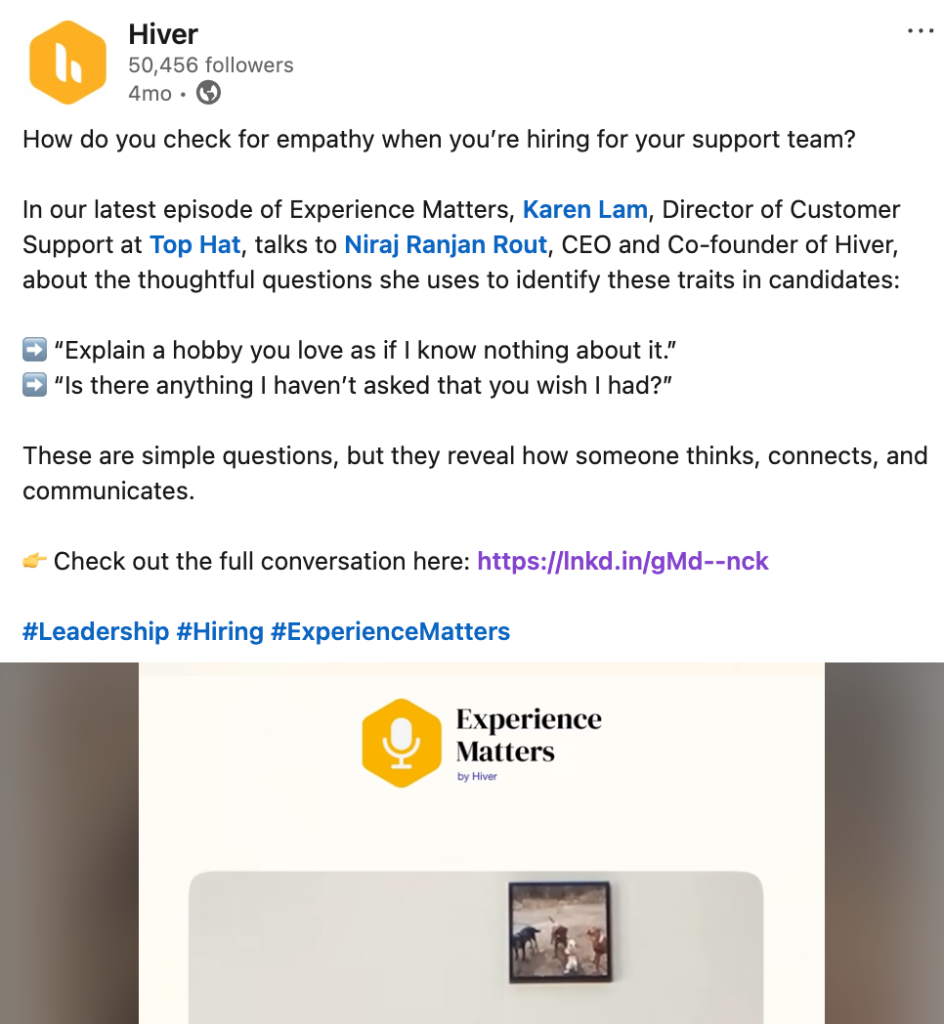
Here’s how Karen Lam, Director of Customer Support at Top Hat, approaches it when hiring.
The solution
- Train your team to be more empathetic. Inculcating empathy in your team is the first step to ensuring that your customers feel heard. Train your existing team to be mindful of their language. Using phrases like “I completely understand” and “I know where you’re coming from” demonstrates that you are attentive and acknowledge the customer’s perspective.
- Remove biases. Recognize and address biases—age, gender, language, or occupation—that affect how support agents interact with customers.
- Actively listen. Frustrated customers crave empathy, not a quick fix. Focus on active listening before jumping to solutions. By asking open-ended questions like “Can you tell me more about what happened?” and demonstrating genuine interest, you validate their feelings and show them they’re valued.
Recommended reading
5. Problem: Your policies leave no room for real-life situations
“I booked a flight but had a medical emergency a day before departure. I provided documentation and asked to reschedule the trip. The agent pointed to the ‘no changes’ clause and refused any accommodation or credit. I felt punished for circumstances I couldn’t control. I’m never booking with that airline again.”
In situations like this, adhering strictly to the rules can make an already stressful moment even more difficult for the customer. When customers hear a generic response or a flat “nothing can be done,” it feels dismissive, especially when the situation is clearly outside their control.
In this case, the least the agent could have done was escalate the request to a manager and explore possible alternatives, given that it was a genuine emergency.
Rigid policies can backfire, especially in situations where a little flexibility could make a significant difference. Sticking strictly to the rules can negatively impact the quality of your service, leading to frustrated customers, like in this example:

The solution
- Give more autonomy to your support staff. Without autonomy, customer service reps can’t make decisions or handle issues. Empowering support staff ensures they have the ability and autonomy to make decisions without seeking multiple approvals. This, in turn, improves the time taken to resolve queries.
- Relax policies, wherever possible. Relax your company policies for prompt response and action. If they are too rigid, customer service representatives may be limited in providing personalized solutions to customers.
Recommended reading
6. Problem: Your support is harder to reach than it should be
The problem
“I needed help with a return, but the email address listed in the app didn’t work. After digging around, I finally found a phone number, only to realize the support team was already outside business hours. By then, I just felt stuck.”
Customers expect support to be easy to reach. When contact details are buried or getting help takes too many steps, frustration builds quickly.
If customers can’t find a clear way to reach you, many simply give up, and that often shows up later as a bad review.
A good support experience starts with accessibility. Make it simple for customers to find help, whether they’re using email, chat, or phone, so getting support never feels harder than the problem itself.
The solution
- Improve visibility. Having a ‘contact us’ button in prominent locations, such as the header, footer, or a fixed position on the side of the page, ensures that customers can easily find help.
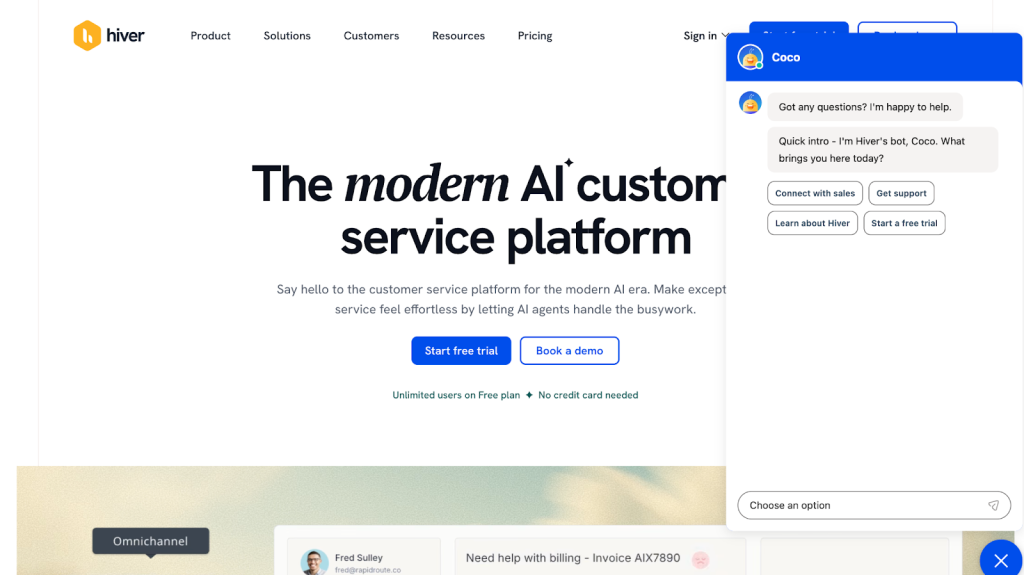
For instance, at Hiver, we have our own live chatbot, Coco, to help users get help at any stage of the buyer journey:
- Be where your customers are. Allow customers to reach you through their preferred communication channel at any time. For this, an omnichannel helpdesk is the best option as customers can contact you by phone, email, chat, social media, or WhatsApp.
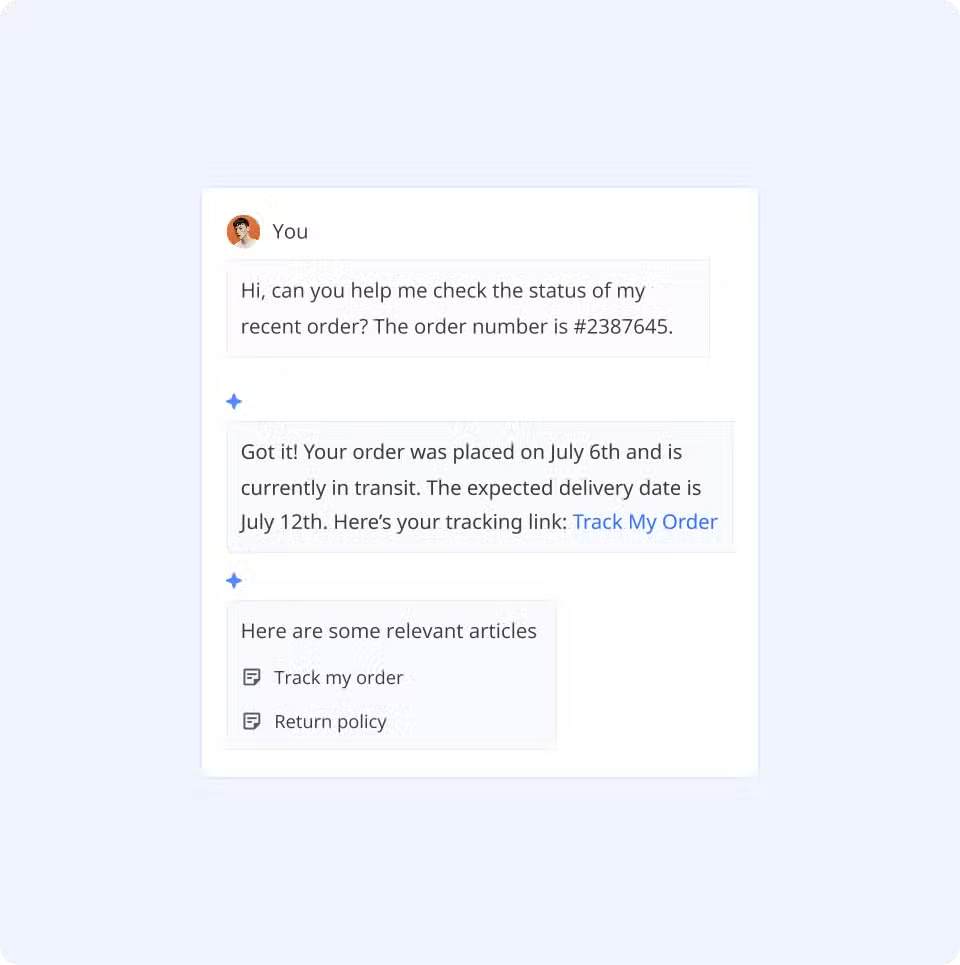
- Use AI to stay accessible beyond business hours. Customers don’t stop needing help just because your team is offline. AI can step in to answer common, repetitive questions, such as return policies, order status, or basic account queries. This ensures that customers still receive help instantly, even when live agents are unavailable, and reduces the backlog waiting for your team the next day.
🌞 Pro tip:
Tools like Hiver make this easier with AI Answers on chat, which uses your knowledge base to resolve routine questions automatically. And when a conversation becomes more complex, AI Copilot supports agents with full context, suggested replies, and file understanding, so handoffs feel smooth instead of repetitive.
Ensure staffing for all support channels is done correctly. Make sure each support channel is staffed the right way. Phone, email, chat, and social media all work differently and come with different response expectations. A live chat needs quick replies, while email allows more time. Understanding how each channel works helps you assign the right number of people and avoid long wait times or missed messages.
7. Problem: Your IVR makes reaching a human feel impossible
“I really needed to talk to someone from the team, but when I called the customer service number, I had to go through all these prompts that got me nowhere. And after all that, I still had no answer to my question.”
This experience is more common than it should be. I’ve had this happen myself. I recently called the bank with an urgent issue, hoping to speak to a representative, and instead found myself stuck listening to automated prompts and pressing buttons, wondering if I’d ever reach a real person.
To be clear, IVR systems aren’t bad by default. When designed well, they can handle simple requests and reduce support workload.
The problem starts when IVR menus get too complicated. Customers struggle to remember all the options, get stuck in loops, or have to start over, leading to repeated attempts and mounting frustration.
The solution
- Offer repeat prompts. Give callers the option to replay the menu if they miss something or need more time to decide.
- Keep it short. Limit the main menu options to 3-4 items. Prioritize the most frequently chosen options first.
- Make escalation seamless. Have an option for emergency situations or for reaching a support rep earlier on in the pre-recorded IVR menu.
Recommended reading
8. Problem: You promise follow-ups that never actually happen
“My internet service provider told me a technician would visit between 2-4 pm on Tuesday and promised an email confirmation ‘within the hour.’ The email never came. Nobody showed up on Tuesday. I had taken time off work, had no internet, and had to start over with support, feeling like my time didn’t matter.”
When your business fails to follow up with customers after offering a solution or fix, it could appear lethargic.
Not only that, but the lack of follow-up leaves customers unsure of the following steps or whether their concerns are even being addressed. This builds frustration and makes them feel unimportant.
The solution
- Make it easy for your support staff to follow up. Create clear guidelines for what information should be included in follow-up communication (e.g., next steps, timelines, contact details). You can also include email templates that your support staff can use to ensure consistent information.
- Use automated reminders. Use tools that integrate with various calendar apps like Google Calendar. For example, Hiver can trigger follow-up emails or CSAT surveys at designated times after an initial interaction.
Recommended reading
9. Problem: Your pricing hides the real cost
“I signed up for a service because the price looked reasonable, but after a month I realized I was being charged extra for things I assumed were included. By the time I noticed, I already felt misled.”
When customers do not receive precise product details, prices, and terms, they cannot make well-informed choices. This can lead to feelings of regret and potential product returns.
Like this customer who voiced their concern about AT&T’s charges:

The solution
- Be transparent with pricing from the start.
Clearly display the total cost upfront, including all mandatory charges. If there are optional add-ons, clearly indicate what’s included by default and what costs extra, so customers aren’t surprised later. - Help customers understand what they’ll actually pay.
Where pricing varies, give customers a simple way to estimate their final cost based on their choices. This could be a pricing breakdown, plan comparison, or a quick calculator that adjusts as options are selected. - Call out additional fees clearly and early.
Don’t hide extra charges in fine print or reveal them only at the last step. Surface important fee details throughout the experience using clear language, visual cues, or brief explanations, so customers can make informed decisions.
10. Problem: You ask for feedback, then nothing changes
“I kept mentioning in surveys that my invoices didn’t always add up and were hard to understand. A few months later, nothing had changed. When I finally asked about it, I was told it was a known issue and had already been added to the product backlog, but there was no clear plan or timeline for fixing it.”
Customer feedback gives you direct insight into what’s working and what isn’t. It reflects real customer experiences, not assumptions, and highlights issues that matter most to the people using your product or service.
When feedback is collected but not acted on, customers notice. Being told that an issue is “known” without any follow-up, timeline, or visible improvement quickly erodes trust. Over time, that frustration pushes customers to look elsewhere.
In fact, 72% of customers say they plan to switch to another brand after a negative support experience, which directly impacts retention and long-term growth.
The solution
- Define SLAs. The first step is setting up Service Level Agreements (SLAs). By establishing clear expectations, accountability, and performance metrics, SLAs can help ensure that customer support teams do not miss or ignore customer feedback.
- Categorize incoming issues. Categorizing all incoming customer complaints will help you prioritize better. You’ll know which queries need to be addressed immediately, how to manage workload, and how to set the right expectations with the customer.
Bad customer service? Not on our watch.
Most of these mistakes sound obvious. And yet, they happen every day, often because teams are stretched thin or stuck with tools that make support harder than it needs to be.
The good news is that none of this is permanent. With the right processes and the right tools, support teams can fix these issues and deliver consistently good experiences.
Tools like Hiver help teams stay organized, respond faster, and keep context in one place, so customers feel heard, supported, and taken care of every time they reach out.
Because in the end, great customer support isn’t about being perfect. It’s about showing up, following through, and making customers feel like they matter.Wondering how Hiver fits in your support team’s workflow? Try it for free today.













