





Messaging is the fastest way for doctors, nurses, and patients to connect, but it can also be risky. A single unsecured text can expose sensitive health information and put your organization at risk of a HIPAA violation.
Traditional messaging tools, while convenient, often fall short of the stringent security standards required in healthcare.
That’s why more healthcare teams now rely on HIPAA-compliant messaging apps. They ensure that each conversation, note, or shared document remains private and protected.
But with an expanding market of solutions, how do you determine which tool suits your needs the best?
In this guide, you’ll learn what HIPAA means, what makes a messaging app compliant, and how the top HIPAA-compliant chat tools compare in 2026.
What is HIPAA?
HIPAA stands for the Health Insurance Portability and Accountability Act, a U.S. law that protects sensitive patient information from being shared or accessed without permission. The law requires every organization that handles Protected Health Information (PHI) to protect it and prevent unauthorized disclosure.
HIPAA applies to:
- Hospitals, clinics, and private practices
- Health insurance providers
- Third-party vendors and software companies that store or transmit patient data
Even a single lapse can be costly. In 2025, a New York surgery center paid $250,000 to settle HIPAA violations after a ransomware attack exposed nearly 25,000 patient records.
The investigation revealed that the center had never conducted a proper risk analysis or sent timely breach notifications. It’s clear violations of the HIPAA Security and Breach Notification Rules.
What is a HIPAA-Compliant Messaging App?
A HIPAA-compliant messaging app is a secure chat tool that adheres to strict privacy and security guidelines. These apps enable healthcare teams to exchange messages, share files, and coordinate patient care in real-time, all while protecting Protected Health Information (PHI).
To qualify as HIPAA-compliant, a live chat or messaging platform must meet a few key requirements:
Top HIPAA-Compliant Messaging Apps in 2025 – Comparison
To help you pick the right solution for secure healthcare communication, here’s a quick comparison of five top HIPAA-compliant messaging apps: Hiver, TigerConnect, OhMD, Klara, and QliqSOFT.
Each of these tools enables confidential patient communication with features like encryption, audit trails, and Business Associate Agreements (BAAs) to ensure HIPAA compliance.
The table below offers a look at their key criteria:
| Feature | Hiver | TigerConnect | OhMD | Klara | QliqSOFT |
|---|---|---|---|---|---|
| BAA Available | Yes (provided to customers) | Yes (will sign BAA) | Yes (included in paid plans) | Yes (HIPAA-compliant by design) | Yes (for paid clients) |
| EHR Integration | No (focuses on email workflow) | Yes (many EHRs supported) | Yes (85+ EHR systems) | Yes (multiple EHR integrations) | Yes (major EHR/CRM systems) |
| Audit Logging | Yes (comprehensive audit trails) | Yes (detailed message logs) | Yes (chat auditing and logs) | Yes (tracks all message activity) | Yes (robust audit trails) |
| Supported Platforms | Works inside inbox (web), iOS & Android apps | iOS, Android, Desktop app, Web portal | Web app, iOS & Android apps | Web interface, iOS & Android apps | iOS & Android apps, Desktop client, Web portal |
Let’s have a deeper look at each platform below:
1. Hiver
Hiver is a collaboration-focused AI customer service platform. If your clinic or hospital relies on Google Workspace for communication, Hiver lets you manage patient inquiries securely without switching to a new interface.
P.S. Hiver also offers a dedicated omnichannel platform, Hiver Omni, that consolidates all your channels like email, chat, voice, socials, SMS, Slack, and more in one intuitive workspace.
The best part is that it has an intuitive interface, so staff have virtually no learning curve.
In essence, Hiver’s core value is bringing HIPAA-compliant customer service tools into the email workflow your team already uses.
Among the many healthcare teams using Hiver, Cohere Health stands out for its use of support workflows through inbox-based collaboration. The Boston-based health-tech company uses Hiver to auto-assign and tag emails, track SLAs and response times, and facilitate internal collaboration, all within the inbox.
The setup now saves their team over 20 hours per month and provides them with complete visibility into performance and communication.
Key features of Hiver
- Unified Inbox: Hiver allows your entire team to manage patient interactions from a unified inbox. It means no more missed messages or overlaps.
- Email Tags & Notes: Discuss patient concerns and requests internally by simply @mentioning a colleague and leaving a note. No more email CCs or forwards.

- Collision Detection: Avoid duplicate messages. Ensure that two team members aren’t addressing the same patient query, improving response efficiency.
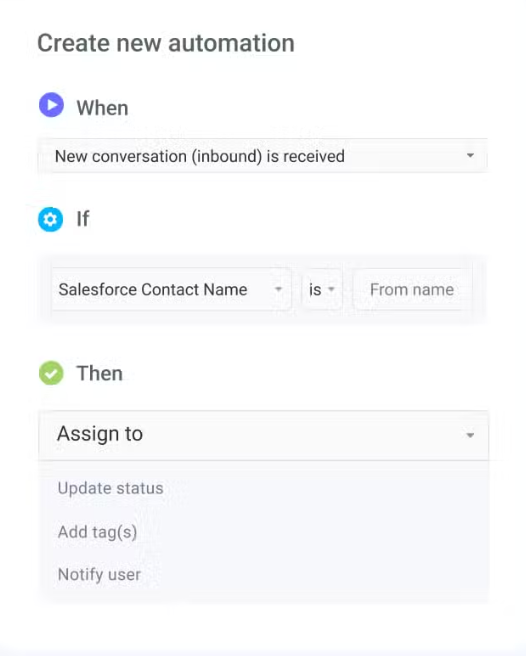
- Automated Workflows: Simplify repetitive tasks and ensure that patient queries go to the right department or specialist without delay.
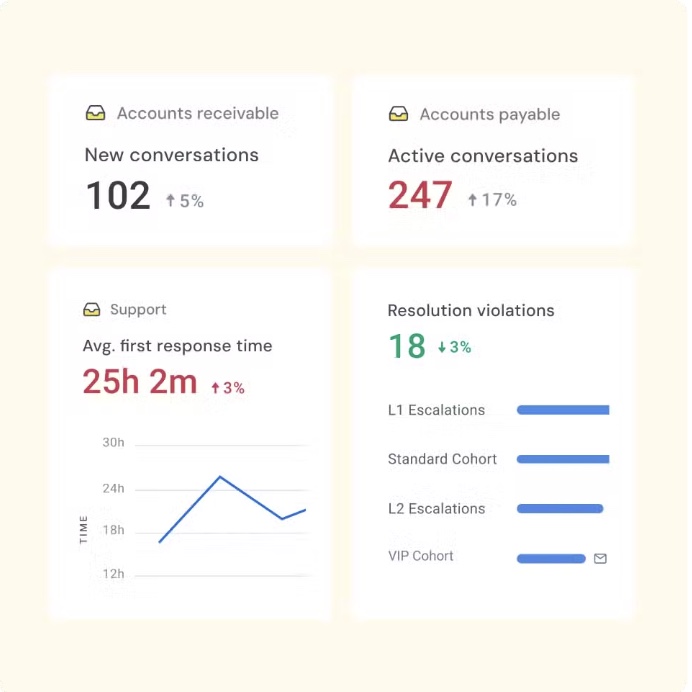
- Reporting Capabilities: Measure the efficiency of live chat and other customer support operations with visual reports and make data-driven decisions.
Pros
- Hiver makes it simple for teams to stay organized and manage shared inboxes efficiently.
- Hiver’s shared inbox feature makes collaboration easy for teams managing high volumes of email.
- It’s intuitive, quick to implement
- Hiver helps teams assign emails to the right members effortlessly, removing confusion and improving accountability.

Cons.
- Some users wish for deeper integrations with tools to improve cross-platform collaboration.
(All the above pros and cons are sourced from G2)
Pricing
Hiver offers four pricing plans:
- Free – $0/user/month: Basic shared inbox and team collaboration tools.
- Growth – $25/user/month: Adds multi-channel support and workflow automations.
- Pro – $45/user/month: Includes advanced analytics, CSAT surveys, and chatbots.
- Elite – $75/user/month: Designed for enterprises with advanced controls and security.
HIPAA compliance is available exclusively on the Elite plan and for enterprise customers.
Best for: Teams that need HIPAA-compliant messaging setup without heavy setup.
Compliance Highlights
- BAA is available for enterprise healthcare plans
- Data is encrypted in transit and at rest within Google Workspace.
- Role-based access controls and audit trails
- Data stays with you (no external storage)
- Regular security reviews and employee HIPAA training
2. TigerConnect
TigerConnect is a HIPAA-compliant texting app designed specifically for the needs of healthcare providers. They ensure that patient data remains secure and confidential, aligning with industry regulations and protecting healthcare institutions from potential data breaches.
Unique to TigerConnect is its role-based messaging; staff can message a role (such as “On-Call Cardiologist”) without needing to know who’s assigned, ensuring the right person receives the alert.

TigerConnect Key Features
- Role-based messaging delivers alerts to the right on-call clinician without needing their name.
- Priority notifications and read receipts ensure critical messages are seen and acknowledged fast.
- Secure file, image, and voice/video sharing supports real-time clinical collaboration.
- On-call scheduling and escalation rules route urgent messages automatically to available staff.
- Deep integrations connect with EHRs, nurse call systems, and scheduling platforms for workflow continuity.
- Admin controls provide remote wipe, access policies, and detailed audit logs for compliance.
Pros
- TigerConnect makes secure, real-time communication easy across care teams.
- It’s simple to use, HIPAA-compliant, and essential to daily clinical workflows.
Cons
- Some users found the lack of built-in video and patient communication features limiting without an upgrade.
- If the system goes offline, there’s no easy backup, which can disrupt communication in large facilities.
(All the above pros and cons are sourced from G2)
Pricing
TigerConnect offers annual subscription plans with a fixed price and user count. It provides organizations with predictable costs throughout the contract period, making budgeting simpler.
Best for: Large hospitals and multi-site systems are replacing pagers and unifying time-critical clinician messaging.
TigerConnect Compliance Highlights
- BAA; encryption in transit/at rest
- Device controls (PIN/biometric, remote wipe)
- Message lifespan/auto-delete
- MFA/SSO, granular access controls
- Comprehensive audit logs
3. QliqSOFT
For healthcare professionals seeking a HIPAA-compliant communication tool, QliqSOFT is a good option. Their commitment to HIPAA compliance ensures that both patient and provider data are handled with utmost security and integrity.
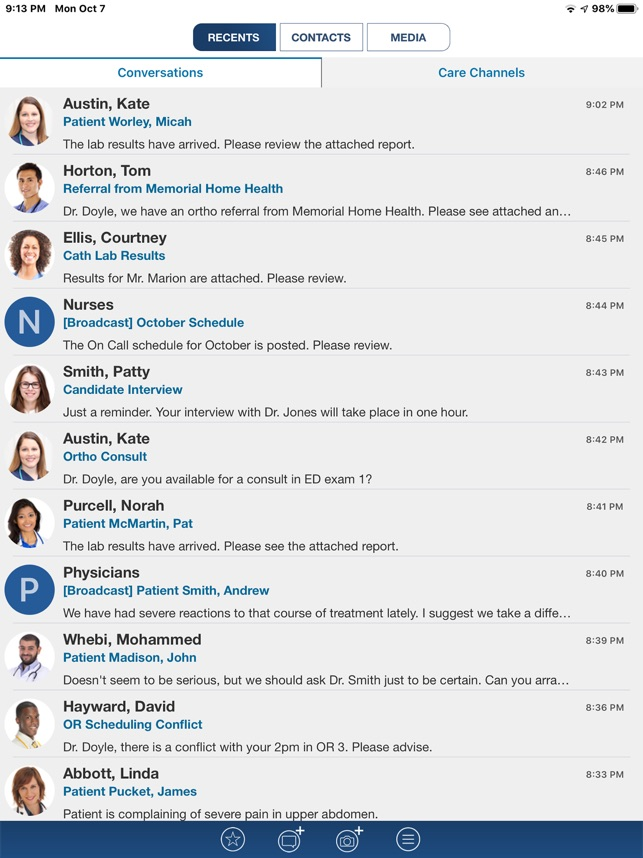
QliqSOFT boasts essential features, including patient communication, video chat, and on-call scheduling. However, what makes QliqSOFT unique is its “QliqStik” feature for secure file transfer, allowing patients to share information with providers via live chat.
It’s ease of integration with various healthcare systems and its patient-centric tools that enhance patient-provider communication.
QliqSOFT Key Features
- Secure team messaging and patient texting bring internal and external communication into one hub.
- Built-in telehealth enables video consults that live alongside chat for a seamless patient experience.
- Broadcast and alerting tools deliver mass notifications and automatically escalate unanswered messages.
Pros
- QliqSOFT provides a secure, HIPAA-compliant platform for easy, real-time communication across teams.
- The app is simple to use and supports encrypted messaging
Cons
- The mobile app experience differs between Android and iPhone, which can confuse users.
- Group messaging lacks flexibility to add or remove members once started.
- Performance may slow in areas with weak network coverage.
(All the above pros and cons are sourced from G2)
Pricing
QliqSOFT doesn’t list pricing publicly and follows a custom, flat-rate model. You’ll need to contact their sales team (sales@qliqsoft.com) directly at sales@qliqsoft.com for quotes tailored to your organization’s size, user count, and feature requirements.
Best for: Outpatient clinics are reducing phone volume and managing patient texting, reminders, and quick telehealth services.
QliqSOFT Compliance Highlights
- BAA on paid plans; end-to-end encryption
- Secure links for PHI, access controls
- Audit logs and retention policies
- Device revocation/remote sign-out
- EHR documentation of communications
4. OhMD
OhMD stands out as a patient engagement and messaging app that’s very patient-centric in its approach. It’s a HIPAA-compliant platform built to simplify digital communication between healthcare providers and their patients.
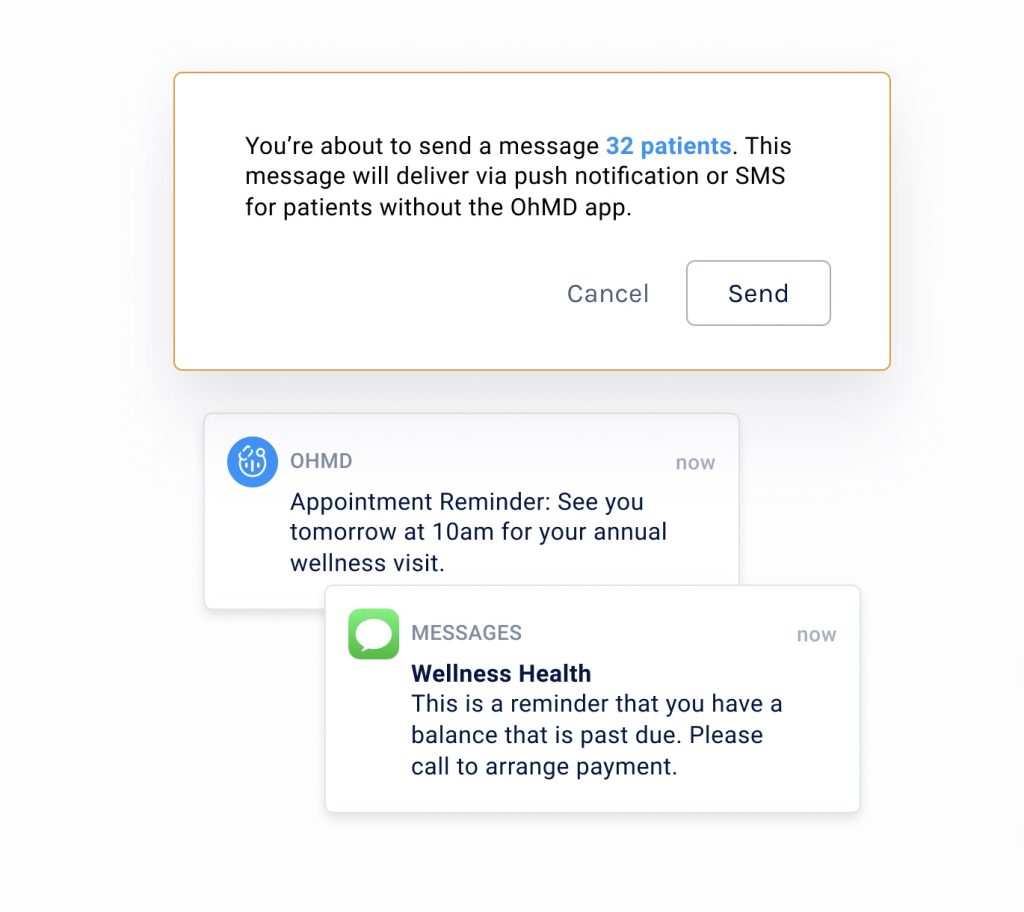
OhMD combines secure texting, calling, and forms, allowing patients to connect with providers through familiar channels (like SMS) while maintaining compliance.
OhMD Key Features
- Two-way texting lets patients message your practice from their phones without downloading an app.
- Website live chat captures new inquiries and patient questions directly into a secure inbox.
- Telehealth video visits run inside the platform to keep care and communication in one place.
- Automated workflows handle intake, screeners, reminders, and follow-ups with minimal staff effort.
Pros
- OhMD makes patient communication faster, easier, and more convenient for both staff and patients.
- Texting is quick, secure, and ideal for reminders, follow-ups, and form sharing.
- The platform is user-friendly and easy to implement
Cons
- Occasional glitches may cause delays in message display or require a re-login.
- Some users find features like saved replies or internal notes take too many clicks to access.
- The mobile app could offer more functionality for on-the-go use.
(All the above pros and cons are sourced from G2)
Pricing
OhMD’s Reach plan starts at $250 per month, offering two-way texting and automations, and reminders. The Develop plan offers API-based, HIPAA-compliant texting, with custom pricing available upon request.
Best for: High-volume, multi-provider clinics automating reminders/forms and running telehealth from a single hub.
Compliance Highlights
- BAA; encrypted messaging/files/video
- Role-based access; MFA
- Detailed audit logs/activity history
- Secure file storage; retention/expiration controls
- Secure EHR integrations
5. Klara
Last on the list is Klara, a dynamic patient communication platform that places a strong emphasis on HIPAA compliance to safeguard patient data.
Klara provides essential features, including secure messaging and efficient collaboration tools, for healthcare teams. It also boasts a user-friendly interface, making patient-provider communication more straightforward.
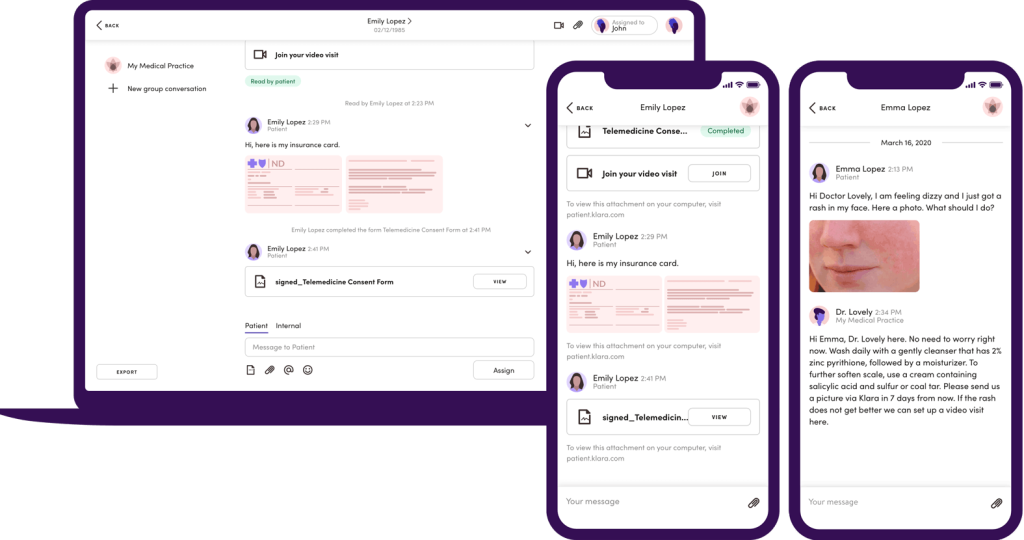
Klara’s UI
Klara Key Features
- A unified, secure inbox centralizes all patient and internal messages for full team visibility.
- Integrated video visits let providers deliver telehealth without switching apps or losing context.
- eForms and automation streamline intake, consent, and recalls to reduce repetitive admin work.
- Role-based permissions and internal team chat keep clinical and non-clinical workflows separated but coordinated.
Pros
- Klara makes patient communication feel as easy as texting, helping staff connect quickly and clearly.
- It integrates smoothly with existing systems, reducing phone calls and saving time.
- Practices can customize message groups, reassign conversations, and handle tasks efficiently.
Cons
- Some patients, especially older ones, may struggle with texting or smartphone use.
- Occasional notification delays and limited automation can slow response times.
- Certain integrations and interface elements can be confusing or need refinement.
(All the above pros and cons are sourced from G2)
Pricing
Klara offers customized, quote-based pricing for its patient engagement platform, which varies depending on several factors.
The company does not publicly list fixed pricing on its website, requiring potential users to contact its sales team for a personalized quote.
Best for: Hospitals/large clinics centralizing all communications and automation (bots, broadcasts) with IT support.
Compliance Highlights
- BAA (paid); end-to-end encryption
- Vendor no-plaintext access posture
- Audit trails across chat/video/broadcast
- MFA/SSO; role-based permissions
- Retention controls, remote wipe, secure integrations
Recommended reading
How to Choose the Right HIPAA Messaging Solution
The best HIPAA messaging tool seamlessly integrates into your daily workflows, keeps your data secure, and is easy for everyone to use from the start. Here’s how you can narrow down your options:
- Workflow and Integration Needs: Start with your existing tools like EHR, scheduling, billing, or telehealth. Choose a messaging app that connects with them easily. If your team is copying data between systems, you’ll waste time and risk errors.
- Compliance and Security Features to Prioritize: Every vendor will claim to be “HIPAA compliant,” but you need to dig deeper. Look for:
- A signed Business Associate Agreement (BAA)
- End-to-end encryption for all data
- Role-based permissions so only authorized staff can access PHI
- Pricing Considerations: Don’t just compare monthly costs; compare what’s included. Some vendors charge extra for BAAs, integrations, or data storage.
- Implementation and Training: Pick a platform that’s intuitive, quick to set up, and comes with clear onboarding materials. Training your staff should take hours.
Benefits of HIPAA-Compliant Messaging Apps
HIPAA-compliant chat tools protect your patients’ privacy, make your team’s job easier, and keep your organization on the right side of compliance. Here’s what you actually gain when you switch to one:
- Monitor and Audit with Ease: Detailed logs show exactly who accessed or shared data, ensuring transparency and quick reporting whenever needed.
- Protect Sensitive Patient Data: Every chat, file, and image is encrypted in transit and at rest. You control who can access data and can revoke permissions instantly if someone leaves the organization.
- Ensure Regulatory Compliance: The platform automatically tracks user activity, making audits and compliance checks effortless.
- Build Patient Trust: Secure communication tools show patients their information is safe, encouraging transparency and stronger relationships.
- Reduce Risk of Data Breaches: Built-in safeguards like authentication, automatic logouts, and remote device control protect you from unauthorized access or PHI exposure.
- Simplify Provider–Patient Communication: Real-time, compliant chat replaces phone calls and email threads, saving hours each week and keeping everyone aligned.
- Integrate with Healthcare Systems: Connects directly with your EHR, CRM, and scheduling tools so patient information updates automatically across systems.
Key Security Requirements of a HIPAA-Compliant Messaging App
To qualify as HIPAA-compliant, a live chat or messaging platform must meet a few key requirements:
- End-to-end encryption: Every message, image, or file is encrypted while it’s being sent and stored. Even if someone intercepts the data, they can’t read it.
- Business Associate Agreement (BAA): The vendor must sign a BAA, confirming they’ll protect PHI according to HIPAA standards. Without this, the app isn’t compliant.
- Access controls and user authentication: Only authorized staff can log in. Multi-factor authentication (MFA) and role-based permissions help prevent data leaks.
- Audit logs: The system tracks who accessed patient records, which is crucial for investigations or compliance reviews.
Best Practices for HIPAA-Compliant Messaging
Even the best HIPAA-compliant app can fail if it’s used incorrectly. Here’s how to ensure your team uses any HIPAA-compliant app safely every day.
- Obtain and Document Patient Consent: Always get clear patient consent before sending digital messages. Capture it during onboarding and record that consent inside your EHR or CRM.
- Train Your Staff on Secure Communication: Run short, regular sessions to remind your team what counts as Protected Health Information (PHI) and how to handle it safely.
- Limit PHI in Conversations: Share only what’s necessary for care coordination. Use patient IDs or initials instead of full names and avoid including sensitive details unless essential for treatment.
- Enable Audit Trails and Monitoring: Turn on audit logging to track every access and action. Review logs monthly to spot unusual activity such as repeated failed logins or access outside work hours.
- Have an Incident Response Plan Ready: Prepare a simple plan that outlines who investigates breaches, how to notify affected patients, and how to document each step.
Your Next Step Toward Safer HIPAA Compliant Messaging Apps
Choosing a HIPAA-compliant messaging app ensures your patients’ privacy stays protected while your team stays efficient.
The right tool encrypts every message, maintains detailed audit trails, and fits naturally into your existing workflows. It’s the foundation for trust between your organization, your team, and your patients.
All these tools we covered provide secure, HIPAA-compliant messaging for healthcare, but each has its niche.
With Hiver, you can simplify how your team connects while staying fully compliant. Manage secure conversations across email, live chat, and WhatsApp, all from one intuitive platform built for healthcare teams.
The best choice depends on your organization’s size, technical needs, and budget. Regardless of which option you choose, transitioning to a HIPAA-compliant messaging app is a smart move to protect patient privacy.
It’s a win-win for both patients and healthcare teams.
Start your journey toward safer, smarter healthcare communication.
Frequently Asked Questions (FAQs)
1. What makes a text messaging app HIPAA compliant?
A HIPAA-compliant messaging app encrypts every message, limits access to authorized users, and signs a Business Associate Agreement (BAA) with your organization. It also logs user activity and secures data both in transit and at rest to protect patient information.
2. Why isn’t regular SMS texting considered HIPAA compliant?
Standard SMS doesn’t encrypt data or control who can read the messages. Once a text is sent, it can be intercepted, forwarded, or stored on unsecured devices, all of which violate HIPAA’s privacy and security rules.
3. Can I use popular messaging apps like WhatsApp or Google Chat for HIPAA communication?
No. Even though some apps use end-to-end encryption, they don’t offer BAAs or full audit controls. Without a signed BAA and system-level safeguards, using them to share patient data would violate HIPAA compliance.
4. How do healthcare providers ensure messaging stays HIPAA compliant?
You can stay compliant by using only approved apps, limiting PHI in chats, and training staff regularly. Turn on audit logs and access controls, and review activity reports each month to ensure all communication remains secure and documented.
5. Are there free HIPAA-compliant messaging apps?
Most free chat tools aren’t fully compliant because they don’t provide a signed BAA or audit trail. Some vendors offer limited free trials, but healthcare organizations should always choose paid, compliant versions to avoid risk.
Start using Hiver today
- Collaborate with ease
- Manage high email volume
- Leverage AI for stellar service













