Skip to content





The moment the holidays roll in, the vibe shifts. Everything feels brighter, busier, and a little chaotic in the best way. Shoppers move with urgency. Expectations jump overnight. And your support team feels it the second every channel starts buzzing at once. Customers want quick answers, clear updates, and no surprises. One slow reply can throw the whole experience off and ruin your customer’s day.
That’s why holiday time customer service needs real, early prep. When you plan ahead, queues stay manageable, and the experience stays solid. This guide breaks down twelve proven strategies to help you stay ahead this season.
What Is Holiday Customer Service?
Holiday time customer service is the work you do to prepare for the holiday rush. It helps your team handle higher ticket volume, faster expectations, and seasonal policies from November to January. It includes staffing plans, channel coordination, proactive updates, returns workflows, and crisis protocols.
Table of Contents
- What Is Holiday Customer Service?
- 12 Proven Strategies to Win Holiday Customer Service in 2025
- 1. Automate Holiday Support Workflows with AI Before Volume Spikes
- 2. Omnichannel and Unified Support
- 3. Holiday-Specific FAQs and Self-Service
- 4. Proactive Communication About Delays
- 5. Smart Seasonal Staffing and Scheduling
- 6. Training for Holiday Scenarios
- 7. Mobile-First Support Optimization
- 8. Real-Time Analytics
- 9. Team Morale and Retention Tactics
- 10. Crisis and Incident Response
- 11. Returns and Exchanges Management
- 12. Loyalty Building From Holiday Interactions
- Holiday Customer Service Prep Timeline (90-Day Roadmap)
- Real-World Success Cases
- Common Mistakes to Avoid
- Strengthening Holiday Time Customer Service for 2025
- Frequently Asked Questions
12 Proven Strategies to Win Holiday Customer Service in 2025
The holiday season brings its own support hurdles, and this section shows you exactly how to handle them. You’ll learn how to route questions more cleanly and update self-service for holiday needs. You’ll also see how to train your team for seasonal cases, tighten mobile support, and stay on top of live data.
1. Automate Holiday Support Workflows with AI Before Volume Spikes
Holiday support is full of repeatable tasks: shipping updates, order checks, promo questions, and basic troubleshooting. Automating these steps removes hours of manual work and keeps your team focused when ticket volume spikes.
Why it matters
Automation reduces queue buildup and prevents agents from getting buried in low-value tasks. It also gives them more time to handle complex or sensitive customer issues.
How to implement it
- Automate categorization and routing for topics like shipping delays, promo issues, gift receipts, and out-of-stock alerts so tickets land in the right queue.
- Use AI to draft replies for high-volume queries, including order status, return windows, and exchange requests.
- Trigger automatic updates for delays, shipping milestones, backorders, and holiday policy reminders.
- Use auto-tagging for themes like returns, exchanges, or promo errors so reporting stays accurate and you can spot daily spikes quickly.
- Use AI summaries so agents jump between cases without rereading long threads.
- Use automation inside your helpdesk, live chat, and CRM integrations so order data, tracking updates, and categorization sync automatically during peak weeks.
Pro Tip: Make repeat holiday answers easy for agents to reuse.
Set rules for order status, shipping delays, and returns. Let Hiver’s AI Copilot draft replies and auto-tag these tickets so agents stay fast during peak hours.
Recommended reading
Live Chat Best Practices: The Ultimate List of Dos and Don’ts
2. Omnichannel and Unified Support
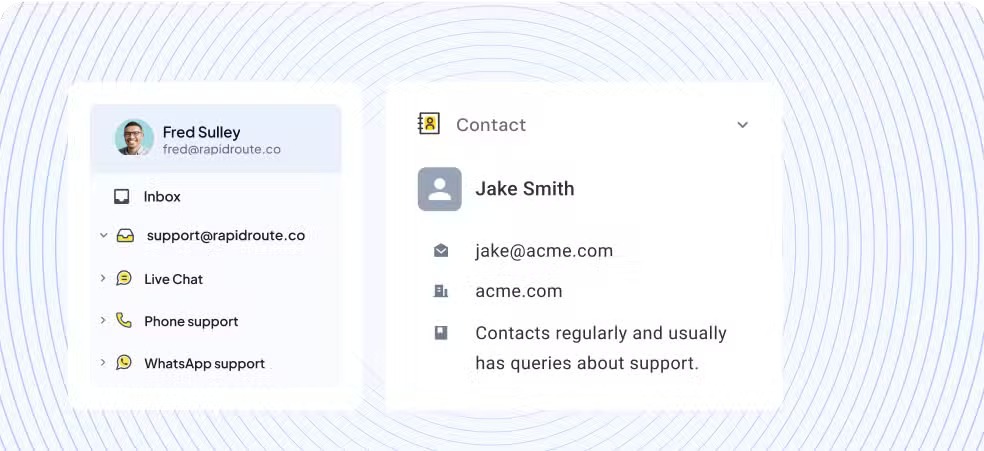
During holidays, customers reach out wherever it’s convenient for them. A customer may start with a live chat, follow up by email, and switch to phone when the issue feels urgent. If each channel operates in isolation, your team ends up with duplicate tickets, missed context, and longer queues.
Why it matters
A unified history helps your team stay efficient. Agents know what the customer has already tried. They avoid double responses. And they stay consistent even when volumes spike.
How to implement it
- Manage chat, email, voice, and social messages in a single workspace, like a unified helpdesk. Platforms such as Hiver make it easier for customer service teams to track everything without switching screens.
- Ensure agents can view past orders, conversations, and notes before responding.
- Establish a single response-time standard for chat, email, phone, and social media. It keeps expectations clear and prevents certain channels from becoming slower than others.
- Route incoming chats, emails, or social messages based on agent load, instead of locking each channel to a fixed team.
- Add live chat for quick questions like order status, promo clarifications, or size exchanges.
- Turn on collision alerts so agents know when a teammate is already handling that conversation.
Pro Tip: Keep holiday conversations connected across chat, email, and voice
Hiver’s omnichannel view pulls chat, email, voice, and social messages into one place. Agents get to see the full context before replying. This prevents duplicate responses and speeds up resolutions during the holiday rush.
Recommended reading
Omnichannel Customer Service: Definition, Strategy, Benefits, and Examples
3. Holiday-Specific FAQs and Self-Service
Holiday traffic creates a surge of simple, repetitive questions. A well-built seasonal FAQ helps customers find the answers they need fast, without waiting for your team.
Why it matters
A clear knowledge base cuts ticket spikes, reduces back-and-forth, and keeps your agents focused on cases that require judgment or personal attention.

How to implement it
- Create a dedicated holiday FAQ page with the questions customers check first, including delivery timing, return windows, and how holiday promos work.
- Add clear steps for common questions, such as “Where is my order?” or backorder timelines.
- Spell out store hours, holiday closures, and processing delays so customers aren’t surprised.
- Update these pages at least four to six weeks before your holiday rush, and review them weekly during the season.
- Link your FAQs directly in order confirmations, shipping emails, and chat widgets so customers can find answers quickly.
Pro Tip: Make your holiday FAQs easy for agents to pull up.
Hiver’s built-in knowledge base suggests the right article as agents type, which helps them respond faster and stay consistent during peak weeks.
Recommended reading
4. Proactive Communication About Delays
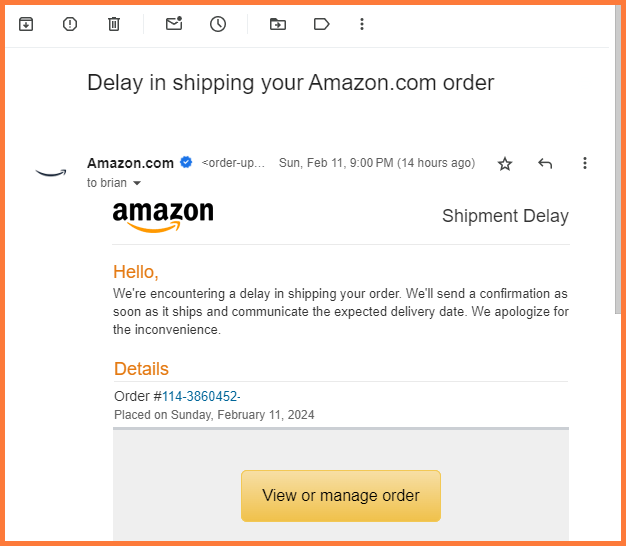
When delivery dates slip without warning, customers panic. They flood your support channels, cancel orders, and leave negative reviews. A proactive update often decides whether you keep the sale or lose the customer.
Why it matters
Clear, early updates prevent a large portion of “just checking in” tickets. Customers feel informed, and your team avoids dealing with the same status questions repeatedly.
How to implement it
- Identify the exact points where orders typically get stuck, such as stalled tracking scans, missed carrier pickups, or orders sitting at a sorting hub longer than expected.
- Configure email or SMS notifications to go out the moment an order hits one of these delay points. Customers hear from you first, not through their own tracking refresh.
- Use push notifications or in-app banners to highlight systemwide delays or slower processing times. If a carrier is backed up or your warehouse is running slower than usual, call it out upfront. A simple banner can prevent hundreds of one-off “Is this delayed?” tickets.
- If a package hasn’t moved for 24 to 48 hours, send a quick “Your order is still moving” message. This keeps customers confident that the order hasn’t disappeared.
- Place brief delay notices on your checkout page, order confirmation email, and tracking page during peak weeks. Customers expect slower timelines in December — they just want it stated clearly.
- Equip your team with short, consistent responses for common delay scenarios. It speeds up replies and keeps messaging steady across multiple channels.
Here’s a sample message to address the delay issues.
“Hi <Name>, your order is still on the way, but running slightly behind due to high seasonal volume. We’ll send another update as soon as it moves again. Thanks for your patience.”
Pro Tip: Proactively inform customers of shipping delays during peak season.
Set rules that flag orders with no tracking movement and send a prewritten update. It keeps messaging consistent and prevents those avoidable status-check tickets.
Recommended reading
5. Smart Seasonal Staffing and Scheduling
Holiday volume spikes at predictable moments. Chat surges as soon as sales go live. Email piles up overnight. Phone calls jump when delivery dates slip. If you don’t staff around these patterns, queues stack up fast, and your team can’t keep up.
Why it matters
When staffing matches your real volume patterns, you avoid the spike-and-scramble cycle. Chats don’t pile up, email doesn’t become a second backlog, and agents aren’t stretched thin every weekend.
How to implement it
- Review last year’s data by day, week, and hour. Spot the exact moments when chat spiked, email piled up, or phone calls jumped. Patterns like 10 AM chat peaks or post-3 PM email surges usually repeat every holiday season.
- Map expected spikes across channels. Use your promo calendar and shipping cutoffs to predict demand. Sales events drive chat, big email campaigns create follow-ups, and tracking delays push customers to social DMs.
- Schedule staffing based on channel load. Staff chat heavily during active shopping hours, plan email-heavy shifts later in the day, and keep phone support steady for delivery or billing issues.
- Hire and train seasonal agents early. Bring them in three to four weeks before peak volume so they learn your tools, workflows, and holiday policies before queues grow.
- Build a buffer for disruptions. Keep 10 to 15 percent staffing flexible for weather delays, carrier backlogs, major promos, or sudden system issues.
- Use staggered shifts to avoid coverage gaps. Add overlap during known spikes — like 10 AM to 1 PM for chat or 3 PM to 6 PM for email — instead of starting everyone at the same time.
Pro Tip: Keep an eye on agent load throughout the day.
A real-time view helps you move conversations to the right people before queues get out of hand. Hiver makes this simple with its custom workload dashboard.
Recommended reading
24/7 Customer Service: Complete Guide to Delivering Round‑the‑Clock Support
6. Training for Holiday Scenarios
During the holiday season, agents make more on-the-spot calls around refunds, replacements, exceptions, and promo fixes. Without practice, these decisions slow down responses and increase escalations. Focused training helps agents act decisively and keep conversations moving.
Why it matters
Training removes uncertainty. Agents know exactly what they can approve, which cases need escalation, and how to apply holiday policies without second-guessing. It keeps decisions clean and prevents small mistakes from turning into refund issues or repeated contacts.
How to implement it
- Train for shipping and delivery exceptions. Cover situations like stalled tracking, partial deliveries, incorrect carrier scans, and missed delivery attempts.
- Walk through holiday promo troubleshooting. Review common discount errors, expired codes, stacking rules, and how to explain promo terms clearly when customers push back.
- Run short role-plays on handling upset customers. Teach agents how to acknowledge the frustration, calm the situation, and keep the conversation moving toward a resolution.
- Clarify escalation paths for holiday-only cases. Make it clear which holiday issues agents can’t resolve on their own. Lost packages, duplicate charges, or gifts that won’t arrive by the promised date should be escalated right away.
- Run through refund and partial-refund scenarios. Give agents examples of late deliveries, damaged gifts, or missed promotions so they know what they can offer without hesitation.
- Use short, focused training formats to keep the team sharp. Run quick 10-minute practice rounds, issue scenario cards for self-paced refreshers, or use AI-powered simulations to help agents build speed and confidence.
Pro Tip: Pre-approve small goodwill offers.
Give agents a short list of pre-approved gestures, like a partial refund, shipping upgrade, or store credit. It helps them resolve emotional cases quickly without waiting for approval.
Recommended reading
7. Mobile-First Support Optimization
A huge share of holiday traffic comes from mobile, such as shoppers checking orders on the go, comparing products, or reaching out fast when something feels off. If your help center or chat widget doesn’t work well on a small screen, customers drop off and head straight to your support queue.
Why it matters
Mobile friction creates abandoned chats, repeated contacts, and unclear conversations. A smooth mobile experience lets customers solve simple issues on their own and reduces unnecessary volume.
How to implement it
- Make your help docs mobile-friendly. Use short paragraphs, scannable bullets, and layouts that don’t break on smaller screens.
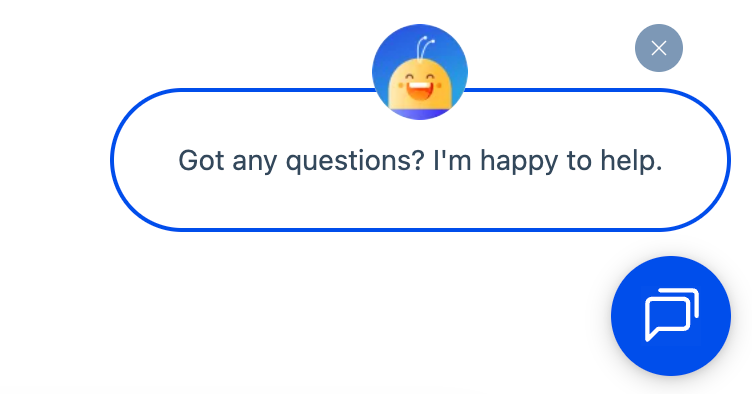
- Ensure chat loads instantly on mobile. Slow chat widgets lead to drop-offs. Test load times during peak hours, not just off-season.
- Use clear, thumb-friendly CTA buttons. Replace tiny text links with large tap targets so customers can find tracking links, returns pages, or policy details easily.
- Compress images and remove heavy elements. Large files slow down help pages on mobile, especially on weaker connections.
- Enable auto-scrolling chat transcripts. Customers shouldn’t have to swipe endlessly to find the latest message. Keep the view anchored to the most recent reply.
Pro Tip: Test your mobile flow end-to-end.
Walk through your entire support experience — chat, FAQs, tracking page, returns flow — from your phone during a busy time of day. This will help you quickly spot what customers struggle with.
Recommended reading
How to Boost Mobile Customer Engagement: 10 Tips and Strategies for 2025
8. Real-Time Analytics
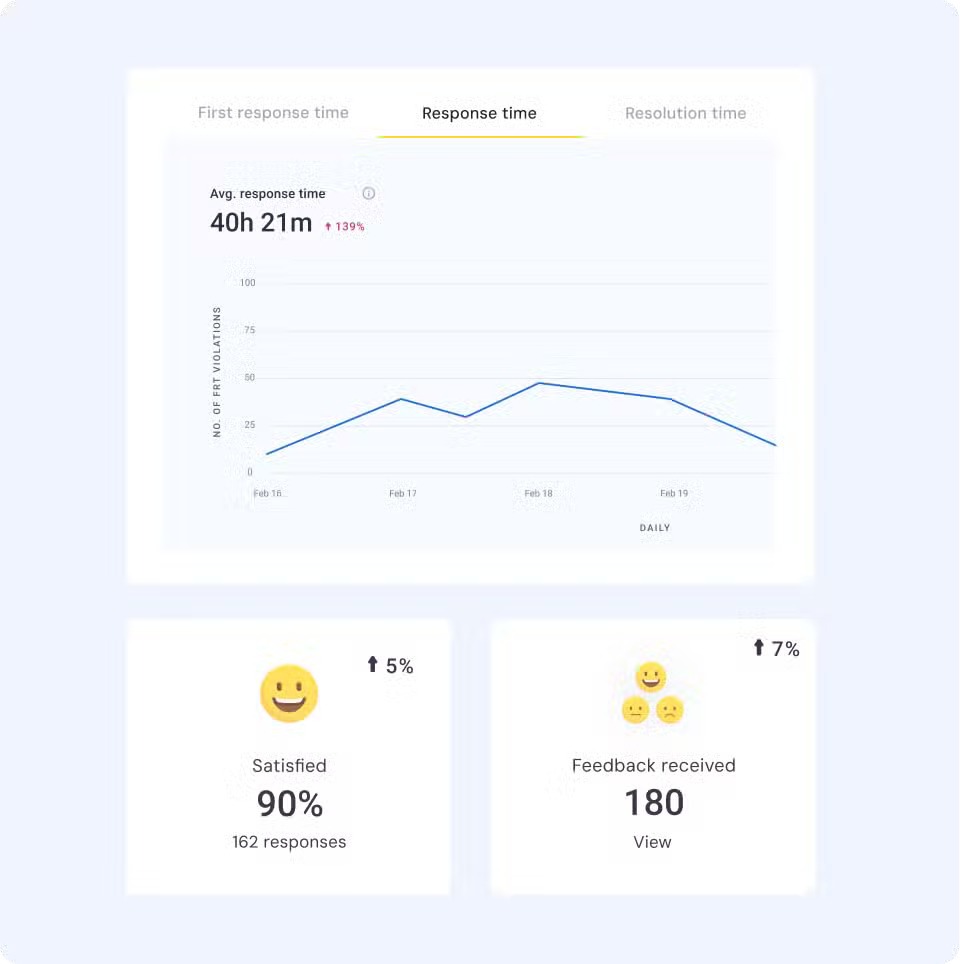
Holiday volume can shift within minutes. A promo goes live, and chat fills with product questions. A carrier falls behind, and “Where is my order?” tickets jump. An item sells out, and customers ask about alternatives. Real-time analytics help you catch these changes early and respond before queues build.
What to track in real time
- First response time (FRT): This tells you how long customers wait for the first reply. Watch for sudden jumps that signal understaffing or a channel spike.
- Resolution time: This shows how long it takes to close a case end-to-end. Longer handling times often mean agents are stuck on complex cases or searching for policy answers.
- Queue spikes by hour: A live count of pending chats, emails, or DMs. It helps you shift coverage the moment a channel heats up.
- Channel performance: Measure how fast each channel is moving in real time. If chat slows or email starts backing up, you know where to increase capacity.
- Contact reasons: A breakdown of why customers are reaching out. For example, promo errors, stalled tracking, stockouts, and payment issues. Real-time patterns help you fix problems at the source.
- Return-related volume: Track return and exchange requests in real time. Early spikes often point to sizing issues, damaged shipments, or shipping delays. This will give you time to adjust staffing or update your FAQs.
- Agent bandwidth: See how much each agent is handling. This lets you redistribute conversations before customers start feeling the delay.
How to act on the data
- Set alerts when FRT rises above your threshold for more than five minutes. This is one of the earliest signs of overload. Shift agents to that channel immediately so wait times don’t spiral.
- If “Where is my order?” tickets spike, update your banner, chat prompts, or shipping page. A quick message at the entry point deflects repeat questions and keeps customers informed without opening a ticket.
- When return-related questions jump, surface your return policy everywhere customers look. Add a quick link inside chat, highlight return windows on your help center, and update email templates so customers get answers instantly.
- If resolution time increases, fast-track older or complex cases. Route anything older than 2 hours to senior agents so the backlog doesn’t grow. This keeps the queue moving without slowing first responses.
Pro Tip: Use a single real-time dashboard during the holiday season.
Combine metrics like FRT, queue spikes, and agent capacity in one place so team leads can make quick decisions. Hiver’s dashboards help surface these signals without digging through multiple tabs.
Recommended reading
How to Use Customer Support Benchmarks to Deliver Better Support
9. Team Morale and Retention Tactics
Holiday workloads stack quickly. Without structured support, even experienced agents burn out fast. Customer service teams feel the pressure immediately, and morale drops fast if the workload isn’t managed well.
Why it matters
Low morale shows up in slower responses, rushed conversations, and inconsistent decisions. When teams feel supported, they stay focused, handle tough cases better, and are far more likely to stick with you after the season ends.
What helps
- Run a 10-minute standup at the start of each shift. Review expected spikes, share any overnight issues, and assign owners for high-priority queues so everyone starts aligned.
- Create a weekly schedule that rotates late nights, weekends, and high-pressure shifts. Publish it early so agents can plan their week, and no one gets stuck with repeat difficult slots.
- Call out wins in Slack or during standups. Highlight exactly what the agent did well — de-escalation, speed, clarity — so others can learn from it.
- Block off one or two “reset days” for agents to choose from after the rush. Approve flexible start times for the first week of January so the team can recover without stress.
- Set a simple budget for weekly boosts — snacks, coffee cards, pizza drops, or themed days. Use a rotating volunteer to pick the morale activity so everyone feels included.
Pro Tip: Assign one agent each day as the “relief rep.”
Their only job is to jump into any overloaded queue or support an agent handling back-to-back tough cases. It prevents burnout before it starts.
Recommended reading
A Complete Guide to Customer Service Training for Employees in 2025
10. Crisis and Incident Response
Peak season exposes every weak point, such as systems stalling, carriers missing pickups, checkout bugs appearing, and partner APIs failing without warning. When that happens, customers don’t judge you by the incident. They judge you by how fast and clearly you communicate.
Why it matters
A confusing or delayed response creates panic, spikes ticket volume, and damages trust. A clear crisis plan keeps your team aligned and customers informed before frustration takes over.
What to prepare
- Define who takes the lead for each type of incident — shipping failures, payment issues, site outages — and who approves customer-facing updates.
- Write short templates in advance so your team can communicate instantly without waiting for legal or leadership reviews.
- Assign someone responsible for updating chat, pinning social posts, sending email alerts, and managing status banners.
- Document a manual or alternative workflow for confirming order status when your CRM, OMS, or warehouse system goes down.
- Use a single internal page or Slack channel where engineering, ops, and support update the latest status so your entire team shares the same message.
Pro Tip: Finalize your “first message” in advance.
Have a ready-to-send opening line for outages — clear, calm, and honest. It prevents guesswork and ensures customers hear from you before they fill your queues.
Recommended reading
70 Customer Service Email Templates for Faster, Friendlier Support
11. Returns and Exchanges Management
After the holiday season, support teams face a second surge — wrong sizes, duplicate gifts, delayed deliveries, and customers checking refund status. If the returns experience is slow or confusing, ticket volume doubles, and customer frustration rises quickly. A clean, self-serve process keeps queues stable and protects customer satisfaction.
Why it matters
Returns are often the last touchpoint customers have with your brand. A smooth experience drives repeat purchases. A painful one guarantees more contacts, negative reviews, and churn.

Tips for smoother returns
- Create a self-serve return flow. Let customers start returns online without contacting support. Include drop-off options, item selection, and instant eligibility checks.
- Remove friction by giving customers ready-to-use labels or QR codes they can scan at drop-off locations — no printing or manual steps needed.
- Provide real-time refund status. Show exactly where they are in the process — return received, inspected, refund initiated — so they don’t open “Just checking in” tickets.
- Keep your return policy short and transparent. Spell out timelines, eligibility, exceptions, and whether holiday purchases get extended return windows.
- Use automation to update customers at each step. Trigger notifications when the return is approved, processed, or refunded. This closes the loop and prevents repeated inquiries.
Pro Tip: Add a dedicated post-holiday returns banner.
Place a simple message on your help center and chat widget linking directly to your return flow. It deflects “How do I return this?” questions and keeps your team focused on complex cases.
Recommended reading
Customer Journey Mapping Made Easy: Guide+Tools +Templates & Examples
12. Loyalty Building From Holiday Interactions
Holiday tickets reveal what first-time shoppers struggle with — sizing issues, delayed gifts, promo errors, or setup steps. Fixing these fast builds trust and pulls them back after the holiday season.
Why it matters
These shoppers have high intent and very little patience. If their first support experience feels smooth, personal, and fast, they’re far more likely to trust you, come back in January, and recommend you to others. That’s how one seasonal spike turns into long-term revenue, not just holiday volume.
How to convert seasonal shoppers
- Add personalized thank-you notes to replies. Small, human touches reinforce the brand and leave customers with a positive impression.
- Recommend helpful guides or next steps. Share care tips, style guides, onboarding links, or product setup steps so the customer gets more value after the purchase.
- Offer loyalty perks or small post-holiday discounts. A tailored offer (not a generic coupon) nudges customers back after the rush.
- Invite them to your community or newsletter. Give them a place to stay engaged and not just shop.
- Use AI to identify repeat contact reasons. Fix recurring issues at the source so the next interaction is smoother and more impressive.
Pro Tip: Tag every holiday customer who reaches out.
Follow up in January with a personalized message or offer tied to their interaction. It turns a seasonal conversation into a long-term relationship.
Recommended reading
Holiday Customer Service Prep Timeline (90-Day Roadmap)
Holiday support depends on early data review, accurate staffing forecasts, tested automation, updated FAQs, and a schedule that matches channel spikes. Those pieces take weeks, not days. This 90-day roadmap breaks down the work step-by-step so every part of your operation is ready before volume accelerates.

90 Days Out — Foundation and Forecasting
- Review last year’s data: Analyze hourly volume, contact reasons, and channel spikes to understand when pressure will hit this year.
- Identify volume drivers: Map what caused previous surges, such as major promos, shipping cutoffs, inventory drops, or social campaigns.
- Set KPIs for FRT, CSAT, and resolution time: Establish targets for peak season so your team knows exactly what “healthy” performance looks like.
- Finalize tech upgrades: Lock in helpdesk improvements, integrations, and AI capabilities now so they’re stable before busy weeks.
- Start building holiday workflows: Create rules for routing, auto-tagging, delay alerts, and exception handling based on last year’s patterns.
60 Days Out — Training, Staffing, and Knowledge Prep
- Begin refresher training: Run modules on promo rules, shipping exceptions, refund limits, and de-escalation skills.
- Hire seasonal staff: Hire your seasonal agents and walk them through must-know workflows. This includes how to handle order lookups, apply promo rules, process returns, and escalate delivery issues.
- Update holiday FAQs: Add shipping cutoffs, promo conditions, return windows, and tracking steps to your knowledge base.
- Define escalation protocols: List which issues frontline agents can resolve and which must go to specialists (lost packages, duplicate charges, out-of-stock replacements).
- Test AI and automation flows: Validate that auto-responses, delay notifications, triage rules, and routing logic fire correctly under load.
30 Days Out — Stress Testing and Final Adjustments
- Stress test your helpdesk: Simulate high chat and email volume to ensure your system, macros, and automations hold up.
- Finalize shift schedules: Lock coverage for peak shopping days, major sales events, weekends, and evenings.
- QA your mobile experience: Test chat, FAQs, and tracking pages on multiple devices to remove any friction for mobile shoppers.
- Update FAQ links in templates: Insert holiday time FAQ links into order confirmations, shipping emails, macros, and chat replies.
In-Season — Daily Monitoring and Fast Adjustments
- Mid-shift micro-reviews: Do a 5-minute check halfway through each shift to rebalance queues, update messaging, and flag any issues your team is seeing in real time.
- Live issue triage: Assign one lead per shift to monitor outages, promo glitches, or sudden spikes. They make quick decisions on routing, messaging, and escalations so agents aren’t guessing during peak hours.
- Rapid response templates: Prepare a set of prewritten delay, stockout, and promo-error replies. Push updates to these templates throughout the season so agents always share the latest information.
- Channel prioritization blocks: When queues rise, switch agents into 30-minute focus blocks dedicated to a single channel. This clears backlogs faster than bouncing between conversations.
Post-Season — Returns, Feedback, and Future Planning
- Prioritize returns: Staff your returns queue with your fastest agents for the first two weeks of January. Create dedicated triage rules for sizing issues, duplicate gifts, and damaged shipments so they’re resolved quickly without derailing other queues.
- Close feedback loops with product and logistics: Send a weekly post-season report highlighting the top recurring issues like mislabeled items, inaccurate size charts, slow carrier lanes, and promo confusion. Include counts, customer quotes, and resolution time to help teams fix root causes before next year.
- Archive lessons learned: Document broken workflows, unclear policies, and cases that required repeated escalations. Store these in a shared playbook so your team can refine scripts, escalation rules, and workflows before the next holiday cycle.
- Celebrate the team: Give agents recovery time during the first week of January — flexible starts, mental health days, or shortened shifts. Pair this with public recognition of top performers to maintain morale as you move into Q1.
Recommended reading
Real-World Success Cases
Holiday time pressure looks different across industries, but the core challenge is the same: high volume, high expectations, and zero tolerance for delays. These examples show how brands handled peak-season spikes with better processes, automation, and smarter staffing.
Case 1: Tipsy Elves
Tipsy Elves, the holiday-focused apparel brand, struggled with steep seasonal spikes in customer questions across email, chat, and voice. Their small internal team couldn’t keep up with rising order volume, shipping issues, and promo confusion.

They scaled support with Influx, growing from a small core team to a 24/7 operation staffed with trained agents across all channels. They also established clear workflows for holiday tickets and tightened response guidelines to ensure conversations moved quickly.
As a result, they maintained a 92% CSAT, kept chat handle times under 10 minutes, and resolved cases with zero escalations during peak weeks.
Case 2: Airline Holiday Backlog of 200,000 Tickets
A national airline was hit by a major winter storm and a system outage during the holiday travel rush, leaving more than 200,000 unresolved customer tickets in 2022. Travelers needed updates on cancellations, rebooking options, luggage delays, and refunds, and the airline’s internal teams couldn’t keep up.
They brought in Working Solutions as an on-demand CX partner and quickly deployed a surge team across phone, chat, and email. This team absorbed the overflow, stabilized response times, and worked through the massive backlog while the airline restored normal operations.
The impact was direct and measurable: the entire backlog was cleared, stranded travelers received faster communication during the disruption, and the airline regained control of customer interactions at a time when delays were escalating across the industry.
Case 3: Flight Centre
Flight Centre, a global travel agency network, struggled with heavy booking changes, cancellations, and itinerary adjustments during peak travel seasons. Manual processing slowed agents down and created bottlenecks when customer inquiries surged.

They implemented UiPath automation to take over specific back-office processes that consumed the most time. This included ticket issuance, refund validation, fare checks, and itinerary updates. These workflows ran automatically in the background, so agents could stay focused on customer conversations instead of administrative tasks.
Once automation went live, tasks that previously took hours were completed in minutes. Refund checks became consistent and error-free, and itinerary adjustments no longer pulled agents away from traveler support. The automation also enabled Flight Centre to process 105,000 refunds in three weeks, avoiding the need to hire nearly 80 temporary staff during the holiday travel rush.
Recommended reading
20 Customer Service Best Practices Every Support Team Needs in 2025
Common Mistakes to Avoid
Even strong teams slip during the holidays when the pressure kicks in. Most problems don’t come from bad service, but from preventable gaps in planning, communication, and execution. Here are the six issues that cause the most trouble, plus what to do instead.
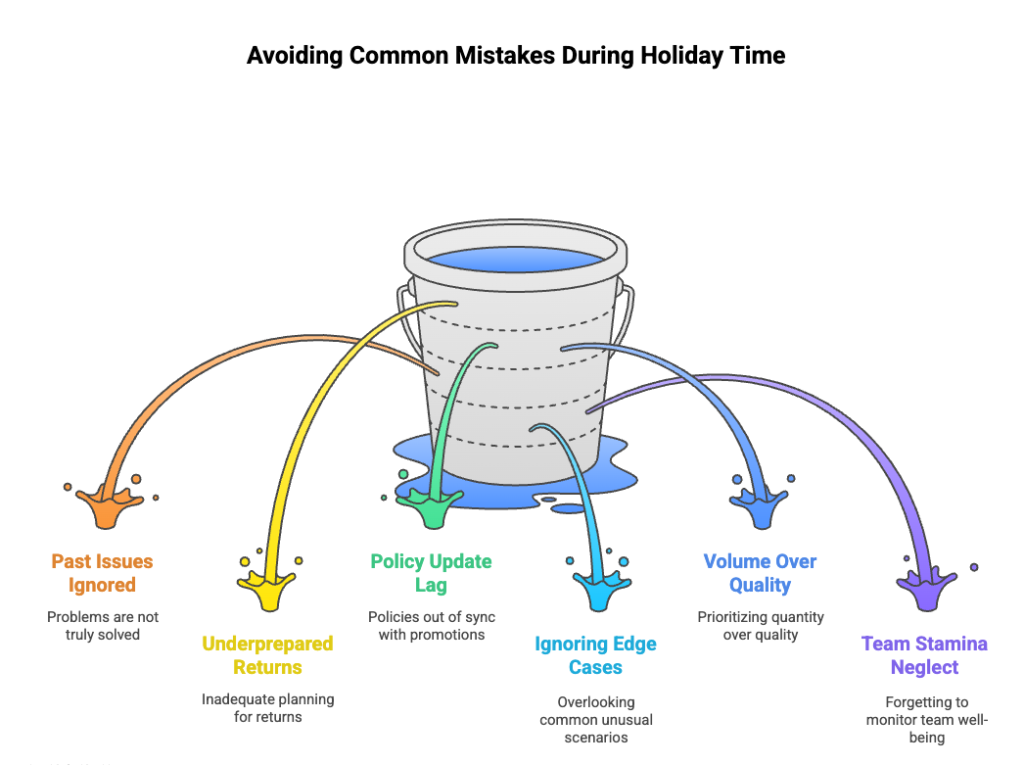
1. Treating last year’s issues as “solved.”
Many teams assume that because something worked last December, it’ll work again. But volume patterns, shipping partners, customer expectations, and promo mechanics all shift year to year.
Fix: Re-run your data analysis from scratch. Look at actual patterns from the last 60–90 days, not just last year’s holiday numbers. Update your workflows, escalation paths, and staffing expectations based on what’s changed.
2. Under-preparing for returns and exchanges.
Most teams plan heavily for pre-purchase conversations, then get blindsided when returns spike right after the holidays.
Fix: Set up a separate returns workflow with dedicated coverage. Update return FAQs early, add automation for refund-status updates, and test your return flow end-to-end before December hits.
3. Letting policy updates lag behind promos.
Marketing launches new holiday offers, bundles, or last-minute discounts. However, if support doesn’t get the updated rules until customers start complaining, it starts piling up ticket volume.
Fix: Create a fast channel between marketing and CX. Finalize promo mechanics early and add a checklist: coupon rules, gift receipt behavior, bundle exceptions, and replacement policies.
4. Treating “edge cases” as rare instead of planning for them.
In December, situations that feel uncommon the rest of the year start showing up daily. Wrong addresses, duplicate orders, size swaps, partial shipments, and damaged packaging all spike at once.
Fix: Review recent holiday-period tickets and identify the 5–7 exception scenarios that are already trending upward. Build lightweight playbooks for each. Include sample replies, refund or replacement rules, and clear escalation triggers so agents can act quickly during peak volume.
5. Focusing only on ticket volume, not ticket quality.
When queues spike, leaders get tunnel vision. Speed improves, but accuracy drops. That leads to repeat contacts, escalations, and customer frustration.
Fix: Run fast QA checks throughout the week. Review 5–10 random conversations per agent, flag trends quickly, and share examples of clear, concise replies that reduce follow-up questions.
6. Forgetting to monitor team stamina.
Holiday pressure builds quietly. Even strong agents burn out when cases get repetitive, emotional, or time-sensitive.
Fix: Use a simple check-in routine:
- Ask leads to look at case type concentration.
- Rotate agents out of heavy queues every 60–90 minutes.
- Give micro-breaks after tough cases.
- Add one floating “relief” agent per shift.
Small resets prevent burnout from tanking quality.
Strengthening Holiday Time Customer Service for 2025
Holiday time support is where your processes are tested hardest. Tickets spike fast, customer expectations rise instantly, and one weak workflow can slow your entire operation. The teams that win the season are the ones that prepare early, act on real data, and stay flexible when volume shifts.
If you want to keep queues steady and customers confident, build your plan now. Tighten your staffing model, update self-service, automate routine work, and give your team the tools they need to move quickly. Platforms like Hiver help you do this with AI-driven replies, unified channels, automated triage, and real-time dashboards so your team can stay ahead even on the busiest days.
A smoother holiday season is not about working harder. It is about working smarter, planning earlier, and giving your support team the structure they need to deliver consistently. Start now, and peak season becomes manageable rather than chaotic.
Frequently Asked Questions
1. What is holiday customer service?
Holiday customer service is the process of preparing your support team, tools, and workflows for the surge in customer questions from November to January. It includes staffing, channel management, delayed communication, returns handling, and training agents for seasonal scenarios.
2. When does the holiday support rush start?
Most teams see activity rise by early November. The first major spike hits on Black Friday week, followed by consistent volume through Christmas and a second surge in early January when returns and exchanges peak.
3. How much do customer service tickets increase during the holidays?
Ticket volume typically increases 2 to 3 times for retail and e-commerce brands. Some categories see even higher spikes during big sales, shipping delays, or winter weather disruptions. Looking at last year’s data is the best way to estimate your exact lift.
4. What are the most important customer service channels during the holidays?
Live chat, email, and social messaging drive the highest volume because customers want quick updates on orders, promos, and delivery timelines. Phone support remains critical for urgent issues like missed deliveries or payment failures.
5. How can businesses reduce wait times and improve holiday customer satisfaction?
Automate repeat questions, update your holiday FAQs, add clear shipping and delay messaging, and route conversations to the fastest available agent. Use real-time dashboards to shift coverage when queues spike. Tools like Hiver help with auto-tagging, AI replies, and unified channel routing so your team stays quick even during peak hours.
6. How can I simplify returns and exchanges during the holidays?
Create a self-serve return flow, offer prepaid labels or QR code returns, and provide real-time refund status. Update your return policy with clear holiday timelines. Automate status notifications so customers do not open repeated “checking in” tickets.
7. What steps should support teams take to prepare for the holiday season demand?
Start planning 60 to 90 days ahead. Review last year’s data, set clear KPIs, test automation, update seasonal FAQs, hire and train temporary agents, and stress test your help-desk. Create delay templates, escalation paths, and a clear crisis plan. During the season, monitor real-time data and adjust staffing quickly as volume shifts.