







TL;DR
Which is the best team email management software?
Help Scout — Clean interface with customer context and simple workflows
Hiver — Fast setup with built-in AI, automation, and team collaboration
Gmelius — Gmail-based team inbox with automation, sequences, and team visibility
Front — Strong collaboration layer with internal comments and email management workflows
Zendesk — Structured ticketing system with advanced workflows, automation, and reporting
Here’s a quick look at the top email management tools for teams, compared by their core use case, starting price, free plan, and G2 rating:
| Tool | Best For | Starting Price | Free Plan | G2 Rating |
| Hiver | Cross-team collaboration, built-in AI and fast setup | $25/user/month | Yes (unlimited users) | 4.6 |
| Front | Team collaboration inside email threads | $25/seat/month | No (14-day trial) | 4.7 |
| Zendesk | Large support teams needing structured workflows | $19–$115/agent/month | No (14-day trial) | 4.3 |
| Help Scout | Personalized, customer-first conversations | $25/user/month | Yes (5 users) | 4.4 |
| Missive | Heavy internal collaboration | $18/user/month | Yes (3 users) | 4.7 |
| Gmelius | Gmail-based teams with automation needs | $24/user/month | No (7-day trial) | 4.4 |
| Zoho TeamInbox | Small teams in the Zoho ecosystem | $6/user/month | No (14-day trial) | 4.2 |
| Freshdesk | Structured support with automation and SLAs | $19/user/month | Yes (2 agents) | 4.4 |
| ProProfs | Lightweight email management on a tight budget | $19/user/month | Yes (1 agent) | 4.5 |
From Personal Inboxes to Team Email
I know someone who has three different email IDs. One for signing up for promotions, one for personal use, and one for “important stuff.” They say it’s the only way to stay organized.
It’s a clever workaround, but it only works because they are the only one who need to know the system.
The moment you are working in a team, managing shared conversations, or handling customer emails at scale, that kind of personal patchwork falls apart. You need everyone working from the same structure, with visibility into what is being handled by whom, and what still needs a response.
That is exactly what email management software is built for. The problem is choosing one. Over 1,800 email management tools are listed on G2 alone, and they are not all built for the same thing.
So where do you start? You start here. I’ve gone through the options and narrowed it down to the tools that actually hold up in real-world use cases..
Why Listen to Us
Hiver runs team email for over 10,000 companies, not just customer support desks. Handel Bouw Advies, a construction firm, rolled Hiver out in a single day, built 65+ automation rules for tagging and routing, and now saves 400+ hours a month while client satisfaction rose 80%.

What I looked for in an email management tool
Before getting into the tools, a quick note on how I approached this: I’m not covering every email tool out there. The focus here is on tools teams can actually use to streamline internal communication, collaborate effectively, and manage customer and vendor conversations at scale.
I went through user reviews, product documentation, and real-world use cases to understand what holds up beyond the feature list. Here is what I prioritized.
- Collaboration that reduces back-and-forth: Collaborative inboxes get messy when multiple people get involved. I looked for tools that make ownership clear, support internal notes, and prevent duplicate replies.
- Automation and AI that actually save time: Features like auto-assignment, tagging, AI-assisted replies, and summaries should reduce manual work, not add complexity.
- Continuity across conversations: Customers should not have to repeat themselves every time a different teammate picks up a thread. I prioritised tools that preserve context across replies, teammates, and channels.
- Visibility into what’s happening: You should be able to see what’s pending, who owns it, and how fast things are moving. Reporting should surface real bottlenecks.
- Pricing that scales predictably: Some tools get expensive as you add users, automation, or AI. I looked closely at what’s included vs what’s gated behind add-ons.
Note: While you will see Hiver listed here, it’s because it fits the criteria I’ve outlined. The goal here is to give a fair and practical overview so you can decide which tool fits your team best.
From Managing Email to Resolving It
Every tool on this list will organize your inbox. Fewer of them actually reduce the number of things a human has to do. That’s a meaningful difference, and it’s worth naming before you compare 14 tools that all describe themselves as “email management software.”
Managing email means getting a message to the right place:
- Assign it to the right person
- Apply the right label or tag
- Route it to the right queue
- Give a human the context they need to respond
That’s useful, but the human still has to read the email, understand the request, and write the response.
Resolving email goes further. The software understands what the customer needs and handles the request without human intervention when possible. Think:
- Password resets
- Order status checks
- Repetitive questions already answered in your knowledge base
- Routine requests that don’t require human judgment
The tools on this list split roughly into two camps:
| Managing email | Resolving email |
| Front, Missive, Zoho TeamInbox | Hiver, Zendesk |
| Assigns and routes messages | Understands the request and intent |
| AI drafts replies or summarizes conversations | AI can complete routine requests |
| A human remains responsible for the response | A human steps in when judgment is needed |
| Best for teams that need clear ownership and reliable routing | Best for teams handling high volumes of repetitive requests |
Neither approach is wrong. A five-person team fielding a manageable volume of internal email mostly needs the first: clear ownership, no duplicate replies, nothing falling through the cracks. A team handling hundreds of repetitive requests a day is paying a real, ongoing cost every time “managed well” still means “a person typed the answer,” when a meaningful share of those answers didn’t need a person at all.
Worth checking as you compare tools: does the AI on offer draft a reply for a human to send, or does it resolve the request on its own? Those are two different products wearing the same “AI-powered” label, and the gap between them is exactly the gap between managing email and resolving it.
Best email management software: Detailed breakdown
Here’s a closer look at each tool, what it does well, and where it starts to fall short.
1. Hiver: Best for fast setup with built-in AI and automation
The first thing I did while researching was search for the best email management tools on Google and ask ChatGPT.
Hiver showed up in the top 2 results on both platforms (see snapshot). Which is why it is at the top of my list too.

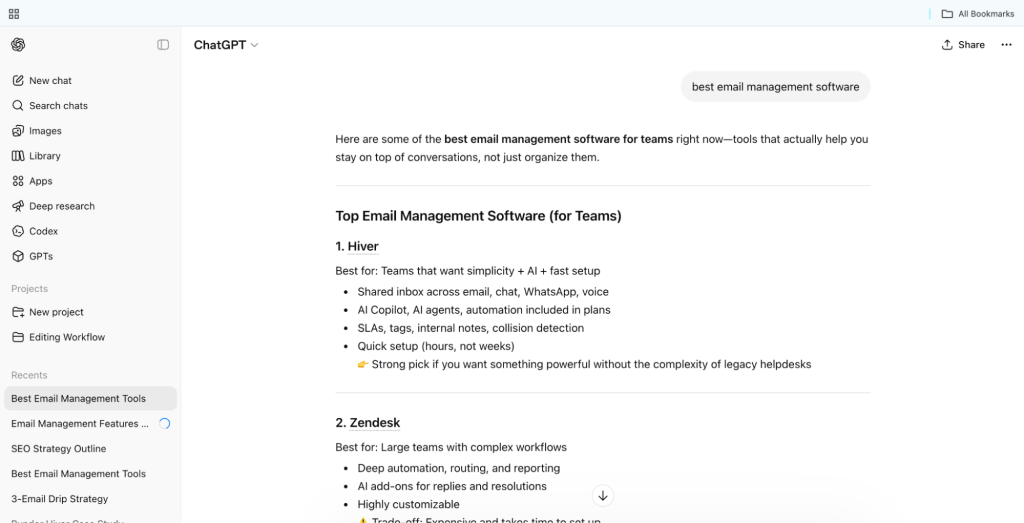
Hiver is one of the top-rated email management tools on G2, with a 4.6 rating across 1,283 reviews. This lines up with what I kept seeing in customer feedback: that it’s “the easiest to use” and it “plugs right into existing workflows.” As someone who uses it daily, I’d agree.
Compared to legacy tools like Zendesk, which offer more depth and customization but require significant setup time and admin overhead, Hiver is built around speed and usability. You can get started in minutes, AI and automation are included out of the box, and you don’t need IT support to get things running.
And unlike Zendesk, where AI capabilities come bundled into higher-tier plans starting at $55 per agent per month, Hiver includes AI from its most basic paid plan at $25 per user per month. You can “categorize emails, assign ownership, use tags, and collaborate internally”, which goes a long way in keeping team inboxes organized without confusion.
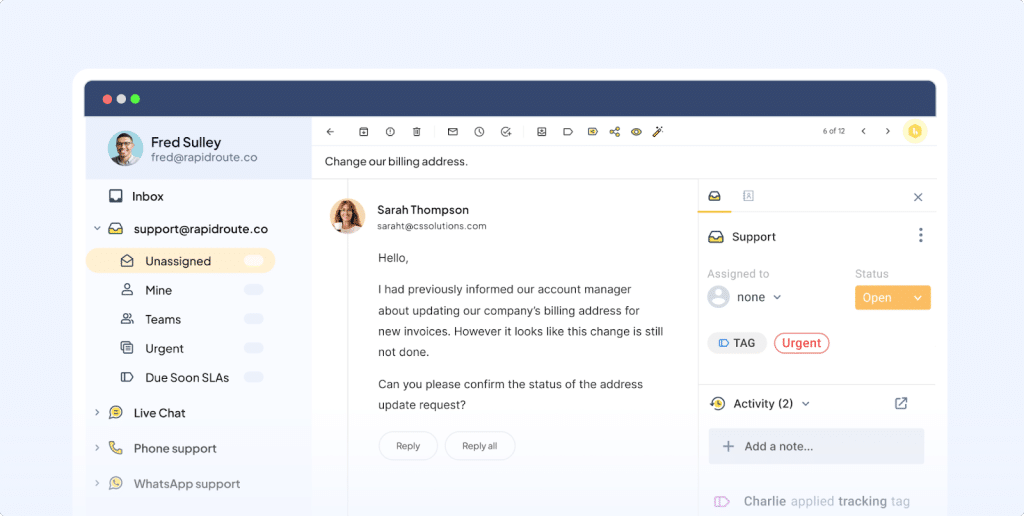
As someone who uses Hiver to manage our marketing@hiverhq.com inbox daily, the part I find most useful is how clearly it handles ownership. You can see who is replying to what, assign threads in seconds, and loop in other teams over email or Slack without losing the thread of the conversation.
When a potential partner reaches out about a co-marketing opportunity, for instance, I tag our partnerships lead in an internal note to get their input. They get notified about this and can respond to my query on the same thread. I can also create a ClickUp task linked to that thread to track the follow-up actions on our end. Everything stays in one place, so whoever picks it up next has the full context without needing a separate briefing.

Hiver handles both rule-based and AI-powered automation. Rules take care of the straightforward stuff: routing emails by keyword, assigning by CRM ownership, sending off-hours replies. But keyword rules break the moment a customer phrases things differently. That’s where AI Tasks comes in.
Instead of matching exact words, AI Tasks reads intent. So whether a customer writes “billing issue,” “I’ve been charged twice,” or “why did my card get debited,” one task handles all of them, routes the conversation to the right team, and even sends a response. This doesn’t require predicting every possible wording or building a dozen rules to catch every variation.
Beyond automation, Hiver’s AI covers three areas that matter most to support teams. AI Agents handle repetitive, high-volume queries end to end, without agent involvement. Think order status questions, password resets, refund policy queries — they get answered automatically, so the agent queue only sees what actually needs a human.
AI Copilot drafts replies, summarizes threads, and pulls answers from internal docs mid-conversation. Before sending a response, AI QA reviews drafts in real time and flags tone issues or incomplete responses. Compared to tools like Help Scout, where automation is more limited and volume tends to pile up as manual work, this feels like a more complete setup.
One area I’d like to see improved is the mobile app experience. If your team frequently responds to customer emails on the go, it’s worth factoring that in.
Key features
- AI email management for handling repetitive tasks
- Shared workspace to ensure clear ownership and avoid duplicate replies
- Built-in automation to tag, prioritize, and route emails
- Seamless team collaboration with internal notes, mentions, and cross-team visibility within email threads
- SLA management and detailed reporting for tracking performance
Pricing
Basic plan starts at $25/user/month, with AI included (no separate add-on costs).
My takeaway
Most AI email management tools are either hard to set up or get expensive quickly, especially once you need advanced automation. Hiver avoids both. If you’re looking for an easy way to manage emails with AI, it’s definitely worth trying Hiver for yourself. That said, if your workflows are heavily mobile-first or you need very detailed, customizable reporting, it may not be the best fit.
2. Front: Best for team collaboration inside email threads
Front takes your existing email workflow and adds a collaboration layer on top of it. It holds a 4.7 rating on G2, and reviewers consistently point to that collaboration layer as the reason why.
Emails stay as threads, but you can assign ownership, leave internal comments, and tag teammates directly inside a conversation, without forwarding emails or jumping between tools.
A customer success team handling account queries, for example, can assign specific threads to the right rep, leave notes with context, and avoid the usual confusion of who is responding to what.
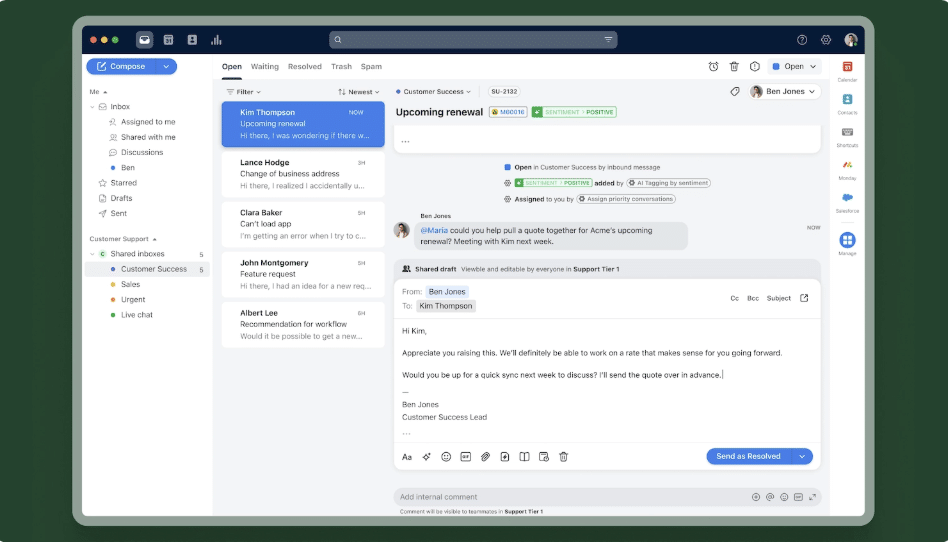
You can also set up rules to automatically tag, assign, and route emails based on sender or keywords, which helps keep things organised as volume grows. AI is built into this workflow as well. Copilot can summarize long threads, draft replies using past context, and help speed up responses. That said, the AI responses can still need review before sending, and automation beyond basic routing starts to feel limited when workflows get more complex.
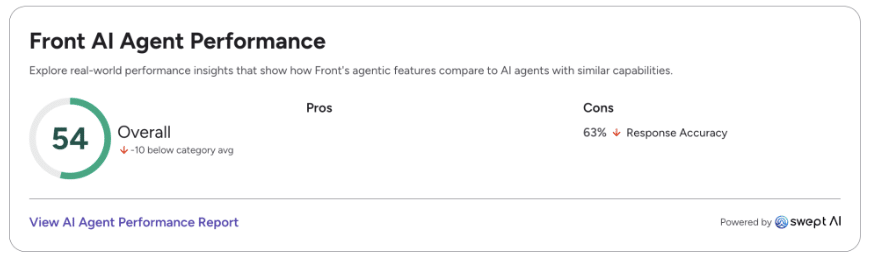
Another drawback of Front is that advanced AI, QA, and automation often come as add-ons (Copilot and Smart QA at $20/seat/month and Smart CSAT at $10/seat/month), unlike Hiver where these are included more natively across plans. It can “become expensive as the team grows,” especially when adding advanced features.
Key features
- Manage emails as a team with assignments and internal comments
- Rules-based routing for tagging and assigning emails
- AI summaries and reply drafting (Copilot)
Pricing
Comes with a 14 day free trial. Paid plans start at $25/seat/month (Starter) and go up to $105/seat/month (Enterprise). Most AI features (Copilot, QA, Autopilot) are paid add-ons on lower plans.
Recommended reading
Front Pricing 2026: Plans, Real Costs & What Teams Actually Pay
My takeaway
Front works well for teams that need cleaner collaboration inside a team email setup. But automation is limited, setup takes effort, and costs increase as you scale. For teams that want stronger AI capabilities and more customizable automation, tools like Hiver or Zendesk tend to be a better fit.
3. Zendesk: Best for large support teams needing structured workflows
Technically, Zendesk is not an email management tool. But if your email inbox is handling high volumes of customer conversations across channels, it’s hard not to consider it. Zendesk has a 4.3 rating on G2, the most modest of the top five group.
Instead of managing emails as threads, like most tools on this list, Zendesk converts every incoming request into a ticket. That means each conversation becomes trackable, assignable, and tied to a customer record. For a support team fielding hundreds of emails a day across different product lines or regions, this kind of structure makes a real difference.
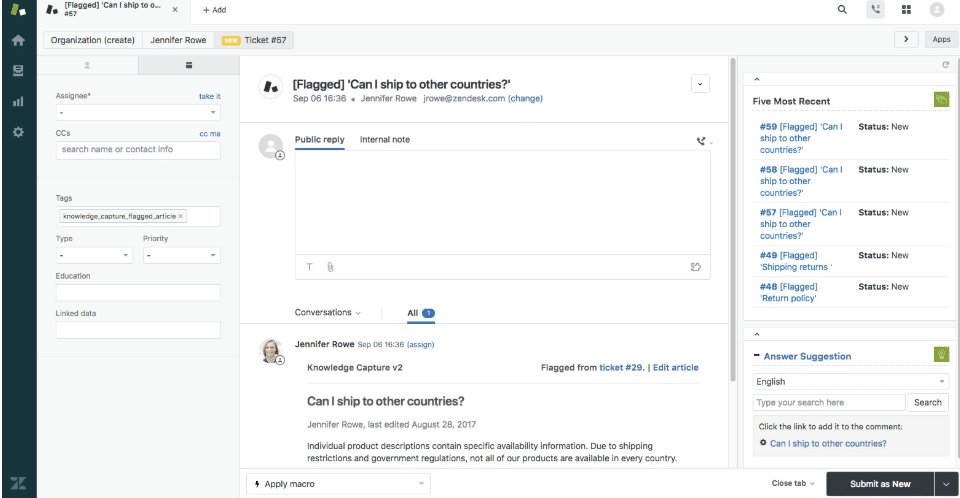
Automation handles a lot of the heavy lifting. You can set up rules to triage and route incoming emails to the right team, flag urgent requests, and escalate anything that has been sitting too long without a response. For teams running structured SLA-based support, this level of control is where Zendesk earns its reputation.
Their AI features are genuinely strong. The AI copilot proactively surfaces context and suggests next actions, helping agents respond faster. Zendesk also offers AI agents that can resolve certain queries end-to-end across email and chat using generative AI.
The catch is that these features are not available on starter plans. You need to move to a higher tier to access them. Some G2 users also complain about Zendesk “charging for each use of an AI response,” regardless of whether it’s helpful.
Teams also get detailed reporting across response times, resolution, and team performance. This makes it easier to spot bottlenecks and improve operations over time.
The trade-off is complexity. Unlike tools that you can get running in an afternoon, Zendesk requires proper configuration. Workflows need to be built out, and most teams need dedicated admin support to manage the platform over time. For a 200-person support organisation, that overhead makes sense. For a 10-person team managing emails together, it can feel like far more than the job requires.
Key features
- AI copilot that suggests replies and surfaces context for faster responses
- AI agents that handle repetitive queries across email and chat
- Workflow automation for routing, classification, and escalations
Pricing
Paid plans start at $19/agent/month and go up to $169/agent/month. 14-day free trial available. AI features are available on higher-tier plans, with some charged on a per-use basis.
My takeaway
Zendesk works best for teams that need structure and control at scale. But it takes time to set up, costs climb once you factor in AI, and the day-to-day admin overhead is real. For teams that want something faster to adopt and easier to manage without dedicated admin support, it can feel heavier than necessary. Some might say this is a drawback but the platform is predominantly built for customer support teams. Other departments like finance or HR might not find much value in using Zendesk to manage internal email accounts like hiring@ or accountreceivables@.
4. Help Scout: Best for personalized, customer-first conversations
Help Scout is built for teams that want email support to feel personal rather than transactional. It does not convert emails into tickets or route them through queues. The interface looks and feels like an inbox, which is partly the point. It holds a 4.4 rating on G2, and reviewers consistently mention how little training a new agent needs.
But what stood out to me is the customer context feature. When I open an email, I can see past conversations and relevant customer details right next to it. For a support rep handling a billing question from a customer who raised a similar issue three months ago, that context means they can respond with continuity instead of asking the customer to explain themselves again from scratch.
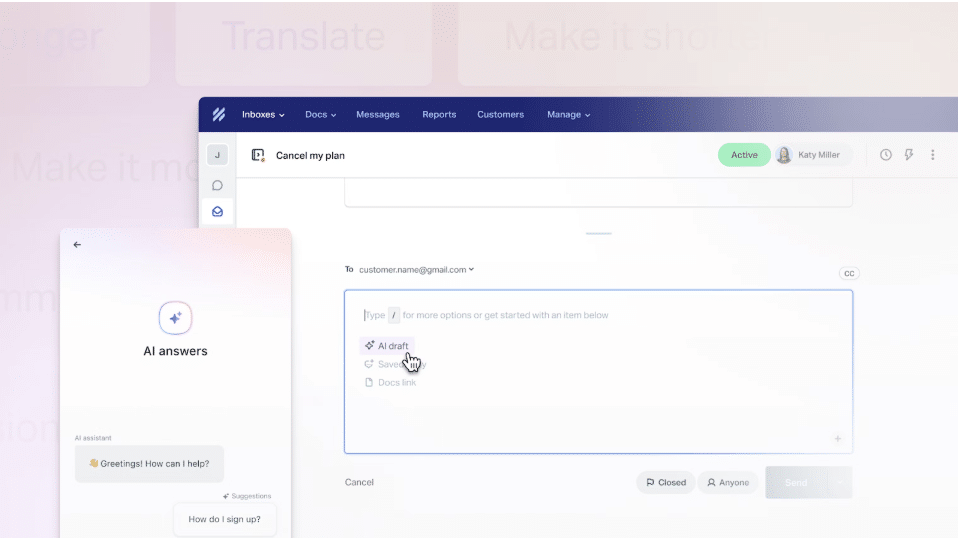
You can assign emails, leave internal notes, use saved replies, and set up workflows to tag or route conversations automatically. That said, automation is relatively lightweight compared to tools like Hiver, which can handle repetitive queries end-to-end and reduce manual work at scale.
Help Scout’s AI features let you draft replies using past conversations and knowledge base content, and assist with tone adjustments, translation, and rewriting. Useful for day-to-day correspondence, though not as deep as what more automation-heavy tools offer.
A couple of practical limitations are worth knowing upfront. The Standard plan is capped at two shared accounts, which means teams managing multiple departments or workflows will find themselves needing to upgrade sooner than expected. Integration options are also narrower compared to tools like Zendesk or Freshdesk, which can be a constraint if your team relies on a broader tech stack.
Key features
- Rich customer context (history, profiles, past conversations)
- Collision detection to avoid duplicate replies
- Basic workflows for tagging and routing emails
- AI summaries and reply drafting
Pricing
It has a 15-day free trial. Paid plan starts at $25/user/month. Lower plans have limits (like the number of team inboxes).
My takeaway
If you are a customer-facing team that wants to deliver personalized and human interaction, Help Scout would be a great fit. It’s easy to use and keeps the focus on the customer rather than the system. But automation, AI, and scalability are limited.
5. Missive: Best for heavy internal collaboration
If your email workflow involves a lot of internal discussions before a response is sent out, Missive is built for that. It holds a 4.7 rating on G2, though the interface complaints show up often enough in reviews to be a real pattern rather than a one-off.
The standout feature is real-time collaboration inside email threads. You can leave comments, assign tasks, and turn conversations into to-dos without leaving the thread. For a team where a customer email might need input from sales, legal, or a senior manager before anyone replies, this removes the need for a separate Slack thread or a forwarded chain of internal emails. Everything stays in one place, attached to the original conversation.
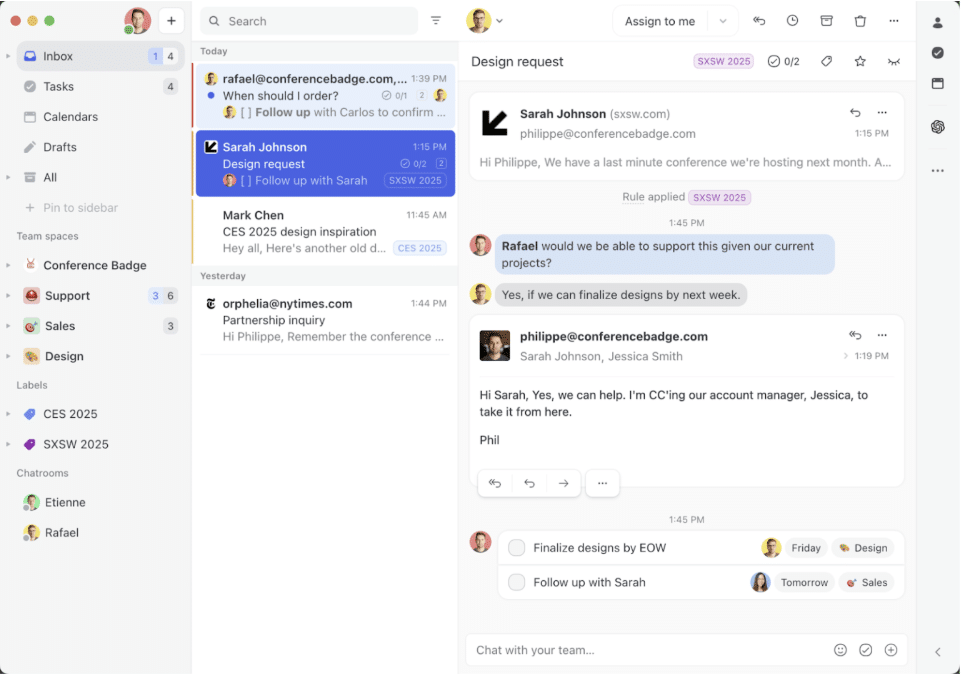
On the email fundamentals, it holds up well. You can label conversations, schedule emails, assign ownership, and set up rules to handle repetitive tasks. There is also an AI assistant for reading threads, checking calendars, and drafting replies with context, though it is fairly basic and not deeply integrated into the broader workflow.
The trade-offs become more visible as you scale. The interface can feel cluttered once you have multiple integrations active, and getting everything configured properly takes time. As a G2 user mentions:
“[I don’t like] its user interface. I find it difficult to navigate compared to the previous tool we used. It seems more complex and cluttered…they could redesign it with a simpler and more streamlined interface…”
Missive also has a noticeably smaller native integration list compared to tools like Front, which supports over 100 integrations across CRM, project management, and telephony. If your team relies on a broad tech stack, that gap is worth factoring in.
Recommended reading
Front vs Missive (2026): Pricing, Features, Pros, Cons, and Which One Is Better
Key features
- Real-time collaboration inside email threads
- Internal comments and task assignments
- AI Rules that route, tag, and triage messages using natural language prompts.
- Basic automation rules for handling repetitive tasks
Pricing
Missive offers a 30-day free trial plan, which is longer than most other tools on this list. Paid plans start at around $18/user/month.
My takeaway
Missive is a good fit for teams where collaboration is the bottleneck, where multiple people need to weigh in before a reply goes out. However, its automation and AI features are limiting, in my opinion. For teams handling higher email volumes, it can start to feel more like a coordination tool than a system built for managing email workflows efficiently.
6. Gmelius: Best for Gmail-based teams with automation needs
For teams already working inside Gmail, Gmelius is a natural extension. It lets you turn labels into shared workflows, assign emails, add internal notes, and collaborate on conversations without leaving your inbox. Because it sits inside a familiar environment (Gmail), most teams can get up and running without much of a ramp-up period.
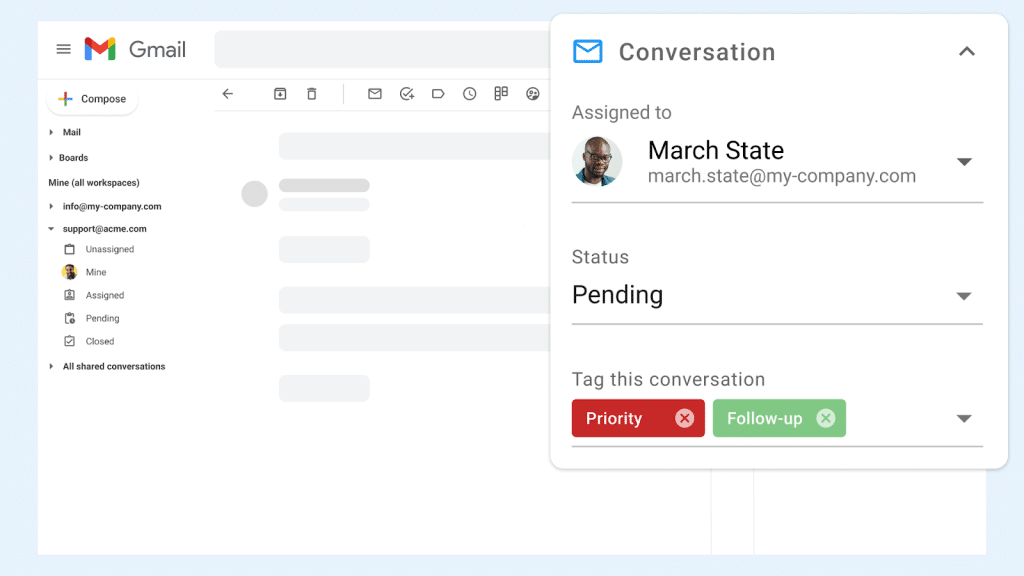
Where Gmelius earns its place is automation. It goes deeper than most Gmail-based tools, with rules to sort emails, assign conversations, trigger sequences, and handle repetitive tasks. For an operations team managing a structured intake process, for example, incoming emails can be automatically sorted by type, assigned to the right person, and moved through stages without anyone touching them manually.
There’s also flexibility in how teams visualize work. Conversations can be organized into Kanban-style views, which makes it easier to track progress across stages rather than working from a flat inbox view. For sales teams that think in terms of pipeline stages rather than individual emails, this is a genuinely useful way to work.
It also offers AI features for drafting replies, sorting emails, and routing conversations. On paper, it covers the basis quite well. The trade-offs show up in day-to-day use. Setting up advanced workflows takes time. Search, filtering, and sequences are not always as smooth as you would expect, and some users report performance slowdowns within Gmail as usage scales.
Key features
- Team email workflows built using Gmail labels
- Email assignments, notes, and team collaboration
- Automation rules, templates, and sequences
- Email analytics and team workload visibility
Recommended reading
Pricing
You get a 7-day free trial. Paid plan starts around $24/user/month, and you have to get higher tiers for advanced automation and AI.
My takeaway
Gmelius is a solid choice for Gmail-based teams that want to layer collaboration and structured automation on top of their existing inbox without switching tools. But the setup investment is real, and performance can become inconsistent at scale.
7. Zoho TeamInbox: Best for small teams in the Zoho ecosystem
Zoho TeamInbox is a software built for teams managing addresses like support@ or finance@. It is not as widely known as some of the other tools on this list, but it covers the fundamentals cleanly and at a price point that is hard to argue with for smaller teams.
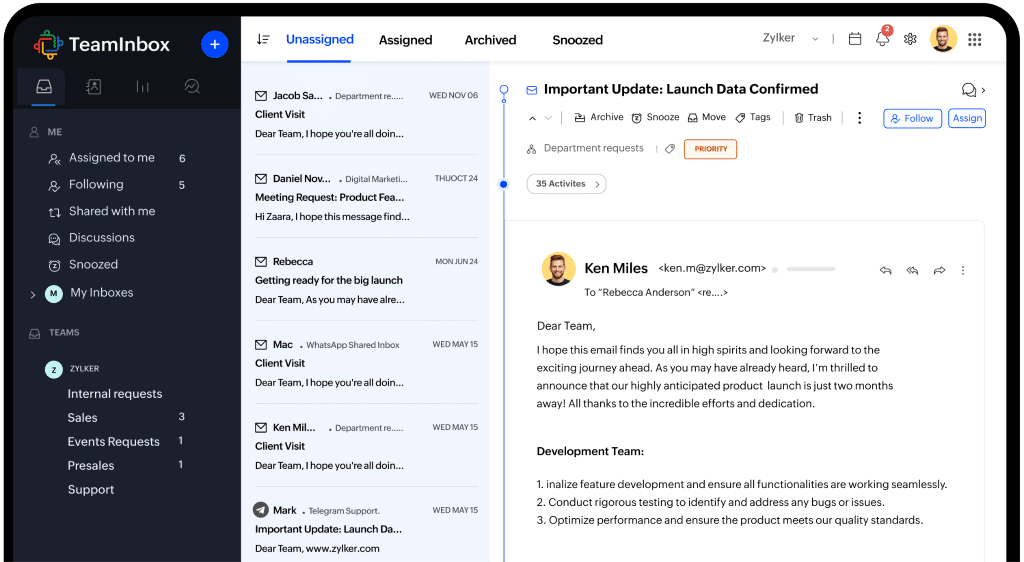
Like most other tools here, it turns a shared email address or a group email into a collaborative workspace where conversations can be assigned, discussed internally, and tracked with clear ownership.
Where it holds up well is in day-to-day workflow management. You can automate repetitive tasks like assigning, sorting, and responding to emails. Conversations move through structured views, so teams can delegate, follow, snooze, or archive threads while keeping everything organized. There’s also built-in visibility into how work is progressing with activity logs and timelines tracking.
The natural fit is teams already using Zoho’s broader suite. If your team runs on Zoho CRM, Zoho Desk, or other Zoho products, TeamInbox plugs in without friction. Outside that ecosystem, the case for choosing it over more established tools like Hiver or Front becomes less obvious.
Key features
- Assignments, internal notes, and activity tracking
- Basic automation for routing and workflows
- Views and filters for organizing conversations
- Multi-channel support
Pricing
14 days free trial available. Paid plans start at $6/user/month (Starter, billed annually), with a Professional tier at $9/user/month.
My takeaway
Zoho TeamInbox is a sensible choice for small teams that need a structured space to manage emails and are already working within the Zoho ecosystem. But if your workflows are growing in complexity or you need more from automation and AI, it can start to feel limited.
8. Freshdesk: Best for structured support with automation and SLAs
Freshdesk is a cloud-based customer support tool that has been around long enough to be considered a legacy player in the space. Like Zendesk, it converts incoming customer emails into structured tickets that can be assigned, prioritised, and tracked. It is generally more accessible to set up and manage than Zendesk, though, making it a common choice for mid-sized teams that need that kind of structure without the enterprise-level overhead.
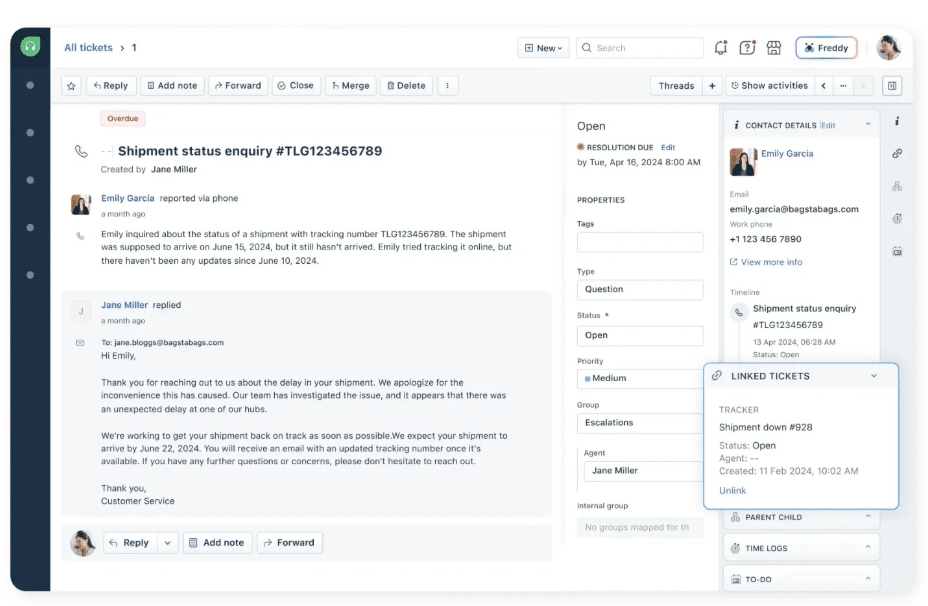
Freshdesk’s built-in AI, called Freddy, handles reply suggestions, thread summaries, and can auto-resolve certain repetitive queries without agent involvement. For a support team dealing with a high volume of similar questions, like order status updates or password resets, this kind of automation can reduce the manual load.
Freddy also surfaces insights around team performance and flags areas for improvement. But again, where tools like Hiver have AI as a part of the basic setup, most advanced AI features in Freshdesk sit behind higher-tier plans.
Their automation capabilities are also a strong point for me. You can set up rules for routing, prioritization, and SLA workflows, which helps reduce manual work. A ticket from a premium customer can be automatically routed to a senior agent, flagged as high priority, and set with a tighter SLA, all without anyone manually triaging it. It also includes a knowledge base and self-service tools to handle repetitive queries.
Although the interface is fairly straightforward in comparison to Zendesk, setup still takes effort. Getting workflows, SLAs, and routing rules configured properly requires some trial and error. Another concern from users is that Freshdesk’s non-queue-based structure can make it harder to track metrics like first response time, particularly when tickets are reassigned or handled by multiple agents across a thread.
Key features
- Ticket-based system for managing email and other channels
- Automation for routing, prioritization, and SLAs
- AI (Freddy) for summaries, suggestions, and auto-resolution of queries
- Reporting and analytics on team performance
Pricing
Free trial available for 14 days. Paid plans start around $19/user/month and scale up as you add advanced automation and AI features.
My takeaway
Freshdesk is a reasonable middle ground between lightweight email management tools and the full complexity of Zendesk. It offers solid automation, and Freddy adds genuine value at higher pricing tiers. But as you scale, the complexity in navigating the platform, limitations in analytics, and the cost of the tool become noticeable. For teams whose primary workflow is email rather than multi-channel ticket management, a better choice would be Missive or Front.
9. ProProfs: Best for lightweight email management on a tight budget
ProProfs Help Desk is a simple help desk that focuses on covering the basics without adding too much complexity. You can manage shared email accounts, assign conversations, leave internal notes, and track tickets, all without requiring dedicated setup time and effort.

It includes core features like ticket prioritization, automated assignment, reports, and chatbots. CRM integrations are also available if you need additional customer context. For a small customer support team handling a manageable volume of inbound queries across email and chat, this covers most of what day-to-day operations actually require.
Automation is present but does not go very deep. You can set up rules for routing and assignment, which handles the basics, but more complex workflows, like conditional logic, multi-step sequences, or AI-assisted triage, are not really in scope here.
User reviews consistently highlight two things: how easy it is to get started, and the quality of ProProfs’ customer support.
Key features
- Shared inbox with assignments and internal notes
- Ticket prioritization and automated assignment
- Chatbots and knowledge base for deflecting repetitive queries
- Basic reporting and analytics
- CRM integrations
Pricing
Free plan available for 1 agent. Paid plans start at $19 per user/month.
My takeaway
I’d use ProProfs if I’m managing a small team that needs a basic, cost effective tool to manage shared inboxes. But automation depth and integrations are limited. As long as you’re not rapidly scaling or handling high email volume, ProProfs should work just fine.
Other options to consider
10. HubSpot Service Hub
If your team already runs on HubSpot, this fits right in. Every conversation comes with CRM context, which makes it easier to align sales and support around the same customer. That said, if all you need is cleaner email workflows, it can feel a little too overwhelming.
11. Helpwise
Best for small teams that want straightforward, easy-to-manage email workflows. However, Helpwise’s automation and reporting are fairly basic, so it may not scale well as your needs grow.
12. Kayako
Designed to keep customer context front and center across every conversation. That said, the platform hasn’t evolved as much in terms of modern features like AI, automation, and advanced reporting compared to others in this space.
13. Crisp
Primarily a live chat tool that also handles email. If real-time conversations are a core part of your workflow, it is worth a look. For teams where email is the primary channel, it is not the strongest fit.
14. Loop Email
Lets teams discuss and act on emails together without leaving the thread. Works well for internal coordination, less so for structured support workflows.
Features to look for in an email management software
Every tool on this list has shared inboxes, assignments, and some form of automation. The question is which features actually hold up under real workloads. Here is what I would prioritise.
- Clear ownership and collaboration: Every tool on this list has shared inboxes, assignments, and some form of automation. The question is which features actually hold up under real workloads. Here is what to prioritise. You should be able to assign conversations, leave notes, and track status so everyone knows what they own.
- Automation that removes manual work: Rules for tagging, routing, and prioritizing emails should run in the background. The best automation is the kind you stop noticing because it is just working.
- AI that actually helps: Reply suggestions, thread summaries, and query auto-resolution should genuinely save time. If an AI feature requires more effort to use than doing the task manually, it is not adding value. And if it sits behind a significantly higher pricing tier, factor that into the real cost of the tool.
- A shared workspace across channels: If your team handles more than email, context should not get lost when a conversation moves from email to chat to Slack. Everything should be accessible in one place without switching tools mid-conversation.
- Visibility into workload: At any given moment, you should be able to see what’s pending, who owns it, and how fast things are moving.
- Ease of setup and use: A tool that takes weeks to configure and requires dedicated admin support is a cost that does not show up on the pricing page. The best tools are usable within hours and improve as you go.
- Predictable pricing: Some tools look affordable until you add users, unlock automation, or turn on AI. What you see on the pricing page should reflect what you actually pay as you scale, not just what you pay on day one.
So, which is the best email management tool for you?
Truth is, there’s no single “best” option.
The honest starting point is this: what is actually breaking in your current workflow?
If conversations are getting lost across inboxes, multiple people are replying to the same email, or no one knows who owns what—you’ll need something more structured. If your team is spending hours manually tagging, assigning, or following up on emails, that’s a sign you need automation. And if adding more people or volume is making things slower, messier, or more expensive, you’ll want a tool that scales without adding complexity.
The tools on this list serve different kinds of teams at different stages. What works for a five-person support team looks very different from what a fifty-person operation needs.If you want something that is easy to set up, built for collaboration, and brings AI into the workflow without a separate price tag for it, Hiver is worth trying. You can try it free for 14 days and see how it fits before committing.
Frequently Asked Questions
1. What is email management software?
Email management software helps you organize, prioritize, and automate how you handle emails. Instead of manually sorting through messages, these tools categorize, route, and track conversations so nothing gets missed and ownership is always clear. At a basic level, they bring structure to your inbox and reduce time spent on repetitive tasks. At a more advanced level, it includes automation rules, SLA tracking, AI-assisted replies, and reporting that gives teams visibility into how quickly they are responding and where things are slowing down.
2. Which email management tool is best for small businesses?
For small businesses, the priority is something easy to set up, strong on collaboration, and affordable without hidden costs as you grow. Hiver is a strong fit: shared inboxes, automation, and AI built in from the base plan at $25 per user per month. Help Scout works well for smaller customer-facing teams that want to keep conversations personal and contextual. If the budget is tight and workflows are straightforward, ProProfs covers the basics with a free single-agent plan and paid plans starting at $19 per user per month.
3. What is the best email management tool?
The best email management tool depends on your needs. Hiver stands out for teams that want built-in automation and AI without a lengthy setup or escalating costs. If deep collaboration inside email threads is the core need, Front is worth a look. For larger support operations that need structured workflows, detailed reporting, and multi-channel ticketing, Zendesk has the depth, though it comes with a steeper learning curve and higher total cost.













